



Firefly Live Top Up: Recharge Firefly Live Gems Online
Firefly Live is a popular global interactive live streaming platform where users connect with broadcasters, showcase talents, engage in real-time PK battles, and build vibrant social communities. To participate fully in live stream interactions, send animated gifts, and support your favorite hosts, you need Firefly Live Gems.
BitTopup provides a direct, secure, and fast Firefly Live recharge service. By simply entering your Firefly Live Player ID, your Gems are delivered directly to your account without sharing passwords or sensitive personal login details.
Step-by-Step Guide to Top Up Firefly Live Gems
- Select Your Gems Package: Browse the available Firefly Live Gems denominations on BitTopup and choose the quantity you wish to purchase.
- Enter Your Firefly Live Player ID: Input your unique numeric Player ID in the designated account field. Double-check the number to ensure accurate delivery.
- Choose Your Payment Method: Pick your preferred payment channel from the available global and local payment solutions displayed on the checkout screen.
- Confirm and Complete Payment: Finalize your transaction. Once payment verification is complete, your Gems are credited directly to your Firefly Live account balance.
How to Find Your Firefly Live Player ID
Your Firefly Live Player ID (also referred to as your UID or User ID) is a unique numeric identifier linked to your profile. You only need this ID to complete a top-up on BitTopup.
Follow These Steps to Locate Your Player ID:
- Launch the Firefly Live app on your mobile device and log in to your account.
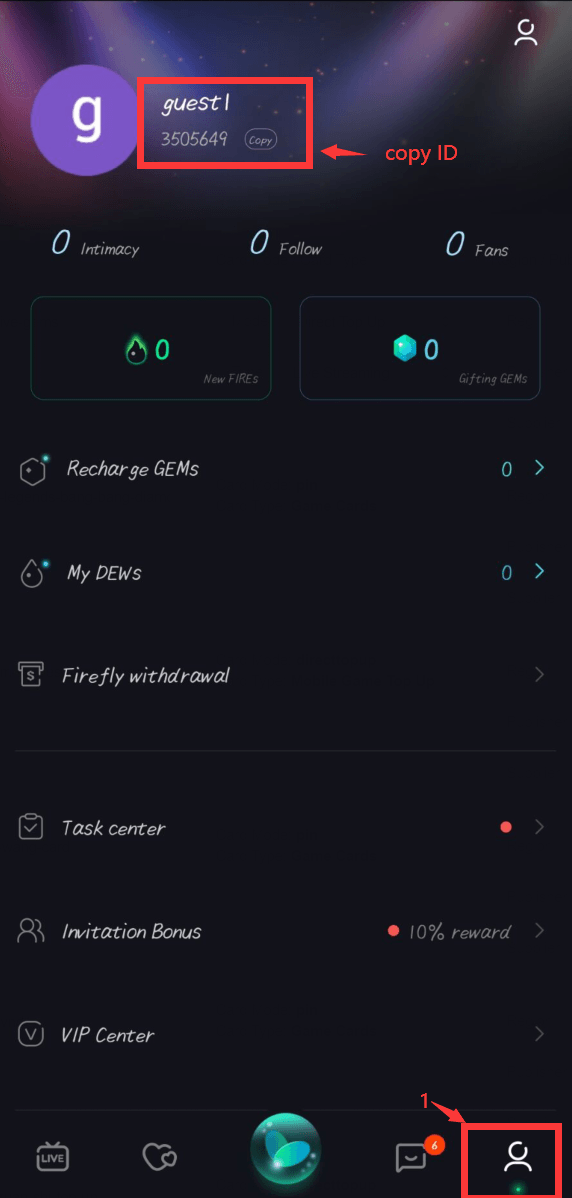
- Tap the Profile icon (labeled "My" or "Me") located at the bottom right corner of the home screen.
- Look directly beneath your profile picture and username near the top of the screen.
- You will see your numeric ID clearly displayed.
- Tap the copy icon next to your ID or write it down carefully to paste it into the BitTopup checkout form.
Tip: Always double-check your Player ID before submitting an order. Recharges sent to an incorrect ID that belongs to another active user cannot be reversed once processed.
What Are Firefly Live Gems and How to Use Them
Firefly Live Gems serve as the official premium virtual currency within the Firefly Live ecosystem. Having a healthy balance of Gems allows you to access premium interactive features and stand out in any broadcast room.
Core Uses of Firefly Live Gems
- Sending Virtual Gifts: Reward talented streamers with diverse dynamic gifts, ranging from roses and applause to extravagant full-screen luxury animations.
- Supporting Streamer PK Battles: Help your favorite host win timed live PK competitions by sending high-value gift combinations during match rounds.
- Unlocking VIP Badges and Titles: Increase your user level and display exclusive supporter badges next to your name in stream chats.
- Entrance Effects & Room Perks: Gain customized entry animations, unique chat bubble colors, and priority visibility in crowded broadcast rooms.
- Direct Fan Interaction: Access special interactive games, private messaging features, and exclusive fan club privileges.
| Feature | Description | Primary In-App Benefit |
|---|---|---|
| Virtual Gifting | Send animated gifts during live streams | Directly supports streamers and boosts fan ranking |
| PK Battle Support | Drop gifts during competitive battles | Helps your favorite creator win live broadcast matches |
| Profile Leveling | Accumulate spending points on your account | Unlocks exclusive profile frames, badges, and status |
| Special Effects | Custom chat colors and room entry effects | Enhances visibility and recognition in public rooms |
Safe Top-Up: Why You Never Need to Share Account Passwords
Account safety is essential when purchasing digital entertainment currencies. BitTopup uses a direct Player ID recharge system designed to protect user privacy.
Why ID-Only Top-Up is the Safest Option:
- Zero Password Sharing: You never have to share your Firefly Live password, social login credentials, or SMS verification codes.
- Direct System Delivery: Gems are credited directly via your public numeric identifier, preventing unauthorized account modifications.
- Protection Against Phishing: By keeping your login details private, you eliminate risks associated with credential theft, unauthorized access, or account suspensions.
- Encrypted Checkout: All transactions on BitTopup are processed through encrypted payment gateways to ensure your financial details remain fully protected.
Supported Payment Methods for Firefly Live Recharge
BitTopup supports a broad selection of verified payment options to ensure users worldwide can complete transactions smoothly. Available payment channels include:
- Credit and Debit Cards: Visa, Mastercard, and other major card networks.
- Digital E-Wallets: Popular regional and international digital wallet providers.
- Online Banking & Bank Transfers: Direct bank payment solutions depending on your region.
- Local Payment Channels: Convenient local options tailored to specific regional markets.
All real-time pricing, applicable currency conversions, and available payment methods are clearly shown on the live BitTopup checkout page before you confirm your order.
Troubleshooting Firefly Live Top-Up Issues
If you encounter any unexpected issues with your Firefly Live recharge, follow these troubleshooting recommendations:
1. Gems Not Showing in Your In-App Balance
- Refresh the Application: Close the Firefly Live app completely from your background tasks and reopen it.
- Check In-App Transaction History: Go to your profile wallet section in Firefly Live to verify if the latest credit transaction has registered.
- Allow Processing Time: While most orders process immediately, minor network delays can occasionally occur. Please allow a short buffer window.
2. Entered an Incorrect Player ID
- If you realize you entered the wrong Player ID, contact BitTopup Customer Support immediately with your order number.
- If the order has not yet been processed by the system, our team will assist in updating your details. However, if the order has already been finalized and delivered to an active ID, transactions cannot be revoked.
3. Payment Deducted but Order Marked Pending
- Check your payment provider statement to confirm whether the funds were settled or are held in a temporary pre-authorization state.
- Retain your transaction ID and receipt screenshot to assist our 24/7 customer support team in quickly verifying your order status.
Frequently Asked Questions About Firefly Live Top Up
How do I recharge Gems in Firefly Live?
To recharge Gems, select your preferred Gems denomination on BitTopup, input your Firefly Live Player ID, choose your payment method, and complete the payment. Your Gems will be delivered directly to your Firefly Live account balance.
Where can I find my Firefly Live Player ID?
Open the Firefly Live app, tap the Profile ("My" or "Me") icon in the bottom right corner, and look below your profile avatar and username. Your numeric Player ID is listed there with a convenient copy button.
Do I need to share my Firefly Live password to top up Gems?
No. BitTopup only requires your public Firefly Live Player ID. You should never share your account password, email login, or verification codes with anyone.
What can Firefly Live Gems be used for?
Firefly Live Gems are used to purchase dynamic virtual gifts for streamers, support creators in PK battles, level up your profile badge, unlock customized chat effects, and gain exclusive fan privileges.
What should I do if my Firefly Live recharge does not appear immediately?
Restart the Firefly Live app and check your wallet balance. If the Gems have not reflected after a short period, contact BitTopup 24/7 customer support with your order number and payment receipt for immediate assistance.
Can I recharge Firefly Live Gems for a friend using their Player ID?
Yes. You can top up Gems for friends, family, or your favorite content creators. Simply enter their Firefly Live Player ID instead of your own during checkout, and the Gems will be credited straight to their profile.