



GrabGifts Online Voucher (SG) Top Up: Service Overview
GrabGifts Online Vouchers for Singapore provide prepaid digital credit redeemable across the Grab super-app ecosystem. Whether you need transport rides, food delivery, grocery orders, or parcel courier services across Singapore, Grab vouchers let you settle payments digitally without linking a personal credit card to every transaction.
When you purchase a GrabGifts SG voucher, you receive a direct digital redemption link. This link lets you select your preferred Grab service category and credits the discount straight to your Singapore Grab account.
Grab Services Breakdown and Usage Rules
GrabGifts SG vouchers allow you to assign your purchased credit to one specific Grab vertical. Review the service breakdown and usage terms below before applying your voucher:
| Service Vertical | Supported Uses | Balance Splitting | Validity & Application |
|---|---|---|---|
| Grab Transport | JustGrab, GrabCar, GrabTaxi, GrabHitch | Single-use only (No split) | Deducts from base ride fare |
| GrabFood | Restaurant food delivery & self pick-up | Single-use only (No split) | Applies to food subtotal & delivery |
| GrabMart | Supermarket, convenience store, & retail delivery | Single-use only (No split) | Applies to store items & delivery |
| GrabExpress | Instant parcel and courier delivery | Single-use only (No split) | Deducts from delivery fee |
Single-Use and Balance Forfeiture Rules
Grab vouchers operate on a single-redemption model:* Under-utilization: If your voucher value exceeds the order total (for example, using a 15 SGD voucher on an 11 SGD GrabFood order), the remaining 4 SGD balance is forfeited immediately. It does not carry over to future orders.* Over-utilization: If your order total exceeds your voucher value (for example, a 22 SGD ride using a 15 SGD voucher), you simply pay the remaining 7 SGD balance using GrabPay, a linked credit/debit card, or cash.
Singapore Account Setup and Voucher Claiming
GrabGifts Online Vouchers issued for the SG region are strictly region-locked. They can only be claimed by Grab accounts registered with a Singapore (+65) mobile number and used within the Singapore territory.
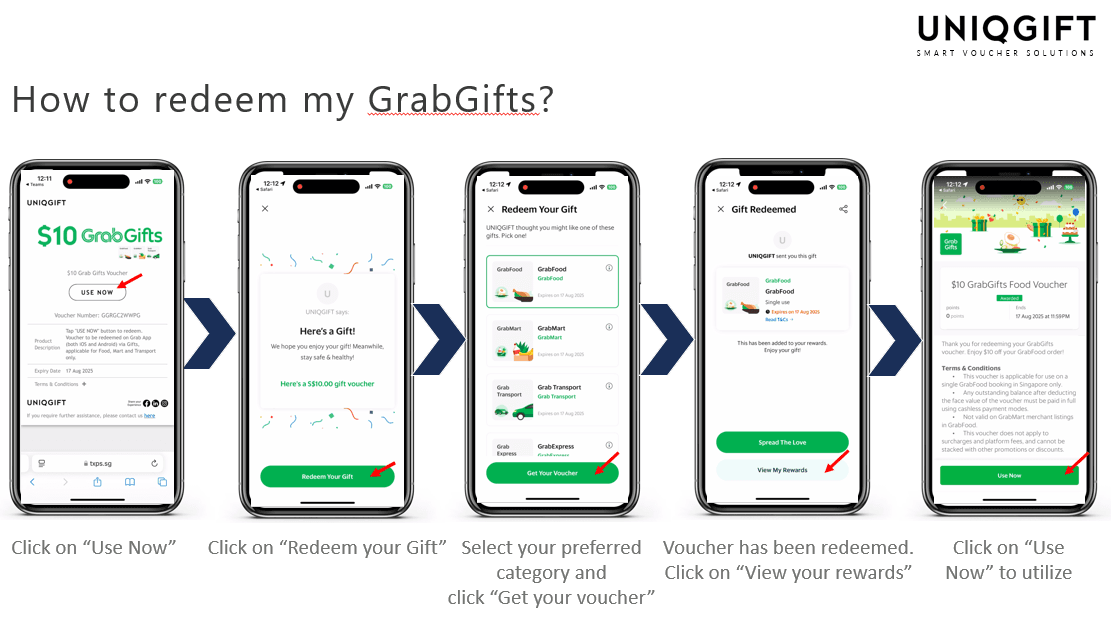
To ensure smooth redemption:1. Open your Grab app on iOS or Android.2. Tap Account at the bottom right corner.3. Verify that your registered phone number starts with country code +65.4. Check that your active country location is set to Singapore.
Step-by-Step Guide: How to Buy and Redeem GrabGifts Online Vouchers
Step 1: Purchasing on BitTopup
- Select your desired GrabGifts Online Voucher (SG) denomination.
- Review the live checkout total displayed on the product page.
- Complete your payment using your preferred local payment method.
- Access your digital redemption URL instantly on your order confirmation screen and email receipt.
Step 2: Activating Your Grab Voucher Link
- Tap the digital redemption link you received from BitTopup.
- You will be directed to the official Grab claim page in your web browser.
- Choose your preferred service vertical: Transport, Food, Mart, or Express.
- Confirm your selection. Once confirmed, this choice cannot be reversed or transferred to another service.
- Tap Redeem in Grab App to automatically open your Grab application and link the voucher to your profile.
Step 3: Applying the Voucher to Your Order
- Build your GrabFood cart, set up your GrabMart delivery, or input your ride pick-up and drop-off points.
- On the checkout screen, tap Offer / Promo Code or Add an Offer.
- Select your saved GrabGifts voucher from the list.
- Verify that the voucher discount reflects in your final payment summary before placing the order.
Service Vertical Locking, Platform Fees, and Balance Rules
Non-Reversible Vertical Selection
When clicking your Grab claim link, you must pick one service category. Once you select GrabFood, the balance cannot be converted to GrabTransport or GrabExpress. Take care to select the exact service category you plan to use.
Platform Fees and Surcharges
Grab voucher discounts apply against the primary order total (fare, food items, or delivery fees). However, depending on local Grab policies:* Standard platform fees (such as the 0.70 SGD Grab platform fee) and small order fees may require payment via your secondary payment method if the voucher terms exclude ancillary charges.* Driver tips and road tolls (ERP) are excluded from voucher coverage and will be billed separately to your Grab balance or linked card.
Why Buy GrabGifts Online Vouchers on BitTopup
- Instant Link Delivery: Receive valid digital claim URLs immediately upon order completion for quick use.
- Account Safety: No Grab account passwords or sensitive login credentials are ever required to purchase.
- Clear Checkout Rates: Live pricing is calculated transparently at checkout with no hidden service charges.
- 24/7 Dedicated Support: Responsive customer care is standing by around the clock to assist with any order queries.
Troubleshooting Grab Voucher Errors
- "Voucher Already Claimed": This error occurs if the link was previously opened and assigned to a Grab profile. Check the Offers / Rewards section inside your Grab app. If you manage multiple accounts, ensure you are logged into the account used during initial activation.
- "Country Not Supported": Grab vouchers for Singapore require a Singapore Grab app profile. Switch your app region to Singapore or log in with your +65 registered account.
- "Voucher Expired": Grab vouchers feature a set activation and usage window. Ensure you claim the link and apply the discount before the expiry date noted on your claim page.
- "Voucher Cannot Be Applied to This Order": Confirm that the service vertical you locked during claim matches your current cart (e.g., using a Transport voucher on a GrabFood cart will fail). Also verify that your order meets any minimum spend requirements.
Frequently Asked Questions
How to redeem a GrabGifts voucher in the Grab app?
Open the redemption link provided after checkout, select your desired Grab service (Food, Transport, Mart, or Express), and tap "Redeem in Grab App". The voucher will automatically save under "My Rewards" in your Grab account. Select it at checkout before confirming your ride or delivery.
Can I split my GrabGifts voucher across multiple Grab services?
No. When claiming the digital link, you must assign the full voucher value to a single service vertical (such as GrabFood or Grab Transport). It cannot be divided between different categories.
Why can't I use my Grab voucher to cover platform fees?
Grab voucher rules prioritize base fares and merchant order costs. Certain supplementary fees, such as small order surcharges, ERP toll charges, and driver tips, must be paid via your default secondary payment method (GrabPay, credit card, or cash).
Do GrabGifts Singapore online vouchers have an expiration date?
Yes. Each GrabGifts voucher carries a specific validity period displayed on the digital redemption landing page. You must claim and use the voucher before this stated expiration date.
Can I use a Singapore (SG) GrabGifts voucher in other countries?
No. GrabGifts SG vouchers are strictly region-locked to Singapore. They cannot be used in Malaysia, Indonesia, Thailand, Vietnam, the Philippines, or any other Grab operational territory.
What should I do if my Grab voucher code shows as already redeemed?
Check the Rewards tab inside your Grab application to see if the voucher was already credited to your profile. If you have multiple Grab accounts, ensure you are logged into the exact profile that opened the redemption URL.