


Twitch Gift Card USD Top Up: Digital Balance & Channel Support
A Twitch Gift Card USD top up provides digital credit directly to your Twitch wallet. Once applied to your account, the credit appears as your Twitch Gift Card Balance, allowing you to support your favorite creators, participate in stream communities, and customize your viewing experience.
Twitch wallet funds denominated in US Dollars (USD) give viewers flexible spending options across the platform without linking a credit card or direct bank account. Whether you want to send Cheer Bits during an exciting gaming moment, buy a Tier 1, Tier 2, or Tier 3 channel subscription, or purchase Twitch Turbo for ad-free viewing across all channels, digital gift card codes offer a direct and secure payment path.
What Balance Can and Cannot Be Used For
| Purchase Type | Supported with USD Gift Card Balance | Notes & Platform Rules |
|---|---|---|
| Channel Subscriptions | Yes | One-time monthly billing via web browser |
| Tier Upgrades & Multi-Month Subs | Yes | Upfront payment using wallet balance |
| Gift Subscriptions (Community / Single) | Yes | Web checkout only; supports 1 to 100 gift subs |
| Bits (Cheering) | Yes | Purchased directly through desktop or mobile web |
| Twitch Turbo | Yes | Monthly ad-free viewer pass via browser |
| Recurring Auto-Renewals | No | Balance pays initial period; renewal requires fallback method |
| Prime Gaming / Amazon Prime | No | Billed directly through Amazon payment systems |
| Physical Twitch Merchandise | No | Twitch Loot Cave requires standard retail checkout |
| In-App Purchases (iOS / Android) | No | Mobile apps route through Apple/Google in-app billing |
How to Find Your Twitch Account Username and Verification Status
Before you buy a digital code, verify that you are logged into the correct Twitch account and that your account settings align with US region requirements.
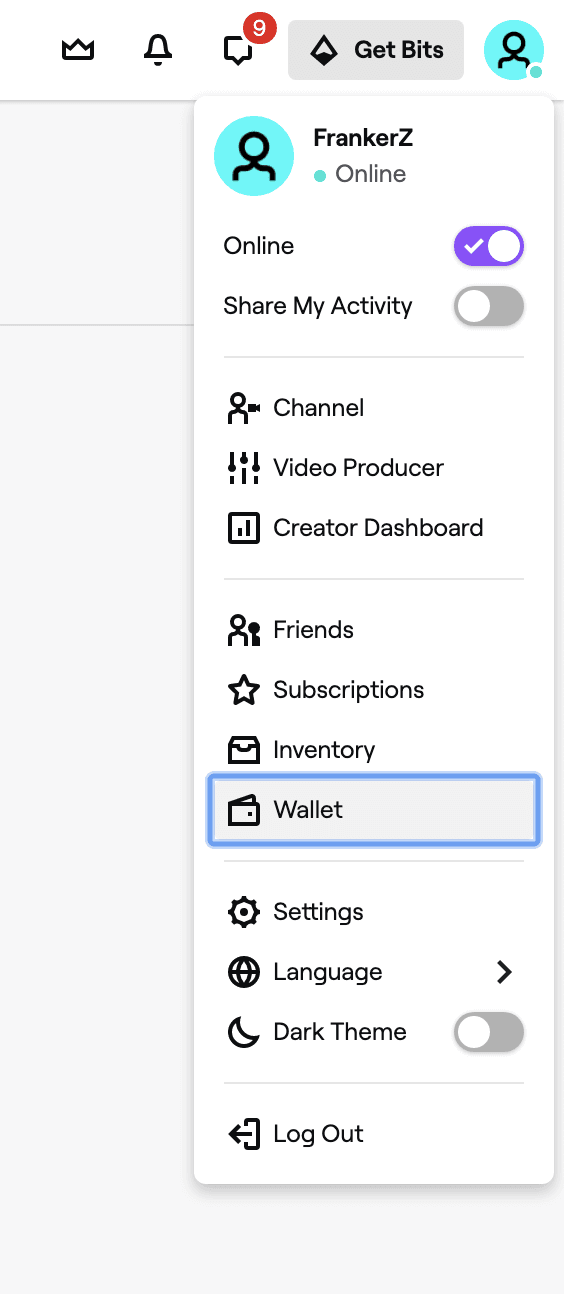
- Open your web browser and navigate to
twitch.tv. - Log in to your personal Twitch account.
- Click your profile avatar in the top-right corner of the screen.
- Your Twitch username is displayed at the top of the dropdown menu.
- Select Settings and click the Security and Privacy tab to confirm your email verification and two-factor authentication (2FA) status. Having 2FA enabled is recommended before applying digital balances.
Step-by-Step Guide: How to Redeem a US Twitch Gift Card
Redeeming your digital code takes only a few seconds. Follow these steps to load funds into your Twitch wallet balance:
- Open a desktop or mobile browser and go directly to
twitch.tv/redeem. - Log in with the Twitch credentials of the account where you want the balance stored.
- Locate the alphanumeric redemption code from your BitTopup order details.
- Enter the code exactly as provided into the redemption box.
- Click Redeem.
- The page will display a confirmation message showing the credited USD amount. Your updated balance will be visible under your profile icon in the Wallet section.
US Account and Region Lock Requirements for USD Cards
Twitch Gift Cards in USD are region-locked. They are designed exclusively for users with accounts based in the United States and accounts where currency settings reflect USD.
Residency and Currency Matching
Twitch uses account verification and payment profile settings to confirm region eligibility. When redeeming a USD code, your account must not be locked to another regional currency (such as EUR, GBP, CAD, or AUD). Attempting to apply a USD card to an account registered in a non-USD region will result in a redemption error. If you manage multiple profiles or travel frequently, confirm that your active Twitch profile is set to the United States region before entering your code.
Browser vs Mobile App Spending Restrictions for Wallet Balance
A critical distinction for Twitch balance users is the difference between web checkout and mobile app checkout.
Due to mobile platform policies, the official Twitch iOS and Android apps process payments through Apple App Store and Google Play in-app billing systems. As a result, your Twitch Gift Card Balance will not display as an available payment option when attempting to subscribe or buy Bits directly inside the mobile apps.
How to Spend Your Balance on Mobile Devices
If you prefer to browse or watch streams on your smartphone or tablet, you can still use your gift card balance:
- Open Safari, Chrome, or any mobile browser on your device.
- Go to
twitch.tvand log in to your account. - Navigate to the streamer's channel page or the Bits checkout page.
- Complete your subscription or Bits purchase through the browser interface.
- Your gift card balance will be applied automatically as the primary payment source.
- Return to your Twitch mobile app; your subscription badges, sub status, and Bits inventory will update immediately.
Troubleshooting Common Twitch Gift Card Errors
If you experience an issue while redeeming or spending your balance, review these standard fixes:
Invalid Code Error
- Check formatting: Ensure there are no accidental spaces before or after the code when pasting.
- Character confusion: Double-check easily confused characters, such as the numeral
0and uppercaseO, or uppercaseIand the numeral1.
Region Mismatch or Currency Error
- This occurs when attempting to apply a USD code to an account tied to a different country or local currency. Check your account settings to ensure your residency details reflect the United States.
Balance Not Applying at Checkout
- Ensure you are purchasing an eligible product via a web browser.
- Subscriptions set to recurring billing may request a secondary backup payment method. Select one-month non-recurring options where available, or apply the balance to gift subscriptions and Bits directly.
Code Already Redeemed
- Refresh your browser and check
twitch.tv/wallet. Digital balances credit instantly; if the page timed out during entry, the balance may already be present in your wallet summary.
Safe Twitch Gift Card USD Recharge on BitTopup
BitTopup provides a straightforward digital delivery system for purchasing Twitch Gift Card USD digital codes. When purchasing digital codes on BitTopup, you never need to share your Twitch password or grant third-party account access. You receive an authentic digital code directly in your order center and email, ready to be entered at twitch.tv/redeem.
- Fast Digital Delivery: Access your code immediately after payment confirmation.
- No Account Credentials Required: Keep your login information secure; redeem the code yourself directly on the official Twitch website.
- Live Checkout Rates: Current rates, denominations, and availability are always transparently presented on the product selection page.
- Customer Support: Responsive help desk support is available to assist with any order queries.
Frequently Asked Questions
How to load a Twitch gift card?
To load a Twitch gift card, sign in to your Twitch account on a web browser and go to twitch.tv/redeem. Enter your digital code into the input field and click Redeem. The USD amount is instantly added to your Twitch wallet balance and is ready for use.
Can I use a USD Twitch gift card on an account outside the United States?
No. USD Twitch gift cards are region-restricted to accounts operating in the United States and using USD currency. Accounts registered in regions with other currencies cannot redeem USD gift cards.
Why can I not spend my Twitch Gift Card balance on the Twitch mobile app?
Twitch mobile apps on iOS and Android use external platform billing (Apple App Store and Google Play), which cannot access internal Twitch wallet balances. To spend your balance, log in to twitch.tv using a web browser on desktop or mobile.
Can Twitch gift card balance be used for Bits and channel subscriptions?
Yes. Your Twitch wallet balance can be used to buy Cheer Bits, single-month channel subscriptions, multi-month subs, Tier 2/Tier 3 upgrades, gift subs for the community, and Twitch Turbo via web checkout.
Can I use a Twitch gift card to pay for Prime Gaming or Twitch merch?
No. Prime Gaming memberships are billed separately through Amazon, and physical merchandise from the Twitch Loot Cave uses a separate storefront checkout. Gift card balances apply only to digital Twitch platform products.
What should I do if my Twitch gift card code shows an error during redemption?
First, verify that every character was entered correctly with no stray spaces. If the issue persists, check your Twitch account region settings and refresh your Twitch Wallet page to ensure the funds were not already applied. For code-specific verification, reach out to BitTopup customer support with your order ID.