


Steam Wallet Code (SAR) Top Up: Fast Digital Delivery & Activation
A Steam Wallet Code (SAR) is a prepaid digital voucher used to add Saudi Arabian Riyals directly to your Steam balance. Once credited, the funds give you instant purchasing power across Valve's entire digital PC gaming catalog without linking personal credit cards or local bank accounts directly to your gaming client.
BitTopup delivers your SAR digital voucher instantly after payment. You receive an alphanumeric redemption key directly in your BitTopup user dashboard and order confirmation screen. No account passwords, login credentials, or private information are ever requested.
What is a Steam Wallet Code (SAR) and What Can You Buy With It?
A Saudi Riyal Steam card converts directly into your local store currency, enabling direct access to all content available within the Saudi Arabia Steam regional storefront. You can use your funded balance for:
- Full Game Purchases: Buy the latest AAA releases, indie hits, and pre-orders directly through the Steam Store.
- Downloadable Content (DLC) & Expansions: Expand your favorite titles with season passes, story expansions, and bonus content packs.
- In-Game Microtransactions: Purchase in-game currencies, battle passes, character skins, and event bundles in games such as Counter-Strike 2, Dota 2, Apex Legends, and EA SPORTS FC.
- Steam Community Market Trading: Buy and sell weapon skins, trading cards, stickers, crates, and cosmetics with other Steam community members.
- Software & Hardware Accessories: Purchase PC utility software, soundtrack albums, and supported digital merchandise.
Wallet funds added to your account balance remain permanently available until spent and carry no ongoing maintenance fees.
How to Check Your Steam Account Country and Currency
Steam enforces strict regional matching policies for wallet code redemptions. Before purchasing a SAR code, confirm that your Steam account region is officially set to Saudi Arabia (SAR).
Follow these steps to verify your store region:
- Open the Steam desktop client or log in to the official Steam website.
- Click on your profile name in the top right corner of the window.
- Select Account details from the dropdown menu.
- Under the Store & Purchase History section, locate Country and Wallet Balance.
- Verify that the country listed is Saudi Arabia and the local currency indicates SAR (Saudi Riyal).
If your account is registered to another country, you must either update your store country using a valid local payment method or create an account matching the Saudi region before redeeming a SAR voucher.
Step-by-Step Guide: How to Recharge Steam Wallet with SAR Digital Codes
Redeeming your SAR voucher is straightforward and takes less than a minute across desktop or mobile platforms.
Method 1: Redeeming via the Steam Desktop Client
- Launch the Steam application on your PC and log in to your account.
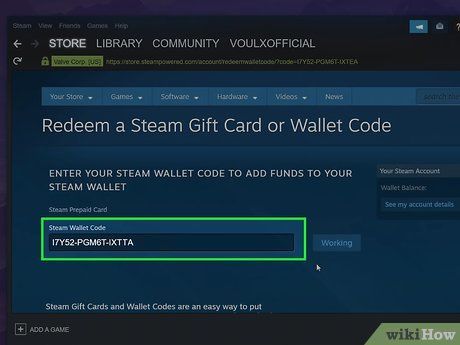
- In the top navigation bar, click on Games and select Redeem a Steam Wallet Code.
- Alternatively, click on your current wallet balance in the upper-right corner and click Redeem a Steam Gift Card or Wallet Code.
- Enter your 15-character digital code received from BitTopup into the Steam Wallet Code input box.
- Click Continue.
- If prompted for a billing address, enter your local Saudi Arabian postal information to finalize the conversion.
- The exact SAR denomination is credited to your balance immediately.
Method 2: Redeeming via Web Browser or Mobile
- Open your web browser and go to
store.steampowered.com/account/redeemwalletcode. - Log in with your Steam account credentials.
- Paste the digital voucher code obtained from your BitTopup order history into the redemption field.
- Click Continue to confirm the transaction.
Steam Region and Currency Policy: Important Rules for Saudi Arabian Riyal (SAR) Accounts
Valve employs strict regional controls to prevent cross-border currency exploitation. Steam wallet codes denominated in Saudi Riyal (SAR) can only be activated on Steam accounts whose store country is set to Saudi Arabia.
| Feature / Requirement | Saudi Arabia Store (SAR) | Other Global Store Regions (USD/EUR/Others) |
|---|---|---|
| SAR Code Compatibility | Fully Supported | Not Supported (Throws Currency Error) |
| Auto-Currency Conversion | Not Required | Disabled by Valve Policy |
| Account Region Match | Saudi Arabia | Mismatched Region |
| Account Security Impact | 100% Safe | Code will not apply |
Attempting to redeem a SAR code on an account set to the United States, Europe, or other GCC regions with different store currencies will result in an automated currency mismatch error. Always check your account settings before placing an order.
How to Fix Common Steam Wallet Code Redemption Errors
If you experience an issue when activating your voucher, check the following troubleshooting solutions:
- Error: 'The code you entered is invalid'
- Re-check for common alphanumeric misreads (such as mistaking the number
0for the letterO, or the number1for the letterI). - Copy and paste the code directly from your BitTopup order page to avoid manual typing mistakes.
- Ensure no extra trailing spaces were added before or after the code string.
- Error: 'An unexpected error has occurred / Currency mismatch'
- This error indicates that your Steam account store region does not match the SAR currency.
- Check your account settings under Account details to ensure your country is set to Saudi Arabia.
- Prompt: 'Address Verification Required'
- Steam occasionally prompts users to supply a local billing address during code redemption to confirm tax and regional compliance. Enter a valid Saudi Arabian address and postal code to complete activation.
Unlocking Limited Steam Accounts with SAR Wallet Cards (The $5 Rule Explained)
Valve places new accounts into a "Limited User" state to protect the platform from spam, phishing bots, and automated trading abuse. Limited accounts cannot send friend invites, access the Steam Community Market, create group chats, or vote on Steam Workshop items.
To remove these restrictions, an account must spend or add at least $5.00 USD (or the equivalent amount in your local currency).
Redeeming a Steam Wallet Code (SAR) that meets or exceeds the equivalent of $5.00 USD in Saudi Riyal immediately unlimits your profile. Once the code is credited, your account status updates automatically, giving you full access to all Steam social and community features.
Why Buy Steam Wallet Code (SAR) on BitTopup?
BitTopup provides a fast, secure, and transparent digital code purchase experience tailored for gamers in Saudi Arabia and the GCC:
- Instant Digital Delivery: Codes are generated and displayed on your screen right after checkout, allowing you to top up your balance without delays.
- Zero Password Requirement: We never ask for your Steam username, password, or Guard codes. You receive an unredeemed digital key to activate independently.
- Transparent Live Checkout: Check all available SAR denominations with direct real-time pricing shown upfront.
- Order History Tracking: Access past purchases, check code status, and review redemption details anytime through your personal BitTopup account panel.
- Dedicated Support: Customer assistance is available 24/7 to resolve code delivery or ordering inquiries.
Frequently Asked Questions
How do I recharge my Steam wallet using a SAR code?
Go to the Steam client or visit store.steampowered.com/account/redeemwalletcode, log in, enter the digital key provided by BitTopup in the redemption box, and click Continue. The funds are instantly added to your wallet balance.
Can I redeem a Saudi Riyal (SAR) Steam code on an account set to another currency or region?
No. Valve restricts Steam wallet card redemptions to accounts matching the code's designated currency. SAR codes will only activate on accounts whose store region is configured to Saudi Arabia.
Where will I receive my Steam Wallet Code after completing the recharge on BitTopup?
Your digital code appears directly on the order completion page immediately following payment. You can also view it at any time under your BitTopup user profile in the Order History section.
Does a Steam Wallet Code (SAR) have an expiration date?
No. The digital codes do not expire before redemption, and once applied to your Steam wallet, the balance remains in your account indefinitely until you choose to spend it.
Will redeeming a Steam Wallet Code SAR unlock the Steam $5 account spending limit?
Yes. If the total SAR value of the redeemed card meets or exceeds the equivalent of $5.00 USD, your Steam account will automatically be upgraded from limited status to a fully unlocked account.
What should I do if I get an error when redeeming my Steam Wallet code?
First, confirm that your account country is set to Saudi Arabia. Next, copy the code directly from BitTopup to prevent character typos. If you still encounter an unexpected system error, wait a few minutes before trying again or reach out to BitTopup customer support with your order ID.