

วิธีเติมเงิน Badlanders

Badlanders เติมเงิน

ยอดเยี่ยม
Trustpilot
GLOBALGLOBAL
Instant Deliveryจัดส่งทันที
Safe & Secure paymentชำระเงินปลอดภัยและมั่นใจได้

Fast and secure Badlanders Bullets delivery via direct UID top up on BitTopup.

เลือกมูลค่า
  • จัดส่งทันที
  • ชำระเงินปลอดภัยและมั่นใจได้
  • บริการลูกค้าตลอด 24 ชั่วโมงทุกวัน

300 Coupons42% OFF

฿ 124.68 ฿ 240.87

ยอดรวม · x1

Badlanders คู่มือการเติมเงิน

Badlanders Top Up: Overview of Bullets and In-Game Currencies

Badlanders drops players into competitive survival-looter arenas where extracting valuable gear is the ultimate goal. Success in the Red Beach sanctuary requires strategic planning, precision weapon handling, and top-tier equipment. To gain access to premium tactical items, season passes, and character customizations, players use the game's premium currency: Bullets.

  • Bullets: The primary paid currency in Badlanders. Bullets allow you to purchase high-tier equipment crates, weapon paint jobs, expansion slots, and the premium track of the seasonal battle pass. They can also be exchanged for specific premium events and supply draws.
  • Coupons / Cash: In-game functional currencies earned through gameplay, trading on the open market, or extracting loot from the battlefield. While cash buys basic supplies and market listings, Bullets are required for exclusive store bundles and immediate character upgrades.

To maximize your survival rate in 2026, topping up your Bullets balance ensures you have the resources needed to craft advanced loadouts and secure rare blueprint modifications.


How to Recharge Badlanders on BitTopup

Recharging Badlanders on BitTopup takes only a few moments. Follow this straightforward step-by-step guide to credit your account directly via UID:

  1. Select Your Bullet Pack: Choose the desired amount of Badlanders Bullets from the product list above.
  2. Enter Your Account Information: Input your Badlanders numeric Account ID and select your current game Server from the dropdown menu.
  3. Proceed to Payment: Click Buy Now and select your preferred payment method on the checkout screen.
  4. Confirm Your Order: Review your Account ID details and complete the transaction.
  5. Receive Your Bullets: Once payment verification is complete, the Bullets will be sent directly to your in-game mailbox or account balance. Launch Badlanders to verify your new balance.

How to Find Your Badlanders Account ID and Server

To ensure your recharge reaches your profile without delay, you need your unique in-game numeric Account ID and Server name. Follow these steps on your mobile device:

  1. Launch the Badlanders app on your device.
  2. Tap your Player Avatar / Profile Icon located in the top-left corner of the main lobby screen.
  3. Open the Basic Info tab.
  4. Your Account ID (a series of numbers) is displayed beneath your nickname. Tap the copy icon next to your ID to copy it to your clipboard.
  5. Note your active Server (such as SEA or Global), which is visible on the login screen or within the profile overview.
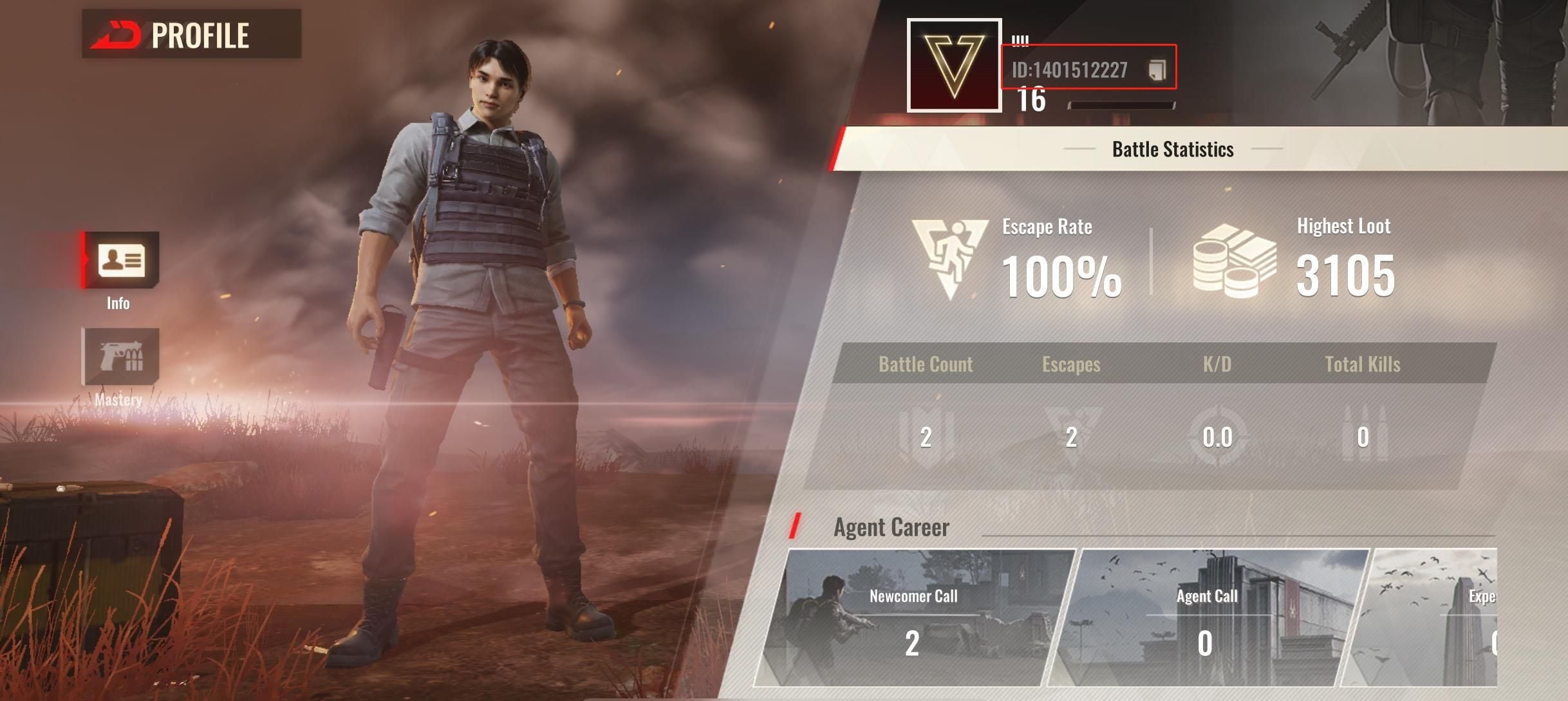
How to recharge Badlanders

Double-check that both your Account ID and Server match exactly before placing your order on BitTopup.


Badlanders Bullet Pack Sizes and Value Guide

Choosing the right Bullet pack depends on your tactical goals in the arena. Check the table below to see common denominations and how they are typically utilized in-game:

Bullet TierPrimary In-Game UsageRecommended Player Type
Small Packs (60 – 300 Bullets)Daily supply boxes, basic cosmetic spins, quick stash expansionsCasual players looking for minor utility boosts
Medium Packs (680 – 1,980 Bullets)Premium Season Pass unlock, exclusive weapon skin sets, blueprint cratesRegular survivors focused on season progression
Large Packs (3,280 – 6,480+ Bullets)High-tier event gachas, elite bundle collections, full armory customizationCompetitive squad leaders and serious collectors

Note: Exact pricing and regional availability are displayed on the live BitTopup checkout interface.


Why Choose Direct UID Top-Up Over P2P Marketplaces

When buying in-game currency, safety and speed are critical. BitTopup uses a direct UID top-up system rather than a peer-to-peer (P2P) marketplace model. Here is why direct UID top-ups offer a superior experience:

  • Zero Account Sharing: You never need to hand over your game login, password, or third-party social account credentials. All top-ups process exclusively through your public numeric UID.
  • Automated Processing: Unlike P2P platforms that require manual seller communication, escrow confirmations, and waiting on individual vendors, BitTopup processes your transaction through automated systems for minimal turnaround time.
  • No Risk of Account Phishing: P2P transactions often carry risks of credential theft or unauthorized account access. UID top-ups eliminate login vulnerabilities completely.
  • Guaranteed Crediting: Direct delivery channels reduce the chance of manual seller error or disputed fulfillment, ensuring your Bullets arrive directly to your game server.

Payment Methods Available for Badlanders Top-Up

BitTopup supports a wide variety of global and localized payment channels to make purchasing Badlanders Bullets convenient for players worldwide. Available options include:

  • Major International Credit and Debit Cards
  • Regional E-Wallets and Digital Wallets
  • Local Bank Transfers and Instant Direct Banking Channels
  • Country-Specific Prepaid and Online Payment Solutions

All checkout options feature upfront pricing with no hidden platform fees, letting you see the exact total before confirming your payment.


Troubleshooting Badlanders Recharge and Delivery Issues

If your Bullets do not appear in your account immediately after payment, use the following troubleshooting steps:

  1. Check Your In-Game Mail: Some promotional Bullets or bundle items are delivered directly to your in-game mailbox rather than credited straight to the HUD balance. Open the Mail tab in the main lobby and claim any uncollected rewards.
  2. Restart the Game Client: Completely close Badlanders from your device's multitasking menu and reopen it. This forces the game to sync your balance with the server database.
  3. Verify Your UID and Server: Check your BitTopup order confirmation receipt. Ensure that the Account ID and Server entered during checkout match the profile you are logged into.
  4. Check Payment Processing Status: Log in to your BitTopup account and review the order history to verify that your transaction status shows as completed.
  5. Contact Support: If the balance has not arrived after 15–30 minutes, contact BitTopup Customer Support with your order number, Badlanders numeric ID, and a screenshot of your in-game profile. Our team is available 24/7 to resolve delivery inquiries.

Frequently Asked Questions

How do I recharge Bullets in Badlanders?

Select your Bullet package on BitTopup, provide your numeric Badlanders Account ID and Server, and complete checkout using your preferred payment method. The currency is sent directly to your game profile.

Where can I find my Badlanders Account ID and Server?

Open Badlanders, tap your avatar in the top-left corner of the lobby screen, and go to the Basic Info tab. Your Account ID is listed under your player name. Your server is visible on the profile screen or main login menu.

Do I need to provide my Badlanders password to top up?

No. BitTopup requires only your public Account ID and Server. You should never share your account password, email login, or verification codes with anyone.

How long does it take for Badlanders Bullets to arrive after recharge?

Most orders are processed automatically within a few minutes after payment confirmation. During peak network times, it may take slightly longer. Restarting your game client helps refresh the balance.

Is Badlanders available on mobile devices in 2026?

Yes, Badlanders remains active and playable on supported iOS and Android mobile devices, featuring regular seasonal updates and community events throughout 2026.

What can I buy with Bullets in Badlanders?

Bullets can be used to unlock the Premium Battle Pass, purchase weapon skins, open supply and tactical crates, acquire character outfits, and buy select blueprint modifications directly from the store.

What should I do if my Badlanders top-up does not appear in my account?

First, check your in-game mail to see if the pack requires manual claiming, and restart the game. If the Bullets still do not appear, verify the UID on your order invoice and contact BitTopup 24/7 customer support with your order ID for immediate assistance.
Badlanders ข่าวสารแนะนำ

ตารางกิจกรรม Free Fire เซิร์ฟ EU ปี 2026 เวลาเวลารีเซ็ต และกิจกรรมที่ไม่ควรสุ่ม

เชี่ยวชาญตารางกิจกรรม Free Fire เซิร์ฟ EU ปี 2026 พร้อมเวลารีเซ็ตที่แม่นยำ ราคาตู้สุ่ม กฎโทเคน และคำแนะนำชัดเจนว่าตู้ดักเพชรไหนควรข้าม

The sales volume of "Legend of Madness" exceeded 2.5 million, and the release schedule of previous works has been announced

The sales volume of "Legend of Madness" exceeded 2.5 million, and the release schedule of previous works has been announced

"Black Myth: Wukong" producer Feng Ji issued a message responding to matters related to the TGA awards

"Black Myth: Wukong" producer Feng Ji issued a message responding to matters related to the TGA awards

Erbian’s exclusive interview with the planning team of the supernatural open world survival game "Seven Days in the World"

Erbian’s exclusive interview with the planning team of the supernatural open world survival game "Seven Days in the World"

ConcernedApe doesn’t think “Haunted Chocolate Shop” will put pressure on itself

ConcernedApe doesn’t think “Haunted Chocolate Shop” will put pressure on itself

Hellraiser 2 is back on the shelves in some countries and regions on Steam

Hellraiser 2 is back on the shelves in some countries and regions on Steam

สินค้าแนะนำ

Badlanders คำถามที่พบบ่อยเกี่ยวกับการเติมเงิน

ใช้เวลานานเท่าใดกว่าที่คำสั่งซื้อจะเสร็จสมบูรณ์?
โดยปกติแล้ว คำสั่งซื้อจะเสร็จสมบูรณ์ภายในไม่กี่นาที หากมีความล่าช้าใดๆ โปรดติดต่อฝ่ายสนับสนุนลูกค้าของเรา
BitTopup คืออะไร?
BitTopup คือแพลตฟอร์มออนไลน์สำหรับเติมเกมและบริการต่าง ๆ ได้อย่างรวดเร็วและปลอดภัย
เวลาทำการของฝ่ายบริการลูกค้า?
ฝ่ายบริการลูกค้าของ BitTopup พร้อมให้บริการตลอด 24 ชั่วโมงทุกวัน
คุณยอมรับวิธีการชำระเงินแบบใดบ้าง?
ช่องทางชำระเงินระหว่างประเทศและบริการที่รองรับในบางประเทศมีดังนี้: Apple Pay · Google Pay · Visa · Mastercard · PayPal · American Express · JCB · Klarna · Skrill · NETELLER ช่องทางที่ใช้ได้ขึ้นอยู่กับประเทศ อุปกรณ์ ผู้ออกบัตร และบัญชีของคุณ โปรดตรวจสอบตัวเลือกสำหรับคำสั่งซื้อในหน้าชำระเงิน
หากเติมเงินแล้วไม่เข้าต้องทำอย่างไร?
ติดต่อฝ่ายสนับสนุนลูกค้าตลอด 24 ชั่วโมงทุกวันพร้อมแจ้งหมายเลขคำสั่งซื้อของคุณ แล้วเราจะส่งรหัสให้ใหม่หรือคืนเงินให้ทันที

Badlanders รีวิวจากลูกค้าเกี่ยวกับการเติมเงิน

รีวิวทั้งหมด: 1,867ขายแล้วทั้งหมด: 5.5K

คะแนนเฉลี่ย

how to top-up in bittopup

4.8

customer avatar
Egor MiholapRU
ชอบแอปของคุณมากเลย เติมเงินเข้าในวินาทีเดียว ขอบคุณนะ!
customer avatar
PablinMX
ลองเติมขั้นต่ำแล้วใช้งานได้จริง เข้าทันทีเลย
customer avatar
Leung KendlzHK
คำสั่งซื้อของฉันเสร็จสิ้นแทบจะในทันที ไม่มีอะไรจะง่ายไปกว่านี้อีกแล้ว
customer avatar
Dipak magarNP
ประสบการณ์ที่ดีและบริการลูกค้าดีมาก
customer avatar
JewelVN
ชอบแอปนี้มากเพราะใช้งานง่ายและเหรียญเข้าทันทีโดยไม่ต้องรอนาน ขอบคุณสำหรับแอปนี้!
customer avatar
Hafiz BlattpPK
การดำเนินการ Bigo Diamonds ของฉันใช้เวลานานกว่าที่คิดไว้เล็กน้อย แต่ก็ส่งถึงอย่างปลอดภัย ฉันพอใจมาก
Badlanders รีวิวทั้งหมด

ทำไมต้องเลือกเรา?

ธุรกรรมปลอดภัย 100%

ทุกการเติมเงินได้รับการปกป้องด้วยระบบรักษาความปลอดภัยในการชำระเงินที่เข้ารหัสตามมาตรฐานอุตสาหกรรม ซึ่งจะรักษาข้อมูลส่วนตัวและข้อมูลการชำระเงินของคุณไว้เป็นความลับอย่างสมบูรณ์ ช้อปได้อย่างมั่นใจ ปลอดภัย 100% ทุกครั้ง

บริการลูกค้าตลอด 24 ชั่วโมงทุกวัน

ทีมสนับสนุนที่เป็นมิตรของเราพร้อมให้บริการตลอด 24 ชั่วโมงเพื่อช่วยเหลือคุณทั้งก่อน ระหว่าง และหลังการซื้อ รับความช่วยเหลือที่รวดเร็วและเชื่อถือได้ทุกเมื่อที่คุณต้องการ ไม่ว่าจะเป็นกลางวันหรือกลางคืน

รับประกันคืนเงินเต็มจำนวน

เพลิดเพลินกับราคาที่คุ้มค่าที่สุดพร้อมการจัดส่งที่รวดเร็วและเชื่อถือได้ หากคำสั่งซื้อของคุณไม่ได้รับการจัดส่งหรือไม่สามารถใช้งานได้ เรารับประกันการคืนเงิน 100% เงินของคุณจะได้รับการคุ้มครองเสมอ

ช่องทางการชำระเงินที่รองรับ

PM_WALLET_QRIS - ช่วยเหลือด้านการชำระเงิน | BitTopupPM_PIX - ช่วยเหลือด้านการชำระเงิน | BitTopupWG_PIX - ช่วยเหลือด้านการชำระเงิน | BitTopupWG_PHONE_PE - ช่วยเหลือด้านการชำระเงิน | BitTopupPM_BANK_TRANSFER_PSE - ช่วยเหลือด้านการชำระเงิน | BitTopupPMKakaoPay - ช่วยเหลือด้านการชำระเงิน | BitTopupPMTNG - ช่วยเหลือด้านการชำระเงิน | BitTopupPMGCASH - ช่วยเหลือด้านการชำระเงิน | BitTopupPM_WALLET_NAVERPAY - ช่วยเหลือด้านการชำระเงิน | BitTopupPM_WALLET_PMPROMPTPAY - ช่วยเหลือด้านการชำระเงิน | BitTopupAlipay HK - ช่วยเหลือด้านการชำระเงิน | BitTopupDANA - ช่วยเหลือด้านการชำระเงิน | BitTopupAM_SBP - ช่วยเหลือด้านการชำระเงิน | BitTopupOVO - ช่วยเหลือด้านการชำระเงิน | BitTopupPMToss - ช่วยเหลือด้านการชำระเงิน | BitTopupWG_MADA - ช่วยเหลือด้านการชำระเงิน | BitTopupWG_PAY_NOW - ช่วยเหลือด้านการชำระเงิน | BitTopupWG_BLIK - ช่วยเหลือด้านการชำระเงิน | BitTopupWG_PAYU - ช่วยเหลือด้านการชำระเงิน | BitTopupPM_WALLET_JKOPAY - ช่วยเหลือด้านการชำระเงิน | BitTopupWG_STCPAY - ช่วยเหลือด้านการชำระเงิน | BitTopupPM_WALLET_SAMSUNGPAY - ช่วยเหลือด้านการชำระเงิน | BitTopupPM_7_ELEVEN - ช่วยเหลือด้านการชำระเงิน | BitTopupPM_WALLET_WECHATPAYHK - ช่วยเหลือด้านการชำระเงิน | BitTopupPM_NET_BANKING_FPX - ช่วยเหลือด้านการชำระเงิน | BitTopupAM_CARD_KZ - ช่วยเหลือด้านการชำระเงิน | BitTopupAM_CARD_BY - ช่วยเหลือด้านการชำระเงิน | BitTopupWG_SADAD - ช่วยเหลือด้านการชำระเงิน | BitTopupAM_SBERPAY - ช่วยเหลือด้านการชำระเงิน | BitTopupPM_WALLET_GASH - ช่วยเหลือด้านการชำระเงิน | BitTopupPM_OKMART - ช่วยเหลือด้านการชำระเงิน | BitTopupPM_HILIFE - ช่วยเหลือด้านการชำระเงิน | BitTopupPM_FAMILYMART - ช่วยเหลือด้านการชำระเงิน | BitTopupPM_CARD_SA_CD - ช่วยเหลือด้านการชำระเงิน | BitTopupAM_CARD - ช่วยเหลือด้านการชำระเงิน | BitTopupPM_CARD_EU - ช่วยเหลือด้านการชำระเงิน | BitTopupPM_CARD_KNET - ช่วยเหลือด้านการชำระเงิน | BitTopupBIN_DO_PAY_ME - ช่วยเหลือด้านการชำระเงิน | BitTopupPM_CARD_JP - ช่วยเหลือด้านการชำระเงิน | BitTopupBIN_DO_OCTOPUS - ช่วยเหลือด้านการชำระเงิน | BitTopupPM_CARD_US - ช่วยเหลือด้านการชำระเงิน | BitTopupPM_CARD - ช่วยเหลือด้านการชำระเงิน | BitTopupPM_WALLET_SHOPEEPAY - ช่วยเหลือด้านการชำระเงิน | BitTopupPM_WALLET_PAOTANGPAY - ช่วยเหลือด้านการชำระเงิน | BitTopupPM_WALLET_LINEPAY - ช่วยเหลือด้านการชำระเงิน | BitTopupPM_WALLET_TRUEMONEY - ช่วยเหลือด้านการชำระเงิน | BitTopupPM_CARD_SA - ช่วยเหลือด้านการชำระเงิน | BitTopupD_LOCAL_MX_IO - ช่วยเหลือด้านการชำระเงิน | BitTopupD_LOCAL_MX_BQ - ช่วยเหลือด้านการชำระเงิน | BitTopupD_LOCAL_MX_SE - ช่วยเหลือด้านการชำระเงิน | BitTopupD_LOCAL_MX_SM - ช่วยเหลือด้านการชำระเงิน | BitTopupD_LOCAL_MX_BV - ช่วยเหลือด้านการชำระเงิน | BitTopupPMPayco - ช่วยเหลือด้านการชำระเงิน | BitTopupGOPAY - ช่วยเหลือด้านการชำระเงิน | BitTopupPMPAYMAYA - ช่วยเหลือด้านการชำระเงิน | BitTopupPMGRABPAYPH - ช่วยเหลือด้านการชำระเงิน | BitTopupPMGRABPAYMY - ช่วยเหลือด้านการชำระเงิน | BitTopupPMBOOST - ช่วยเหลือด้านการชำระเงิน | BitTopupWG_PAYTM - ช่วยเหลือด้านการชำระเงิน | BitTopupPM_BANK_TRANSFER_EFECTY - ช่วยเหลือด้านการชำระเงิน | BitTopupWG_BPI - ช่วยเหลือด้านการชำระเงิน | BitTopupWG_GCASH - ช่วยเหลือด้านการชำระเงิน | BitTopupWG_BANCOMAT_PAY - ช่วยเหลือด้านการชำระเงิน | BitTopupWG_iDEAL - ช่วยเหลือด้านการชำระเงิน | BitTopupWG_BANCONTACT - ช่วยเหลือด้านการชำระเงิน | BitTopupPM_CARD_APPLE_US - ช่วยเหลือด้านการชำระเงิน | BitTopupPM_APPLEPAY - ช่วยเหลือด้านการชำระเงิน | BitTopupD_LOCAL_PH_PM - ช่วยเหลือด้านการชำระเงิน | BitTopupD_LOCAL_PH_GY - ช่วยเหลือด้านการชำระเงิน | BitTopupWG_BHIM - ช่วยเหลือด้านการชำระเงิน | BitTopupPM_WALLET_STCPAY - ช่วยเหลือด้านการชำระเงิน | BitTopupPM_GOOGLEPAY_US - ช่วยเหลือด้านการชำระเงิน | BitTopupPM_GOOGLEPAY - ช่วยเหลือด้านการชำระเงิน | BitTopupD_LOCAL_TH_TK - ช่วยเหลือด้านการชำระเงิน | BitTopupBINANCE_PAY - ช่วยเหลือด้านการชำระเงิน | BitTopupGATE_IO_PAY - ช่วยเหลือด้านการชำระเงิน | BitTopupPAY_LOCO_ESumLifeET - ช่วยเหลือด้านการชำระเงิน | BitTopupPAY_LOCO_ESumFamilyMart - ช่วยเหลือด้านการชำระเงิน | BitTopupPAY_LOCO_ESum711 - ช่วยเหลือด้านการชำระเงิน | BitTopupBIT_WALLET - ช่วยเหลือด้านการชำระเงิน | BitTopupPM_REALTIME_PAYMENT - ช่วยเหลือด้านการชำระเงิน | BitTopupPM_OXXO - ช่วยเหลือด้านการชำระเงิน | BitTopupD_LOCAL_PK_JK - ช่วยเหลือด้านการชำระเงิน | BitTopupD_LOCAL_PK_IO - ช่วยเหลือด้านการชำระเงิน | BitTopupD_LOCAL_PK_HB - ช่วยเหลือด้านการชำระเงิน | BitTopupPayPal - ช่วยเหลือด้านการชำระเงิน | BitTopup

แพลตฟอร์มเติมเกมและแอปไลฟ์สตรีมที่ได้รับความไว้วางใจมา 10 ปี

BitTopup เป็นบริการเติมเงินเกมและแอปไลฟ์สตรีมที่เชื่อถือได้สำหรับผู้ใช้ในประเทศไทย

ตั้งแต่ปี 2016 · ผู้ใช้กว่า 5,000,000 คนทั่วโลก

KAMAGEN LIMITED

เลขทะเบียน: ⁨76888246⁩

ห้อง 1508 ชั้น 15 อาคารสำนักงาน Grand Plaza II เลขที่ 625 ถนนนาธาน มงก๊ก เกาลูน ฮ่องกง

ความร่วมมือทางธุรกิจ: ibittopup@gmail.com

© 2016-2026 BitTopup. สงวนลิขสิทธิ์ทั้งหมด

ได้รับความไว้วางใจและการรับรองจาก

ScamAdviser - รีวิว BitTopupGridinsoft - รีวิว BitTopupTrustpilot - รีวิว BitTopup
customer service