
BitTopup Logohow to top-up in bittopup
ค้นหา
วิธีเติมเงิน Beat Party SEA Pass

Beat Party SEA Pass

Excellent
Trustpilot
SOUTH EAST ASIASOUTH EAST ASIA
Instant Deliveryจัดส่งทันที
Safe & Secure paymentชำระเงินปลอดภัยและมั่นใจได้

Get exclusive rewards instantly with safe Beat Party SEA Pass recharge on BitTopup.

เลือกมูลค่า

Pass-Luxury box

฿ 138.87

ยอดรวม · x1

Beat Party SEA Pass คู่มือการเติมเงิน

Beat Party SEA Pass Top Up: Overview and In-Game Rewards

The Beat Party SEA Pass is the primary seasonal progression track for players on the Southeast Asia server. Upgrading your pass unlocks a structured ladder of premium items, fashion sets, dance accessories, and direct currency drops that cannot be obtained through standard daily quests alone.

When you activate the SEA Pass, every completed music stage, daily mission, and seasonal challenge grants pass experience points (EXP). As you climb through the pass tiers, you collect milestone rewards designed to customize your character's look on the dance floor and enhance your social profile.

Key rewards typically featured across Beat Party SEA Pass seasons include:

  • Exclusive Season Outfits: Complete multi-piece fashion sets themed around current seasonal styles, available only during the active pass period.
  • Rare Mounts and Stage Props: Stage-ready vehicles, floating effects, and decorative props that make your avatar stand out in group lobbies.
  • Currency Packages: Bonus Diamonds, Gold, and gacha lottery tickets distributed across specific level milestones.
  • Social Cosmetics: Custom chat bubbles, dynamic avatar frames, action emotes, and exclusive profile badges that display your seasonal tier status.
  • Material Bundles: Upgrade materials used to craft custom accessories and boost performance ratings.

Buying your pass through BitTopup allows you to activate these rewards immediately on your Southeast Asia server account without manual voucher entry.

How to Find Your Beat Party User ID (UID)

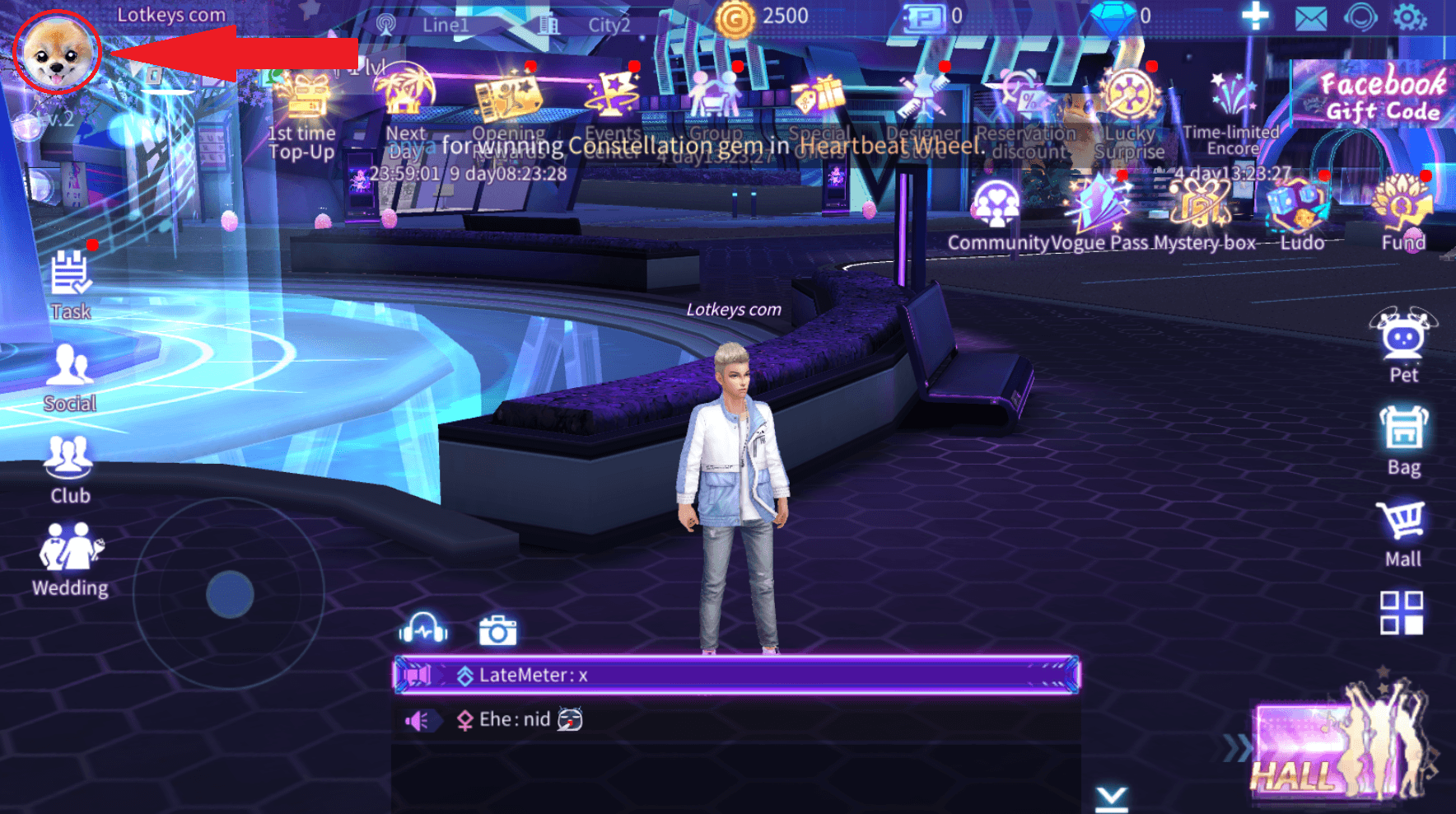
To ensure your Beat Party SEA Pass recharge is credited directly to your account, you must provide your correct in-game User ID (UID). Follow these quick steps to locate your information:

  1. Launch Beat Party on your mobile device or emulator.
  2. Tap your Avatar icon located in the top-left corner of the main home screen.
  3. Open the Basic Info or Profile tab.
  4. Locate the numeric UID (Character ID) displayed below your character name and current server label.
  5. Tap the small copy icon next to the number, or write it down carefully.
How to recharge Beat Party SEA Pass

Double-check that your game region matches the South East Asia (SEA) server before placing your order. Passing an incorrect UID or a profile registered on a different regional server can cause fulfillment delays.

How to Recharge Beat Party SEA Pass Online in 2026

Getting your pass updated through BitTopup takes only a few quick steps. Follow this guide to complete your recharge:

  1. Select the Pass Product: Choose the Beat Party SEA Pass option from the catalog on this page.
  2. Enter Your Account Details: Input your numeric Beat Party UID and select your server region (South East Asia).
  3. Review Current Pricing: Check the live checkout screen for real-time prices, available bundles, and active order totals.
  4. Pick a Payment Method: Select your preferred local or international payment option.
  5. Complete Payment: Follow the on-screen prompts to confirm the transaction.
  6. Receive Your Pass: Once the order status shows completed, restart your Beat Party app. Open the seasonal pass menu to confirm your unlocked status and claim your tier rewards.

Beat Party SEA Pass Server & Region Compatibility

Beat Party operates dedicated regional servers across different app store listings. Because user databases are separated by territory, items purchased for one server cannot be transferred to another.

Feature / AttributeBeat Party SEA Server Details
Target Server RegionSouth East Asia (SEA)
Account IdentifierIn-Game Numeric UID
Login RequiredNo (Direct UID Crediting)
Pass ActivationAutomatic upon order completion
Cross-Server TransferNot Supported (Requires SEA Account)
Usable DevicesAndroid, iOS, and PC Emulators connected to SEA server

Make sure your active account is logged into the SEA server before submitting your order to avoid misdirected deliveries.

Accepted Payment Methods for Beat Party SEA Recharge

BitTopup supports a wide selection of payment options to give players across Southeast Asia and global regions a straightforward checkout experience. You can choose from:

  • Credit and Debit Cards: Major international card networks including Visa and Mastercard.
  • Digital E-Wallets: Regional digital wallets suited for Southeast Asian countries.
  • Online Banking & Instant Transfers: Direct internet banking gateways based on your billing region.
  • Alternative Digital Currencies: Selected cryptocurrency gateways for decentralized checkout options.

All real-time conversion rates and final prices are displayed transparently on the live checkout interface before you authorize payment, ensuring zero hidden fees.

Safe Account Recharge: Why BitTopup Never Asks for Your Password

Account security is essential when buying game credits online. BitTopup uses a direct-to-ID fulfillment workflow that requires only your public game UID.

  • No Password Required: You will never be asked for your login password, Google credentials, Apple ID, or social network tokens.
  • Zero Risk of Account Sharing: Because technicians never log into your profile, your private messages, friend lists, and stored inventory remain entirely private.
  • Encrypted Checkout: Every payment gateway on BitTopup operates over secure SSL encryption, safeguarding your personal data throughout the transaction.
  • Official System Delivery: Purchases are delivered directly into the game network through authorized backend protocols, keeping your account in full compliance with game terms.

Protect your login credentials at all times. Never share your password with any service claiming to top up your account.

Beat Party SEA Pass Delivery Times and Troubleshooting Tips

Orders placed on BitTopup process automatically through automated delivery channels. Most transactions credit to your account shortly after payment confirmation.

If your pass does not appear immediately, follow these troubleshooting recommendations:

  • Restart the Game Client: Completely close the Beat Party application from your device's recent apps list and reopen it. This forces the client to sync with the server database.
  • Check the In-Game Mailbox: Some event bundles or pass activation tokens are sent directly to your in-game mailbox. Check your unread messages and tap Claim All.
  • Verify Your UID Input: Review your BitTopup order history. Check whether the UID submitted matches your current character profile number digit-for-digit.
  • Confirm Server Matching: Ensure your account is registered on the Southeast Asia server rather than a global, European, or North American server build.
  • Contact 24/7 Customer Support: If your order status is marked complete on BitTopup but your pass has not arrived after restarting, contact BitTopup customer support with your Order ID. The support team will verify the delivery status with the provider.

Frequently Asked Questions

What is included in the Beat Party SEA Pass?

The Beat Party SEA Pass contains a full seasonal reward track that includes exclusive themed outfits, stage accessories, avatar frames, chat bubbles, bonus Diamonds, and gacha tickets. Upgrading unlocks the premium tier track, giving you access to all milestone rewards as you earn pass EXP.

How do I recharge the Beat Party SEA Pass on BitTopup?

Select the Beat Party SEA Pass on BitTopup, input your in-game User ID (UID), choose your payment method, and complete the payment on the live checkout page. Your pass will be credited directly to your account.

Do I need to share my game login password to buy the Beat Party SEA Pass?

No. BitTopup only requires your numeric User ID (UID) and server region. You should never share your account password, email login, or social credentials with anyone.

How long does it take for the Beat Party SEA Pass to appear in my account?

Delivery occurs quickly after payment confirmation. In most cases, the pass activates almost immediately. Restarting your game app will update your pass status.

Can I purchase the SEA Pass if I play Beat Party on a different server region?

No. The Beat Party SEA Pass is strictly compatible with accounts created on the South East Asia server. If you play on Global or other regional servers, please ensure you purchase the product corresponding to your specific server build.

What should I do if my Beat Party SEA Pass is not credited after payment?

First, restart the Beat Party app and check your in-game mail tab. If the pass still does not appear, check your BitTopup order receipt to verify that your entered UID was correct, then contact BitTopup customer support with your Order ID for rapid assistance.


Beat Party SEA Pass ข่าวสารแนะนำ

Honkai: Star Rail – หมายเหตุสำคัญเกี่ยวกับ Abyss ครั้งที่สี่! ไม่มีรางวัล Stellar Jade อีกต่อไป?!

สวัสดี Trailblazers! เดิมทีภาพสปลาชอาร์ตของตัวละครใหม่คาดว่าจะเปิดเผยภายในสิ้นเดือนกรกฎาคม แต่ปรากฏว่าถูกเลื่อนออกไป นั่นหมายความว่าเราต้องรอจนถึงวันที่ 3 สิงหาคมเพื่อดูพวกเขาหรือไม่?

Honkai: Star Rail – เจดสตาร์ 15,570 เม็ด! ข่าว Xilian มาถึงแล้ว! ยืนยันแบนเนอร์เวอร์ชัน 3.5!

สวัสดีครับ Trailblazers! การร่วมมือกับ Fate ได้เริ่มมาตั้งแต่สักระยะแล้ว และแบนเนอร์ White Abyss กำลังเข้าสู่ช่วงนับถอยหลังสุดท้าย สำหรับผู้ที่ยังไม่ได้สุ่ม ตอนนี้เป็นเวลาที่ต้องรีบตัดสินใจ เวอร์ชัน 3.4 ครึ่งหลังจะเริ่มในวันที่ 23 กรกฎาคม พร้อมกับการกลับมาของตัวละครที่ได้รับการเสริมพลัง เลือกสุ่มให้ดีนะครับ!

Identity V | Top Costume Optimizations: Are These Even the Same Characters?

In Identity V, several costumes have undergone model optimizations following player feedback. Some of these enhancements have dramatically improved the appearance of the skins. Let's take a look at some of the most notable transformations:


RTX 50 series graphics cards are about to be unveiled, new details of RTX 5070 Ti exposed

RTX 50 series graphics cards are about to be unveiled, new details of RTX 5070 Ti exposed

Latest Poppo Live Event and Get Your Poppo Live Coins!

"Assassin's Creed: Shadows" bonus content and character introduction, the physical version requires online installation

"Assassin's Creed: Shadows" bonus content and character introduction, the physical version requires online installation

สินค้าแนะนำ

Beat Party SEA Pass คำถามที่พบบ่อยเกี่ยวกับการเติมเงิน

ใช้เวลานานเท่าใดกว่าที่คำสั่งซื้อจะเสร็จสมบูรณ์?
โดยปกติแล้ว คำสั่งซื้อจะเสร็จสมบูรณ์ภายในไม่กี่นาที หากมีความล่าช้าใดๆ โปรดติดต่อฝ่ายสนับสนุนลูกค้าของเรา
BitTopup คืออะไร?
BitTopup คือแพลตฟอร์มออนไลน์สำหรับเติมเกมและบริการต่าง ๆ ได้อย่างรวดเร็วและปลอดภัย
เวลาทำการของฝ่ายบริการลูกค้า?
ฝ่ายบริการลูกค้าของ BitTopup พร้อมให้บริการตลอด 24 ชั่วโมงทุกวัน
ฉันจำเป็นต้องแชร์รหัสผ่านบัญชี Beat Party SEA Pass หรือไม่?
ไม่จำเป็น การเติมเงินโดยตรงใช้เพียง Player ID/UID ของคุณเท่านั้น ห้ามแชร์รหัสผ่านของคุณกับใครเด็ดขาด
Beat Party SEA Pass รองรับภูมิภาคใดบ้าง?
สินค้านี้รองรับบัญชีภูมิภาค SOUTH EAST ASIA โปรดตรวจสอบภูมิภาคบัญชีของคุณก่อนทำการสั่งซื้อ
หากเติมเงินแล้วไม่เข้าต้องทำอย่างไร?
ติดต่อฝ่ายสนับสนุนลูกค้าตลอด 24 ชั่วโมงทุกวันพร้อมแจ้งหมายเลขคำสั่งซื้อของคุณ แล้วเราจะส่งรหัสให้ใหม่หรือคืนเงินให้ทันที

Beat Party SEA Pass รีวิวจากลูกค้าเกี่ยวกับการเติมเงิน

รีวิวทั้งหมด: 688

คะแนนเฉลี่ย

how to top-up in bittopup

4.9

customer avatar
Eoi Hwh2026/09/27
ยอดเยี่ยม
customer avatar
Silver Tex2026/09/28
เติมเงินปลอดภัยและรวดเร็ว
customer avatar
Luco Tnayon2026/09/27
แอปดีมาก ทำรายการสำเร็จเรียบร้อย
customer avatar
Farhan Nafis2026/09/26
ดี โอเค เยี่ยมเลย
customer avatar
Binelle2026/09/27
แอปที่ยอดเยี่ยมมาก ฉันขอแนะนำเลย
customer avatar
Raju Mandal2026/09/26
จ่ายเงินแล้วได้รับของไวมาก
customer avatar
Prime Divas2026/09/27
บริการดีมาก
customer avatar
PONZO2026/09/28
จ่ายง่าย โอนไว
customer avatar
Rahim Software2026/09/26
แอปที่ดีที่สุด ชอบเว็บไซต์นี้มาก รวดเร็วทันใจ แถมคืนเงินให้ทันทีหากมีปัญหา
customer avatar
Ella Clark2026/09/26
ได้รับ UC ของ PUBG Mobile เข้าบัญชีในเวลาไม่ถึงสองนาที! ราคาดีและชำระเงินปลอดภัย ใช้บริการมาหลายเดือนแล้วไม่มีปัญหาเลย แนะนำเลย
customer avatar
Jarrett M.2026/09/26
ฉันเคยซื้อของแล้วไม่ได้รับ เลยติดต่อฝ่ายสนับสนุนไป และภายใน 5 นาทีก็เจอออเดอร์และเข้ามาอยู่ในกระเป๋าเงินของฉัน มืออาชีพและสุภาพมาก แนะนำร้านนี้เลยสำหรับทุกคนที่ต้องการเติมเงิน
customer avatar
Adam Wilson2026/09/30
การเติมเงิน Poppo Live เป็นไปอย่างราบรื่น ได้รับเหรียญภายในไม่กี่นาที จะกลับมาใช้บริการอีกแน่นอน!
customer avatar
Ale Pro2026/09/29
ฝ่ายสนับสนุนดูแลดีมาก พอมีปัญหาก็ตอบกลับทันทีและช่วยแก้ปัญหาให้เลย
customer avatar
Jahan zaib2026/09/28
บริการดีมาก
customer avatar
Tammy Sweet2026/09/29
จัดส่งรวดเร็วสุดๆ ประทับใจมาก! ขอบคุณ BitTopup
customer avatar
Mary Degamo2026/09/28
แฮปปี้มาก ขอบคุณครับ
customer avatar
Egor Miholap2026/09/28
ชอบแอปของคุณมากเลย เติมเงินเข้าในวินาทีเดียว ขอบคุณนะ!
customer avatar
DELIGHT2026/09/27
ชำระเงินง่ายและรวดเร็ว แถมราคายังดีมากด้วย แนะนำเลยครับ!
customer avatar
Ellie Harcus2026/09/26
อยากได้เพชร Bigo ไปเปย์สตรีมเพื่อนแล้วมาเจอเว็บนี้ ชำระเงินราบรื่นดีและเพชรก็เข้าทันทีเลย
customer avatar
Bilal Lakhal2026/09/30
ชอบมาก เร็วมาก
Beat Party SEA Pass รีวิวทั้งหมด

ทำไมต้องเลือกเรา?

ธุรกรรมปลอดภัย 100%

ทุกการเติมเงินได้รับการปกป้องด้วยระบบรักษาความปลอดภัยในการชำระเงินที่เข้ารหัสตามมาตรฐานอุตสาหกรรม ซึ่งจะรักษาข้อมูลส่วนตัวและข้อมูลการชำระเงินของคุณไว้เป็นความลับอย่างสมบูรณ์ ช้อปได้อย่างมั่นใจ ปลอดภัย 100% ทุกครั้ง

บริการลูกค้าตลอด 24 ชั่วโมงทุกวัน

ทีมสนับสนุนที่เป็นมิตรของเราพร้อมให้บริการตลอด 24 ชั่วโมงเพื่อช่วยเหลือคุณทั้งก่อน ระหว่าง และหลังการซื้อ รับความช่วยเหลือที่รวดเร็วและเชื่อถือได้ทุกเมื่อที่คุณต้องการ ไม่ว่าจะเป็นกลางวันหรือกลางคืน

รับประกันคืนเงินเต็มจำนวน

เพลิดเพลินกับราคาที่คุ้มค่าที่สุดพร้อมการจัดส่งที่รวดเร็วและเชื่อถือได้ หากคำสั่งซื้อของคุณไม่ได้รับการจัดส่งหรือไม่สามารถใช้งานได้ เรารับประกันการคืนเงิน 100% เงินของคุณจะได้รับการคุ้มครองเสมอ

ช่องทางการชำระเงินที่รองรับ

PM_PIX - ช่วยเหลือด้านการชำระเงิน | BitTopupWG_PIX - ช่วยเหลือด้านการชำระเงิน | BitTopupPMKakaoPay - ช่วยเหลือด้านการชำระเงิน | BitTopupPMTNG - ช่วยเหลือด้านการชำระเงิน | BitTopupWG_TNG - ช่วยเหลือด้านการชำระเงิน | BitTopupPMGCASH - ช่วยเหลือด้านการชำระเงิน | BitTopupPM_WALLET_NAVERPAY - ช่วยเหลือด้านการชำระเงิน | BitTopupPM_WALLET_PMPROMPTPAY - ช่วยเหลือด้านการชำระเงิน | BitTopupAlipay HK - ช่วยเหลือด้านการชำระเงิน | BitTopupDANA - ช่วยเหลือด้านการชำระเงิน | BitTopupAM_SBP - ช่วยเหลือด้านการชำระเงิน | BitTopupPM_OXXO - ช่วยเหลือด้านการชำระเงิน | BitTopupOVO - ช่วยเหลือด้านการชำระเงิน | BitTopupPMToss - ช่วยเหลือด้านการชำระเงิน | BitTopupWG_PAY_NOW - ช่วยเหลือด้านการชำระเงิน | BitTopupWG_BLIK - ช่วยเหลือด้านการชำระเงิน | BitTopupPM_CARD_SA - ช่วยเหลือด้านการชำระเงิน | BitTopupWG_PAYU - ช่วยเหลือด้านการชำระเงิน | BitTopupPM_WALLET_JKOPAY - ช่วยเหลือด้านการชำระเงิน | BitTopupWG_STCPAY - ช่วยเหลือด้านการชำระเงิน | BitTopupPM_WALLET_SAMSUNGPAY - ช่วยเหลือด้านการชำระเงิน | BitTopupPM_7_ELEVEN - ช่วยเหลือด้านการชำระเงิน | BitTopupPM_WALLET_WECHATPAYHK - ช่วยเหลือด้านการชำระเงิน | BitTopupPM_NET_BANKING_FPX - ช่วยเหลือด้านการชำระเงิน | BitTopupPM_WALLET_QRIS - ช่วยเหลือด้านการชำระเงิน | BitTopupAM_CARD_KZ - ช่วยเหลือด้านการชำระเงิน | BitTopupAM_CARD_BY - ช่วยเหลือด้านการชำระเงิน | BitTopupWG_SADAD - ช่วยเหลือด้านการชำระเงิน | BitTopupWG_MADA - ช่วยเหลือด้านการชำระเงิน | BitTopupAM_TBANK - ช่วยเหลือด้านการชำระเงิน | BitTopupAM_SBERPAY - ช่วยเหลือด้านการชำระเงิน | BitTopupPM_REALTIME_PAYMENT - ช่วยเหลือด้านการชำระเงิน | BitTopupPM_WALLET_GASH - ช่วยเหลือด้านการชำระเงิน | BitTopupPM_OKMART - ช่วยเหลือด้านการชำระเงิน | BitTopupPM_HILIFE - ช่วยเหลือด้านการชำระเงิน | BitTopupPM_FAMILYMART - ช่วยเหลือด้านการชำระเงิน | BitTopupPM_CARD_SA_CD - ช่วยเหลือด้านการชำระเงิน | BitTopupAM_CARD - ช่วยเหลือด้านการชำระเงิน | BitTopupPM_CARD_EU - ช่วยเหลือด้านการชำระเงิน | BitTopupPM_CARD_KNET - ช่วยเหลือด้านการชำระเงิน | BitTopupBIN_DO_PAY_ME - ช่วยเหลือด้านการชำระเงิน | BitTopupPM_CARD_JP - ช่วยเหลือด้านการชำระเงิน | BitTopupBIN_DO_OCTOPUS - ช่วยเหลือด้านการชำระเงิน | BitTopupPM_CARD_US - ช่วยเหลือด้านการชำระเงิน | BitTopupPM_CARD - ช่วยเหลือด้านการชำระเงิน | BitTopupPM_WALLET_SHOPEEPAY - ช่วยเหลือด้านการชำระเงิน | BitTopupPM_WALLET_PAOTANGPAY - ช่วยเหลือด้านการชำระเงิน | BitTopupPM_WALLET_LINEPAY - ช่วยเหลือด้านการชำระเงิน | BitTopupPM_WALLET_TRUEMONEY - ช่วยเหลือด้านการชำระเงิน | BitTopupD_LOCAL_MX_IO - ช่วยเหลือด้านการชำระเงิน | BitTopupD_LOCAL_MX_BQ - ช่วยเหลือด้านการชำระเงิน | BitTopupD_LOCAL_MX_SE - ช่วยเหลือด้านการชำระเงิน | BitTopupD_LOCAL_MX_SM - ช่วยเหลือด้านการชำระเงิน | BitTopupD_LOCAL_MX_BV - ช่วยเหลือด้านการชำระเงิน | BitTopupD_LOCAL_PK_HB - ช่วยเหลือด้านการชำระเงิน | BitTopupD_LOCAL_PK_JK - ช่วยเหลือด้านการชำระเงิน | BitTopupD_LOCAL_PK_ES - ช่วยเหลือด้านการชำระเงิน | BitTopupD_LOCAL_PK_IO - ช่วยเหลือด้านการชำระเงิน | BitTopupPMPayco - ช่วยเหลือด้านการชำระเงิน | BitTopupGOPAY - ช่วยเหลือด้านการชำระเงิน | BitTopupPMPAYMAYA - ช่วยเหลือด้านการชำระเงิน | BitTopupPMGRABPAYPH - ช่วยเหลือด้านการชำระเงิน | BitTopupPMGRABPAYMY - ช่วยเหลือด้านการชำระเงิน | BitTopupPMBOOST - ช่วยเหลือด้านการชำระเงิน | BitTopupWG_PAYTM - ช่วยเหลือด้านการชำระเงิน | BitTopupPM_BANK_TRANSFER_PSE - ช่วยเหลือด้านการชำระเงิน | BitTopupPM_BANK_TRANSFER_EFECTY - ช่วยเหลือด้านการชำระเงิน | BitTopupWG_BPI - ช่วยเหลือด้านการชำระเงิน | BitTopupWG_GCASH - ช่วยเหลือด้านการชำระเงิน | BitTopupWG_BANCOMAT_PAY - ช่วยเหลือด้านการชำระเงิน | BitTopupWG_iDEAL - ช่วยเหลือด้านการชำระเงิน | BitTopupWG_BANCONTACT - ช่วยเหลือด้านการชำระเงิน | BitTopupPM_CARD_APPLE_US - ช่วยเหลือด้านการชำระเงิน | BitTopupPM_APPLEPAY - ช่วยเหลือด้านการชำระเงิน | BitTopupD_LOCAL_PH_PM - ช่วยเหลือด้านการชำระเงิน | BitTopupD_LOCAL_PH_GY - ช่วยเหลือด้านการชำระเงิน | BitTopupWG_BHIM - ช่วยเหลือด้านการชำระเงิน | BitTopupPM_WALLET_STCPAY - ช่วยเหลือด้านการชำระเงิน | BitTopupPM_GOOGLEPAY_US - ช่วยเหลือด้านการชำระเงิน | BitTopupPM_GOOGLEPAY - ช่วยเหลือด้านการชำระเงิน | BitTopupD_LOCAL_TH_TK - ช่วยเหลือด้านการชำระเงิน | BitTopupGATE_IO_PAY - ช่วยเหลือด้านการชำระเงิน | BitTopupBINANCE_PAY - ช่วยเหลือด้านการชำระเงิน | BitTopupWG_PHONE_PE - ช่วยเหลือด้านการชำระเงิน | BitTopupPAY_LOCO_ESumLifeET - ช่วยเหลือด้านการชำระเงิน | BitTopupPAY_LOCO_ESumFamilyMart - ช่วยเหลือด้านการชำระเงิน | BitTopupPAY_LOCO_ESum711 - ช่วยเหลือด้านการชำระเงิน | BitTopupBIT_WALLET - ช่วยเหลือด้านการชำระเงิน | BitTopup

10 Years Trusted Game & Live Streaming Top-Up Platform

Since 2016 | 5,000,000+ Users Worldwide

KAMAGEN LIMITED

Registration No. 76888246

Room 1508, 15/F, Grand Plaza Office Tower II, 625 Nathan Road, Mong Kok, Kowloon, Hong Kong

BUSINESS COOPERATION: ibittopup@gmail.com

© 2016-2026 BitTopup. All Rights Reserved.

Trusted & Verified by

ScamAdviser review of BitTopupGridinsoft review of BitTopupTrustpilot review of BitTopup
customer service