

BitTopup Logohow to top-up in bittopup
ค้นหา
วิธีเติมเงิน Macy's Gift Card (US)

Macy's Gift Card (US)

Excellent
Trustpilot
UNITED STATESUNITED STATES
Instant Deliveryจัดส่งทันที
Safe & Secure paymentชำระเงินปลอดภัยและมั่นใจได้

Shop fashion and home instantly with Macy's Gift Card (US) top up on BitTopup.

เลือกมูลค่า

Macy's Gift Card 50 USD US

฿ 1475.86

ยอดรวม · x1

Macy's Gift Card (US) คู่มือการเติมเงิน

Macy's Gift Card (US) Top Up & Digital Card Overview

Macy's is one of America's premier department store retailers, offering an extensive selection of apparel, luxury cosmetics, designer footwear, jewelry, home goods, and seasonal collections. A Macy's Gift Card (US) top up provides prepaid store credit denominated in US Dollars (USD) that you can redeem for purchases on macys.com, in the Macy's mobile app, or at any physical Macy's department store across the United States.

Whether you want to budget your personal shopping, take advantage of seasonal sales, or send a digital present, buying a digital Macy's e-gift card code on BitTopup gives you instant access to store funds without exposing personal credit card information or banking details at checkout.

How to Buy Macy's Gift Card (US) Online at BitTopup

Buying an authentic Macy's US digital gift card on BitTopup takes only a few quick steps:

  1. Select Card Value: Choose the exact USD denomination you wish to purchase from the live product list on this page.
  2. Enter Contact Details: Provide the email address where your digital redemption code should be sent. BitTopup never asks for your personal Macy's account login or password.
  3. Choose Payment Method: Select your preferred payment option from the supported international and localized checkout methods.
  4. Complete Checkout: Review the real-time pricing displayed on the payment screen and confirm your transaction.
  5. Receive Your Code: Once payment clears, your 15-digit Macy's gift card number and 3-digit or 4-digit CID/PIN appear immediately in your BitTopup order dashboard and arrive in your email inbox.

How to Locate and Apply Your Macy's Gift Card Digital Code & PIN

Every Macy's digital gift card consists of two critical security credentials:- Card Number: A 15-digit numeric sequence uniquely identifying your card balance.- CID / PIN (Customer Identification Code): A 3-digit or 4-digit security code required to verify ownership during online redemption or balance queries.

When your order completes on BitTopup, both numbers are clearly displayed together on your order confirmation screen and receipt email.
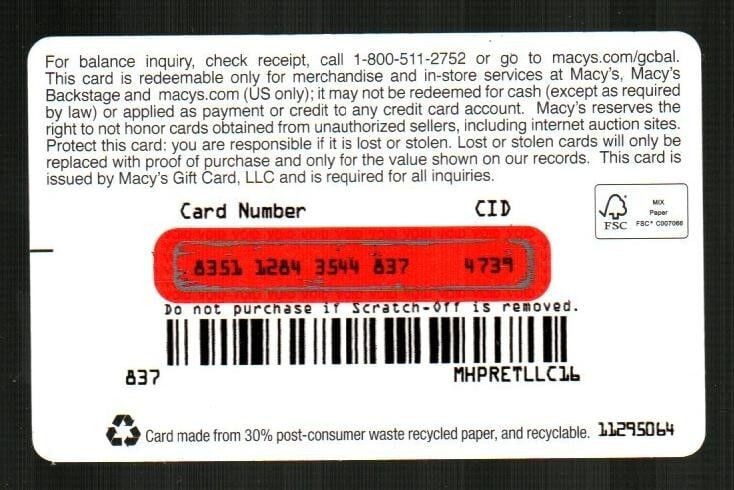
How to recharge Macy's Gift Card (US)

Keep your card number and CID confidential until you are ready to apply them to your purchase.

Step-by-Step Instructions to Redeem Macy's Digital Gift Card Codes on Macys.com

Applying your digital code to online orders is straightforward:

  1. Visit macys.com or open the Macy's app and log in to your shopping profile (or continue as a guest).
  2. Add your chosen fashion, beauty, or home merchandise to your shopping bag and proceed to checkout.
  3. Under the Payment section during checkout, locate and select the option labeled Apply Gift Cards or Macy's Gift Card.
  4. Enter the 15-digit Card Number and the CID / PIN exactly as shown in your BitTopup order details.
  5. Click Apply Card.
  6. The full available balance will immediately deduct from your order total. If your order total exceeds your gift card balance, you can cover the remaining balance with another card, PayPal, or a major credit card.

Note: Macys.com allows you to apply up to five (5) gift cards per single online transaction.

Physical Card Reloading vs Instant Online Digital Gift Cards

Shoppers frequently ask whether they can top up an existing plastic Macy's card balance directly through the website. Here is how physical card reloads compare to purchasing a digital top-up code:

FeaturePhysical Store Card ReloadBitTopup Digital Gift Card
Online Reload SupportIn-store register onlyInstant new code generated online
Delivery SpeedRequires physical store visitInstant digital code on screen & email
Online Checkout UseYes (requires 15-digit # & CID)Yes (15-digit # & CID provided)
In-Store RedemptionYes (swipe or scan barcode)Yes (show digital barcode/number)
Account Sharing RequiredNoNo (100% password-free)
International AccessUS stores onlyBuy online globally for US store use

Because Macy's does not permit adding new funds to an existing gift card via online payment on macys.com, buying an instant digital code on BitTopup serves as the standard, direct method to recharge your online shopping balance.

US Region Lock and Card Usage Rules

Macy's Gift Cards sold on this page are region-locked to the United States marketplace:

  • Currency: Denominated strictly in United States Dollars (USD).
  • Store Platforms: Valid for use on macys.com, the US Macy's mobile app, Macy's Backstage locations, and physical Macy's department stores located in the 50 US states, Puerto Rico, and Guam.
  • No Expiration Date: Macy's gift cards do not expire, and Macy's does not charge dormancy, maintenance, or inactivity fees.
  • International Shipping Restrictions: Macy's US gift cards cannot be redeemed on international orders shipped outside the United States through third-party global fulfillment services (such as Borderfree). You must use a valid US shipping address when checking out on macys.com.

How to Check Your Macy's Gift Card Balance in the USA

You can verify your remaining store credit anytime through three official channels:

  1. Online Balance Checker: Go to macys.com/account/giftcardbalance. Enter your 15-digit card number and CID/PIN, solve the security captcha, and click View Balance.
  2. Toll-Free Phone Verification: Call the automated Macy's balance hotline at 1-800-511-2752. Follow the voice prompts to input your card number and PIN.
  3. In-Store Inquiries: Present your digital code barcode or card number to any cashier at a Macy's store register to print a balance inquiry receipt.

Troubleshooting Macy's Gift Card Redemption Issues

If you encounter an error when applying your code at checkout, check these common issues:

  • Extra Spaces or Typographical Errors: Ensure no leading or trailing spaces are copied into the card number or CID fields. Verify that numeric digits like 0 (zero) and 1 (one) were not swapped with letters O or I.
  • CID/PIN Omission: Both the 15-digit number and CID are required for online checkout. Entering only the card number will cause a validation failure.
  • Maximum Card Limit Exceeded: Macys.com restricts checkout to a maximum of 5 gift cards per order. If you have more cards, use them on separate orders.
  • International Delivery Address Selected: Switch your store delivery destination to a valid US address. Digital gift cards are disabled if an international shipping destination is selected in the website header.
  • Temporary Server Lock: If you input an incorrect CID multiple times, Macy's fraud prevention system may temporarily lock the card for 30 minutes. Wait briefly before trying again.

Why Choose BitTopup for Macy's Gift Card Recharge

  • Zero Account Credentials Needed: We never ask for your Macy's password, username, or personal financial login details. You receive a clean, authentic digital redemption code.
  • Instant Code Delivery: Digital codes are generated immediately upon completed payment and archived securely in your BitTopup user dashboard.
  • Transparent Live Pricing: What you see at checkout is what you pay, with no unexpected post-purchase service fees.
  • Multiple Global Payment Options: Pay with standard credit cards, digital wallets, or localized online banking solutions.
  • Dedicated Support: 24/7 customer assistance is available to help resolve transaction queries quickly.

Frequently Asked Questions

How do I use a Macy's gift card online?

To use your gift card on macys.com or the Macy's app, proceed to the checkout screen after adding items to your cart. Under the Payment section, select Apply Gift Card, type your 15-digit card number along with the CID/PIN, and click Apply. The balance will be subtracted from your total order cost.

Can I recharge my Macy's gift card online?

Macy's does not support adding funds to an existing digital or plastic card balance online. To add funds for online shopping, purchase a new digital gift card code on BitTopup and apply it at checkout alongside your existing cards.

How to check Macy's gift card balance in USA?

You can check your balance online at macys.com/account/giftcardbalance by entering your 15-digit card number and CID. Alternatively, call 1-800-511-2752 for 24/7 automated phone balance lookups or ask an associate at any Macy's store register.

Why isn't my Macy's gift card working online?

The most common reasons include mistyping the 15-digit number or CID, exceeding the 5-card-per-order checkout limit, or selecting an international shipping destination outside the United States. Ensure all digits match your BitTopup receipt and that your shipping address is located in the US.

Can you turn a Macy's gift card into cash?

No. Macy's gift cards cannot be redeemed for cash, refunded, or deposited into a bank account, except where required by specific US state laws (for example, California allows cash back on gift card balances under $10).

Can I buy and redeem a Macy's US gift card outside the United States?

You can purchase Macy's Gift Card (US) on BitTopup from anywhere globally. However, the code can only be redeemed on macys.com for orders shipped to US addresses, or in person at Macy's store locations within the United States, Puerto Rico, and Guam.


Macy's Gift Card (US) ข่าวสารแนะนำ

"Fallout" TV series poster updated, producers regard it as their own "Fallout 5"

"Fallout" TV series poster updated, producers regard it as their own "Fallout 5"

The peak number of players on both platforms of "Helldiver 2" is about 500,000, and it has been constantly refreshing its Steam history recently.

The peak number of players on both platforms of "Helldiver 2" is about 500,000, and it has been constantly refreshing its Steam history recently.

Breaking news: Atlus’ unannounced game codename has been exposed, which may be a new game in the “Goddess” series

Breaking news: Atlus’ unannounced game codename has been exposed, which may be a new game in the “Goddess” series

The latest issue of Fami’s anticipation list: “Holy Beast” and “Paper Horse” rise in ranking

The latest issue of Fami’s anticipation list: “Holy Beast” and “Paper Horse” rise in ranking

["Sufficient stock?" Reports say that NS2 will produce more than 10 million units in its first fiscal year] Bloomberg reporter Takashi Mochizuki recently published an article revealing: "According to monitor shipment data, Nintendo's new game console (hereinafter referred to as NS2) is on the market on the first day of its launch." Production should exceed 10 million units in a fiscal year, which will be completely different from the shortage situation when PS5 and XSX/S were launched. As for the OLED version, research company Omdia said it will not be released this year." Although Nintendo has not yet officially announced NS2 was announced, but many tipsters have claimed that this much-anticipated successor to the NS will be launched this year. Not only that, according to GDC survey reports, many studios are now developing games for NS2. NWe

["Sufficient stock?" Reports say that NS2 will produce more than 10 million units in its first fiscal year] Bloomberg reporter Takashi Mochizuki recently published an article revealing: "According to monitor shipment data, Nintendo's new game console (hereinafter referred to as NS2) is on the market on the first day of its launch." Production should exceed 10 million units in a fiscal year, which will be completely different from the shortage situation when PS5 and XSX/S were launched. As for the OLED version, research company Omdia said it will not be released this year." Although Nintendo has not yet officially announced NS2 was announced, but many tipsters have claimed that this much-anticipated successor to the NS will be launched this year. Not only that, according to GDC survey reports, many studios are now developing games for NS2. NWe

13-year-old boy becomes first person to clear "Tetris"

13-year-old boy becomes first person to clear "Tetris"

สินค้าแนะนำ

Macy's Gift Card (US) คำถามที่พบบ่อยเกี่ยวกับการเติมเงิน

ใช้เวลานานเท่าใดกว่าที่คำสั่งซื้อจะเสร็จสมบูรณ์?
โดยปกติแล้ว คำสั่งซื้อจะเสร็จสมบูรณ์ภายในไม่กี่นาที หากมีความล่าช้าใดๆ โปรดติดต่อฝ่ายสนับสนุนลูกค้าของเรา
BitTopup คืออะไร?
BitTopup คือแพลตฟอร์มออนไลน์สำหรับเติมเกมและบริการต่าง ๆ ได้อย่างรวดเร็วและปลอดภัย
เวลาทำการของฝ่ายบริการลูกค้า?
ฝ่ายบริการลูกค้าของ BitTopup พร้อมให้บริการตลอด 24 ชั่วโมงทุกวัน
ฉันจำเป็นต้องแชร์รหัสผ่านบัญชี Macy's Gift Card (US) หรือไม่?
ไม่จำเป็น การเติมเงินโดยตรงใช้เพียง Player ID/UID ของคุณเท่านั้น ห้ามแชร์รหัสผ่านของคุณกับใครเด็ดขาด
Macy's Gift Card (US) รองรับภูมิภาคใดบ้าง?
สินค้านี้รองรับบัญชีภูมิภาค UNITED STATES โปรดตรวจสอบภูมิภาคบัญชีของคุณก่อนทำการสั่งซื้อ
ฉันสามารถชำระเงินด้วยคริปโตได้หรือไม่?
ได้ เรายอมรับ Bitcoin, ETH, USDT และคริปโตเคอร์เรนซียอดนิยมอื่นๆ พร้อมการยืนยันทันที
หากเติมเงินแล้วไม่เข้าต้องทำอย่างไร?
ติดต่อฝ่ายสนับสนุนลูกค้าตลอด 24 ชั่วโมงทุกวันพร้อมแจ้งหมายเลขคำสั่งซื้อของคุณ แล้วเราจะส่งรหัสให้ใหม่หรือคืนเงินให้ทันที

Macy's Gift Card (US) รีวิวจากลูกค้าเกี่ยวกับการเติมเงิน

รีวิวทั้งหมด: 823

คะแนนเฉลี่ย

how to top-up in bittopup

4.0

customer avatar
Samsung As G2026/09/28
ประสบการณ์การใช้งานที่นี่ดีมาก เติมเงินง่ายและไม่เคยเจอความล่าช้าเลย บริการยอดเยี่ยมมาก รักษามาตรฐานนี้ไว้ต่อไปนะ
customer avatar
Oussama Zaouali2026/09/26
บริการดี
customer avatar
Mansoor Ahadi2026/09/30
ดีและยอดเยี่ยมมาก
customer avatar
Egor Miholap2026/09/30
ชอบแอปของคุณมากเลย เติมเงินเข้าในวินาทีเดียว ขอบคุณนะ!
customer avatar
Zi Young Phoon2026/09/30
ส่วนลดเยอะมาก
customer avatar
Rethabile Jinx2026/09/28
ราคาประหยัดกว่าซื้อในแอป Poppo โดยตรง
customer avatar
Kelvin Goh2026/09/27
มีปัญหานิดหน่อยทำให้คำสั่งซื้อล่าช้า แต่ผู้จัดการฝ่ายดูแลลูกค้าเข้ามาช่วยจัดการและแก้ไขให้ทันที แถมยังทำตามสัญญาที่จะชดเชยให้ด้วย ผลลัพธ์น่าพึงพอใจมาก ขอบคุณสำหรับความใส่ใจครับ!
customer avatar
Ольга Блохина2026/09/26
รวดเร็วและแม่นยำเสมอ
customer avatar
Edrei Isai Martinez2026/09/27
ชอบที่ทุกอย่างใช้งานง่ายและชัดเจนมากครับ
customer avatar
Samantha2026/09/26
สะดวกรวดเร็ว บริการดีมาก
customer avatar
Timan Aisa2026/09/28
ชอบมากเลยค่ะ รวดเร็วทันใจมาก ปัญหาเติมเงินไม่เข้าได้รับการแก้ไขแล้ว ขอบคุณมากๆ นะคะ
customer avatar
Sebastian Maravilla2026/09/26
แอปพลิเคชันยอดเยี่ยมมาก
customer avatar
Daniel Datilm2026/09/30
การเติมเงิน Honor of Kings ของฉันใช้เวลานานกว่าที่คิดนิดหน่อย แต่ในที่สุดก็เข้าบัญชีเรียบร้อย
customer avatar
Tito Dz2026/09/29
ยอดเยี่ยมมาก
customer avatar
Mira Joseph2026/09/30
ดีมากเลย ถูกกว่าที่เคยใช้ก่อนหน้านี้ แถมยังเร็วด้วย
customer avatar
Rachel Taft2026/09/30
การเติมเงิน Bigo Diamonds รวดเร็วสุดๆ ไม่มีปัญหาอะไรเลย และฉันได้รับตรงตามที่ต้องการเป๊ะ
customer avatar
Victor Cobos2026/09/26
บริการดีมาก ขอบคุณครับ
customer avatar
Binelle2026/09/28
แอปที่ยอดเยี่ยมมาก ฉันขอแนะนำเลย
customer avatar
Rahim Software2026/09/28
แอปที่ดีที่สุด ชอบเว็บไซต์นี้มาก รวดเร็วทันใจ แถมคืนเงินให้ทันทีหากมีปัญหา
customer avatar
ibad khan2026/09/28
เชื่อถือได้ จัดส่งปลอดภัย
Macy's Gift Card (US) รีวิวทั้งหมด

ทำไมต้องเลือกเรา?

ธุรกรรมปลอดภัย 100%

ทุกการเติมเงินได้รับการปกป้องด้วยระบบรักษาความปลอดภัยในการชำระเงินที่เข้ารหัสตามมาตรฐานอุตสาหกรรม ซึ่งจะรักษาข้อมูลส่วนตัวและข้อมูลการชำระเงินของคุณไว้เป็นความลับอย่างสมบูรณ์ ช้อปได้อย่างมั่นใจ ปลอดภัย 100% ทุกครั้ง

บริการลูกค้าตลอด 24 ชั่วโมงทุกวัน

ทีมสนับสนุนที่เป็นมิตรของเราพร้อมให้บริการตลอด 24 ชั่วโมงเพื่อช่วยเหลือคุณทั้งก่อน ระหว่าง และหลังการซื้อ รับความช่วยเหลือที่รวดเร็วและเชื่อถือได้ทุกเมื่อที่คุณต้องการ ไม่ว่าจะเป็นกลางวันหรือกลางคืน

รับประกันคืนเงินเต็มจำนวน

เพลิดเพลินกับราคาที่คุ้มค่าที่สุดพร้อมการจัดส่งที่รวดเร็วและเชื่อถือได้ หากคำสั่งซื้อของคุณไม่ได้รับการจัดส่งหรือไม่สามารถใช้งานได้ เรารับประกันการคืนเงิน 100% เงินของคุณจะได้รับการคุ้มครองเสมอ

ช่องทางการชำระเงินที่รองรับ

PM_PIX - ช่วยเหลือด้านการชำระเงิน | BitTopupWG_PIX - ช่วยเหลือด้านการชำระเงิน | BitTopupPMKakaoPay - ช่วยเหลือด้านการชำระเงิน | BitTopupPMTNG - ช่วยเหลือด้านการชำระเงิน | BitTopupWG_TNG - ช่วยเหลือด้านการชำระเงิน | BitTopupPMGCASH - ช่วยเหลือด้านการชำระเงิน | BitTopupPM_WALLET_NAVERPAY - ช่วยเหลือด้านการชำระเงิน | BitTopupPM_WALLET_PMPROMPTPAY - ช่วยเหลือด้านการชำระเงิน | BitTopupAlipay HK - ช่วยเหลือด้านการชำระเงิน | BitTopupDANA - ช่วยเหลือด้านการชำระเงิน | BitTopupAM_SBP - ช่วยเหลือด้านการชำระเงิน | BitTopupPM_OXXO - ช่วยเหลือด้านการชำระเงิน | BitTopupOVO - ช่วยเหลือด้านการชำระเงิน | BitTopupPMToss - ช่วยเหลือด้านการชำระเงิน | BitTopupWG_PAY_NOW - ช่วยเหลือด้านการชำระเงิน | BitTopupWG_BLIK - ช่วยเหลือด้านการชำระเงิน | BitTopupPM_CARD_SA - ช่วยเหลือด้านการชำระเงิน | BitTopupWG_PAYU - ช่วยเหลือด้านการชำระเงิน | BitTopupPM_WALLET_JKOPAY - ช่วยเหลือด้านการชำระเงิน | BitTopupWG_STCPAY - ช่วยเหลือด้านการชำระเงิน | BitTopupPM_WALLET_SAMSUNGPAY - ช่วยเหลือด้านการชำระเงิน | BitTopupPM_7_ELEVEN - ช่วยเหลือด้านการชำระเงิน | BitTopupPM_WALLET_WECHATPAYHK - ช่วยเหลือด้านการชำระเงิน | BitTopupPM_NET_BANKING_FPX - ช่วยเหลือด้านการชำระเงิน | BitTopupPM_WALLET_QRIS - ช่วยเหลือด้านการชำระเงิน | BitTopupAM_CARD_KZ - ช่วยเหลือด้านการชำระเงิน | BitTopupAM_CARD_BY - ช่วยเหลือด้านการชำระเงิน | BitTopupWG_SADAD - ช่วยเหลือด้านการชำระเงิน | BitTopupWG_MADA - ช่วยเหลือด้านการชำระเงิน | BitTopupAM_TBANK - ช่วยเหลือด้านการชำระเงิน | BitTopupAM_SBERPAY - ช่วยเหลือด้านการชำระเงิน | BitTopupPM_REALTIME_PAYMENT - ช่วยเหลือด้านการชำระเงิน | BitTopupPM_WALLET_GASH - ช่วยเหลือด้านการชำระเงิน | BitTopupPM_OKMART - ช่วยเหลือด้านการชำระเงิน | BitTopupPM_HILIFE - ช่วยเหลือด้านการชำระเงิน | BitTopupPM_FAMILYMART - ช่วยเหลือด้านการชำระเงิน | BitTopupPM_CARD_SA_CD - ช่วยเหลือด้านการชำระเงิน | BitTopupAM_CARD - ช่วยเหลือด้านการชำระเงิน | BitTopupPM_CARD_EU - ช่วยเหลือด้านการชำระเงิน | BitTopupPM_CARD_KNET - ช่วยเหลือด้านการชำระเงิน | BitTopupBIN_DO_PAY_ME - ช่วยเหลือด้านการชำระเงิน | BitTopupPM_CARD_JP - ช่วยเหลือด้านการชำระเงิน | BitTopupBIN_DO_OCTOPUS - ช่วยเหลือด้านการชำระเงิน | BitTopupPM_CARD_US - ช่วยเหลือด้านการชำระเงิน | BitTopupPM_CARD - ช่วยเหลือด้านการชำระเงิน | BitTopupPM_WALLET_SHOPEEPAY - ช่วยเหลือด้านการชำระเงิน | BitTopupPM_WALLET_PAOTANGPAY - ช่วยเหลือด้านการชำระเงิน | BitTopupPM_WALLET_LINEPAY - ช่วยเหลือด้านการชำระเงิน | BitTopupPM_WALLET_TRUEMONEY - ช่วยเหลือด้านการชำระเงิน | BitTopupD_LOCAL_MX_IO - ช่วยเหลือด้านการชำระเงิน | BitTopupD_LOCAL_MX_BQ - ช่วยเหลือด้านการชำระเงิน | BitTopupD_LOCAL_MX_SE - ช่วยเหลือด้านการชำระเงิน | BitTopupD_LOCAL_MX_SM - ช่วยเหลือด้านการชำระเงิน | BitTopupD_LOCAL_MX_BV - ช่วยเหลือด้านการชำระเงิน | BitTopupD_LOCAL_PK_HB - ช่วยเหลือด้านการชำระเงิน | BitTopupD_LOCAL_PK_JK - ช่วยเหลือด้านการชำระเงิน | BitTopupD_LOCAL_PK_ES - ช่วยเหลือด้านการชำระเงิน | BitTopupD_LOCAL_PK_IO - ช่วยเหลือด้านการชำระเงิน | BitTopupPMPayco - ช่วยเหลือด้านการชำระเงิน | BitTopupGOPAY - ช่วยเหลือด้านการชำระเงิน | BitTopupPMPAYMAYA - ช่วยเหลือด้านการชำระเงิน | BitTopupPMGRABPAYPH - ช่วยเหลือด้านการชำระเงิน | BitTopupPMGRABPAYMY - ช่วยเหลือด้านการชำระเงิน | BitTopupPMBOOST - ช่วยเหลือด้านการชำระเงิน | BitTopupWG_PAYTM - ช่วยเหลือด้านการชำระเงิน | BitTopupPM_BANK_TRANSFER_PSE - ช่วยเหลือด้านการชำระเงิน | BitTopupPM_BANK_TRANSFER_EFECTY - ช่วยเหลือด้านการชำระเงิน | BitTopupWG_BPI - ช่วยเหลือด้านการชำระเงิน | BitTopupWG_GCASH - ช่วยเหลือด้านการชำระเงิน | BitTopupWG_BANCOMAT_PAY - ช่วยเหลือด้านการชำระเงิน | BitTopupWG_iDEAL - ช่วยเหลือด้านการชำระเงิน | BitTopupWG_BANCONTACT - ช่วยเหลือด้านการชำระเงิน | BitTopupPM_CARD_APPLE_US - ช่วยเหลือด้านการชำระเงิน | BitTopupPM_APPLEPAY - ช่วยเหลือด้านการชำระเงิน | BitTopupD_LOCAL_PH_PM - ช่วยเหลือด้านการชำระเงิน | BitTopupD_LOCAL_PH_GY - ช่วยเหลือด้านการชำระเงิน | BitTopupWG_BHIM - ช่วยเหลือด้านการชำระเงิน | BitTopupPM_WALLET_STCPAY - ช่วยเหลือด้านการชำระเงิน | BitTopupPM_GOOGLEPAY_US - ช่วยเหลือด้านการชำระเงิน | BitTopupPM_GOOGLEPAY - ช่วยเหลือด้านการชำระเงิน | BitTopupD_LOCAL_TH_TK - ช่วยเหลือด้านการชำระเงิน | BitTopupGATE_IO_PAY - ช่วยเหลือด้านการชำระเงิน | BitTopupBINANCE_PAY - ช่วยเหลือด้านการชำระเงิน | BitTopupWG_PHONE_PE - ช่วยเหลือด้านการชำระเงิน | BitTopupPAY_LOCO_ESumLifeET - ช่วยเหลือด้านการชำระเงิน | BitTopupPAY_LOCO_ESumFamilyMart - ช่วยเหลือด้านการชำระเงิน | BitTopupPAY_LOCO_ESum711 - ช่วยเหลือด้านการชำระเงิน | BitTopupBIT_WALLET - ช่วยเหลือด้านการชำระเงิน | BitTopup

10 Years Trusted Game & Live Streaming Top-Up Platform

Since 2016 | 5,000,000+ Users Worldwide

KAMAGEN LIMITED

Registration No. 76888246

Room 1508, 15/F, Grand Plaza Office Tower II, 625 Nathan Road, Mong Kok, Kowloon, Hong Kong

BUSINESS COOPERATION: ibittopup@gmail.com

© 2016-2026 BitTopup. All Rights Reserved.

Trusted & Verified by

ScamAdviser review of BitTopupGridinsoft review of BitTopupTrustpilot review of BitTopup
customer service