
BitTopup Logohow to top-up in bittopup
ค้นหา
วิธีเติมเงิน The Moon in the Heart of Flowers and Mountains Ingot (TW)

The Moon in the Heart of Flowers and Mountains Ingot (TW)

Excellent
Trustpilot
TAIWANTAIWAN
Instant Deliveryจัดส่งทันที
Safe & Secure paymentชำระเงินปลอดภัยและมั่นใจได้

Fast Game ID direct recharge for The Moon in the Heart of Flowers on BitTopup.

เลือกมูลค่า

ข้อมูลการเติมเงิน

Game ID

55 Ingot

฿ 28.04

ยอดรวม · x1

The Moon in the Heart of Flowers and Mountains Ingot (TW) คู่มือการเติมเงิน

The Moon in the Heart of Flowers and Mountains Ingot (TW) Top Up

Ingots are the primary premium currency in The Moon in the Heart of Flowers and Mountains (花亦山心之月), the ancient academy-themed narrative RPG. Players on the Taiwan, Hong Kong, and Macau server use Ingots to acquire Gold Leaves, purchase Flower Greetings for exclusive UR and SSR character banners, reset daily dungeon challenge counts, refill daily stamina, and purchase rare cultivation materials in the academy store.

BitTopup offers a direct top-up system tailored specifically for Taiwan (TW) server accounts. By using only your numerical Game ID, you can top up your account balance directly without sharing your private account passwords or third-party login credentials.

How to Recharge The Moon in the Heart of Flowers and Mountains Ingot (TW)

Follow these steps to complete your Ingot recharge on BitTopup:

  1. Select the Ingot denomination or package you wish to purchase from the catalog list above.
  2. Enter your numerical Game ID into the designated field.
  3. Verify that your account is registered on the Taiwan/Hong Kong/Macau (TW) server.
  4. Click the purchase button to proceed to the secure checkout screen.
  5. Select your preferred local or international payment method and complete the payment.
  6. Open The Moon in the Heart of Flowers and Mountains on your device to confirm your updated Ingot balance.

How to Find Your Game ID in The Moon in the Heart of Flowers and Mountains

Finding your Game ID is simple and requires only a few taps from the main game interface:

  1. Launch the The Moon in the Heart of Flowers and Mountains game client on your mobile device or emulator.
  2. Log into your Taiwan server account and enter the main courtyard screen.
  3. Tap your character avatar in the upper-left corner of the screen to open the scholar profile window.
  4. Locate your numerical Game ID displayed below your character name and academy title.
  5. Tap the copy icon next to the number string to copy your Game ID directly to your clipboard, preventing typographical errors.
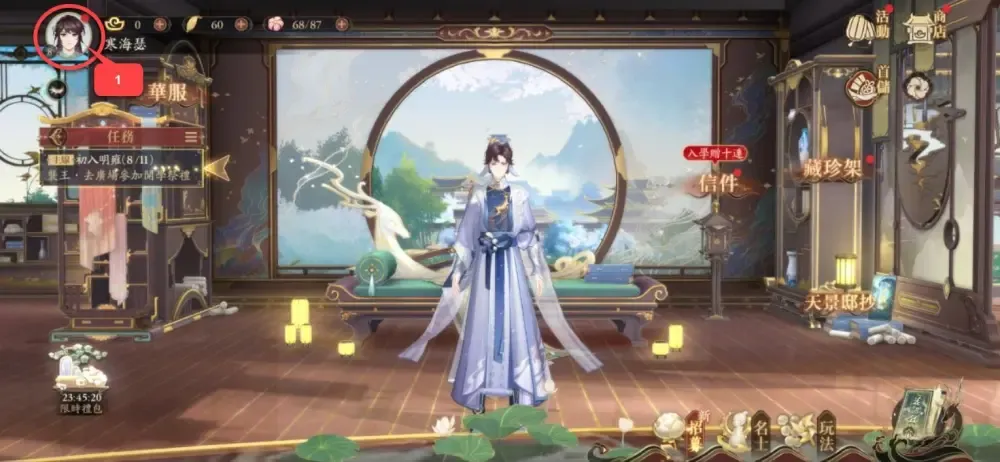
How to recharge The Moon in the Heart of Flowers and Mountains Ingot (TW)

Server Compatibility and Region Rules for TW Accounts

Before placing an order, confirm that your game installation matches the Taiwan / Hong Kong / Macau regional release. The Moon in the Heart of Flowers and Mountains operates distinct server architectures across different regions.

Server RegionTop-Up SupportedRequired ID TypeAccount Database Isolation
Taiwan / Hong Kong / Macau (TW)YesNumerical Game ID (TW Client)Dedicated TW/HK/MO Server
Mainland China (CN)NoCN Server UIDDedicated CN Server
Global / Other Regional ServersNoGlobal Client UIDRegional Global Servers

Submitting a Game ID from a Mainland China or Global account will prevent the order from delivering successfully. Ensure your client was downloaded from the Taiwan App Store, Taiwan Google Play Store, or the official TW APK distribution.

Available Ingot Denominations and Packages on BitTopup

BitTopup provides multiple Ingot tiers designed to suit your in-game goals, from single gacha pulls to major seasonal recruitment campaigns. Available options include standard Ingot packs, special value bundles, and monthly privilege cards.

  • Standard Ingot Packs: Direct currency injections to convert into Gold Leaves or spend on shop items.
  • First-Purchase Bonuses: If your game account is eligible for in-game first-charge multipliers, the game automatically credits the promotional bonus Ingots upon successful recharge delivery.
  • Real-Time Rates: Package pricing and regional currency conversions are updated continuously on the live BitTopup checkout interface.

Security and Password-Free Top-Up Protection on BitTopup

Account safety is a core priority when purchasing game currencies online. BitTopup utilizes a direct Game ID top-up mechanism that protects your personal data:

  • Zero Password Requirements: You will never be asked for your account password, email login, Apple ID, Google Play credentials, or social media tokens.
  • No Account Sharing: Your account stays entirely in your control. There is no need to transfer access to an external operator.
  • Encrypted Processing: All transactions on BitTopup use industry-standard encryption protocols to protect your billing details.
  • Publisher Compliance: Deliveries occur through standard top-up interfaces, safeguarding your account from penalties associated with unauthorized account modifications.

Troubleshooting Ingot Delivery and Order Status Verification

If your Ingots do not appear immediately after completing payment, use the following troubleshooting checklist:

  1. Restart the Game App: Close The Moon in the Heart of Flowers and Mountains completely and relaunch it. A fresh login forces the client to sync with the server database.
  2. Inspect the In-Game Mailbox: Certain event rewards, bundle items, and first-top-up milestone gifts are sent as attachments via the system mail menu rather than applied straight to the currency counter.
  3. Verify Submitted Game ID: Check your BitTopup order history to verify that the Game ID entered during checkout matches your in-game profile ID exactly.
  4. Check Payment Status: Confirm that your payment provider processed the charge successfully and that your order shows as completed in your BitTopup user center.
  5. Contact Customer Support: If your order status indicates completion but your balance has not updated after restarting, reach out to BitTopup customer support with your Order ID and Game ID for prompt resolution.

Frequently Asked Questions

How do I find my Game ID in The Moon in the Heart of Flowers and Mountains?

Tap your scholar avatar in the top-left corner of the main screen. Your numerical Game ID is visible directly underneath your name. Use the copy button next to it to copy the exact string.

Do I need to provide my account login password to recharge Ingots?

No. BitTopup requires only your numerical Game ID to process the top-up. Never share your password or verification codes with anyone.

Can I recharge this product if my account is registered on the CN or Global server?

No. This product catalog is strictly configured for accounts on the Taiwan, Hong Kong, and Macau (TW) server. Accounts on CN or Global versions are not compatible with this service.

How quickly will the Ingots be credited to my in-game account after checkout?

Recharges are processed automatically once payment verification is complete. In most cases, Ingots reflect on your account shortly after the transaction is confirmed.

What should I do if the recharged Ingots do not reflect in my balance?

Restart your game client to refresh the server connection, check your in-game mailbox for system deliveries, and confirm your order status on BitTopup. If you still need help, contact BitTopup customer support with your order details.

What payment methods are supported on BitTopup for this recharge?

BitTopup supports a wide variety of regional and international payment options, including major credit/debit cards, e-wallets, and online banking. View the live checkout page to see all payment channels currently available for your location.


The Moon in the Heart of Flowers and Mountains Ingot (TW) ข่าวสารแนะนำ

สินค้าแนะนำ

The Moon in the Heart of Flowers and Mountains Ingot (TW) คำถามที่พบบ่อยเกี่ยวกับการเติมเงิน

ใช้เวลานานเท่าใดกว่าที่คำสั่งซื้อจะเสร็จสมบูรณ์?
โดยปกติแล้ว คำสั่งซื้อจะเสร็จสมบูรณ์ภายในไม่กี่นาที หากมีความล่าช้าใดๆ โปรดติดต่อฝ่ายสนับสนุนลูกค้าของเรา
BitTopup คืออะไร?
BitTopup คือแพลตฟอร์มออนไลน์สำหรับเติมเกมและบริการต่าง ๆ ได้อย่างรวดเร็วและปลอดภัย
เวลาทำการของฝ่ายบริการลูกค้า?
ฝ่ายบริการลูกค้าของ BitTopup พร้อมให้บริการตลอด 24 ชั่วโมงทุกวัน
ฉันจำเป็นต้องแชร์รหัสผ่านบัญชี The Moon in the Heart of Flowers and Mountains Ingot (TW) หรือไม่?
ไม่จำเป็น การเติมเงินโดยตรงใช้เพียง Player ID/UID ของคุณเท่านั้น ห้ามแชร์รหัสผ่านของคุณกับใครเด็ดขาด
The Moon in the Heart of Flowers and Mountains Ingot (TW) รองรับภูมิภาคใดบ้าง?
สินค้านี้รองรับบัญชีภูมิภาค TAIWAN โปรดตรวจสอบภูมิภาคบัญชีของคุณก่อนทำการสั่งซื้อ
หากเติมเงินแล้วไม่เข้าต้องทำอย่างไร?
ติดต่อฝ่ายสนับสนุนลูกค้าตลอด 24 ชั่วโมงทุกวันพร้อมแจ้งหมายเลขคำสั่งซื้อของคุณ แล้วเราจะส่งรหัสให้ใหม่หรือคืนเงินให้ทันที

The Moon in the Heart of Flowers and Mountains Ingot (TW) รีวิวจากลูกค้าเกี่ยวกับการเติมเงิน

รีวิวทั้งหมด: 747

คะแนนเฉลี่ย

how to top-up in bittopup

4.6

customer avatar
Juan Jo2026/09/26
แอปยอดเยี่ยมและมีประสิทธิภาพมาก ไม่มีอะไรจะติเลย ดีมากๆ ครับ
customer avatar
Huang Dacres2026/09/29
การรับเครดิตง่ายมาก! ขั้นตอนรวดเร็วและบริการก็รู้สึกเป็นกันเองสุดๆ
customer avatar
Jahan zaib2026/09/30
บริการดีมาก
customer avatar
Star2026/09/28
ดีมากสำหรับการเล่นเกมออนไลน์อย่างแน่นอน
customer avatar
Lucha Ashkanani2026/09/26
สะดวกและใช้งานง่ายมาก ยินดีมากที่ได้ใช้บริการ
customer avatar
Jarrett Meyer2026/09/28
ฉันใช้ BitTopUp มาสองสามปีแล้ว และอยากจะบอกสามเรื่องคือ: ไม่เคยมีปัญหาเรื่องการเติมเงินเลย, ความเร็วในการจัดส่งชนะทุกเว็บที่เคยลองมา, และมันง่ายมากๆ แค่คลิกไม่กี่ทีก็เรียบร้อย ช่วยให้ชีวิตง่ายขึ้นเยอะ
customer avatar
zoopry2026/09/28
BitTopup ให้เรทราคาที่คุ้มค่าที่สุดเท่าที่เคยเห็นมาเลย เว็บไซต์ใช้งานง่ายและมีช่องทางการชำระเงินให้เลือกเยอะมาก ทุกอย่างราบรื่นดีมาก กลับมาใช้บริการอีกแน่นอนครับ!
customer avatar
黎大明2026/09/29
ครั้งแรกที่ฉันพยายามเติมเงินมันไม่ผ่าน อาจเป็นเพราะฉันกรอก ID ผิด ฝ่ายบริการลูกค้าเลยดำเนินการคืนเงินให้ฉัน ส่วนการลองครั้งที่สองผ่านฉลุยไม่มีปัญหาอะไร จะใช้บริการเว็บไซต์นี้ต่อไปเรื่อยๆ
customer avatar
俞臻2026/09/26
หน้าตาใช้งานง่ายและยอดเยี่ยมมาก แถมเติมเงินได้เร็วสุดๆ
customer avatar
Victor Cobos2026/09/28
บริการดีมาก ขอบคุณครับ
customer avatar
Mira Joseph2026/09/27
ดีมากเลย ถูกกว่าที่เคยใช้ก่อนหน้านี้ แถมยังเร็วด้วย
customer avatar
Bilal Lakhal2026/09/30
ชอบมาก เร็วมาก
customer avatar
Елена Премудрая2026/09/29
แอปยอดเยี่ยมมาก รวดเร็วและสะดวกสบาย ชอบมากเลยครับ
customer avatar
Luna Lee2026/09/26
เติมเงิน Identity V และ Blood Strike ได้ไม่มีปัญหาเลย ให้แค่ 4 ดาวเพราะหน้าชำระเงินขัดข้องไปครั้งหนึ่ง แต่ฝ่ายสนับสนุนแก้ไขให้เร็วมากๆ ราคาดีและมีเกมให้เลือกเยอะมาก!
customer avatar
Jean Piero2026/09/28
ดี รวดเร็ว น่าเชื่อถือ และมีประสิทธิภาพ ขาดอย่างเดียวคืออยากให้มีโบนัสหรือของขวัญสำหรับการเติมเงินบ่อยๆ
customer avatar
Abdul Rouf2026/09/30
เว็บไซต์เติมเงินที่ยอดเยี่ยมมาก ตอนแรกก็แอบลังเลว่าจะจริงไหม แต่พอได้อ่านรีวิวเลยลองซื้อยอดน้อยๆ ดู ปรากฏว่าได้รับของภายในไม่ถึง 2 นาที ปลื้มมากค่ะ
customer avatar
Yhjk Kkkk2026/09/26
บริการดี จ่ายเงินง่าย
customer avatar
Muksal Mina2026/09/28
น่าเชื่อถือ
customer avatar
Wassim Hawaji2026/09/26
เว็บไซต์นี้ดีมากเลย
customer avatar
Guliza2026/09/28
เว็บไซต์ยอดเยี่ยมมาก
The Moon in the Heart of Flowers and Mountains Ingot (TW) รีวิวทั้งหมด

ทำไมต้องเลือกเรา?

ธุรกรรมปลอดภัย 100%

ทุกการเติมเงินได้รับการปกป้องด้วยระบบรักษาความปลอดภัยในการชำระเงินที่เข้ารหัสตามมาตรฐานอุตสาหกรรม ซึ่งจะรักษาข้อมูลส่วนตัวและข้อมูลการชำระเงินของคุณไว้เป็นความลับอย่างสมบูรณ์ ช้อปได้อย่างมั่นใจ ปลอดภัย 100% ทุกครั้ง

บริการลูกค้าตลอด 24 ชั่วโมงทุกวัน

ทีมสนับสนุนที่เป็นมิตรของเราพร้อมให้บริการตลอด 24 ชั่วโมงเพื่อช่วยเหลือคุณทั้งก่อน ระหว่าง และหลังการซื้อ รับความช่วยเหลือที่รวดเร็วและเชื่อถือได้ทุกเมื่อที่คุณต้องการ ไม่ว่าจะเป็นกลางวันหรือกลางคืน

รับประกันคืนเงินเต็มจำนวน

เพลิดเพลินกับราคาที่คุ้มค่าที่สุดพร้อมการจัดส่งที่รวดเร็วและเชื่อถือได้ หากคำสั่งซื้อของคุณไม่ได้รับการจัดส่งหรือไม่สามารถใช้งานได้ เรารับประกันการคืนเงิน 100% เงินของคุณจะได้รับการคุ้มครองเสมอ

ช่องทางการชำระเงินที่รองรับ

PM_PIX - ช่วยเหลือด้านการชำระเงิน | BitTopupWG_PIX - ช่วยเหลือด้านการชำระเงิน | BitTopupPMKakaoPay - ช่วยเหลือด้านการชำระเงิน | BitTopupPMTNG - ช่วยเหลือด้านการชำระเงิน | BitTopupWG_TNG - ช่วยเหลือด้านการชำระเงิน | BitTopupPMGCASH - ช่วยเหลือด้านการชำระเงิน | BitTopupPM_WALLET_NAVERPAY - ช่วยเหลือด้านการชำระเงิน | BitTopupPM_WALLET_PMPROMPTPAY - ช่วยเหลือด้านการชำระเงิน | BitTopupAlipay HK - ช่วยเหลือด้านการชำระเงิน | BitTopupDANA - ช่วยเหลือด้านการชำระเงิน | BitTopupAM_SBP - ช่วยเหลือด้านการชำระเงิน | BitTopupPM_OXXO - ช่วยเหลือด้านการชำระเงิน | BitTopupOVO - ช่วยเหลือด้านการชำระเงิน | BitTopupPMToss - ช่วยเหลือด้านการชำระเงิน | BitTopupWG_PAY_NOW - ช่วยเหลือด้านการชำระเงิน | BitTopupWG_BLIK - ช่วยเหลือด้านการชำระเงิน | BitTopupPM_CARD_SA - ช่วยเหลือด้านการชำระเงิน | BitTopupWG_PAYU - ช่วยเหลือด้านการชำระเงิน | BitTopupPM_WALLET_JKOPAY - ช่วยเหลือด้านการชำระเงิน | BitTopupWG_STCPAY - ช่วยเหลือด้านการชำระเงิน | BitTopupPM_WALLET_SAMSUNGPAY - ช่วยเหลือด้านการชำระเงิน | BitTopupPM_7_ELEVEN - ช่วยเหลือด้านการชำระเงิน | BitTopupPM_WALLET_WECHATPAYHK - ช่วยเหลือด้านการชำระเงิน | BitTopupPM_NET_BANKING_FPX - ช่วยเหลือด้านการชำระเงิน | BitTopupPM_WALLET_QRIS - ช่วยเหลือด้านการชำระเงิน | BitTopupAM_CARD_KZ - ช่วยเหลือด้านการชำระเงิน | BitTopupAM_CARD_BY - ช่วยเหลือด้านการชำระเงิน | BitTopupWG_SADAD - ช่วยเหลือด้านการชำระเงิน | BitTopupWG_MADA - ช่วยเหลือด้านการชำระเงิน | BitTopupAM_TBANK - ช่วยเหลือด้านการชำระเงิน | BitTopupAM_SBERPAY - ช่วยเหลือด้านการชำระเงิน | BitTopupPM_REALTIME_PAYMENT - ช่วยเหลือด้านการชำระเงิน | BitTopupPM_WALLET_GASH - ช่วยเหลือด้านการชำระเงิน | BitTopupPM_OKMART - ช่วยเหลือด้านการชำระเงิน | BitTopupPM_HILIFE - ช่วยเหลือด้านการชำระเงิน | BitTopupPM_FAMILYMART - ช่วยเหลือด้านการชำระเงิน | BitTopupPM_CARD_SA_CD - ช่วยเหลือด้านการชำระเงิน | BitTopupAM_CARD - ช่วยเหลือด้านการชำระเงิน | BitTopupPM_CARD_EU - ช่วยเหลือด้านการชำระเงิน | BitTopupPM_CARD_KNET - ช่วยเหลือด้านการชำระเงิน | BitTopupBIN_DO_PAY_ME - ช่วยเหลือด้านการชำระเงิน | BitTopupPM_CARD_JP - ช่วยเหลือด้านการชำระเงิน | BitTopupBIN_DO_OCTOPUS - ช่วยเหลือด้านการชำระเงิน | BitTopupPM_CARD_US - ช่วยเหลือด้านการชำระเงิน | BitTopupPM_CARD - ช่วยเหลือด้านการชำระเงิน | BitTopupPM_WALLET_SHOPEEPAY - ช่วยเหลือด้านการชำระเงิน | BitTopupPM_WALLET_PAOTANGPAY - ช่วยเหลือด้านการชำระเงิน | BitTopupPM_WALLET_LINEPAY - ช่วยเหลือด้านการชำระเงิน | BitTopupPM_WALLET_TRUEMONEY - ช่วยเหลือด้านการชำระเงิน | BitTopupD_LOCAL_MX_IO - ช่วยเหลือด้านการชำระเงิน | BitTopupD_LOCAL_MX_BQ - ช่วยเหลือด้านการชำระเงิน | BitTopupD_LOCAL_MX_SE - ช่วยเหลือด้านการชำระเงิน | BitTopupD_LOCAL_MX_SM - ช่วยเหลือด้านการชำระเงิน | BitTopupD_LOCAL_MX_BV - ช่วยเหลือด้านการชำระเงิน | BitTopupD_LOCAL_PK_HB - ช่วยเหลือด้านการชำระเงิน | BitTopupD_LOCAL_PK_JK - ช่วยเหลือด้านการชำระเงิน | BitTopupD_LOCAL_PK_ES - ช่วยเหลือด้านการชำระเงิน | BitTopupD_LOCAL_PK_IO - ช่วยเหลือด้านการชำระเงิน | BitTopupPMPayco - ช่วยเหลือด้านการชำระเงิน | BitTopupGOPAY - ช่วยเหลือด้านการชำระเงิน | BitTopupPMPAYMAYA - ช่วยเหลือด้านการชำระเงิน | BitTopupPMGRABPAYPH - ช่วยเหลือด้านการชำระเงิน | BitTopupPMGRABPAYMY - ช่วยเหลือด้านการชำระเงิน | BitTopupPMBOOST - ช่วยเหลือด้านการชำระเงิน | BitTopupWG_PAYTM - ช่วยเหลือด้านการชำระเงิน | BitTopupPM_BANK_TRANSFER_PSE - ช่วยเหลือด้านการชำระเงิน | BitTopupPM_BANK_TRANSFER_EFECTY - ช่วยเหลือด้านการชำระเงิน | BitTopupWG_BPI - ช่วยเหลือด้านการชำระเงิน | BitTopupWG_GCASH - ช่วยเหลือด้านการชำระเงิน | BitTopupWG_BANCOMAT_PAY - ช่วยเหลือด้านการชำระเงิน | BitTopupWG_iDEAL - ช่วยเหลือด้านการชำระเงิน | BitTopupWG_BANCONTACT - ช่วยเหลือด้านการชำระเงิน | BitTopupPM_CARD_APPLE_US - ช่วยเหลือด้านการชำระเงิน | BitTopupPM_APPLEPAY - ช่วยเหลือด้านการชำระเงิน | BitTopupD_LOCAL_PH_PM - ช่วยเหลือด้านการชำระเงิน | BitTopupD_LOCAL_PH_GY - ช่วยเหลือด้านการชำระเงิน | BitTopupWG_BHIM - ช่วยเหลือด้านการชำระเงิน | BitTopupPM_WALLET_STCPAY - ช่วยเหลือด้านการชำระเงิน | BitTopupPM_GOOGLEPAY_US - ช่วยเหลือด้านการชำระเงิน | BitTopupPM_GOOGLEPAY - ช่วยเหลือด้านการชำระเงิน | BitTopupD_LOCAL_TH_TK - ช่วยเหลือด้านการชำระเงิน | BitTopupGATE_IO_PAY - ช่วยเหลือด้านการชำระเงิน | BitTopupBINANCE_PAY - ช่วยเหลือด้านการชำระเงิน | BitTopupWG_PHONE_PE - ช่วยเหลือด้านการชำระเงิน | BitTopupPAY_LOCO_ESumLifeET - ช่วยเหลือด้านการชำระเงิน | BitTopupPAY_LOCO_ESumFamilyMart - ช่วยเหลือด้านการชำระเงิน | BitTopupPAY_LOCO_ESum711 - ช่วยเหลือด้านการชำระเงิน | BitTopupBIT_WALLET - ช่วยเหลือด้านการชำระเงิน | BitTopup

10 Years Trusted Game & Live Streaming Top-Up Platform

Since 2016 | 5,000,000+ Users Worldwide

KAMAGEN LIMITED

Registration No. 76888246

Room 1508, 15/F, Grand Plaza Office Tower II, 625 Nathan Road, Mong Kok, Kowloon, Hong Kong

BUSINESS COOPERATION: ibittopup@gmail.com

© 2016-2026 BitTopup. All Rights Reserved.

Trusted & Verified by

ScamAdviser review of BitTopupGridinsoft review of BitTopupTrustpilot review of BitTopup
customer service