


BitTopup Logohow to top-up in bittopup
ค้นหา
วิธีเติมเงิน Tom and Jerry: Chase Diamond

Tom and Jerry: Chase Diamond

Excellent
Trustpilot
SOUTH EAST ASIASOUTH EAST ASIA
Instant Deliveryจัดส่งทันที
Safe & Secure paymentชำระเงินปลอดภัยและมั่นใจได้

Instant delivery with direct Player ID recharge on BitTopup. Get your Diamonds now.

เลือกมูลค่า

ข้อมูลการเติมเงิน

Player ID
Server information

Tom and Jerry: Chase Diamond 60 Diamonds

฿ 25.00

ยอดรวม · x1

Tom and Jerry: Chase Diamond คู่มือการเติมเงิน

How to Recharge Tom and Jerry: Chase Diamonds on BitTopup

Purchasing Diamonds for your Tom and Jerry: Chase account on BitTopup is direct, fast, and secure. By utilizing the direct Player ID system, you can credit your balance without ever sharing your account passwords or personal login credentials.

Follow these steps to complete your recharge:1. Select the Diamond denomination you wish to purchase from the product catalog.2. Enter your numeric Tom and Jerry: Chase Player ID in the designated account field.3. Confirm your server selection (Asia_Server / 10001).4. Click the Buy Now button to navigate to the live checkout page.5. Review your order details and choose your preferred regional payment method.6. Complete the checkout. Your Diamonds will be credited directly to your in-game profile.

How to Locate Your Tom and Jerry: Chase Player ID

Your Player ID is a unique numeric identifier linked to your profile on the Asia Server. Entering the correct ID ensures that your Diamonds arrive promptly without delivery interruptions.

Follow this step-by-step guide to locate your ID:1. Launch the Tom and Jerry: Chase app on your mobile device.2. Wait for the main lobby screen to finish loading.3. Tap your character avatar located in the top-left corner of the main screen.4. Open your personal profile tab to view your account details.5. Locate your numeric Player ID displayed beneath your character nickname.6. Tap the small copy icon next to your ID to copy the number directly to your clipboard.
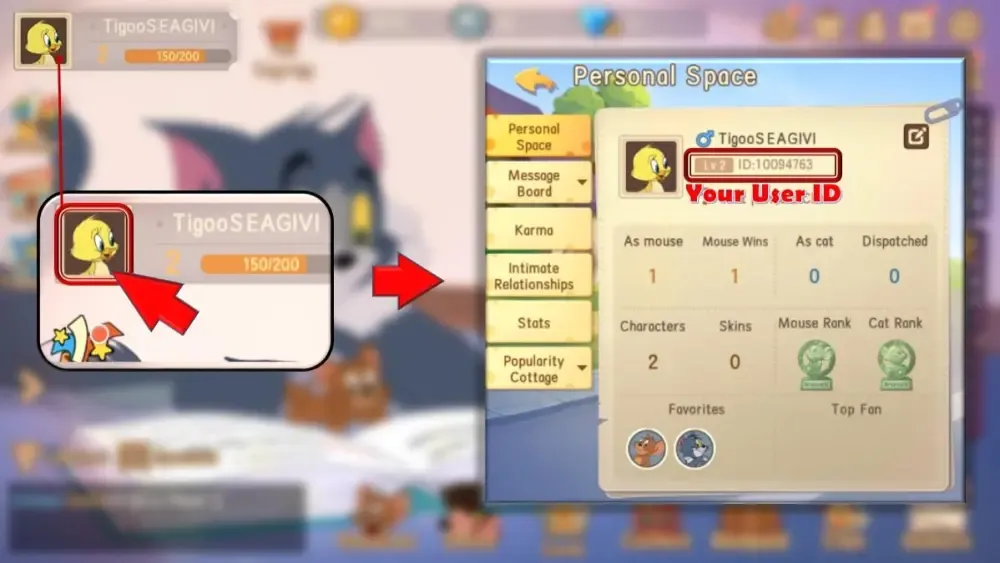
How to recharge Tom and Jerry: Chase Diamond

Always double-check your ID before submitting your order on BitTopup. Because digital top-ups are processed automatically based on the numeric string provided, entering an incorrect ID may cause the currency to be credited to the wrong account.

Tom and Jerry: Chase Diamond Uses: Magic Mirror, Post Office, and Skins

Diamonds serve as the core premium currency in Tom and Jerry: Chase. Having a ready reserve of Diamonds allows you to unlock exclusive cosmetics, competitive perks, and seasonal pass rewards.

1. Magic Mirror Gacha Draws

The Magic Mirror is the centerpiece cosmetic feature in Tom and Jerry: Chase. Players use Diamonds or Magic Stars to perform draws for rare S-class and SS-class character skins, unique weapon skins, and custom match entrance animations. Top-tier skins often come equipped with exclusive sound effects, voice lines, and visual flair for popular characters like Detective Jerry, King Jerry, Swordsman Jerry, Cowboy Tom, and Butch.

2. Post Office Stamps and Perk Cards

The Post Office allows players to exchange Diamonds for Stamps. Stamps are essential for drawing Character Perk Cards, special passive traits, and active abilities. Equipping high-tier cards strengthens your playstyle whether you are setting up traps as a Cat or coordinating cheese collection as a Mouse.

3. Chase Pass Premium Upgrades

Every competitive season introduces an updated Chase Pass. Upgrading to the advanced Chase Pass with Diamonds unlocks premium seasonal tracks, giving you immediate access to exclusive outfits, bonus gold, perk points, profile frames, and rare items that cannot be obtained through standard gameplay.

4. Direct Character and Store Purchases

Special character bundles, skin recolors, and progression packs in the in-game shop can be purchased directly with Diamonds. This allows you to acquire newly released characters immediately without waiting to accumulate standard gold.

Platform and Server Compatibility: Android and Asia Server Details

Before completing your order, ensure that your game account matches the supported regional parameters. BitTopup currently supports players on the Southeast Asian server environment.

ParameterDetails
Game TitleTom and Jerry: Chase
Premium CurrencyDiamonds
Target RegionSouth East Asia
Supported ServerAsia_Server (Server ID: 10001)
Platform FocusAndroid Client / Cross-Linked UID
Account VerificationNumeric Player ID Only
Security ProtocolDirect UID Delivery (Zero Passwords Required)

Make sure your active game account is registered on the Asia Server (10001) before finalizing your purchase on BitTopup.

Safe and Secure Recharge with BitTopup: No Password Required

Account safety is a top priority when topping up online. BitTopup provides a protected environment designed to keep your game credentials secure:

  • Zero Password Access: We will never ask for your account password, Google Play credentials, or social media login details. All orders are processed via your public Player ID.
  • Protected Transactions: Payment processing on BitTopup utilizes modern data encryption protocols to safeguard your payment information at every stage.
  • Transparent Checkout: All available denominations and final prices are displayed clearly on the live checkout page with no hidden charges.
  • Account Safety: Orders delivered via standard in-game system channels avoid the risks associated with third-party account sharing or unauthorized logins.

Troubleshooting Common Top Up and Delivery Questions

If you experience any delay or need assistance with your order, follow these troubleshooting steps:

  1. Restart the Game Application:In most instances, Diamonds appear in your account balance shortly after payment confirmation. If the balance does not refresh automatically, force close Tom and Jerry: Chase and restart the app to sync with the server.

  2. Check the In-Game Mailbox:Certain promotional items, event bonuses, or package components may arrive via the in-game mail system rather than updating your raw counter directly. Open your mailbox from the main lobby and claim all unread messages.

  3. Verify Your Order Information:Review your BitTopup transaction receipt to confirm that the Player ID and Server ID entered match your in-game profile. Submitting a typo in the Player ID will direct the recharge to another account.

  4. Reach Out to Customer Support:If your balance has not updated after restarting and verifying your details, contact BitTopup customer support with your Order ID for prompt tracking and resolution.

Frequently Asked Questions About Tom and Jerry: Chase Diamonds

How do I find my Tom and Jerry: Chase Player ID?

Open Tom and Jerry: Chase on your mobile device, tap your player avatar in the top-left corner of the home screen, and find your numeric ID listed under your nickname. Tap the copy icon to copy it directly.

Which servers are supported for Tom and Jerry: Chase Diamond recharge?

BitTopup supports the Asia Server (Server ID: 10001) catering to the South East Asia region. Please ensure your account belongs to this server before submitting your order.

Can iOS players recharge Tom and Jerry: Chase Diamonds here?

This service is configured primarily for the Android client on the Asia Server. If your account is cross-linked and accessible on the Asia Server UID structure, you can recharge using your numeric Player ID.

Do I need to provide my game account password to recharge?

No. You only need to provide your numeric Player ID and select your server. BitTopup will never ask for your game password or third-party login credentials.

What can I buy with Diamonds in Tom and Jerry: Chase?

Diamonds can be used for Magic Mirror gacha pulls, Post Office stamp draws for character perk cards, unlocking the premium Chase Pass, and purchasing exclusive characters and skins directly from the shop.

How long does it take for Diamonds to reflect in my game account?

Once your transaction is verified on BitTopup, the Diamonds are credited directly to your account. Simply restart your game app to see your updated balance.

What should I do if my Diamonds are not credited after recharge?

First, restart the game client to refresh your balance and check your in-game mailbox. If the Diamonds still do not appear, contact BitTopup support with your Order ID and transaction details for immediate assistance.


Tom and Jerry: Chase Diamond ข่าวสารแนะนำ

Sausage Man Summer Splash 2026: กำหนดการ รางวัล และคู่มือภารกิจ

พิชิตอีเวนต์ Sausage Man Summer Splash 2026 เช็กวันสำคัญตลอดเดือนสิงหาคม วางแผนเคลียร์ภารกิจรายสัปดาห์ และคว้าไอเทมลิมิเต็ดก่อนเทศกาลจะสิ้นสุดลง

Honkai: Star Rail – Countdown to Version 3.3! Four Key Activities to Note & Anniversary Album Shipping Update

Greetings, Trailblazers! The Version 3.3 preview has concluded, and the official launch is scheduled for May 21, 2025. Before the new version goes live, here are four important activities to keep in mind:

Honkai: Star Rail 3.2 Update – Don't Miss Out on Limited-Time Stellar Jades and New Events!

Honkai: Star Rail Version 3.2 is in full swing, offering Trailblazers a wealth of events and rewards. Don't miss out on these opportunities to enhance your roster and experience the latest content!

Honkai: Star Rail | Comprehensive Build Guide for 5-Star Character Xueyi

This guide provides an in-depth look at building Xueyi effectively, focusing on her Break Effect capabilities and Quantum damage potential.​

Popular anime "Natsume's Book of Friends" announced to be gamified

Popular anime "Natsume's Book of Friends" announced to be gamified

The game director confirms that the "Dark Souls" BOSS will appear in "Elden's Circle: Reign of Night"

The game director confirms that the "Dark Souls" BOSS will appear in "Elden's Circle: Reign of Night"

สินค้าแนะนำ

Tom and Jerry: Chase Diamond คำถามที่พบบ่อยเกี่ยวกับการเติมเงิน

ใช้เวลานานเท่าใดกว่าที่คำสั่งซื้อจะเสร็จสมบูรณ์?
โดยปกติแล้ว คำสั่งซื้อจะเสร็จสมบูรณ์ภายในไม่กี่นาที หากมีความล่าช้าใดๆ โปรดติดต่อฝ่ายสนับสนุนลูกค้าของเรา
BitTopup คืออะไร?
BitTopup คือแพลตฟอร์มออนไลน์สำหรับเติมเกมและบริการต่าง ๆ ได้อย่างรวดเร็วและปลอดภัย
เวลาทำการของฝ่ายบริการลูกค้า?
ฝ่ายบริการลูกค้าของ BitTopup พร้อมให้บริการตลอด 24 ชั่วโมงทุกวัน

Tom and Jerry: Chase Diamond รีวิวจากลูกค้าเกี่ยวกับการเติมเงิน

รีวิวทั้งหมด: 884

คะแนนเฉลี่ย

how to top-up in bittopup

5.0

customer avatar
Kaylee Flores2026/08/26
ไว้ใจได้มากสำหรับบัตรของขวัญ Steam! ปกติฉันจะกลัวโดนโกงจากเว็บพวกนี้ แต่รหัสใช้งานได้สมบูรณ์แบบเลย แนะนำเลย 10/10
customer avatar
黎大明2026/08/26
ครั้งแรกที่ฉันพยายามเติมเงินมันไม่ผ่าน อาจเป็นเพราะฉันกรอก ID ผิด ฝ่ายบริการลูกค้าเลยดำเนินการคืนเงินให้ฉัน ส่วนการลองครั้งที่สองผ่านฉลุยไม่มีปัญหาอะไร จะใช้บริการเว็บไซต์นี้ต่อไปเรื่อยๆ
customer avatar
Mhabe2026/08/27
ดีมาก เว็บไซต์ที่ดีที่สุดเท่าที่เคยมีมา
customer avatar
Laila Kermadi2026/08/25
ได้รับไวมาก ขอบคุณนะ
customer avatar
Francis Wynne2026/08/25
บอกตามตรงว่าไม่เคยเจอปัญหาในการใช้แอปนี้เลย แถมยังส่งไวด้วย แนะนำเลยครับ
customer avatar
Michael Z2026/08/28
ทำรายการได้ดีและราบรื่นมาก
customer avatar
ZarGa2026/08/26
บริการรวดเร็วมาก ฉันมีปัญหานิดหน่อยกับรหัสแลกรับ แต่ปรากฏว่ารหัสถูกส่งมาแล้วและไปอยู่ในโฟลเดอร์สแปม หลังจากติดต่อฝ่ายสนับสนุน ปัญหาก็ได้รับการแก้ไขโดยมี Anna คอยให้คำแนะนำ
customer avatar
Hlaine Aykari Phyoe2026/08/25
ช่วยด้วย ฉันต้องการ PUBG Global UC
Tom and Jerry: Chase Diamond รีวิวทั้งหมด

ทำไมต้องเลือกเรา?

ธุรกรรมปลอดภัย 100%

ทุกการเติมเงินได้รับการปกป้องด้วยระบบรักษาความปลอดภัยในการชำระเงินที่เข้ารหัสตามมาตรฐานอุตสาหกรรม ซึ่งจะรักษาข้อมูลส่วนตัวและข้อมูลการชำระเงินของคุณไว้เป็นความลับอย่างสมบูรณ์ ช้อปได้อย่างมั่นใจ ปลอดภัย 100% ทุกครั้ง

บริการลูกค้าตลอด 24 ชั่วโมงทุกวัน

ทีมสนับสนุนที่เป็นมิตรของเราพร้อมให้บริการตลอด 24 ชั่วโมงเพื่อช่วยเหลือคุณทั้งก่อน ระหว่าง และหลังการซื้อ รับความช่วยเหลือที่รวดเร็วและเชื่อถือได้ทุกเมื่อที่คุณต้องการ ไม่ว่าจะเป็นกลางวันหรือกลางคืน

รับประกันคืนเงินเต็มจำนวน

เพลิดเพลินกับราคาที่คุ้มค่าที่สุดพร้อมการจัดส่งที่รวดเร็วและเชื่อถือได้ หากคำสั่งซื้อของคุณไม่ได้รับการจัดส่งหรือไม่สามารถใช้งานได้ เรารับประกันการคืนเงิน 100% เงินของคุณจะได้รับการคุ้มครองเสมอ

ช่องทางการชำระเงินที่รองรับ

PM_PIX - ช่วยเหลือด้านการชำระเงิน | BitTopupWG_PIX - ช่วยเหลือด้านการชำระเงิน | BitTopupPMKakaoPay - ช่วยเหลือด้านการชำระเงิน | BitTopupPMTNG - ช่วยเหลือด้านการชำระเงิน | BitTopupPMGCASH - ช่วยเหลือด้านการชำระเงิน | BitTopupPM_WALLET_NAVERPAY - ช่วยเหลือด้านการชำระเงิน | BitTopupPM_WALLET_PMPROMPTPAY - ช่วยเหลือด้านการชำระเงิน | BitTopupAlipay HK - ช่วยเหลือด้านการชำระเงิน | BitTopupDANA - ช่วยเหลือด้านการชำระเงิน | BitTopupAM_SBP - ช่วยเหลือด้านการชำระเงิน | BitTopupPM_OXXO - ช่วยเหลือด้านการชำระเงิน | BitTopupOVO - ช่วยเหลือด้านการชำระเงิน | BitTopupPMToss - ช่วยเหลือด้านการชำระเงิน | BitTopupWG_PAY_NOW - ช่วยเหลือด้านการชำระเงิน | BitTopupWG_BLIK - ช่วยเหลือด้านการชำระเงิน | BitTopupPM_CARD_SA - ช่วยเหลือด้านการชำระเงิน | BitTopupWG_PAYU - ช่วยเหลือด้านการชำระเงิน | BitTopupPM_WALLET_JKOPAY - ช่วยเหลือด้านการชำระเงิน | BitTopupWG_STCPAY - ช่วยเหลือด้านการชำระเงิน | BitTopupPM_WALLET_SAMSUNGPAY - ช่วยเหลือด้านการชำระเงิน | BitTopupPM_7_ELEVEN - ช่วยเหลือด้านการชำระเงิน | BitTopupAIRWALLEX_APPLEPAY - ช่วยเหลือด้านการชำระเงิน | BitTopupPM_WALLET_WECHATPAYHK - ช่วยเหลือด้านการชำระเงิน | BitTopupPM_NET_BANKING_FPX - ช่วยเหลือด้านการชำระเงิน | BitTopupAIRWALLEX - ช่วยเหลือด้านการชำระเงิน | BitTopupPM_WALLET_QRIS - ช่วยเหลือด้านการชำระเงิน | BitTopupAM_CARD_KZ - ช่วยเหลือด้านการชำระเงิน | BitTopupAM_CARD_BY - ช่วยเหลือด้านการชำระเงิน | BitTopupWG_SADAD - ช่วยเหลือด้านการชำระเงิน | BitTopupWG_MADA - ช่วยเหลือด้านการชำระเงิน | BitTopupAM_TBANK - ช่วยเหลือด้านการชำระเงิน | BitTopupAM_SBERPAY - ช่วยเหลือด้านการชำระเงิน | BitTopupPM_REALTIME_PAYMENT - ช่วยเหลือด้านการชำระเงิน | BitTopupPM_WALLET_GASH - ช่วยเหลือด้านการชำระเงิน | BitTopupPM_OKMART - ช่วยเหลือด้านการชำระเงิน | BitTopupPM_HILIFE - ช่วยเหลือด้านการชำระเงิน | BitTopupPM_FAMILYMART - ช่วยเหลือด้านการชำระเงิน | BitTopupPM_CARD_SA_CD - ช่วยเหลือด้านการชำระเงิน | BitTopupAM_CARD - ช่วยเหลือด้านการชำระเงิน | BitTopupPM_CARD_EU - ช่วยเหลือด้านการชำระเงิน | BitTopupPM_CARD_KNET - ช่วยเหลือด้านการชำระเงิน | BitTopupBIN_DO_PAY_ME - ช่วยเหลือด้านการชำระเงิน | BitTopupPM_CARD_JP - ช่วยเหลือด้านการชำระเงิน | BitTopupBIN_DO_OCTOPUS - ช่วยเหลือด้านการชำระเงิน | BitTopupPM_CARD_US - ช่วยเหลือด้านการชำระเงิน | BitTopupPM_CARD - ช่วยเหลือด้านการชำระเงิน | BitTopupPM_WALLET_SHOPEEPAY - ช่วยเหลือด้านการชำระเงิน | BitTopupPM_WALLET_PAOTANGPAY - ช่วยเหลือด้านการชำระเงิน | BitTopupPM_WALLET_LINEPAY - ช่วยเหลือด้านการชำระเงิน | BitTopupPM_WALLET_TRUEMONEY - ช่วยเหลือด้านการชำระเงิน | BitTopupD_LOCAL_MX_IO - ช่วยเหลือด้านการชำระเงิน | BitTopupD_LOCAL_MX_BQ - ช่วยเหลือด้านการชำระเงิน | BitTopupD_LOCAL_MX_SE - ช่วยเหลือด้านการชำระเงิน | BitTopupD_LOCAL_MX_SM - ช่วยเหลือด้านการชำระเงิน | BitTopupD_LOCAL_MX_BV - ช่วยเหลือด้านการชำระเงิน | BitTopupD_LOCAL_PK_HB - ช่วยเหลือด้านการชำระเงิน | BitTopupD_LOCAL_PK_JK - ช่วยเหลือด้านการชำระเงิน | BitTopupD_LOCAL_PK_ES - ช่วยเหลือด้านการชำระเงิน | BitTopupD_LOCAL_PK_IO - ช่วยเหลือด้านการชำระเงิน | BitTopupPMPayco - ช่วยเหลือด้านการชำระเงิน | BitTopupGOPAY - ช่วยเหลือด้านการชำระเงิน | BitTopupPMPAYMAYA - ช่วยเหลือด้านการชำระเงิน | BitTopupPMGRABPAYPH - ช่วยเหลือด้านการชำระเงิน | BitTopupPMGRABPAYMY - ช่วยเหลือด้านการชำระเงิน | BitTopupPMBOOST - ช่วยเหลือด้านการชำระเงิน | BitTopupAIRWALLEX_GOOGLEPAY - ช่วยเหลือด้านการชำระเงิน | BitTopupWG_PAYTM - ช่วยเหลือด้านการชำระเงิน | BitTopupPM_BANK_TRANSFER_PSE - ช่วยเหลือด้านการชำระเงิน | BitTopupPM_BANK_TRANSFER_EFECTY - ช่วยเหลือด้านการชำระเงิน | BitTopupWG_BPI - ช่วยเหลือด้านการชำระเงิน | BitTopupWG_GCASH - ช่วยเหลือด้านการชำระเงิน | BitTopupWG_BANCOMAT_PAY - ช่วยเหลือด้านการชำระเงิน | BitTopupWG_iDEAL - ช่วยเหลือด้านการชำระเงิน | BitTopupWG_BANCONTACT - ช่วยเหลือด้านการชำระเงิน | BitTopupPM_CARD_APPLE_US - ช่วยเหลือด้านการชำระเงิน | BitTopupPM_APPLEPAY - ช่วยเหลือด้านการชำระเงิน | BitTopupD_LOCAL_PH_PM - ช่วยเหลือด้านการชำระเงิน | BitTopupD_LOCAL_PH_GY - ช่วยเหลือด้านการชำระเงิน | BitTopupWG_BHIM - ช่วยเหลือด้านการชำระเงิน | BitTopupPM_WALLET_STCPAY - ช่วยเหลือด้านการชำระเงิน | BitTopupPM_GOOGLEPAY_US - ช่วยเหลือด้านการชำระเงิน | BitTopupPM_GOOGLEPAY - ช่วยเหลือด้านการชำระเงิน | BitTopupD_LOCAL_TH_TK - ช่วยเหลือด้านการชำระเงิน | BitTopupGATE_IO_PAY - ช่วยเหลือด้านการชำระเงิน | BitTopupBINANCE_PAY - ช่วยเหลือด้านการชำระเงิน | BitTopupWG_PHONE_PE - ช่วยเหลือด้านการชำระเงิน | BitTopupPM_WALLET_SSGPAY - ช่วยเหลือด้านการชำระเงิน | BitTopupAIRWALLEX_EPS - ช่วยเหลือด้านการชำระเงิน | BitTopupAIRWALLEX_SWISH - ช่วยเหลือด้านการชำระเงิน | BitTopupPAY_LOCO_ESumLifeET - ช่วยเหลือด้านการชำระเงิน | BitTopupPAY_LOCO_ESumFamilyMart - ช่วยเหลือด้านการชำระเงิน | BitTopupPAY_LOCO_ESum711 - ช่วยเหลือด้านการชำระเงิน | BitTopupBIT_WALLET - ช่วยเหลือด้านการชำระเงิน | BitTopupPayPal - ช่วยเหลือด้านการชำระเงิน | BitTopupAIRWALLEX_TRUSTLY - ช่วยเหลือด้านการชำระเงิน | BitTopup

10 Years Trusted Game & Live Streaming Top-Up Platform

Since 2016 | 5,000,000+ Users Worldwide

KAMAGEN LIMITED

Room 1508, 15/F, Grand Plaza Office Tower II, 625 Nathan Road, Mong Kok, Kowloon, Hong Kong

BUSINESS COOPERATION: ibittopup@gmail.com

© 2016-2026 BitTopup. All Rights Reserved.

Trusted & Verified by

ScamAdviser review of BitTopupGridinsoft review of BitTopupTrustpilot review of BitTopup
customer service