

ESET PH Top Up: Digital License Renewal and Recharge in 2026
Keeping your digital life secure requires uninterrupted antivirus and cybersecurity protection. An ESET PH top up provides genuine digital activation keys tailored specifically for Philippine users. Whether you run security software on a standalone desktop PC, a family network of laptops, or an Android smartphone, renewing your subscription keeps real-time threat detection, anti-ransomware shields, and phishing protection active.
BitTopup delivers your ESET Philippines activation codes digitally after payment verification. You receive an authentic license key that applies directly to your ESET software or ESET HOME management account without physical retail packaging or waiting for postal delivery.
ESET Philippines License Types: NOD32 Antivirus vs Mobile Security vs Internet Security
ESET provides specialized security tiers to suit different hardware setups and user requirements across the Philippines. Selecting the right key depends on the devices you want to protect and the level of network filtering you need.
| Edition / Plan | Primary Supported Devices | Key Security Features | Recommended Use Case |
|---|---|---|---|
| ESET NOD32 Antivirus | Windows, macOS | Antivirus, Antispyware, Exploit Blocker, Cloud-Powered Scanning | Standalone gaming PCs, basic workstation desktop protection |
| ESET Mobile Security | Android | Real-Time Antivirus, Anti-Phishing, App Lock, SIM Guard | Android smartphones and tablets |
| ESET Internet Security / HOME Security | Windows, macOS, Android | Multi-Layer Defense, Banking Protection, Firewall, Parental Control, Webcam Shield | Comprehensive home networks, family devices, online financial activities |
ESET NOD32 Antivirus
NOD32 is engineered for speed and lightweight performance. It blocks malware, viruses, worms, and spyware without degrading system performance during gaming or resource-heavy applications. This license tier is ideal for users who need core system defense and offline media scanning on desktop computers.
ESET Mobile Security for Android
Mobile devices face targeted phishing schemes and malicious APK files. ESET Mobile Security screens incoming downloads, secures financial transactions made on mobile web browsers, and offers device-tracking tools in the event of theft or loss.
ESET Internet Security (HOME Security Essential / Advanced)
For complete online protection, ESET Internet Security protects your web traffic. It provides a personal firewall, secures payment portals during online banking, monitors your home Wi-Fi router for unauthorized connected devices, and prevents unauthorized webcam hijacking.
Philippine Region Restrictions and Account Compatibility Rules
Digital ESET licenses are geo-restricted by region. Understanding these technical rules ensures quick activation without verification errors:
- Regional Activation Lock: ESET PH license keys are coded exclusively for activation within the Philippines. The activation server checks your IP address and the account country assigned to your ESET HOME portal during key redemption.
- Account Country Setting: Your ESET HOME account profile must reflect the Philippines as its registered country. If your account was originally created in another territory (such as North America, Europe, or other APAC countries), a Philippine license code will not validate.
- No Cross-Border Key Migration: A PH digital key cannot be applied to clients running under non-PH enterprise consoles or region-locked international accounts.
- Travel Usage: Once your PH license is successfully activated on your device while connected to a Philippine network, your protection remains fully operational even if you travel abroad temporarily.
Step-by-Step Guide to Activating Your Digital Key on ESET HOME
Activating your renewed or newly purchased ESET license takes only a few minutes. You do not need to share any account passwords or grant remote access to third parties.
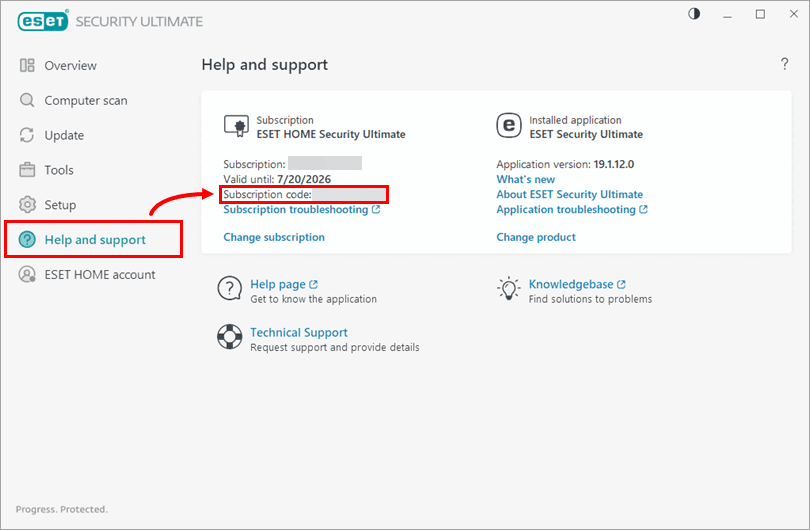
How to Retrieve Your Existing Public License ID or Info
- Open your ESET desktop software on Windows or macOS.
- Click the Help and Support tab on the left navigation panel.
- Locate your Public License ID (format:
XXX-XXX-XXX) or Subscription Status. This helps you verify which software version is currently installed.
How to Activate Your New Key
- Complete your purchase on BitTopup for the required ESET PH license plan.
- Go to your BitTopup order history to retrieve your unique alphanumeric activation key.
- Launch your installed ESET application on your computer or mobile device.
- Click Help and Support > Change Subscription (or Activate Product).
- Choose Use a purchased subscription / Enter a License Key.
- Paste your new activation key into the input field and click Continue.
- Alternatively, log in to home.eset.com, click Subscriptions > Add Subscription, enter your key, and assign it to your connected devices.
Why Recharge ESET PH on BitTopup
- Direct Digital Delivery: Keys are generated and displayed on your order confirmation screen right after checkout.
- Zero Account Sharing: BitTopup never asks for your personal ESET login credentials or passwords. You receive a clean license code to activate directly on official ESET platforms.
- Transparent Live Checkout: Review exact pricing, regional details, and available payment methods directly at live checkout before completing your purchase.
- Dedicated Customer Support: If you have questions regarding code redemption or license tiers, BitTopup customer support is available 24/7 to assist.
Troubleshooting ESET Activation and License Sync Delays
Expiration Date Not Updating
If you entered a new key but your desktop application still displays the old expiration date, the local security client may be running on cached license data. To resolve this:1. Open the ESET application.2. Navigate to Update on the left menu.3. Click Check for updates to force a server synchronization.4. If the date remains unchanged, restart your computer to restart the background ESET Service (ekrn.exe).
Error: "Activation Key Invalid" or "Region Mismatch"
This error occurs if your internet connection is routing through an international VPN proxy. Disable any active VPN or proxy software so your device connects through a Philippine ISP IP address, then re-enter the code.
Upgrading from Older Legacy Keys to ESET HOME Subscriptions
If you are switching from an older legacy license to a modern multi-device plan, link the key inside the ESET HOME web portal first. The cloud dashboard automatically unifies management across your Windows, Mac, and Android hardware.
Frequently Asked Questions
How do I renew my ESET subscription in the Philippines?
Purchase an ESET (PH) digital key on BitTopup. Once your code is generated, open your ESET desktop program, navigate to Help and Support, select Change Subscription, and enter your new key. You can also redeem the key directly inside your ESET HOME web account at home.eset.com.
Can I activate an ESET PH license outside the Philippines?
No. ESET PH digital keys are region-locked to the Philippines. The activation servers verify that both your connection and your ESET HOME account country are set to the Philippines during redemption. Once activated, the software continues to protect your device during travel.
Do I need to reinstall ESET software after renewing my license?
No reinstallation is necessary. Entering your new digital activation key updates your existing software license on the spot. All custom scanning rules, firewall preferences, and quarantine lists remain intact.
Why is my old expiration date still showing after renewal?
The desktop client updates its license certificate periodically. You can force an instant sync by clicking Update > Check for updates in the client menu, or simply restarting your PC.
What products are compatible with the ESET PH renewal key?
Renewal keys are product-specific. Ensure you select the matching key tier on BitTopup (such as ESET NOD32 Antivirus, ESET Mobile Security, or ESET Internet Security / HOME Security) to match your installed software version.
How do I retrieve or verify my ESET subscription information?
Open your ESET security program, click Help and Support, and check the Public License ID shown on the screen. To view all devices protected under your plan, log into your web dashboard at home.eset.com under the Subscriptions section.