Mobile Legends Bang Bang Russia PIN Recharge: Direct Digital Codes
A Mobile Legends Bang Bang Russia PIN recharge gives players in the Russian region a fast, flexible way to add Diamonds directly to their MLBB account. Digital PIN vouchers allow you to purchase prepaid diamond codes without sharing your account login details or giving anyone access to your private credentials. Once purchased, you redeem the code on the official Mobile Legends redemption page to credit Diamonds straight to your balance.

BitTopup delivers official digital PINs with instant digital delivery. Whether you want to purchase the latest 2026 Starlight Pass, pull for limited-time event skins, or expand your hero roster, a Russian region prepaid card provides full purchasing flexibility.
What is a Mobile Legends Bang Bang Russia PIN Voucher
An MLBB Russia PIN voucher is an alphanumeric prepaid code issued specifically for accounts operating on or associated with Russian regional servers. Unlike direct User ID (UID) recharges that credit your account automatically upon checkout, a PIN voucher gives you a code that you can redeem whenever you choose, or gift to friends and teammates.
Difference Between Direct Top-Up and PIN Voucher Redemption
| Feature | Direct UID Recharge | MLBB Russia PIN Voucher |
|---|---|---|
| Delivery Method | Auto-credited to in-game balance | Digital code delivered to order history |
| Account ID Required at Purchase | Yes (UID & Zone ID) | No (Only needed during redemption) |
| Gifting Capability | Must know recipient UID upfront | Easy to send code to any Russian player |
| Redemption Requirement | Automatic | Manual entry on official redemption portal |
| Account Security | Safe (No password needed) | 100% Safe (No password needed) |
| Expiration | Instant delivery | Valid code with flexible redemption timing |
Step-by-Step Guide: How to Redeem MLBB Russia PIN Codes

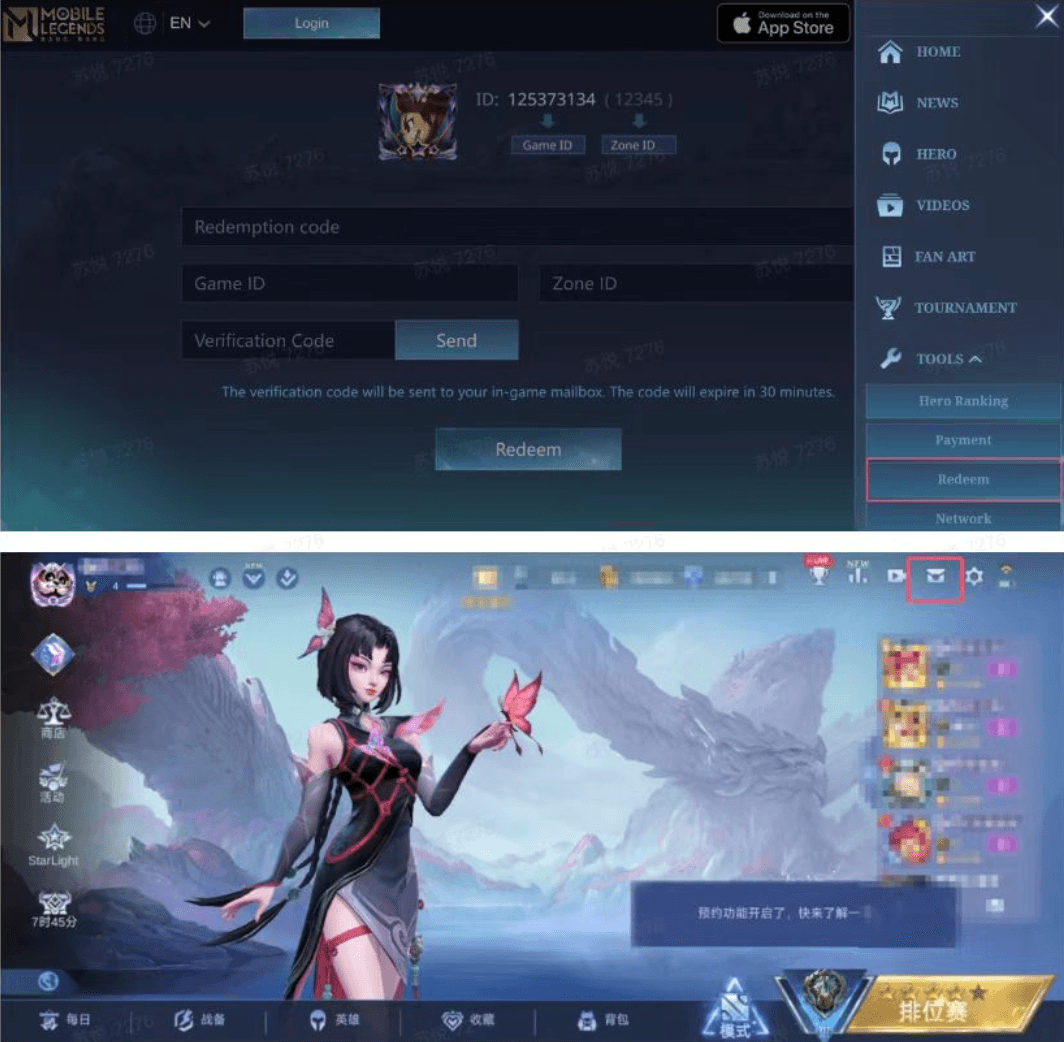
Redeeming your Mobile Legends Russia PIN code is straightforward. Follow these steps to complete the process on the official redemption portal:
- Copy Your PIN Code: Retrieve your purchased voucher code from your BitTopup order confirmation page or email.
- Visit the Official Redemption Page: Open your browser and navigate to the official Mobile Legends code exchange portal (
m.mobilelegends.com/en/codexchange). - Enter the Redemption Code: Paste your Russia PIN voucher into the Redemption Code field.
- Input Your Game ID: Enter your MLBB User ID and Zone ID into the Game ID box.
- Request Verification Code: Click the Send button next to the Verification Code field. Moonton will send a 6-digit code to your in-game mailbox.
- Check In-Game Mail: Open Mobile Legends: Bang Bang on your device, check your in-game mail, and copy the verification code.
- Submit and Confirm: Return to the browser, paste the verification code into the form, and click Redeem.
- Collect Diamonds: Your Diamonds will appear instantly in your in-game balance.
How to Recharge MLBB Diamonds for Russian Region on BitTopup
Purchasing your MLBB Russia PIN on BitTopup takes only a few moments:
- Select Denomination: Choose the desired diamond package or Weekly Diamond Pass voucher suitable for the Russian region.
- Review Real-Time Price: Check the live checkout screen for current pricing and supported payment methods.
- Complete Payment: Select your preferred payment method and finalize your transaction.
- Access Your Code: Your digital PIN code will generate immediately in your BitTopup account dashboard and order confirmation.
- Redeem Online: Follow the redemption steps above to apply the Diamonds to your game profile.

BitTopup never asks for your Moonton password, social login, or email access. All transactions remain completely protected.
Russian Server Compatibility & Finding Your MLBB UID and Zone ID
To redeem your PIN code successfully, you must provide your exact User ID and Zone ID on the redemption website. Mobile Legends Russia PIN codes are restricted to game accounts registered in the Russian Federation / CIS regional server cluster. Attempting to activate a Russian PIN on an account based in Southeast Asia, Latin America, or Western Europe will result in a regional mismatch error.

How to Locate Your User ID and Zone ID
- Launch Mobile Legends: Bang Bang on your mobile device.
- Tap your Avatar (Profile icon) in the top-left corner of the main menu.
- Open the Basic Info tab.
- Look below your nickname on the right-hand side. You will see a string of numbers formatted like:
User ID: 123456789 (1234). - The long number (
123456789) is your UID, and the 4-to-5 digit number inside the parentheses (1234) is your Zone ID (Server ID).

Ensure both numbers are recorded accurately before requesting the redemption verification code.
What You Can Buy with MLBB Diamonds in 2026
Diamonds represent the primary premium currency in Mobile Legends: Bang Bang. Recharging your Russian account opens access to all major in-game content releases in 2026:

- Starlight Membership: Unlock exclusive monthly skins, sacred statues, painted skins, and bonus Starlight shop currency to claim previous Starlight rewards.
- Weekly Diamond Pass: Maximize your diamond yield through steady daily claims, Starlight points, and bonus reward chests.
- Grand Collection & Collector Skins: Participate in monthly Grand Collection draws to collect high-tier Collector skins with customized skill effects and voice lines.
- Limited-Time Gacha Events: Draw for collaboration skins, Exorcists, ALLSTAR/515 events, and Aspirants series skins.
- Hero Purchases & Emblems: Expand your hero pool instantly to adapt to the competitive ranked draft meta.
- Cosmetics & Battle Effects: Purchase recall animations, elimination effects, spawn effects, emotes, and name change cards.
Troubleshooting Common PIN Redemption & Recharge Issues
If you run into issues while redeeming your Russia PIN voucher, review these common error codes and solutions:
1. Error: "Verification Code Expired" or "Verification Code Incorrect"
The 6-digit verification code sent to your in-game mailbox is valid for only 30 minutes. If the timer runs out, click Send again on the redemption page to generate a new verification code.
2. Error: "Redemption Code Invalid" or "Code Does Not Exist"
Double-check the PIN string for typos. Make sure there are no accidental spaces before or after the code when pasting. Ensure you have not confused the number 0 with the letter O, or 1 with capital I.
3. Error: "Region Not Supported" / Regional Mismatch
Russian PIN codes only activate on game accounts registered within the Russian regional service territory. Verify that your account origin matches the Russia region.
4. Error: "Redemption Limit Exceeded"
Moonton restricts the number of redemption attempts allowed per account per hour to prevent spam. Wait 30 to 60 minutes before trying again.
5. In-Game Mailbox Full
If you complete a redemption but do not see your Diamonds, check your in-game mail. If your inbox has reached maximum capacity, clear older messages and restart the game client.
Why Buy MLBB Russia PINs on BitTopup
- Instant Digital Delivery: Your PIN codes generate immediately after your payment clears, ready for instant activation.
- Zero Account Risk: You never provide your Moonton login or password. You retain 100% control over your account.
- Transparent Live Checkout: The live checkout screen displays exact pricing and supported payment channels before you confirm your purchase.
- Dedicated 24/7 Support: Customer service is available around the clock to assist you with order inquiries, code verification, or transaction questions.
Frequently Asked Questions
How do I redeem my Mobile Legends Bang Bang Russia PIN code?

Visit the official Mobile Legends Code Exchange website. Enter your purchased PIN code, your Game User ID, and your Zone ID. Click Send to receive a verification code in your in-game mail, enter that code on the site, and click Redeem.
Can I use a Mobile Legends Russia PIN on an account registered outside Russia?
No. MLBB Russia PIN codes are region-locked. They can only be redeemed on Mobile Legends accounts registered in Russia and designated CIS territories.
How to recharge in Mobile Legends Bang Bang using a digital PIN voucher?
Select your preferred denomination on BitTopup, complete the checkout, and copy your code from your order confirmation. Go to the official MLBB redemption page, enter your UID and Zone ID, verify with the in-game code, and submit to receive Diamonds instantly.
What regional payment options are available for Mobile Legends recharge?
BitTopup supports a wide range of secure international and local payment options. Visit the live product checkout page to view all payment methods currently supported for your currency.
What should I do if my MLBB Russia PIN code shows as invalid or already used?
First, check your transaction history to ensure the code was not already redeemed on your account. If the error persists, contact BitTopup 24/7 customer support with your Order ID for immediate verification.
Do Mobile Legends Bang Bang Russia PIN codes expire?
Yes, prepaid PIN vouchers have validity periods assigned by the publisher. It is recommended to redeem your PIN code immediately after purchase to avoid potential expiration or balance issues.