


Fast and Secure Cyber Hunter Top Up on BitTopup
Cyber Hunter drops players into a sci-fi sandbox battleground where survival depends on sharp shooting, tactical climbing, gliding, and constructing tactical structures. Cyber Hunter Credits serve as the premium in-game currency required to unlock exclusive character outfits, weapon wraps, vehicle paints, Quantum Droid skins, and the seasonal Elite Pass.
BitTopup provides a direct, secure Cyber Hunter top up service designed for global players across Android, iOS, and PC. You only need your in-game User ID to complete a transaction. There is no requirement to log in with your social accounts or disclose private credentials. Review the steps below to buy Cyber Hunter Credits and credit your account immediately.
How to Recharge Cyber Hunter Credits on BitTopup
To complete a Cyber Hunter recharge online, follow this simple checkout procedure:
- Select Credit Amount: Choose the Cyber Hunter Credits denomination that fits your in-game purchase goals.
- Enter Your User ID: Type your numeric Cyber Hunter User ID in the required field. Double-check the number to avoid crediting the wrong account.
- Select Server/Region: Make sure your profile region matches your account location (Global servers are supported).
- Proceed to Checkout: Choose your preferred payment method on the checkout screen.
- Confirm Payment: Complete the transaction. The Credits will be transferred directly to your Cyber Hunter balance via our automated delivery system.
- Check In-Game Balance: Open Cyber Hunter on your mobile device or PC to verify that your new Credits reflect in the top right corner of the main lobby.
How to Find Your Cyber Hunter User ID
Your Cyber Hunter User ID is a unique numeric sequence tied directly to your player profile. Follow these steps to find and copy it:
- Launch Cyber Hunter on your phone, tablet, or PC client.
- In the main lobby screen, tap your Avatar / Profile Icon located in the top-left corner.
- Navigate to the Basic Info or Player Info tab.
- Locate your Character ID (UID), which is displayed beneath your nickname.
- Tap the Copy icon next to the number to copy your UID directly to your clipboard.
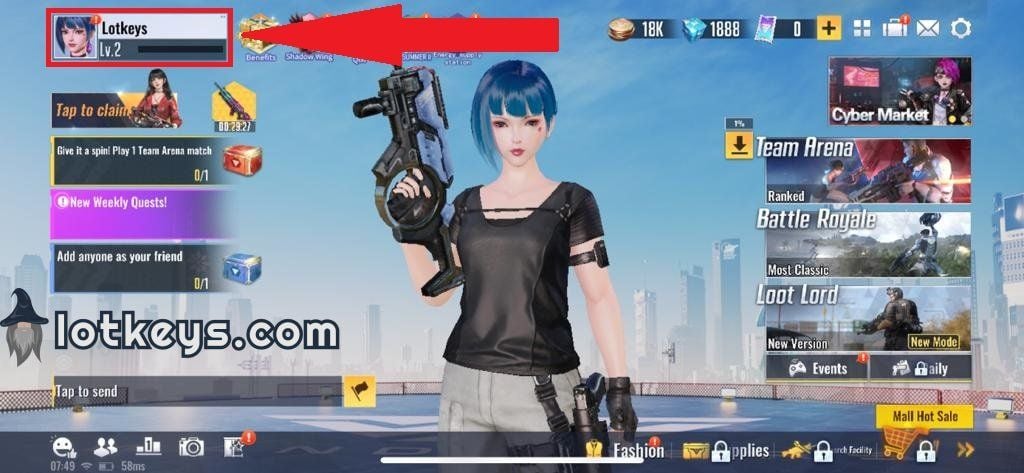
Pasting the copied ID directly into the BitTopup checkout form prevents manual typing mistakes.
What Are Cyber Hunter Credits and What Can You Buy With Them?
Cyber Hunter Credits allow players to personalize their gameplay experience and gain access to premium seasonal reward tracks. While tactical combat and quantum abilities remain balanced for all players, Credits grant access to aesthetic customization and time-limited collection items.
| Item Category | In-Game Utility | Typical Purchase Type |
|---|---|---|
| Elite Season Pass | Unlocks tiered rewards, exclusive outfits, and bonus resource crates as you level up. | Direct Credit purchase |
| Supply Crates | Gives chances to roll rare, epic, and legendary character and weapon finishes. | Credit lottery / opens |
| Weapon & Droid Skins | Visual modifications for assault rifles, sniper rifles, heavy weapons, and your Quantum Droid. | In-store direct or crate roll |
| Vehicle Paints | Custom looks for sports cars, off-road vehicles, and motorbikes. | Direct purchase / Supply box |
| Emotes & Sound Packs | Special lobby animations, victory celebrations, and quick-chat audio customizers. | In-game shop |
Character Customization
Cyber Hunter offers deep cosmetic styling, including face sculpts, makeup, hairstyles, and futuristic gear. Credits allow you to buy high-tier aesthetic bundles directly from the supply shop.
Elite Pass Progression
Activating the seasonal Elite Pass with Credits grants access to dozens of progression tiers containing exclusive avatars, custom glider skins, and bonus V-Coins throughout the season.
Safety and Account Protection for Cyber Hunter Top-Ups
Account safety is a core priority when purchasing digital game currency. BitTopup processes top-ups using official direct top-up pathways that never compromise your personal login data.
- Zero Password Sharing: We will never ask for your Google Play, Apple ID, Facebook, Twitter/X, or NetEase account password. Top-ups require only your public User ID.
- No Account Handover: The entire transaction is completed on external payment channels. Your account remains logged in on your device with no risk of unauthorized device authorizations.
- Encrypted Transactions: BitTopup uses industry-standard TLS encryption protocols to protect your personal and billing details during checkout.
- Anti-Fraud Protections: Automated verification systems prevent fraudulent chargebacks, protecting your Cyber Hunter account from in-game currency balance deductions or suspension flags.
Supported Payment Options for Cyber Hunter Recharge
BitTopup accommodates players worldwide by supporting a diverse range of payment methods. Depending on your region, you can complete your Cyber Hunter Credits recharge using:
- Credit and Debit Cards: Major international cards including Visa and Mastercard.
- E-Wallets: Regional digital wallets suited to your local currency.
- Online Bank Transfers: Direct bank processing solutions.
- Local Payment Gateways: Regional payment networks customized for your country.
Note: Final prices, local currency conversions, and available payment methods are displayed in real time on the live BitTopup checkout screen.
Troubleshooting Recharge Delays and Common Order Issues
While most Cyber Hunter top-up orders complete automatically within moments of payment, external network conditions or server maintenance can occasionally cause minor delays. If your Credits do not appear immediately, follow this troubleshooting checklist:
- Restart the Game Client: Completely close Cyber Hunter on your mobile device or PC, clear the game from background memory, and relaunch it to refresh your server profile.
- Verify the Submitted UID: Check your BitTopup order confirmation email to verify that the User ID entered during purchase matches your in-game UID exactly.
- Check Payment Confirmation: Ensure your payment provider has fully cleared the transaction and not placed it on temporary hold.
- Check Regional Server Status: During scheduled game maintenance or major seasonal updates, NetEase servers may queue incoming digital deliveries until maintenance concludes.
- Contact BitTopup 24/7 Support: If your Credits have not arrived after completing the steps above, reach out to our customer support team with your BitTopup Order ID and in-game UID. Our team is available 24 hours a day, 7 days a week to resolve order inquiries.
Frequently Asked Questions
How do I find my Cyber Hunter User ID?
Open Cyber Hunter, tap your avatar in the top-left corner of the main lobby, and locate the numeric Character ID shown under your username in the Basic Info tab. Use the copy button next to it.
Do I need to share my Cyber Hunter account password to recharge?
No. BitTopup requires only your numeric User ID. You should never share your account passwords or third-party login credentials with anyone.
What can I purchase with Cyber Hunter Credits?
You can use Credits to unlock the Elite Season Pass, draw from premium Supply Crates, purchase character cosmetics, unlock weapon finishes, and acquire custom Droid and vehicle skins.
How long does it take for Cyber Hunter Credits to arrive after payment?
Orders are processed via automated digital delivery right after payment confirmation. Once the payment clears, Credits are sent straight to your account balance.
Are Cyber Hunter Credits available globally across different servers?
Yes. BitTopup supports global top-ups for Cyber Hunter. Simply input your numeric UID accurately regardless of your physical location or supported server region.
What should I do if my Cyber Hunter recharge does not appear in my account?
First, restart your game app to force a balance refresh. If the Credits still do not reflect, check your order receipt to verify the UID was correct, and contact BitTopup 24/7 customer support with your Order ID for rapid assistance.