

Steam Wallet Code (MYR) Top Up: Instant Digital Reload
Recharge your Steam balance quickly and securely with a digital Steam Wallet Code (MYR). Purchasing a prepaid Malaysian Ringgit voucher provides immediate access to thousands of PC titles, downloadable content (DLC), in-game items, and community market items on Steam without linking your personal credit card or bank details directly to your gaming account.
BitTopup delivers your Steam Wallet Code directly to your user account dashboard after checkout, allowing you to top up your balance immediately.
What is a Steam Wallet Code (MYR) and How Does It Work
A Steam Wallet Code is a digital prepaid voucher containing a unique alphanumeric key. When redeemed on Valve's Steam platform, the exact face value in Malaysian Ringgit (MYR) transfers directly into your Steam Wallet balance.
Once added, your Steam balance does not expire. You can use your funds across the platform to:
- Buy full PC games, early access titles, and software packages.
- Purchase in-game currencies, season passes, and character skins (for games like Dota 2, Counter-Strike 2, and Apex Legends).
- Trade and buy weapon skins, trading cards, and badges on the Steam Community Market.
- Gift digital games directly to friends located within the same currency region.
Steam Malaysia Regional Currency Rules and Account Compatibility
Valve enforces strict currency and regional boundaries to protect local pricing. Before purchasing an MYR Steam Wallet Code, make sure your Steam account matches the code's currency.
- Regional Match Required: Steam Wallet Codes denominated in MYR can only be redeemed on Steam accounts whose store region is set to Malaysia and whose base currency is Malaysian Ringgit (RM / MYR).
- No Automatic Cross-Currency Conversion: Valve no longer automatically converts foreign currency wallet codes into different local currencies during redemption. If your Steam account is set to USD, SGD, IDR, or any other region, an MYR code will trigger an error.
- IP & Account Location: Changing store regions requires a valid local payment method and physical location confirmation under Steam's regional policy.
How to Check Your Account Region and Wallet Details
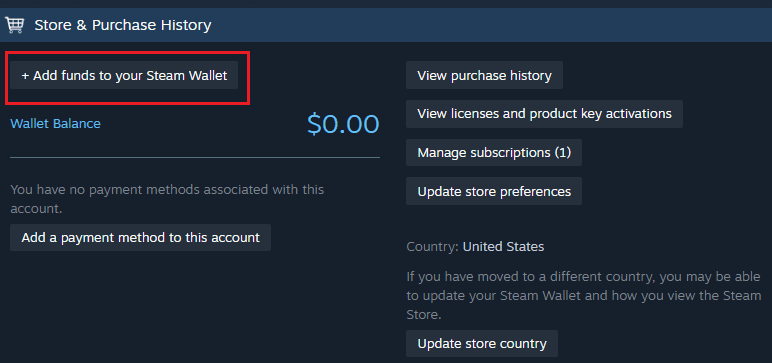
To confirm that your Steam account is set to the Malaysian storefront before redeeming your code, verify your account details using the Steam desktop client or web browser.
- Open Steam and log into your profile.
- Click your profile name in the upper-right corner of the window.
- Select Account details from the dropdown menu.
- Look at the Country field under Store & Purchase History. It must display Malaysia (MYR).
Available Steam Wallet Code MYR Denominations
Select from various denominations to cover small in-game purchases or full AAA pre-orders. Prices and current inventory are displayed on the live BitTopup checkout menu.
| Denomination | Wallet Value (MYR) | Common Use Case |
|---|---|---|
| MYR 5 | RM 5.00 | Steam Community Market purchases, trading cards, microtransactions |
| MYR 10 | RM 10.00 | In-game tier skips, budget indie games, small DLCs |
| MYR 20 | RM 20.00 | Seasonal battle passes, mid-tier indie titles, skin packs |
| MYR 50 | RM 50.00 | Account limitation removal, discounted titles, expansion packs |
| MYR 100 | RM 100.00 | Major game releases, seasonal sale bundles |
| MYR 200 | RM 200.00 | AAA premium editions, collector's bundles, multiple title carts |
How to Recharge Steam Wallet Code (MYR) on Steam (Step-by-Step Guide)
Redeeming your digital code takes less than a minute. You can complete the process via the Steam Desktop Client or through any mobile/web browser.
Method 1: Steam Desktop Client
- Launch the Steam application on your PC and log into your account.
- In the top navigation menu, click Games, then select Redeem a Steam Wallet Code (or click your balance in the top right and select Redeem a Steam Gift Card or Wallet Code).
- In the text field, enter or paste your digital code exactly as received.
- Click Continue.
- The system confirms the denomination, and the funds credit directly to your Steam Wallet.
Method 2: Web Browser or Steam Mobile App
- Open your browser and navigate to
store.steampowered.com/account/redeemwalletcode. - Sign in with your Steam username and password.
- Type or paste your MYR code into the Steam Wallet Code input box.
- Click Continue to complete the top-up.
How Steam Wallet MYR Top-Up Unlocks Limited Steam Accounts
New Steam accounts are placed in a "Limited User Account" state to prevent spam and market manipulation. Limited accounts cannot send friend invites, access the Steam Community Market, open group chats, or write Steam Community reviews.
Valve requires spending or adding the equivalent of at least $5.00 USD to remove these restrictions. Redeeming an MYR Steam Wallet Code equivalent to or exceeding $5.00 USD (such as an MYR 30 or MYR 50 code, depending on current exchange rates calculated by Steam) satisfies this threshold and lifts the limited status permanently.
Why Buy Steam Wallet Codes (MYR) on BitTopup
- Zero Account Risk: BitTopup issues digital activation codes. You never need to share your Steam password, login credentials, or account verification codes.
- Instant Code Delivery: Digital vouchers are generated and displayed in your order dashboard immediately following payment verification.
- Secure Payment Options: Complete your purchase using Malaysian-friendly payment methods with transparent checkout pricing and zero unexpected exchange fees.
- 24/7 Customer Support: If you ever experience issues with code retrieval or checkout, dedicated customer support is available around the clock to assist you.
Troubleshooting Invalid or Failed Steam Wallet Code Redemption
If you encounter an error when entering your code, check these common fixes:
- Check for Typographical Errors: Codes use specific alphanumeric combinations. Carefully distinguish between
0(number) andO(letter),1(number) andIorl(letters), and8andB. - Verify Regional Match: If you receive a "Currency Mismatch" error, verify that your Steam store country is set to Malaysia. Foreign accounts cannot accept MYR codes.
- Code Already Redeemed: Refresh your account details page. If your balance updated, the code processed successfully on your first attempt.
- Network / Steam Server Delays: During major seasonal sales, Valve's redemption servers may experience brief traffic spikes. Wait a few minutes before re-entering the code to prevent temporary rate-limiting.
Frequently Asked Questions
How do I redeem my Steam Wallet Code (MYR) on Steam?
Log into your Malaysian Steam account, open the Redeem a Steam Wallet Code page from the top menu or account settings, paste the code into the box, and click Continue.
Can I use an MYR Steam Wallet Code on an account set to another currency?
No. Due to Valve's regional currency restrictions, MYR Steam Wallet Codes can only be activated on Steam accounts with their store region set to Malaysia (MYR).
Does recharging my Steam Wallet with MYR remove the Steam 5 USD limited account restriction?
Yes. Redeeming an MYR voucher that meets or exceeds the equivalent of $5.00 USD according to Valve's live conversion rate permanently unlocks all social and market features on a limited account.
Do Steam Wallet Codes (MYR) expire if not redeemed immediately?
No. Steam Wallet codes do not have an expiration date. However, we recommend redeeming your voucher soon after purchase to keep your account balance ready for upcoming game releases and sales.
What should I do if my Steam Wallet Code displays an invalid code error?
Double-check the entered characters for typos or accidental spaces before and after the code. If the problem continues, take a screenshot of the error message and contact BitTopup customer support with your order number.
Do I need to share my Steam account password to purchase a code on BitTopup?
No. BitTopup provides direct digital voucher codes. You never need to share your Steam password, Steam Guard codes, or account access with anyone.