Every Galaxy S23, S24, S25 and S26 model can run PUBG Mobile at 120 FPS (Ultra Extreme), including the base S23 and both the Exynos and Snapdragon versions of the S24. The S23 series, S24 series and Z Fold5 received 120 FPS in Version 3.2 (May 2024); the S25 and S26 families meet the official chipset rule added in Version 4.4. To turn it on, set the screen's Motion smoothness to Adaptive (120 Hz), then choose Smooth graphics and Ultra Extreme in the game.
Updated 6 November 2026 for PUBG Mobile 4.6. Version 4.7 is due on 12 November.
Samsung Galaxy PUBG Mobile FPS: S23, S24, S25, S26
Model | Chip | Max PUBG FPS | Since |
|---|
Galaxy S23 / S23+ / S23 Ultra | Snapdragon 8 Gen 2 for Galaxy (all regions) | 120 | Version 3.2 (May 2024) |
Galaxy S24 / S24+ | Exynos 2400 (most markets) or Snapdragon 8 Gen 3 for Galaxy (US, China, Japan) | 120 (both versions) | Version 3.2 |
Galaxy S24 Ultra | Snapdragon 8 Gen 3 for Galaxy | 120 | Version 3.2 |
Galaxy S25 / S25+ / S25 Ultra | Snapdragon 8 Elite for Galaxy | 120 | meets the V4.4 chipset rule |
Galaxy S26 / S26+ | Exynos 2600 or Snapdragon 8 Elite Gen 5 for Galaxy (US, China, Japan) | 120 | meets the V4.4 chipset rule |
Galaxy S26 Ultra | Snapdragon 8 Elite Gen 5 for Galaxy | 120 | meets the V4.4 chipset rule |
Galaxy Z Fold5 | Snapdragon 8 Gen 2 for Galaxy | 120 | Version 3.2 |
Galaxy Z Fold6 / Z Fold7, Z Flip6 / Z Flip7 | Snapdragon 8 Gen 3 / 8 Elite / Exynos 2500 | 120 | meets the V4.4 chipset rule |
Galaxy S22 Ultra, S21 Ultra (Snapdragon), Z Fold4, Tab S9 series | older Snapdragon | 90 (named in patch notes) | Version 2.8 |
Galaxy S23 FE, S24 FE, S25 FE | FE chips | not confirmed for 120 — check in-game | — |
Version 4.4 (May 2026) set the Android minimum for 120 FPS at Snapdragon 8 Gen 3, Dimensity 9300+ / 8400, Exynos 2400 or newer, plus devices that pass testing. That is why the S23 (Snapdragon 8 Gen 2) keeps 120 FPS from its earlier approval, while the FE models are not confirmed. Other brands: full PUBG Mobile 120 FPS device list.
S23 vs S24 vs S25 vs S26 for PUBG
All four generations reach 120 FPS, so the difference is how long they hold it. Newer chips run cooler at the same load, and the Ultra models have the largest batteries and vapor chambers in each generation. The S24 Ultra has 12 GB of RAM; PUBG Mobile does not need more. If you are choosing between models for gaming, the S25 or S26 Ultra will hold 120 FPS longest; an S23 is still fully supported.
Video (THE Technical Ritik, October 2026): a Galaxy S23 at Smooth + 120 FPS in BGMI 4.6, with FPS meter, heat and battery drain.
Before you start: phone settings
Settings → Display → Motion smoothness → Adaptive. Adaptive allows up to 120 Hz; Standard locks the screen at 60 Hz and hides Ultra Extreme.
Turn off Power saving (Settings → Battery). It can limit the refresh rate and CPU speed.
Update the game, Game Booster and Game Optimizing Service from the Galaxy Store; Samsung delivered its PUBG 120 FPS optimisation through these apps.
Keep a few GB of free storage for updates.
Samsung Game Booster settings
Game Booster (open it from Gaming Hub or the game toolbar while playing) decides how hard the phone works in games. For PUBG Mobile at 120 FPS:
Choose the performance-focused game performance option instead of battery saving. The exact wording changes between One UI versions.
Turn off any "limit FPS" or frame-rate saving option for PUBG Mobile.
Optional: block notifications during games so pop-ups do not interrupt fights.
Higher performance also means more heat and battery use; if the phone gets very hot, a balanced profile at 90 FPS can feel smoother than a throttled 120.
PUBG Mobile graphics settings for 120 FPS
Setting | Value |
|---|
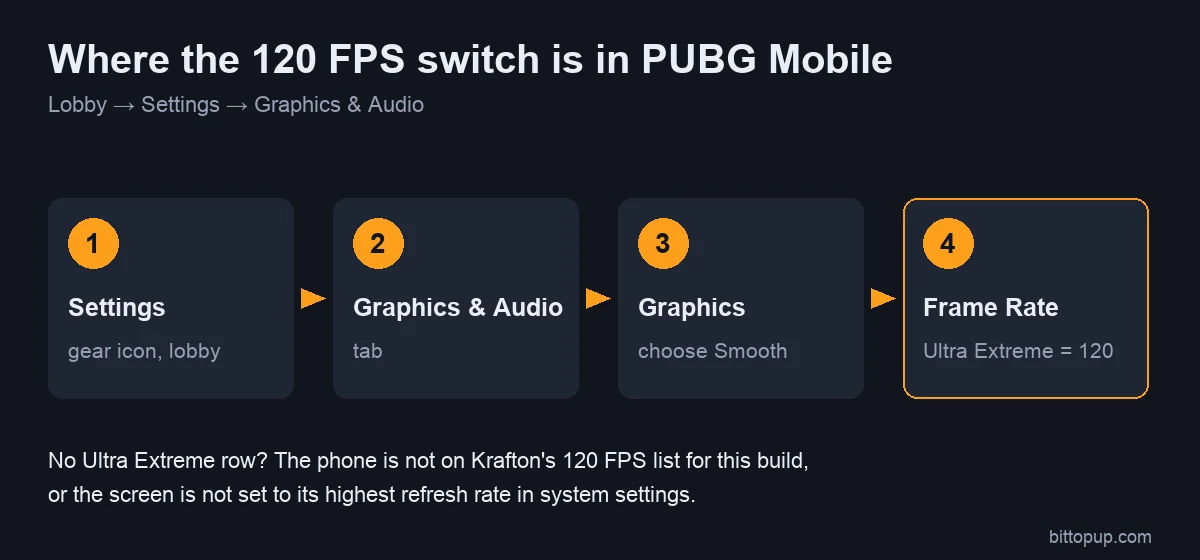
Graphics | Smooth (needed for 120) |
Frame Rate | Ultra Extreme |
Anti-aliasing | Off |
Shadows | Off |
Auto-adjust graphics | Off |
HD and HDR graphics allow up to 90 FPS on select devices; Ultra HDR allows 60. Restart the game after changing the frame rate.
Check your real frame rate
To confirm the screen is running at 120 Hz, enable Developer options (Settings → About phone → Software information → tap Build number seven times), then turn on Show refresh rate. The overlay should read 120 during a match. The in-game FPS display shows the game's own frame rate.
Heat management
Remove thick cases during long sessions.
Do not charge while playing at 120 FPS.
Play in a cool room and take breaks between matches.
A clip-on phone cooler helps hold 120 FPS longer, especially on the S23 and S24.
Troubleshooting
Ultra Extreme does not appear: set Motion smoothness to Adaptive, set Graphics to Smooth, turn off Power saving and update the game. If you have an FE model, it may simply not be enabled yet.
120 selected but the overlay shows 60: check Power saving and Game Booster's settings, then restart the phone.
Drops after 15–20 minutes: the phone is getting hot. Remove the case, unplug the charger, or switch to 90 FPS.
FAQ
How many FPS does PUBG Mobile run on the Samsung S23?
Up to 120 FPS (Ultra Extreme) on the S23, S23+ and S23 Ultra, since Version 3.2. The S23 FE is not confirmed.
Does the Galaxy S24 support 120 FPS in PUBG Mobile?
Yes. The S24, S24+ and S24 Ultra all support 120 FPS, with either the Exynos 2400 or the Snapdragon 8 Gen 3 chip.
Does the Galaxy S25 Ultra support 120 FPS?
Yes. The S25 family uses the Snapdragon 8 Elite for Galaxy, which is above the official chipset minimum.
Does the S23 or S24 get 120 FPS in BGMI?
BGMI enables devices separately. Players have reported that the S24 Ultra got 120 FPS in BGMI while the S23 Ultra did not at first. Check Graphics → Frame Rate in your BGMI version.
Conclusion
Galaxy S23, S24, S25 and S26 phones all reach 120 FPS in PUBG Mobile. Set Motion smoothness to Adaptive, choose Smooth and Ultra Extreme, and use a performance profile in Game Booster. If you need UC for the Royale Pass, you can top up PUBG Mobile UC on BitTopup with your Player ID.
Sources