BitTopup Logohow to top-up in bittopup
ค้นหา
วิธีเติมเงิน AstroPay (UK)

AstroPay (UK)

Excellent
Trustpilot
UNITED KINGDOMUNITED KINGDOM
Instant Deliveryจัดส่งทันที
Safe & Secure paymentชำระเงินปลอดภัยและมั่นใจได้

Top up your AstroPay UK wallet quickly and securely with digital codes on BitTopup.

เลือกมูลค่า

AstroPay GBP 10

฿ 427.76

ยอดรวม · x1

AstroPay (UK) คู่มือการเติมเงิน

AstroPay UK Top Up: What Is AstroPay and How It Works in 2026

AstroPay is a digital payment solution and virtual wallet that allows users across the United Kingdom to shop online, pay on partner merchant platforms, and manage funds without sharing sensitive banking details. In 2026, UK users utilize AstroPay both as a virtual prepaid card and as a mobile wallet funded in British Pound Sterling (GBP).

When you buy an AstroPay UK top up from BitTopup, you receive a digital prepaid voucher containing a 16-digit card number, an expiration date, and a security code (CVV). You can use this digital code directly at supported online checkouts or deposit it directly into your AstroPay mobile app to increase your GBP balance.

AstroPay UK Voucher Specifications

FeatureUK Account / Voucher Details
Default CurrencyBritish Pound Sterling (GBP)
Region CompatibilityUnited Kingdom accounts only (+44 mobile prefix)
Delivery FormatDigital code (16-digit Number, Expiry, CVV)
Direct Merchant CheckoutSupported on all AstroPay-accepted sites
Wallet App DepositSupported via the official AstroPay iOS/Android app
Account SecurityNo user password or banking login required

UK Regional Requirements and Address Verification Guidelines

AstroPay enforces strict regional controls to comply with UK financial regulations. Before purchasing an AstroPay UK digital voucher, ensure your profile meets regional standards:

  • Registered UK Phone Number: Your AstroPay account must be registered with a valid United Kingdom country code (+44).
  • Residential Address: Your account profile must reflect a legitimate UK residential address.
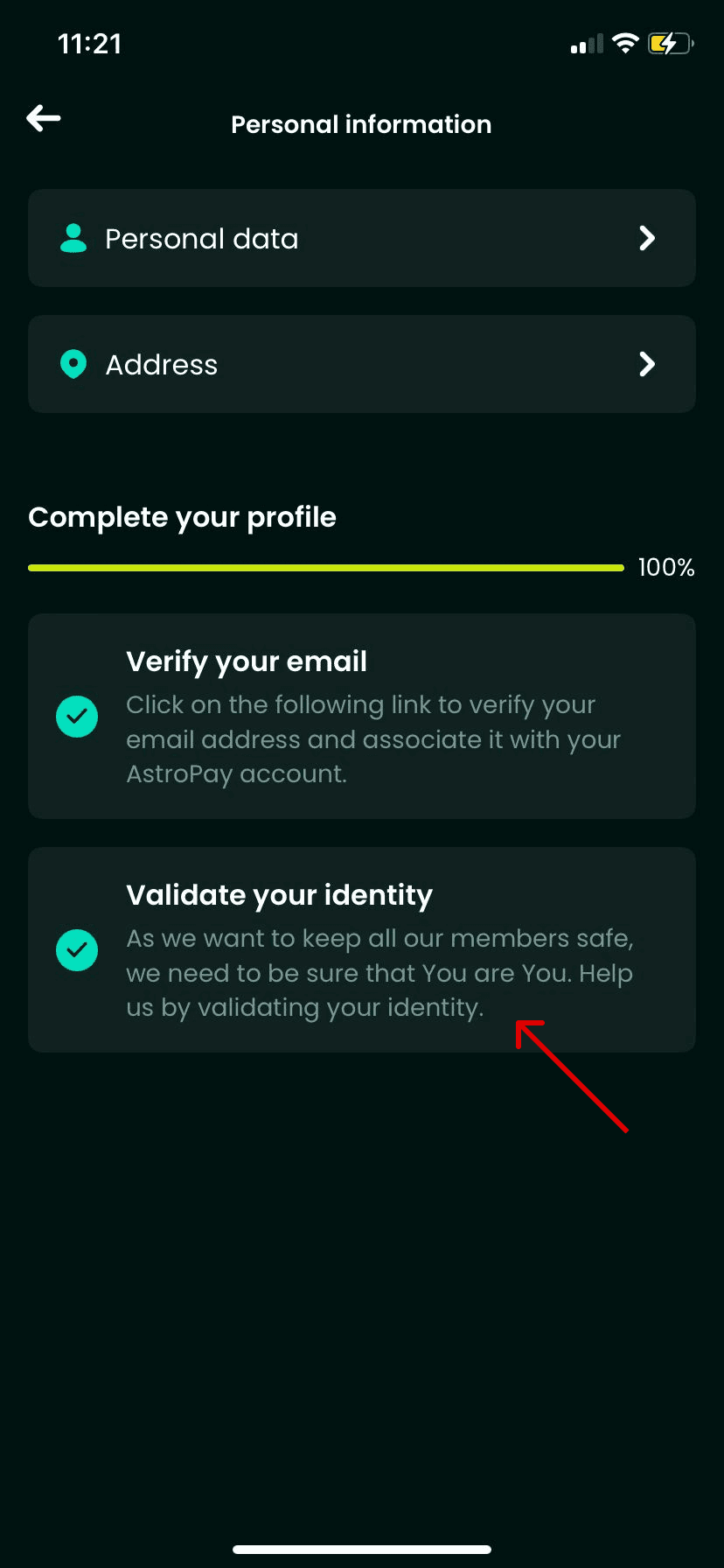
  • Identity Verification (KYC): To hold larger wallet balances or withdraw funds, AstroPay requires standard UK identity verification (such as a UK passport, driving licence, and proof of address).
  • Currency Matching: AstroPay UK vouchers are issued in GBP. If your account was opened in a different country under another currency (such as USD or EUR), a UK voucher code will result in a regional mismatch error upon activation.

How to Find Your AstroPay Account Details and Phone Identifier

Unlike gaming platforms that rely on numeric User IDs, AstroPay identifies your account primarily through your registered UK mobile number. When managing your balance or redeeming vouchers in the mobile app, follow these steps to verify your account identifier:

  1. Open the AstroPay app on your mobile device.
  2. Tap the Profile or Account icon in the navigation bar.
  3. Check your registered mobile phone number (+44) and ensure your verification status is active.
  4. Confirm that your primary wallet currency displays GBP.
How to recharge AstroPay (UK)


Step-by-Step Guide: How to Recharge AstroPay UK Wallet

To complete an AstroPay UK recharge via BitTopup, follow this simple process:

  1. Select Denomination: Choose the AstroPay GBP voucher amount that fits your purchase needs.
  2. Check Region: Ensure you have an active UK AstroPay account or intend to spend the voucher on a merchant accepting UK GBP vouchers.
  3. Proceed to Checkout: Review your order details and payment methods on BitTopup's live checkout screen.
  4. Receive Your Code: Once payment is processed, your 16-digit card number, expiry date, and CVV will be generated immediately in your order dashboard.
  5. Add to Wallet: Open the AstroPay app, select Add Funds or Cards, enter the 16-digit voucher details, and your GBP wallet balance will update instantly.

How to Redeem Your AstroPay Voucher on Merchant Websites

You do not always need to deposit the voucher into your AstroPay app. You can use the digital code directly at partner online merchants:

  1. Go to the cashier or checkout page of your chosen online store or gaming service.
  2. Select AstroPay or AstroPay Card as your payment method.
  3. Enter the 16-digit voucher number provided by BitTopup.
  4. Enter the expiration date (MM/YY) and the 3-digit CVV code.
  5. Confirm the transaction. The merchant will deduct the payment amount instantly from your voucher value.

Supported Payment Options for AstroPay UK Recharge on BitTopup

BitTopup provides access to multiple secure payment methods so you can buy AstroPay UK vouchers smoothly. All available payment gateways, exchange rates, and any associated processing fees are displayed transparently on the live checkout page before you confirm your order.

  • Credit and Debit Cards: Major domestic and international bank cards.
  • Digital Wallets and Online Banking: Fast local and international payment methods.
  • Cryptocurrency Options: Multiple decentralized payment assets for digital flexibility.

Troubleshooting Common AstroPay Code Redemption Errors

  • Error: Invalid Code or Card Details: Verify that you entered the 16-digit card number without accidental spaces, dashes, or transposed digits. Double-check the 3-digit CVV and expiry date.
  • Error: Region Mismatch / Geo-blocked: UK AstroPay vouchers can only be applied to accounts registered in the United Kingdom. If your account is set to another territory, the system will reject the voucher.
  • Error: Insufficient Balance: If paying a merchant directly, ensure the purchase total (including any merchant processing fees) does not exceed the exact face value of your voucher.
  • Error: Card Expired or Inactive: Digital vouchers must be redeemed before their stated expiration date. Check your BitTopup order details to confirm code validity.

Safety and Security: Protecting Your AstroPay Digital Vouchers

  • Treat Your Voucher Like Cash: Anyone with access to your 16-digit voucher number, expiration date, and CVV can spend the balance. Never post screenshots of your code online or share details with unverified third parties.
  • No Password Sharing: BitTopup will never ask for your AstroPay account password, personal banking PIN, or SMS one-time passwords (OTP). Recharge transactions require only the purchase of the digital code.
  • Use Official Applications Only: Only enter your digital code inside the official AstroPay application or on verified merchant checkout gateways that feature secure HTTPS encryption.

Frequently Asked Questions

Which country uses AstroPay?

AstroPay operates internationally across the United Kingdom, Latin America, Europe, Asia, and Africa. However, vouchers are strictly region-locked. An AstroPay UK voucher is denominated in GBP and can only be used on UK accounts or merchants supporting UK billing.

Can I use an AstroPay UK voucher if my account is registered outside the United Kingdom?

No. AstroPay enforces regional restrictions. If your account profile is registered with a non-UK phone number or foreign address, you cannot redeem a UK GBP voucher into your wallet balance.

How do I redeem my AstroPay voucher code?

You can redeem your code in two ways: either open the AstroPay app and add the 16-digit card details to top up your GBP wallet balance, or select AstroPay at a merchant checkout and enter the 16-digit number, expiry date, and CVV directly.

Do I need to share my AstroPay account password to recharge on BitTopup?

No. BitTopup delivers an independent digital voucher code directly to your order screen. You do not need to provide your AstroPay account login credentials, passwords, or verification codes.

Why is my AstroPay UK code showing as invalid or region-locked?

This error usually occurs when attempting to apply a GBP UK voucher to an AstroPay account registered outside the UK, or if digits were typed incorrectly. Verify your account country settings and check your code digits carefully.

What are the verification requirements for AstroPay UK accounts in 2026?

To create an account and redeem vouchers, you need a UK mobile phone number (+44). To unlock higher spending limits or hold extended wallet balances, AstroPay requires standard UK Know Your Customer (KYC) identity verification, such as a government-issued ID and proof of UK residence.
AstroPay (UK) ข่าวสารแนะนำ

สินค้าแนะนำ

AstroPay (UK) คำถามที่พบบ่อยเกี่ยวกับการเติมเงิน

ใช้เวลานานเท่าใดกว่าที่คำสั่งซื้อจะเสร็จสมบูรณ์?
โดยปกติแล้ว คำสั่งซื้อจะเสร็จสมบูรณ์ภายในไม่กี่นาที หากมีความล่าช้าใดๆ โปรดติดต่อฝ่ายสนับสนุนลูกค้าของเรา
BitTopup คืออะไร?
BitTopup คือแพลตฟอร์มออนไลน์สำหรับเติมเกมและบริการต่าง ๆ ได้อย่างรวดเร็วและปลอดภัย
เวลาทำการของฝ่ายบริการลูกค้า?
ฝ่ายบริการลูกค้าของ BitTopup พร้อมให้บริการตลอด 24 ชั่วโมงทุกวัน
ฉันจำเป็นต้องแชร์รหัสผ่านบัญชี AstroPay (UK) หรือไม่?
ไม่จำเป็น การเติมเงินโดยตรงใช้เพียง Player ID/UID ของคุณเท่านั้น ห้ามแชร์รหัสผ่านของคุณกับใครเด็ดขาด
AstroPay (UK) รองรับภูมิภาคใดบ้าง?
สินค้านี้รองรับบัญชีภูมิภาค UNITED KINGDOM โปรดตรวจสอบภูมิภาคบัญชีของคุณก่อนทำการสั่งซื้อ
ฉันสามารถชำระเงินด้วยคริปโตได้หรือไม่?
ได้ เรายอมรับ Bitcoin, ETH, USDT และคริปโตเคอร์เรนซียอดนิยมอื่นๆ พร้อมการยืนยันทันที
หากเติมเงินแล้วไม่เข้าต้องทำอย่างไร?
ติดต่อฝ่ายสนับสนุนลูกค้าตลอด 24 ชั่วโมงทุกวันพร้อมแจ้งหมายเลขคำสั่งซื้อของคุณ แล้วเราจะส่งรหัสให้ใหม่หรือคืนเงินให้ทันที

AstroPay (UK) รีวิวจากลูกค้าเกี่ยวกับการเติมเงิน

รีวิวทั้งหมด: 543

คะแนนเฉลี่ย

how to top-up in bittopup

4.9

customer avatar
Wassim Hawaji2026/09/28
เว็บไซต์นี้ดีมากเลย
customer avatar
Sebastian Maravilla2026/09/29
แอปพลิเคชันยอดเยี่ยมมาก
customer avatar
Adolfo Davila2026/09/30
ชอบมากเลยค่ะ เป็นช่องทางเติมเงินเข้าแอปที่ปลอดภัย ไม่มีขั้นตอนยุ่งยากหรือล่าช้า และมั่นใจได้เลยว่าจะไม่โดนโกง
customer avatar
Ольга Блохина2026/09/27
รวดเร็วและแม่นยำเสมอ
customer avatar
andraina tandrify2026/09/27
รวดเร็วและเชื่อถือได้
customer avatar
Farhan Nafis2026/09/29
ดี โอเค เยี่ยมเลย
customer avatar
Александр Макаренко2026/09/28
ช่องทางการชำระเงินที่ดีที่สุด ขอบคุณนักพัฒนาครับ
customer avatar
A Jordi Cortez2026/09/30
วิธีเติมเงินที่ใช้กันมากที่สุดในประเทศของฉันคือผ่าน OXXO และต้องใช้เวลาถึง 48 ชั่วโมงกว่าจะได้รับเพชร
customer avatar
Jasper Jia Lok2026/09/30
ถูกมาก ถูกกว่าแพลตฟอร์มอื่นเยอะมาก และหลังจากซื้อแล้ว ของก็เข้าบัญชีภายในไม่กี่วินาที
customer avatar
Wali2026/10/01
โปรแกรมนี้เชื่อถือได้และทำธุรกรรมได้รวดเร็ว เป็นโปรแกรมที่ดีที่สุดเลย
customer avatar
Kiska Myrr2026/09/27
ชอบทุกอย่างเลย
customer avatar
Laila Kermadi2026/09/30
ได้รับไวมาก ขอบคุณนะ
customer avatar
Jamil Mosa2026/09/30
บริการดี
customer avatar
Mira Joseph2026/09/29
ดีมากเลย ถูกกว่าที่เคยใช้ก่อนหน้านี้ แถมยังเร็วด้วย
customer avatar
Mansoor Ahadi2026/09/29
ดีและยอดเยี่ยมมาก
customer avatar
Star2026/09/29
ดีมากสำหรับการเล่นเกมออนไลน์อย่างแน่นอน
customer avatar
Mia Becca2026/09/29
รายการสั่งซื้อไม่สำเร็จแต่เงินถูกหักจากบัญชีไปแล้ว และฉันก็ไม่เคยได้รับอีเมลแจ้งเตือนว่าชำระเงินล้มเหลวหรืออีเมลยืนยันเลย ฝ่ายบริการลูกค้าก็ช่วยอะไรไม่ได้ และฉันคิดว่าเป็นบอทเพราะจู่ๆ ก็พูดภาษาจีนขึ้นมา
customer avatar
Rethabile Jinx2026/09/27
ราคาประหยัดกว่าซื้อในแอป Poppo โดยตรง
customer avatar
Dalem Blox2026/10/01
สินค้าหมดแต่ระบบยังปล่อยให้ฉันซื้อได้โดยไม่มีการแจ้งเตือน ตอนนี้ต้องรอเงินคืนเป็นชั่วโมงหรืออาจจะหลายวันเลย
customer avatar
Edrei Isai Martinez2026/09/27
ชอบที่ทุกอย่างใช้งานง่ายและชัดเจนมากครับ
AstroPay (UK) รีวิวทั้งหมด

ทำไมต้องเลือกเรา?

ธุรกรรมปลอดภัย 100%

ทุกการเติมเงินได้รับการปกป้องด้วยระบบรักษาความปลอดภัยในการชำระเงินที่เข้ารหัสตามมาตรฐานอุตสาหกรรม ซึ่งจะรักษาข้อมูลส่วนตัวและข้อมูลการชำระเงินของคุณไว้เป็นความลับอย่างสมบูรณ์ ช้อปได้อย่างมั่นใจ ปลอดภัย 100% ทุกครั้ง

บริการลูกค้าตลอด 24 ชั่วโมงทุกวัน

ทีมสนับสนุนที่เป็นมิตรของเราพร้อมให้บริการตลอด 24 ชั่วโมงเพื่อช่วยเหลือคุณทั้งก่อน ระหว่าง และหลังการซื้อ รับความช่วยเหลือที่รวดเร็วและเชื่อถือได้ทุกเมื่อที่คุณต้องการ ไม่ว่าจะเป็นกลางวันหรือกลางคืน

รับประกันคืนเงินเต็มจำนวน

เพลิดเพลินกับราคาที่คุ้มค่าที่สุดพร้อมการจัดส่งที่รวดเร็วและเชื่อถือได้ หากคำสั่งซื้อของคุณไม่ได้รับการจัดส่งหรือไม่สามารถใช้งานได้ เรารับประกันการคืนเงิน 100% เงินของคุณจะได้รับการคุ้มครองเสมอ

ช่องทางการชำระเงินที่รองรับ

PM_PIX - ช่วยเหลือด้านการชำระเงิน | BitTopupWG_PIX - ช่วยเหลือด้านการชำระเงิน | BitTopupPMKakaoPay - ช่วยเหลือด้านการชำระเงิน | BitTopupPMTNG - ช่วยเหลือด้านการชำระเงิน | BitTopupWG_TNG - ช่วยเหลือด้านการชำระเงิน | BitTopupPMGCASH - ช่วยเหลือด้านการชำระเงิน | BitTopupPM_WALLET_NAVERPAY - ช่วยเหลือด้านการชำระเงิน | BitTopupPM_WALLET_PMPROMPTPAY - ช่วยเหลือด้านการชำระเงิน | BitTopupAlipay HK - ช่วยเหลือด้านการชำระเงิน | BitTopupDANA - ช่วยเหลือด้านการชำระเงิน | BitTopupAM_SBP - ช่วยเหลือด้านการชำระเงิน | BitTopupPM_OXXO - ช่วยเหลือด้านการชำระเงิน | BitTopupOVO - ช่วยเหลือด้านการชำระเงิน | BitTopupPMToss - ช่วยเหลือด้านการชำระเงิน | BitTopupWG_PAY_NOW - ช่วยเหลือด้านการชำระเงิน | BitTopupWG_BLIK - ช่วยเหลือด้านการชำระเงิน | BitTopupPM_CARD_SA - ช่วยเหลือด้านการชำระเงิน | BitTopupWG_PAYU - ช่วยเหลือด้านการชำระเงิน | BitTopupPM_WALLET_JKOPAY - ช่วยเหลือด้านการชำระเงิน | BitTopupWG_STCPAY - ช่วยเหลือด้านการชำระเงิน | BitTopupPM_WALLET_SAMSUNGPAY - ช่วยเหลือด้านการชำระเงิน | BitTopupPM_7_ELEVEN - ช่วยเหลือด้านการชำระเงิน | BitTopupPM_WALLET_WECHATPAYHK - ช่วยเหลือด้านการชำระเงิน | BitTopupPM_NET_BANKING_FPX - ช่วยเหลือด้านการชำระเงิน | BitTopupPM_WALLET_QRIS - ช่วยเหลือด้านการชำระเงิน | BitTopupAM_CARD_KZ - ช่วยเหลือด้านการชำระเงิน | BitTopupAM_CARD_BY - ช่วยเหลือด้านการชำระเงิน | BitTopupWG_SADAD - ช่วยเหลือด้านการชำระเงิน | BitTopupWG_MADA - ช่วยเหลือด้านการชำระเงิน | BitTopupAM_TBANK - ช่วยเหลือด้านการชำระเงิน | BitTopupAM_SBERPAY - ช่วยเหลือด้านการชำระเงิน | BitTopupPM_REALTIME_PAYMENT - ช่วยเหลือด้านการชำระเงิน | BitTopupPM_WALLET_GASH - ช่วยเหลือด้านการชำระเงิน | BitTopupPM_OKMART - ช่วยเหลือด้านการชำระเงิน | BitTopupPM_HILIFE - ช่วยเหลือด้านการชำระเงิน | BitTopupPM_FAMILYMART - ช่วยเหลือด้านการชำระเงิน | BitTopupPM_CARD_SA_CD - ช่วยเหลือด้านการชำระเงิน | BitTopupAM_CARD - ช่วยเหลือด้านการชำระเงิน | BitTopupPM_CARD_EU - ช่วยเหลือด้านการชำระเงิน | BitTopupPM_CARD_KNET - ช่วยเหลือด้านการชำระเงิน | BitTopupBIN_DO_PAY_ME - ช่วยเหลือด้านการชำระเงิน | BitTopupPM_CARD_JP - ช่วยเหลือด้านการชำระเงิน | BitTopupBIN_DO_OCTOPUS - ช่วยเหลือด้านการชำระเงิน | BitTopupPM_CARD_US - ช่วยเหลือด้านการชำระเงิน | BitTopupPM_CARD - ช่วยเหลือด้านการชำระเงิน | BitTopupPM_WALLET_SHOPEEPAY - ช่วยเหลือด้านการชำระเงิน | BitTopupPM_WALLET_PAOTANGPAY - ช่วยเหลือด้านการชำระเงิน | BitTopupPM_WALLET_LINEPAY - ช่วยเหลือด้านการชำระเงิน | BitTopupPM_WALLET_TRUEMONEY - ช่วยเหลือด้านการชำระเงิน | BitTopupD_LOCAL_MX_IO - ช่วยเหลือด้านการชำระเงิน | BitTopupD_LOCAL_MX_BQ - ช่วยเหลือด้านการชำระเงิน | BitTopupD_LOCAL_MX_SE - ช่วยเหลือด้านการชำระเงิน | BitTopupD_LOCAL_MX_SM - ช่วยเหลือด้านการชำระเงิน | BitTopupD_LOCAL_MX_BV - ช่วยเหลือด้านการชำระเงิน | BitTopupD_LOCAL_PK_HB - ช่วยเหลือด้านการชำระเงิน | BitTopupD_LOCAL_PK_JK - ช่วยเหลือด้านการชำระเงิน | BitTopupD_LOCAL_PK_ES - ช่วยเหลือด้านการชำระเงิน | BitTopupD_LOCAL_PK_IO - ช่วยเหลือด้านการชำระเงิน | BitTopupPMPayco - ช่วยเหลือด้านการชำระเงิน | BitTopupGOPAY - ช่วยเหลือด้านการชำระเงิน | BitTopupPMPAYMAYA - ช่วยเหลือด้านการชำระเงิน | BitTopupPMGRABPAYPH - ช่วยเหลือด้านการชำระเงิน | BitTopupPMGRABPAYMY - ช่วยเหลือด้านการชำระเงิน | BitTopupPMBOOST - ช่วยเหลือด้านการชำระเงิน | BitTopupWG_PAYTM - ช่วยเหลือด้านการชำระเงิน | BitTopupPM_BANK_TRANSFER_PSE - ช่วยเหลือด้านการชำระเงิน | BitTopupPM_BANK_TRANSFER_EFECTY - ช่วยเหลือด้านการชำระเงิน | BitTopupWG_BPI - ช่วยเหลือด้านการชำระเงิน | BitTopupWG_GCASH - ช่วยเหลือด้านการชำระเงิน | BitTopupWG_BANCOMAT_PAY - ช่วยเหลือด้านการชำระเงิน | BitTopupWG_iDEAL - ช่วยเหลือด้านการชำระเงิน | BitTopupWG_BANCONTACT - ช่วยเหลือด้านการชำระเงิน | BitTopupPM_CARD_APPLE_US - ช่วยเหลือด้านการชำระเงิน | BitTopupPM_APPLEPAY - ช่วยเหลือด้านการชำระเงิน | BitTopupD_LOCAL_PH_PM - ช่วยเหลือด้านการชำระเงิน | BitTopupD_LOCAL_PH_GY - ช่วยเหลือด้านการชำระเงิน | BitTopupWG_BHIM - ช่วยเหลือด้านการชำระเงิน | BitTopupPM_WALLET_STCPAY - ช่วยเหลือด้านการชำระเงิน | BitTopupPM_GOOGLEPAY_US - ช่วยเหลือด้านการชำระเงิน | BitTopupPM_GOOGLEPAY - ช่วยเหลือด้านการชำระเงิน | BitTopupD_LOCAL_TH_TK - ช่วยเหลือด้านการชำระเงิน | BitTopupGATE_IO_PAY - ช่วยเหลือด้านการชำระเงิน | BitTopupBINANCE_PAY - ช่วยเหลือด้านการชำระเงิน | BitTopupWG_PHONE_PE - ช่วยเหลือด้านการชำระเงิน | BitTopupPAY_LOCO_ESumLifeET - ช่วยเหลือด้านการชำระเงิน | BitTopupPAY_LOCO_ESumFamilyMart - ช่วยเหลือด้านการชำระเงิน | BitTopupPAY_LOCO_ESum711 - ช่วยเหลือด้านการชำระเงิน | BitTopupBIT_WALLET - ช่วยเหลือด้านการชำระเงิน | BitTopup

10 Years Trusted Game & Live Streaming Top-Up Platform

Since 2016 | 5,000,000+ Users Worldwide

KAMAGEN LIMITED

Registration No. 76888246

Room 1508, 15/F, Grand Plaza Office Tower II, 625 Nathan Road, Mong Kok, Kowloon, Hong Kong

BUSINESS COOPERATION: ibittopup@gmail.com

© 2016-2026 BitTopup. All Rights Reserved.

Trusted & Verified by

ScamAdviser review of BitTopupGridinsoft review of BitTopupTrustpilot review of BitTopup
customer service