BitTopup Logohow to top-up in bittopup
ค้นหา
วิธีเติมเงิน AstroPay (US)

AstroPay (US)

Excellent
Trustpilot
UNITED STATESUNITED STATES
Instant Deliveryจัดส่งทันที
Safe & Secure paymentชำระเงินปลอดภัยและมั่นใจได้

Instant digital code delivery to recharge your AstroPay account on BitTopup.

เลือกมูลค่า

AstroPay (US) $10

฿ 341.60

ยอดรวม · x1

AstroPay (US) คู่มือการเติมเงิน

AstroPay (US) Top Up: What Is an AstroPay Voucher and How It Works

An AstroPay (US) voucher is a prepaid digital payment card issued in United States Dollars (USD). Designed for secure online transactions, it allows you to pay on hundreds of partner websites without exposing your personal bank details or primary credit card numbers.

Each AstroPay voucher contains three critical pieces of information:- A unique 16-digit virtual card number.- A 3-digit CVV/security code.- An expiration date (MM/YY format).

When you purchase a voucher, you can either enter these details directly on merchant checkout pages that accept AstroPay or add the card funds directly to your official AstroPay digital wallet app to consolidate your USD balance.


Step-by-Step Guide: How to Recharge AstroPay US Balance

Recharging your AstroPay USD funds through BitTopup is quick and straightforward. Follow these steps to complete your purchase and apply the code:

Purchasing on BitTopup

  1. Select the desired AstroPay (US) USD voucher denomination from the product catalog.
  2. Verify that your account region is set to the United States.
  3. Proceed to checkout and select your preferred payment option.
  4. Complete the payment. Your 16-digit voucher code, CVV, and expiration date will be generated immediately on your order confirmation screen and delivered to your account.

Locating Your Account Information

To associate or redeem the balance inside your AstroPay app, you must link the voucher to your verified US phone number and account profile.
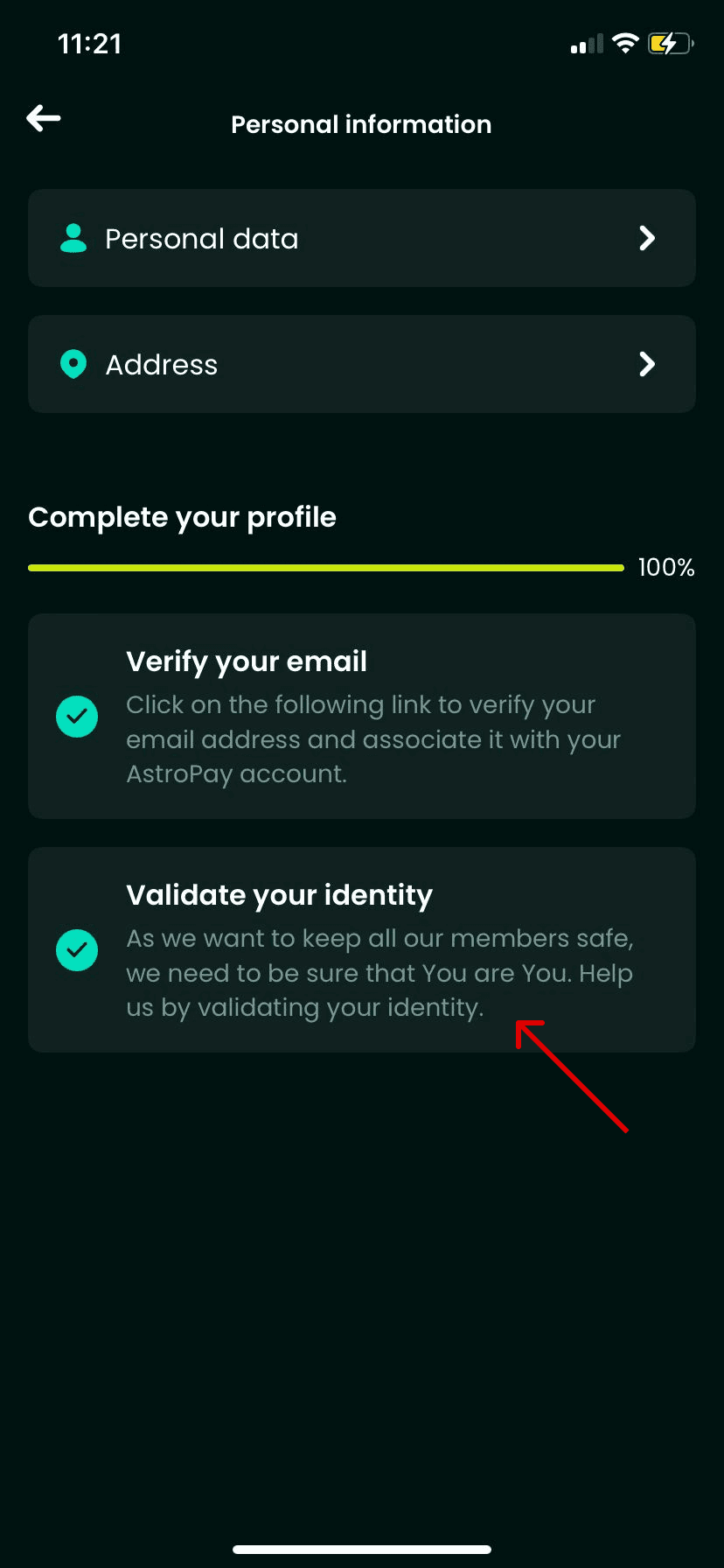
How to recharge AstroPay (US)

Open your AstroPay app, tap the Profile icon at the top corner, and check your registered mobile number (+1 country code) and User ID. This ensures your account is properly configured to receive USD card balances.

Redeeming the Voucher into Your Wallet

  1. Open the AstroPay app on your mobile device.
  2. Go to the Cards or Wallet tab.
  3. Select Add Card or Redeem Voucher.
  4. Enter the 16-digit card number, the expiration date, and the 3-digit CVV code received from BitTopup.
  5. Confirm the submission. The USD value will immediately credit to your digital balance.

Important US Account and Address Eligibility Requirements

AstroPay enforces regional compliance standards. To prevent transaction errors, ensure your profile meets the following criteria before redeeming:

  • US Mobile Number: Your AstroPay account must be registered with a valid United States phone number (+1 prefix).
  • Identity Verification (KYC): For high-volume transactions or wallet withdrawals, AstroPay requires standard customer verification, including a valid government-issued ID and proof of US residency.
  • Billing Address Consistency: When using direct voucher checkouts on merchant sites, enter your registered US address. Mismatched addresses between the merchant and the card region may trigger automatic fraud declines.
  • No IP Masking: Avoid using proxy services or VPNs set to foreign countries during redemption, as this can trigger automated security locks on your voucher.

AstroPay Voucher vs Virtual Visa Card Comparison

Understanding the differences between payment formats helps you pick the right method for your online checkout:

FeatureAstroPay USD VoucherAstroPay Virtual Visa CardAstroPay Wallet Balance
Format16-digit code + CVV + ExpiryVisa-branded 16-digit cardDigital in-app cash balance
RedemptionDirect merchant entry or walletAccepted anywhere Visa is supportedIn-app transfer or AstroPay gateway
KYC RequirementMinimal for basic redemptionFull identity check requiredTiered by usage volume
CurrencyUnited States Dollar (USD)United States Dollar (USD)Multi-currency option
Best ForGaming, entertainment, privacyGeneral e-commerce checkoutsAccount transfers and recurring payments

Where and How to Use Your AstroPay USD Balance Online

AstroPay USD balances are accepted across a wide range of global digital entertainment, gaming, and e-commerce platforms. You can spend your balance in two ways:

  1. Direct AstroPay Gateway: Choose "AstroPay" as the payment method at checkout on a supported merchant. Enter your 16-digit code, expiration date, and CVV directly into the payment window to complete the transaction.
  2. AstroPay Wallet Checkout: Select AstroPay, log in using your registered US phone number, confirm the SMS verification code, and authorize the charge against your existing wallet balance.

Troubleshooting Common AstroPay US Redemption Errors

If you experience an issue when applying your code, refer to these common causes and resolutions:

  • "Invalid Code" Error: Double-check every digit of the 16-digit voucher code. Ensure there are no spaces or special characters added during copy-pasting.
  • "Currency / Region Mismatch": AstroPay (US) vouchers are denominated exclusively in USD and intended for US-registered accounts and USD-supported merchant checkouts. Attempting to redeem a US voucher on an account registered to another country will result in a regional mismatch error.
  • "Card Expired": Verify the expiration date entered. If the card shows expired immediately upon receipt, contact customer support for a quick verification.
  • Merchant Payment Declines: Ensure the total cart value (including taxes and processing fees) does not exceed the exact balance of your voucher. AstroPay cards cannot process partial payments if the cart total is higher than the card balance unless the merchant explicitly supports split payments.

Safe and Instant AstroPay US Recharges on BitTopup

BitTopup provides a secure, efficient platform for purchasing your AstroPay (US) top ups:

  • No Account Passwords Required: We never ask for your AstroPay account password or personal login credentials. You receive a direct digital card code to redeem independently.
  • Instant Delivery: Digital voucher details are generated instantly upon completed payment, allowing you to top up your balance without delays.
  • Live Checkout Pricing: All available denominations, current conversion rates, and payment methods are clearly displayed on the checkout page before you place your order.
  • Dedicated 24/7 Support: Our customer support team is available around the clock to assist with order verification, code retrieval, and redemption questions.

Frequently Asked Questions

Can you use an AstroPay US voucher outside the United States?

AstroPay US vouchers are issued in USD and are intended for accounts registered in the United States or international merchants that accept US-issued AstroPay cards. Attempting to redeem a US voucher into a foreign-currency wallet profile will cause a regional error.

How do I redeem my AstroPay (US) voucher code?

You can redeem your code by opening the AstroPay app, navigating to the Cards section, and inputting the 16-digit number, expiration date, and CVV. Alternatively, select AstroPay as your payment method directly on supported merchant checkouts and type in your card details.

Do I need to provide my AstroPay account password to recharge on BitTopup?

No. BitTopup does not require your AstroPay account login credentials, passwords, or SMS verification codes. You only purchase the digital card details, which you redeem into your account yourself.

What should I do if my AstroPay US recharge code fails to activate?

First, confirm that your 16-digit number, expiry date, and CVV match your order confirmation. Check that your AstroPay account is set to the US region. If the code still returns an error, take a screenshot of the issue and reach out to BitTopup 24/7 support for immediate verification.

Do AstroPay US vouchers expire after purchase?

Yes. AstroPay vouchers have an expiration date printed alongside the 16-digit card number (typically valid for up to 12 months from issuance). It is best practice to redeem the funds into your wallet balance or use them at checkout shortly after purchase.

Which platforms and merchants accept AstroPay USD payments?

AstroPay is accepted at thousands of online gaming platforms, digital service providers, streaming sites, and e-commerce stores that feature the AstroPay logo or integrated payment gateways at checkout.
AstroPay (US) ข่าวสารแนะนำ

สินค้าแนะนำ

AstroPay (US) คำถามที่พบบ่อยเกี่ยวกับการเติมเงิน

ใช้เวลานานเท่าใดกว่าที่คำสั่งซื้อจะเสร็จสมบูรณ์?
โดยปกติแล้ว คำสั่งซื้อจะเสร็จสมบูรณ์ภายในไม่กี่นาที หากมีความล่าช้าใดๆ โปรดติดต่อฝ่ายสนับสนุนลูกค้าของเรา
BitTopup คืออะไร?
BitTopup คือแพลตฟอร์มออนไลน์สำหรับเติมเกมและบริการต่าง ๆ ได้อย่างรวดเร็วและปลอดภัย
เวลาทำการของฝ่ายบริการลูกค้า?
ฝ่ายบริการลูกค้าของ BitTopup พร้อมให้บริการตลอด 24 ชั่วโมงทุกวัน
ฉันจำเป็นต้องแชร์รหัสผ่านบัญชี AstroPay (US) หรือไม่?
ไม่จำเป็น การเติมเงินโดยตรงใช้เพียง Player ID/UID ของคุณเท่านั้น ห้ามแชร์รหัสผ่านของคุณกับใครเด็ดขาด
AstroPay (US) รองรับภูมิภาคใดบ้าง?
สินค้านี้รองรับบัญชีภูมิภาค UNITED STATES โปรดตรวจสอบภูมิภาคบัญชีของคุณก่อนทำการสั่งซื้อ
ฉันสามารถชำระเงินด้วยคริปโตได้หรือไม่?
ได้ เรายอมรับ Bitcoin, ETH, USDT และคริปโตเคอร์เรนซียอดนิยมอื่นๆ พร้อมการยืนยันทันที
หากเติมเงินแล้วไม่เข้าต้องทำอย่างไร?
ติดต่อฝ่ายสนับสนุนลูกค้าตลอด 24 ชั่วโมงทุกวันพร้อมแจ้งหมายเลขคำสั่งซื้อของคุณ แล้วเราจะส่งรหัสให้ใหม่หรือคืนเงินให้ทันที

AstroPay (US) รีวิวจากลูกค้าเกี่ยวกับการเติมเงิน

รีวิวทั้งหมด: 989

คะแนนเฉลี่ย

how to top-up in bittopup

4.6

customer avatar
eraj zero2026/10/02
รวดเร็วและปลอดภัย ชอบเว็บไซต์นี้มากครับ
customer avatar
Lucha Ashkanani2026/10/02
สะดวกและใช้งานง่ายมาก ยินดีมากที่ได้ใช้บริการ
customer avatar
Karlotia2026/09/29
บริการรวดเร็วและง่ายดาย
customer avatar
Hason Habibi2026/09/28
สมบูรณ์แบบ!
customer avatar
Gary Adams2026/09/29
ราคาจับต้องได้และเชื่อถือได้ ประสบการณ์การใช้งานราบรื่นเสมอสำหรับฉัน!
customer avatar
Zi Young Phoon2026/09/28
ส่วนลดเยอะมาก
customer avatar
Ava Brown2026/10/02
บัตรของขวัญ Apple ใช้งานได้ไม่มีปัญหาเลย รหัสส่งตรงเข้าอีเมลของฉันทันทีหลังชำระเงิน
customer avatar
Eddy Cardenas2026/09/30
ชอบเติมเงินที่นี่ มีความรับผิดชอบดี
customer avatar
A almutairi2026/09/28
บริการดีมากครับ
customer avatar
Jennifer Pasiwen2026/10/01
ยอดเยี่ยม ดีงามมาก
customer avatar
Fatema Habibi2026/10/02
ดีครับ พอใจกับเว็บไซต์นี้มาก
customer avatar
Aloosh2026/09/29
ยอดเยี่ยมมาก แนะนำเลยครับ
customer avatar
Guliza2026/09/30
เว็บไซต์ยอดเยี่ยมมาก
customer avatar
its hurt2026/10/02
เร็วมากและไว้ใจได้
customer avatar
mypchamdosamer2026/10/02
เชื่อถือได้ ง่าย รวดเร็ว ปลอดภัย
customer avatar
Hlaine Aykari Phyoe2026/09/28
ช่วยด้วย ฉันต้องการ PUBG Global UC
customer avatar
Victor Cobos2026/09/30
บริการดีมาก ขอบคุณครับ
customer avatar
Yacine Chaabna2026/09/30
เว็บไซต์ที่ดีที่สุดในการเติมเงินบัญชีและบัตรของขวัญ รวดเร็วทันใจ และรองรับช่องทางการชำระเงินหลายช่องทาง เคยลองใช้เว็บอื่นแล้วแต่ BitTopup ดีที่สุด ทำดีต่อไปนะ!
customer avatar
Dalem Blox2026/09/28
สินค้าหมดแต่ระบบยังปล่อยให้ฉันซื้อได้โดยไม่มีการแจ้งเตือน ตอนนี้ต้องรอเงินคืนเป็นชั่วโมงหรืออาจจะหลายวันเลย
customer avatar
Mugaida Atipa2026/09/29
แล้วแอปไลฟ์สตรีมอื่นๆ อย่าง Cruslive กับ Baatlive ล่ะ?
AstroPay (US) รีวิวทั้งหมด

ทำไมต้องเลือกเรา?

ธุรกรรมปลอดภัย 100%

ทุกการเติมเงินได้รับการปกป้องด้วยระบบรักษาความปลอดภัยในการชำระเงินที่เข้ารหัสตามมาตรฐานอุตสาหกรรม ซึ่งจะรักษาข้อมูลส่วนตัวและข้อมูลการชำระเงินของคุณไว้เป็นความลับอย่างสมบูรณ์ ช้อปได้อย่างมั่นใจ ปลอดภัย 100% ทุกครั้ง

บริการลูกค้าตลอด 24 ชั่วโมงทุกวัน

ทีมสนับสนุนที่เป็นมิตรของเราพร้อมให้บริการตลอด 24 ชั่วโมงเพื่อช่วยเหลือคุณทั้งก่อน ระหว่าง และหลังการซื้อ รับความช่วยเหลือที่รวดเร็วและเชื่อถือได้ทุกเมื่อที่คุณต้องการ ไม่ว่าจะเป็นกลางวันหรือกลางคืน

รับประกันคืนเงินเต็มจำนวน

เพลิดเพลินกับราคาที่คุ้มค่าที่สุดพร้อมการจัดส่งที่รวดเร็วและเชื่อถือได้ หากคำสั่งซื้อของคุณไม่ได้รับการจัดส่งหรือไม่สามารถใช้งานได้ เรารับประกันการคืนเงิน 100% เงินของคุณจะได้รับการคุ้มครองเสมอ

ช่องทางการชำระเงินที่รองรับ

PM_PIX - ช่วยเหลือด้านการชำระเงิน | BitTopupWG_PIX - ช่วยเหลือด้านการชำระเงิน | BitTopupPMKakaoPay - ช่วยเหลือด้านการชำระเงิน | BitTopupPMTNG - ช่วยเหลือด้านการชำระเงิน | BitTopupWG_TNG - ช่วยเหลือด้านการชำระเงิน | BitTopupPMGCASH - ช่วยเหลือด้านการชำระเงิน | BitTopupPM_WALLET_NAVERPAY - ช่วยเหลือด้านการชำระเงิน | BitTopupPM_WALLET_PMPROMPTPAY - ช่วยเหลือด้านการชำระเงิน | BitTopupAlipay HK - ช่วยเหลือด้านการชำระเงิน | BitTopupDANA - ช่วยเหลือด้านการชำระเงิน | BitTopupAM_SBP - ช่วยเหลือด้านการชำระเงิน | BitTopupPM_OXXO - ช่วยเหลือด้านการชำระเงิน | BitTopupOVO - ช่วยเหลือด้านการชำระเงิน | BitTopupPMToss - ช่วยเหลือด้านการชำระเงิน | BitTopupWG_PAY_NOW - ช่วยเหลือด้านการชำระเงิน | BitTopupWG_BLIK - ช่วยเหลือด้านการชำระเงิน | BitTopupPM_CARD_SA - ช่วยเหลือด้านการชำระเงิน | BitTopupWG_PAYU - ช่วยเหลือด้านการชำระเงิน | BitTopupPM_WALLET_JKOPAY - ช่วยเหลือด้านการชำระเงิน | BitTopupWG_STCPAY - ช่วยเหลือด้านการชำระเงิน | BitTopupPM_WALLET_SAMSUNGPAY - ช่วยเหลือด้านการชำระเงิน | BitTopupPM_7_ELEVEN - ช่วยเหลือด้านการชำระเงิน | BitTopupPM_WALLET_WECHATPAYHK - ช่วยเหลือด้านการชำระเงิน | BitTopupPM_NET_BANKING_FPX - ช่วยเหลือด้านการชำระเงิน | BitTopupPM_WALLET_QRIS - ช่วยเหลือด้านการชำระเงิน | BitTopupAM_CARD_KZ - ช่วยเหลือด้านการชำระเงิน | BitTopupAM_CARD_BY - ช่วยเหลือด้านการชำระเงิน | BitTopupWG_SADAD - ช่วยเหลือด้านการชำระเงิน | BitTopupWG_MADA - ช่วยเหลือด้านการชำระเงิน | BitTopupAM_TBANK - ช่วยเหลือด้านการชำระเงิน | BitTopupAM_SBERPAY - ช่วยเหลือด้านการชำระเงิน | BitTopupPM_REALTIME_PAYMENT - ช่วยเหลือด้านการชำระเงิน | BitTopupPM_WALLET_GASH - ช่วยเหลือด้านการชำระเงิน | BitTopupPM_OKMART - ช่วยเหลือด้านการชำระเงิน | BitTopupPM_HILIFE - ช่วยเหลือด้านการชำระเงิน | BitTopupPM_FAMILYMART - ช่วยเหลือด้านการชำระเงิน | BitTopupPM_CARD_SA_CD - ช่วยเหลือด้านการชำระเงิน | BitTopupAM_CARD - ช่วยเหลือด้านการชำระเงิน | BitTopupPM_CARD_EU - ช่วยเหลือด้านการชำระเงิน | BitTopupPM_CARD_KNET - ช่วยเหลือด้านการชำระเงิน | BitTopupBIN_DO_PAY_ME - ช่วยเหลือด้านการชำระเงิน | BitTopupPM_CARD_JP - ช่วยเหลือด้านการชำระเงิน | BitTopupBIN_DO_OCTOPUS - ช่วยเหลือด้านการชำระเงิน | BitTopupPM_CARD_US - ช่วยเหลือด้านการชำระเงิน | BitTopupPM_CARD - ช่วยเหลือด้านการชำระเงิน | BitTopupPM_WALLET_SHOPEEPAY - ช่วยเหลือด้านการชำระเงิน | BitTopupPM_WALLET_PAOTANGPAY - ช่วยเหลือด้านการชำระเงิน | BitTopupPM_WALLET_LINEPAY - ช่วยเหลือด้านการชำระเงิน | BitTopupPM_WALLET_TRUEMONEY - ช่วยเหลือด้านการชำระเงิน | BitTopupD_LOCAL_MX_IO - ช่วยเหลือด้านการชำระเงิน | BitTopupD_LOCAL_MX_BQ - ช่วยเหลือด้านการชำระเงิน | BitTopupD_LOCAL_MX_SE - ช่วยเหลือด้านการชำระเงิน | BitTopupD_LOCAL_MX_SM - ช่วยเหลือด้านการชำระเงิน | BitTopupD_LOCAL_MX_BV - ช่วยเหลือด้านการชำระเงิน | BitTopupD_LOCAL_PK_HB - ช่วยเหลือด้านการชำระเงิน | BitTopupD_LOCAL_PK_JK - ช่วยเหลือด้านการชำระเงิน | BitTopupD_LOCAL_PK_ES - ช่วยเหลือด้านการชำระเงิน | BitTopupD_LOCAL_PK_IO - ช่วยเหลือด้านการชำระเงิน | BitTopupPMPayco - ช่วยเหลือด้านการชำระเงิน | BitTopupGOPAY - ช่วยเหลือด้านการชำระเงิน | BitTopupPMPAYMAYA - ช่วยเหลือด้านการชำระเงิน | BitTopupPMGRABPAYPH - ช่วยเหลือด้านการชำระเงิน | BitTopupPMGRABPAYMY - ช่วยเหลือด้านการชำระเงิน | BitTopupPMBOOST - ช่วยเหลือด้านการชำระเงิน | BitTopupWG_PAYTM - ช่วยเหลือด้านการชำระเงิน | BitTopupPM_BANK_TRANSFER_PSE - ช่วยเหลือด้านการชำระเงิน | BitTopupPM_BANK_TRANSFER_EFECTY - ช่วยเหลือด้านการชำระเงิน | BitTopupWG_BPI - ช่วยเหลือด้านการชำระเงิน | BitTopupWG_GCASH - ช่วยเหลือด้านการชำระเงิน | BitTopupWG_BANCOMAT_PAY - ช่วยเหลือด้านการชำระเงิน | BitTopupWG_iDEAL - ช่วยเหลือด้านการชำระเงิน | BitTopupWG_BANCONTACT - ช่วยเหลือด้านการชำระเงิน | BitTopupPM_CARD_APPLE_US - ช่วยเหลือด้านการชำระเงิน | BitTopupPM_APPLEPAY - ช่วยเหลือด้านการชำระเงิน | BitTopupD_LOCAL_PH_PM - ช่วยเหลือด้านการชำระเงิน | BitTopupD_LOCAL_PH_GY - ช่วยเหลือด้านการชำระเงิน | BitTopupWG_BHIM - ช่วยเหลือด้านการชำระเงิน | BitTopupPM_WALLET_STCPAY - ช่วยเหลือด้านการชำระเงิน | BitTopupPM_GOOGLEPAY_US - ช่วยเหลือด้านการชำระเงิน | BitTopupPM_GOOGLEPAY - ช่วยเหลือด้านการชำระเงิน | BitTopupD_LOCAL_TH_TK - ช่วยเหลือด้านการชำระเงิน | BitTopupGATE_IO_PAY - ช่วยเหลือด้านการชำระเงิน | BitTopupBINANCE_PAY - ช่วยเหลือด้านการชำระเงิน | BitTopupWG_PHONE_PE - ช่วยเหลือด้านการชำระเงิน | BitTopupPAY_LOCO_ESumLifeET - ช่วยเหลือด้านการชำระเงิน | BitTopupPAY_LOCO_ESumFamilyMart - ช่วยเหลือด้านการชำระเงิน | BitTopupPAY_LOCO_ESum711 - ช่วยเหลือด้านการชำระเงิน | BitTopupBIT_WALLET - ช่วยเหลือด้านการชำระเงิน | BitTopup

10 Years Trusted Game & Live Streaming Top-Up Platform

Since 2016 | 5,000,000+ Users Worldwide

KAMAGEN LIMITED

Registration No. 76888246

Room 1508, 15/F, Grand Plaza Office Tower II, 625 Nathan Road, Mong Kok, Kowloon, Hong Kong

BUSINESS COOPERATION: ibittopup@gmail.com

© 2016-2026 BitTopup. All Rights Reserved.

Trusted & Verified by

ScamAdviser review of BitTopupGridinsoft review of BitTopupTrustpilot review of BitTopup
customer service