BitTopup Logohow to top-up in bittopup
ค้นหา
วิธีเติมเงิน AstroPay (AU)

AstroPay (AU)

Excellent
Trustpilot
AUSTRALIAAUSTRALIA
Instant Deliveryจัดส่งทันที
Safe & Secure paymentชำระเงินปลอดภัยและมั่นใจได้

Recharge your Australian digital wallet instantly with AstroPay vouchers on BitTopup.

เลือกมูลค่า

AstroPay AU 10

฿ 234.49

ยอดรวม · x1

AstroPay (AU) คู่มือการเติมเงิน

AstroPay AU Top Up: Instant Digital Vouchers for Australian Accounts

AstroPay is a widely recognized digital wallet and prepaid payment solution that enables users to make secure online payments across international platforms, gaming hubs, and e-commerce merchants. An AstroPay Australia (AUD) voucher provides a simple, direct way to fund your AstroPay balance or make direct prepaid checkouts without linking a personal bank card to individual vendor websites.

When you purchase an AstroPay AU digital code on BitTopup, you receive a complete 16-digit card number along with a security CVV and an expiration date. This digital prepaid credential functions immediately upon delivery, allowing you to top up your personal wallet or spend the AUD balance directly wherever AstroPay is accepted.

Important Eligibility Rules: Australia Address and Region Lock

AstroPay enforces strict geographic policy controls. Vouchers issued in Australian Dollars (AUD) operate under precise country parameters:

  • Country Verification: AstroPay AUD vouchers can only be redeemed on AstroPay accounts registered and verified with an Australian residential address and phone number (+61 country code).
  • Currency Lock: AUD codes convert directly into Australian Dollar wallet balances or direct merchant transactions denominated in AUD. They cannot be used on accounts registered in regions where AUD redemption is restricted.
  • IP & Location Consistency: Attempting to redeem an Australian voucher while connected to an incompatible foreign proxy or VPN can trigger temporary security holds on the AstroPay platform. Ensure your network location matches your account registration region during redemption.

Supported AUD Denominations and Package Options

BitTopup provides a range of AUD denominations tailored to different spending requirements. Current retail pricing, conversion calculations, and live stock availability are displayed directly on the selection panel above.

Package DenominationTarget Use CaseRegion Compatibility
10 AUD – 25 AUDSmall merchant payments, mobile micro-transactionsAustralia (AUD accounts only)
50 AUD – 100 AUDStandard gaming recharges, recurring entertainment billsAustralia (AUD accounts only)
150 AUD – 300 AUDGeneral e-commerce checkouts, primary wallet top-upsAustralia (AUD accounts only)
500 AUD+High-volume merchant spending, consolidated balancesAustralia (AUD accounts only)

Note: Exact available values and live checkout rates are shown in real time on BitTopup prior to payment confirmation.

How to Find Your AstroPay Account Details and Eligibility

Before purchasing an AstroPay AU voucher, verify that your account profile matches the required Australian region settings:

  1. Open the AstroPay app on your iOS or Android device, or log in via the official AstroPay web portal.
  2. Tap the Profile or Account Settings icon located in the navigation menu.
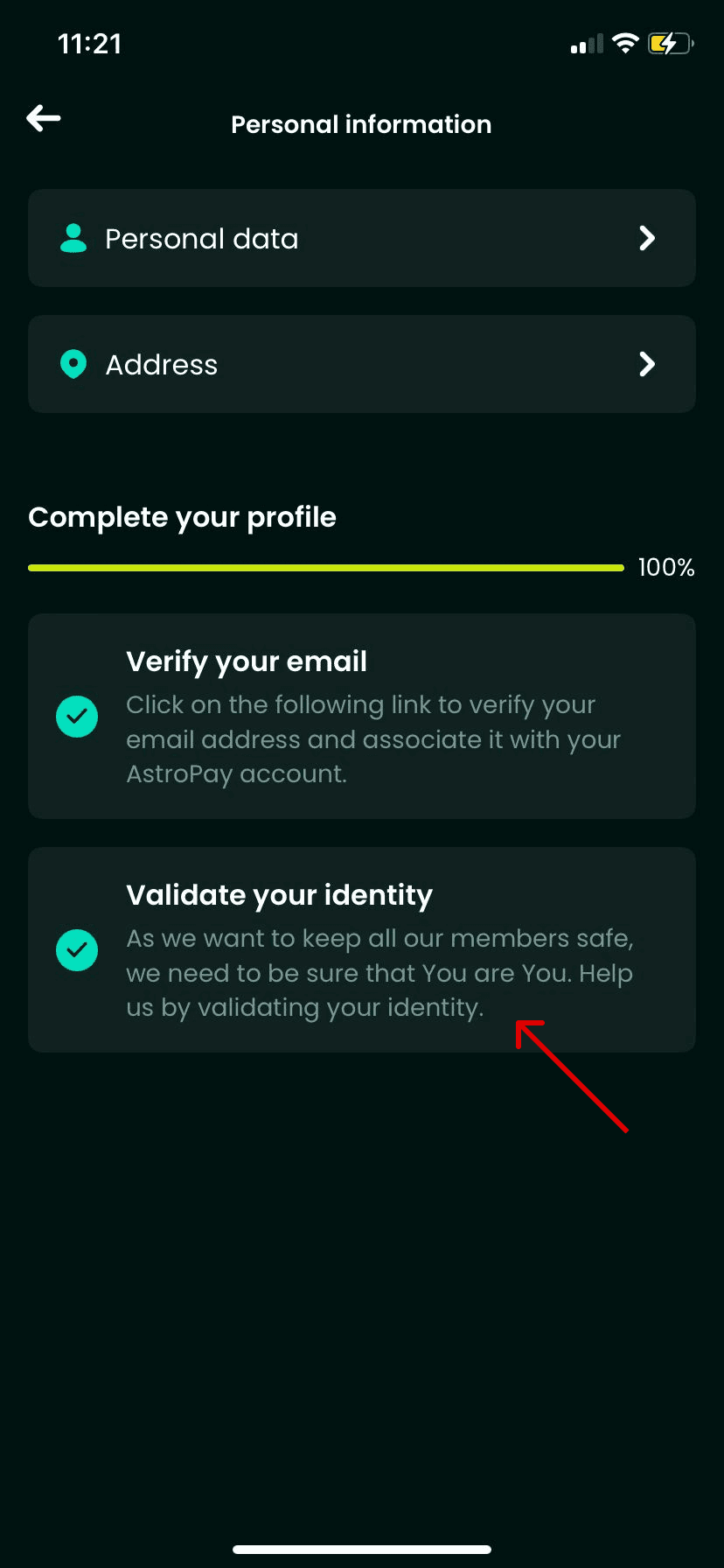
  3. Check your registered country, phone number, and identity verification level. Confirm that your country is listed as Australia.
  4. Ensure your account is in good standing without outstanding verification requests.
How to recharge AstroPay (AU)

How to Recharge AstroPay AU Online on BitTopup

Buying an AstroPay voucher on BitTopup is quick, transparent, and secure:

  1. Select the required AUD denomination on the BitTopup AstroPay (AU) product page.
  2. Check the quantity you wish to order and review the final price shown on the checkout screen.
  3. Enter your contact email address carefully. Your digital code details will be sent directly to this address and stored in your BitTopup order history.
  4. Choose your preferred secure payment method from the available checkout options and complete the transaction.
  5. Once payment is processed, your 16-digit voucher code, expiration date, and CVV code appear instantly in your order dashboard.

Step-by-Step Redemption Guide for AstroPay Australia Codes

You can use your digital code in two ways: by loading funds directly into your AstroPay app wallet, or by using the code directly on partner merchant sites.

Method 1: Adding Funds to the AstroPay Wallet App

  1. Open the AstroPay app and sign in to your Australia-registered account.
  2. Navigate to the Money or Cards section.
  3. Select Add Funds or Redeem Voucher / Gift Card.
  4. Enter the 16-digit voucher number, the expiration date (MM/YY), and the 3-digit CVV code received from BitTopup.
  5. Confirm the submission. The AUD balance will be credited to your available wallet funds immediately.

Method 2: Direct Payment at Supported Merchant Sites

  1. At the checkout page of a supported merchant or gaming site, select AstroPay as your payment method.
  2. When prompted, enter the 16-digit card code, expiration date, and CVV.
  3. Complete the payment prompt. The merchant debits the voucher balance directly without requiring a separate app login.

Safety Guidelines, Anti-Phishing, and Digital Delivery

Protecting your funds requires strict personal security hygiene:

  • Zero Credential Sharing: BitTopup never asks for your AstroPay account password, PIN, or SMS one-time codes. You only purchase a digital voucher code to redeem independently.
  • Phishing Awareness: Only enter your 16-digit code inside the official AstroPay application or on verified checkout gateways featuring secure SSL encryption.
  • One-Time Code Handling: Treat your voucher details like cash. Do not share screenshots of the CVV or card number with third parties or unverified customer support agents on social media.
  • Digital Delivery Security: All codes distributed by BitTopup are generated digitally and stored securely in your encrypted order dashboard to prevent interception.

Frequently Asked Questions

Can I use an AstroPay AU voucher outside of Australia?

No. AstroPay AU vouchers are region-locked to accounts verified in Australia. They will not redeem on accounts registered in other territories or currencies. Attempting to redeem an AUD code in an unsupported country may result in an error or balance lock.

How do I redeem my AstroPay voucher code in the app?

Open your AstroPay application, go to the Cards or Wallet tab, select Add Funds, choose the voucher option, and type in the 16-digit code, expiration date, and CVV provided in your BitTopup order confirmation.

Do AstroPay Australia vouchers expire after purchase?

Yes. AstroPay vouchers have an expiration date printed alongside the code (typically valid for up to 12 months from the date of issue). Always check the MM/YY expiration date provided in your BitTopup receipt and redeem your balance before that date.

Why is an Australian address required for AstroPay AU top up?

AstroPay complies with local financial regulations and Anti-Money Laundering (AML) standards. To use AUD-denominated cards and wallets, users must have a verified Australian profile to prevent cross-border payment irregularities.

What payment methods are supported for AstroPay recharges on BitTopup?

BitTopup supports a wide selection of secure payment methods, including major credit/debit cards, e-wallets, and regional payment solutions. Check the live checkout panel to view all payment options currently active for your region.

What should I do if my AstroPay code does not work?

First, double-check that every digit of the 16-digit number, expiration date, and CVV was entered correctly without extra spaces. Next, confirm that your AstroPay account is registered to Australia. If the error persists, copy the error code and reach out to BitTopup 24/7 customer support with your order ID for fast verification.

AstroPay (AU) ข่าวสารแนะนำ

สินค้าแนะนำ

AstroPay (AU) คำถามที่พบบ่อยเกี่ยวกับการเติมเงิน

ใช้เวลานานเท่าใดกว่าที่คำสั่งซื้อจะเสร็จสมบูรณ์?
โดยปกติแล้ว คำสั่งซื้อจะเสร็จสมบูรณ์ภายในไม่กี่นาที หากมีความล่าช้าใดๆ โปรดติดต่อฝ่ายสนับสนุนลูกค้าของเรา
BitTopup คืออะไร?
BitTopup คือแพลตฟอร์มออนไลน์สำหรับเติมเกมและบริการต่าง ๆ ได้อย่างรวดเร็วและปลอดภัย
เวลาทำการของฝ่ายบริการลูกค้า?
ฝ่ายบริการลูกค้าของ BitTopup พร้อมให้บริการตลอด 24 ชั่วโมงทุกวัน
ฉันจำเป็นต้องแชร์รหัสผ่านบัญชี AstroPay (AU) หรือไม่?
ไม่จำเป็น การเติมเงินโดยตรงใช้เพียง Player ID/UID ของคุณเท่านั้น ห้ามแชร์รหัสผ่านของคุณกับใครเด็ดขาด
AstroPay (AU) รองรับภูมิภาคใดบ้าง?
สินค้านี้รองรับบัญชีภูมิภาค AUSTRALIA โปรดตรวจสอบภูมิภาคบัญชีของคุณก่อนทำการสั่งซื้อ
ฉันสามารถชำระเงินด้วยคริปโตได้หรือไม่?
ได้ เรายอมรับ Bitcoin, ETH, USDT และคริปโตเคอร์เรนซียอดนิยมอื่นๆ พร้อมการยืนยันทันที
หากเติมเงินแล้วไม่เข้าต้องทำอย่างไร?
ติดต่อฝ่ายสนับสนุนลูกค้าตลอด 24 ชั่วโมงทุกวันพร้อมแจ้งหมายเลขคำสั่งซื้อของคุณ แล้วเราจะส่งรหัสให้ใหม่หรือคืนเงินให้ทันที

AstroPay (AU) รีวิวจากลูกค้าเกี่ยวกับการเติมเงิน

รีวิวทั้งหมด: 921

คะแนนเฉลี่ย

how to top-up in bittopup

4.3

customer avatar
Алексей Зеелиг2026/09/28
เว็บที่ดีที่สุดสำหรับการเติมเงินแอปทุกประเภท
customer avatar
Scott Smith2026/09/27
ฉันใช้เว็บนี้มาสองสามสัปดาห์แล้วและแฮปปี้มาก พวกเขาติดต่อมาเพื่อยืนยันรายละเอียดในออเดอร์ของฉันด้วย ติดต่อง่าย แถมเจ้าหน้าที่ฝ่ายสนับสนุนก็ใจดีและช่วยเหลือดีมาก
customer avatar
Luq Mannn2026/09/28
บริการดีครับ
customer avatar
Rosaria Queta2026/09/27
แอปดีมาก ช่วยให้เราซื้อสกุลเงินในเกมได้ง่ายขึ้นเยอะเลย
customer avatar
Kati2026/09/30
ดี เจ๋งมาก
customer avatar
Tina Rivera2026/09/27
สุดยอดมาก ขอบคุณครับ
customer avatar
Natalia2026/09/29
ไม่ได้คาดคิดเลยว่าจะใช้งานได้ดีขนาดนี้ ฉันใช้ส่งของขวัญ welkins ให้ผู้เล่นคนอื่นแล้วชอบผลลัพธ์มาก ฝ่ายบริการลูกค้าก็รวดเร็วด้วย หากคุณต้องการส่งของขวัญให้ใคร แพลตฟอร์มนี้ยอดเยี่ยมมากค่ะ
customer avatar
Sophie König2026/09/30
เพชร Free Fire ใช้เวลาประมาณ 15 นาทีกว่าจะเข้า ช้ากว่าที่คิดนิดหน่อย แต่ราคาดีก็เลยโอเค
customer avatar
Michael Z2026/09/30
ทำรายการได้ดีและราบรื่นมาก
customer avatar
Wali2026/09/30
โปรแกรมนี้เชื่อถือได้และทำธุรกรรมได้รวดเร็ว เป็นโปรแกรมที่ดีที่สุดเลย
customer avatar
adrialex Marchan2026/09/29
ยอดเยี่ยม รวดเร็ว และปลอดภัย
customer avatar
Okeana2026/09/27
สุดยอด ดีมากๆ
customer avatar
C C2026/09/30
ฉันใช้เว็บนี้เติมเงิน และแม้ว่าในที่สุดจะสำเร็จ แต่เครดิตไม่ได้เข้าทันที ฝ่ายบริการลูกค้าใช้เวลาอย่างน้อย 5 นาทีในการตอบกลับ ซึ่งทำให้ฉันกังวลมาก แต่สุดท้ายการเติมเงินก็ผ่านไปด้วยดี จะดีกว่านี้มากถ้าฝ่ายสนับสนุนตอบกลับเร็วกว่านี้
customer avatar
Egor Miholap2026/09/26
ชอบแอปของคุณมากเลย เติมเงินเข้าในวินาทีเดียว ขอบคุณนะ!
customer avatar
eraj zero2026/09/27
รวดเร็วและปลอดภัย ชอบเว็บไซต์นี้มากครับ
customer avatar
Jesse Molina2026/09/29
รวดเร็ว ปลอดภัย และน่าเชื่อถือ
customer avatar
Samantha2026/09/30
สะดวกรวดเร็ว บริการดีมาก
customer avatar
Aloosh2026/09/30
ยอดเยี่ยมมาก แนะนำเลยครับ
customer avatar
Luna Lee2026/09/29
เติมเงิน Identity V และ Blood Strike ได้ไม่มีปัญหาเลย ให้แค่ 4 ดาวเพราะหน้าชำระเงินขัดข้องไปครั้งหนึ่ง แต่ฝ่ายสนับสนุนแก้ไขให้เร็วมากๆ ราคาดีและมีเกมให้เลือกเยอะมาก!
customer avatar
Mary Degamo2026/09/28
แฮปปี้มาก ขอบคุณครับ
AstroPay (AU) รีวิวทั้งหมด

ทำไมต้องเลือกเรา?

ธุรกรรมปลอดภัย 100%

ทุกการเติมเงินได้รับการปกป้องด้วยระบบรักษาความปลอดภัยในการชำระเงินที่เข้ารหัสตามมาตรฐานอุตสาหกรรม ซึ่งจะรักษาข้อมูลส่วนตัวและข้อมูลการชำระเงินของคุณไว้เป็นความลับอย่างสมบูรณ์ ช้อปได้อย่างมั่นใจ ปลอดภัย 100% ทุกครั้ง

บริการลูกค้าตลอด 24 ชั่วโมงทุกวัน

ทีมสนับสนุนที่เป็นมิตรของเราพร้อมให้บริการตลอด 24 ชั่วโมงเพื่อช่วยเหลือคุณทั้งก่อน ระหว่าง และหลังการซื้อ รับความช่วยเหลือที่รวดเร็วและเชื่อถือได้ทุกเมื่อที่คุณต้องการ ไม่ว่าจะเป็นกลางวันหรือกลางคืน

รับประกันคืนเงินเต็มจำนวน

เพลิดเพลินกับราคาที่คุ้มค่าที่สุดพร้อมการจัดส่งที่รวดเร็วและเชื่อถือได้ หากคำสั่งซื้อของคุณไม่ได้รับการจัดส่งหรือไม่สามารถใช้งานได้ เรารับประกันการคืนเงิน 100% เงินของคุณจะได้รับการคุ้มครองเสมอ

ช่องทางการชำระเงินที่รองรับ

PM_PIX - ช่วยเหลือด้านการชำระเงิน | BitTopupWG_PIX - ช่วยเหลือด้านการชำระเงิน | BitTopupPMKakaoPay - ช่วยเหลือด้านการชำระเงิน | BitTopupPMTNG - ช่วยเหลือด้านการชำระเงิน | BitTopupWG_TNG - ช่วยเหลือด้านการชำระเงิน | BitTopupPMGCASH - ช่วยเหลือด้านการชำระเงิน | BitTopupPM_WALLET_NAVERPAY - ช่วยเหลือด้านการชำระเงิน | BitTopupPM_WALLET_PMPROMPTPAY - ช่วยเหลือด้านการชำระเงิน | BitTopupAlipay HK - ช่วยเหลือด้านการชำระเงิน | BitTopupDANA - ช่วยเหลือด้านการชำระเงิน | BitTopupAM_SBP - ช่วยเหลือด้านการชำระเงิน | BitTopupPM_OXXO - ช่วยเหลือด้านการชำระเงิน | BitTopupOVO - ช่วยเหลือด้านการชำระเงิน | BitTopupPMToss - ช่วยเหลือด้านการชำระเงิน | BitTopupWG_PAY_NOW - ช่วยเหลือด้านการชำระเงิน | BitTopupWG_BLIK - ช่วยเหลือด้านการชำระเงิน | BitTopupPM_CARD_SA - ช่วยเหลือด้านการชำระเงิน | BitTopupWG_PAYU - ช่วยเหลือด้านการชำระเงิน | BitTopupPM_WALLET_JKOPAY - ช่วยเหลือด้านการชำระเงิน | BitTopupWG_STCPAY - ช่วยเหลือด้านการชำระเงิน | BitTopupPM_WALLET_SAMSUNGPAY - ช่วยเหลือด้านการชำระเงิน | BitTopupPM_7_ELEVEN - ช่วยเหลือด้านการชำระเงิน | BitTopupPM_WALLET_WECHATPAYHK - ช่วยเหลือด้านการชำระเงิน | BitTopupPM_NET_BANKING_FPX - ช่วยเหลือด้านการชำระเงิน | BitTopupPM_WALLET_QRIS - ช่วยเหลือด้านการชำระเงิน | BitTopupAM_CARD_KZ - ช่วยเหลือด้านการชำระเงิน | BitTopupAM_CARD_BY - ช่วยเหลือด้านการชำระเงิน | BitTopupWG_SADAD - ช่วยเหลือด้านการชำระเงิน | BitTopupWG_MADA - ช่วยเหลือด้านการชำระเงิน | BitTopupAM_TBANK - ช่วยเหลือด้านการชำระเงิน | BitTopupAM_SBERPAY - ช่วยเหลือด้านการชำระเงิน | BitTopupPM_REALTIME_PAYMENT - ช่วยเหลือด้านการชำระเงิน | BitTopupPM_WALLET_GASH - ช่วยเหลือด้านการชำระเงิน | BitTopupPM_OKMART - ช่วยเหลือด้านการชำระเงิน | BitTopupPM_HILIFE - ช่วยเหลือด้านการชำระเงิน | BitTopupPM_FAMILYMART - ช่วยเหลือด้านการชำระเงิน | BitTopupPM_CARD_SA_CD - ช่วยเหลือด้านการชำระเงิน | BitTopupAM_CARD - ช่วยเหลือด้านการชำระเงิน | BitTopupPM_CARD_EU - ช่วยเหลือด้านการชำระเงิน | BitTopupPM_CARD_KNET - ช่วยเหลือด้านการชำระเงิน | BitTopupBIN_DO_PAY_ME - ช่วยเหลือด้านการชำระเงิน | BitTopupPM_CARD_JP - ช่วยเหลือด้านการชำระเงิน | BitTopupBIN_DO_OCTOPUS - ช่วยเหลือด้านการชำระเงิน | BitTopupPM_CARD_US - ช่วยเหลือด้านการชำระเงิน | BitTopupPM_CARD - ช่วยเหลือด้านการชำระเงิน | BitTopupPM_WALLET_SHOPEEPAY - ช่วยเหลือด้านการชำระเงิน | BitTopupPM_WALLET_PAOTANGPAY - ช่วยเหลือด้านการชำระเงิน | BitTopupPM_WALLET_LINEPAY - ช่วยเหลือด้านการชำระเงิน | BitTopupPM_WALLET_TRUEMONEY - ช่วยเหลือด้านการชำระเงิน | BitTopupD_LOCAL_MX_IO - ช่วยเหลือด้านการชำระเงิน | BitTopupD_LOCAL_MX_BQ - ช่วยเหลือด้านการชำระเงิน | BitTopupD_LOCAL_MX_SE - ช่วยเหลือด้านการชำระเงิน | BitTopupD_LOCAL_MX_SM - ช่วยเหลือด้านการชำระเงิน | BitTopupD_LOCAL_MX_BV - ช่วยเหลือด้านการชำระเงิน | BitTopupD_LOCAL_PK_HB - ช่วยเหลือด้านการชำระเงิน | BitTopupD_LOCAL_PK_JK - ช่วยเหลือด้านการชำระเงิน | BitTopupD_LOCAL_PK_ES - ช่วยเหลือด้านการชำระเงิน | BitTopupD_LOCAL_PK_IO - ช่วยเหลือด้านการชำระเงิน | BitTopupPMPayco - ช่วยเหลือด้านการชำระเงิน | BitTopupGOPAY - ช่วยเหลือด้านการชำระเงิน | BitTopupPMPAYMAYA - ช่วยเหลือด้านการชำระเงิน | BitTopupPMGRABPAYPH - ช่วยเหลือด้านการชำระเงิน | BitTopupPMGRABPAYMY - ช่วยเหลือด้านการชำระเงิน | BitTopupPMBOOST - ช่วยเหลือด้านการชำระเงิน | BitTopupWG_PAYTM - ช่วยเหลือด้านการชำระเงิน | BitTopupPM_BANK_TRANSFER_PSE - ช่วยเหลือด้านการชำระเงิน | BitTopupPM_BANK_TRANSFER_EFECTY - ช่วยเหลือด้านการชำระเงิน | BitTopupWG_BPI - ช่วยเหลือด้านการชำระเงิน | BitTopupWG_GCASH - ช่วยเหลือด้านการชำระเงิน | BitTopupWG_BANCOMAT_PAY - ช่วยเหลือด้านการชำระเงิน | BitTopupWG_iDEAL - ช่วยเหลือด้านการชำระเงิน | BitTopupWG_BANCONTACT - ช่วยเหลือด้านการชำระเงิน | BitTopupPM_CARD_APPLE_US - ช่วยเหลือด้านการชำระเงิน | BitTopupPM_APPLEPAY - ช่วยเหลือด้านการชำระเงิน | BitTopupD_LOCAL_PH_PM - ช่วยเหลือด้านการชำระเงิน | BitTopupD_LOCAL_PH_GY - ช่วยเหลือด้านการชำระเงิน | BitTopupWG_BHIM - ช่วยเหลือด้านการชำระเงิน | BitTopupPM_WALLET_STCPAY - ช่วยเหลือด้านการชำระเงิน | BitTopupPM_GOOGLEPAY_US - ช่วยเหลือด้านการชำระเงิน | BitTopupPM_GOOGLEPAY - ช่วยเหลือด้านการชำระเงิน | BitTopupD_LOCAL_TH_TK - ช่วยเหลือด้านการชำระเงิน | BitTopupGATE_IO_PAY - ช่วยเหลือด้านการชำระเงิน | BitTopupBINANCE_PAY - ช่วยเหลือด้านการชำระเงิน | BitTopupWG_PHONE_PE - ช่วยเหลือด้านการชำระเงิน | BitTopupPAY_LOCO_ESumLifeET - ช่วยเหลือด้านการชำระเงิน | BitTopupPAY_LOCO_ESumFamilyMart - ช่วยเหลือด้านการชำระเงิน | BitTopupPAY_LOCO_ESum711 - ช่วยเหลือด้านการชำระเงิน | BitTopupBIT_WALLET - ช่วยเหลือด้านการชำระเงิน | BitTopup

10 Years Trusted Game & Live Streaming Top-Up Platform

Since 2016 | 5,000,000+ Users Worldwide

KAMAGEN LIMITED

Registration No. 76888246

Room 1508, 15/F, Grand Plaza Office Tower II, 625 Nathan Road, Mong Kok, Kowloon, Hong Kong

BUSINESS COOPERATION: ibittopup@gmail.com

© 2016-2026 BitTopup. All Rights Reserved.

Trusted & Verified by

ScamAdviser review of BitTopupGridinsoft review of BitTopupTrustpilot review of BitTopup
customer service