


MiFinity eVoucher ZAR Top Up: Instant Balance for South African Accounts
A MiFinity eVoucher (ZAR) is a secure, prepaid payment solution that enables users in South Africa to fund their digital eWallets and pay on supported online platforms without linking bank accounts or sharing credit card details. By purchasing a prepaid 20-digit digital voucher code in South African Rand, you retain complete oversight of your online spending while enjoying immediate account top-ups.
Whether you need to fund your gaming profile, settle payments across global digital merchants, or keep your primary banking information private, a ZAR eVoucher offers a straightforward payment gateway. BitTopup delivers your 20-digit PIN directly to your email, allowing you to load your account instantly at any hour of the day.
What is a MiFinity eVoucher (ZAR) and How It Works
The MiFinity eVoucher functions as a digital prepaid card. Each voucher contains a fixed monetary value denominated in South African Rand (ZAR) and is secured by a unique 20-digit PIN.
When you buy a voucher, no physical card is required. You receive your digital redemption code instantly after checkout. You can then apply this code inside your MiFinity eWallet deposit portal or submit it directly at checkout on hundreds of online merchant websites that accept MiFinity vouchers as a standalone payment method.
Core Highlights
- Fixed Denominations: Prepaid amounts allow you to spend only what you load.
- Complete Financial Privacy: No need to disclose personal debit or credit card details on third-party sites.
- Direct Currency Processing: Designed specifically for South African Rand (ZAR) accounts to eliminate unnecessary currency conversion fees.
Step-by-Step Guide: How to Recharge Your MiFinity eWallet with a 20-Digit Voucher PIN
Redeeming your voucher code into your eWallet account takes less than two minutes. Follow these direct steps to deposit your funds successfully:
- Log in to Your MiFinity Account: Open the official MiFinity mobile app or log in via your desktop web browser.
- Open the Deposit Menu: Navigate to the main dashboard and click on the Deposit tab located on the left-hand navigation bar.
- Select MiFinity eVoucher: Under the list of available deposit methods, select MiFinity eVoucher.
- Select Your Currency Pocket: Choose your ZAR eWallet pocket as the destination for the deposit.
- Enter the Exact Value: Type the exact amount matching the face value of your purchased voucher (for example, 200 ZAR).
- Enter Your 20-Digit PIN: Input the 20-digit alphanumeric voucher PIN received in your BitTopup order confirmation.
- Confirm Deposit: Click Deposit / Submit. The system verifies the code instantly, and your funds will reflect in your account balance immediately.
How to Check Your MiFinity Account Details Before Redeeming
Before loading your voucher, make sure your MiFinity profile has an active ZAR pocket configured. If you do not have a ZAR balance pocket active, create one in your dashboard under the wallet settings tab to ensure instant, one-click deposits.
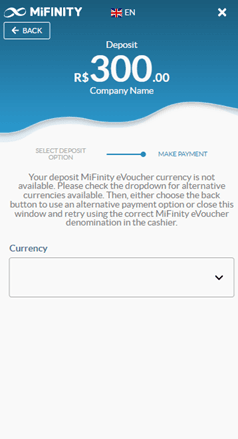
Always double-check that your account status is active and verified according to standard compliance rules before submitting large deposit values.
Available MiFinity ZAR Denominations and Specifications
MiFinity eVouchers come in standard fixed face values. Check the live checkout on BitTopup for up-to-date pricing and current stock levels.
| Voucher Denomination | Currency | Code Format | Primary Usage |
|---|---|---|---|
| 100 ZAR | South African Rand | 20-Digit Digital PIN | Small deposits & microtransactions |
| 200 ZAR | South African Rand | 20-Digit Digital PIN | Standard gaming balance reload |
| 500 ZAR | South African Rand | 20-Digit Digital PIN | Medium online purchases & gaming |
| 1,000 ZAR | South African Rand | 20-Digit Digital PIN | High-balance eWallet deposit |
| 2,000 ZAR | South African Rand | 20-Digit Digital PIN | Maximum single-voucher balance reload |
Note: Current live prices, promotions, and available inventory are displayed directly in the BitTopup checkout menu.
Key Benefits: Safe Online Payments and Gaming Deposits
- Bank-Level Privacy: You never have to share sensitive banking credentials, credit card numbers, or CVV codes with external merchant websites.
- Strict Budget Management: Because vouchers are non-reloadable prepaid cards, you cannot overspend past the balance loaded onto the code.
- Zero Credit Requirements: No credit checks, overdraft risks, or recurring subscription charges attached to the voucher PIN.
- Instant Availability: Your code arrives digitally immediately after purchase, ready to be redeemed right away.
Important MiFinity eVoucher Rules: Expiration, Currency, and Single-Use Limits
To ensure a smooth top-up experience, keep these essential technical conditions in mind:
- Single-Use Policy: A MiFinity eVoucher must be redeemed in its full denomination in a single transaction. You cannot partially redeem a voucher or carry forward remaining balances on the same PIN.
- Currency Matching: Always redeem a ZAR voucher into a ZAR eWallet pocket. Applying a ZAR code to a EUR, GBP, or USD pocket triggers foreign exchange conversion fees set by the platform.
- Validity Duration: MiFinity eVouchers typically remain valid for 12 months from the date of issue. Ensure you redeem your code within this timeframe to avoid expiration.
- Non-Reloadable: Once a 20-digit PIN is applied to an account, it is marked as used and cannot be reloaded with funds.
Troubleshooting Failed MiFinity Voucher Redemptions
If you experience an error message while redeeming your voucher, check the following common causes:
- Mismatched Deposit Amount: The deposit amount entered on the deposit screen must match the face value of the voucher exactly. Entering an amount higher or lower than the voucher value will cause a failure.
- Typographical Errors: Double-check the 20-digit PIN. Avoid copying extra spaces before or after the code string.
- Pocket Currency Mismatch: Ensure you selected your South African Rand (ZAR) wallet pocket rather than a foreign currency balance.
- Already Redeemed Status: If the system states that the voucher has already been claimed, refresh your wallet dashboard to verify if the balance was already credited.
Why Buy MiFinity eVoucher ZAR on BitTopup
BitTopup provides a reliable, secure way to purchase digital gaming and eWallet vouchers. When you buy your MiFinity eVoucher on BitTopup, you benefit from:
- Instant Digital Delivery: Your 20-digit PIN is generated and delivered straight to your email inbox without unnecessary processing delays.
- Secure Payment Protection: All checkout transactions are secured using encrypted payment processing.
- Transparent Live Checkout: See the exact price upfront on the checkout screen with no hidden fees.
- 24/7 Customer Support: Our dedicated help desk is available around the clock to assist you with order delivery or redemption troubleshooting.
Frequently Asked Questions
How can I add money to my MiFinity account using a ZAR eVoucher?
Log in to your MiFinity eWallet, click Deposit, choose MiFinity eVoucher as your deposit option, select your ZAR pocket, type the exact value of your voucher, enter the 20-digit PIN, and click confirm. The balance updates instantly.
How do I redeem my MiFinity 20-digit PIN code?
You can redeem your code directly through the MiFinity app or website under the deposit section, or enter it at the checkout of any supported online merchant that accepts MiFinity eVouchers directly.
Can I use a ZAR MiFinity eVoucher to top up a wallet in another currency?
Yes, but it is not recommended. If you redeem a ZAR voucher into a pocket denominated in USD, EUR, or GBP, MiFinity will apply an automated foreign exchange conversion fee. For the best value, match ZAR vouchers with ZAR pockets.
Do MiFinity eVouchers expire?
Yes. MiFinity eVouchers are valid for 12 months from the date of purchase. It is best practice to redeem your code shortly after purchase.
Can I partially redeem a MiFinity voucher or split the balance?
No. MiFinity eVouchers are single-use prepaid codes. The full face value must be deposited in one transaction. Partial redemptions and balance splitting across multiple deposits are not supported.
What should I do if my MiFinity eVoucher code displays an error during deposit?
First, verify that the deposit amount you entered matches the exact face value of the voucher and check that no spaces were accidentally pasted into the 20-digit PIN field. If the problem persists, contact BitTopup 24/7 customer support with your order reference for swift resolution.