


BIGO Diamonds Not Received? Fix in 5 Minutes (2025)
When BIGO Diamonds don't appear after top-up, 95% of cases resolve within 5 minutes through simple fixes. Primary culprits: incorrect BIGO IDs (40-70% of cases), synchronization failures (40%), and network issues (15-25%). This guide resolves 90% of missing Diamond problems in under 10 minutes.


Normal Processing Timeframes
BIGO Diamonds delivery varies by region:
- Asia: 2-3 minutes average
- Europe/Americas: 5-10 minutes average
- 95% delivery rate: Within 5 minutes for standard transactions
For reliable top-ups, platforms like BitTopup offer Discount BIGO Diamonds online with transparent tracking and competitive pricing.
80% of pending Diamonds resolve automatically within 1-10 minutes without intervention. Bank timestamps often lag 5-15 minutes behind actual delivery.
Instant vs. Delayed Delivery Factors
- Network speed: Below 1 Mbps slows delivery; 5 Mbps+ optimal
- App version: BIGO LIVE 5.0+ and iOS 17+ ensure reliable top-ups
- Security flags: 10% of transactions trigger reviews, adding 10-30 minutes
- Peak hours: Server delays more frequent during high traffic
How Trusted Platforms Ensure Delivery
Reputable platforms validate BIGO IDs (8-12 digit numeric identifier under Me > nickname, e.g., 901216366) before processing, reducing the 40-70% error rate from faulty entries. Direct API connections bypass common bottlenecks, with real-time tracking eliminating uncertainty.
Immediate Checks When Diamonds Don't Appear
Verify Internet Connection
Network issues impact 15-25% of deliveries. Quick checks:
- Test speed—ensure it exceeds 1 Mbps (5 Mbps recommended)
- Switch Wi-Fi to mobile data or vice versa
- Disable VPN services
- Reboot device to clear network errors
Force Refresh BIGO Live App
Pull-to-refresh fixes 50% of missing Diamond cases. Navigate to Me > Wallet, swipe down 3-5 times with pauses between refreshes. This forces server queries for latest balance.
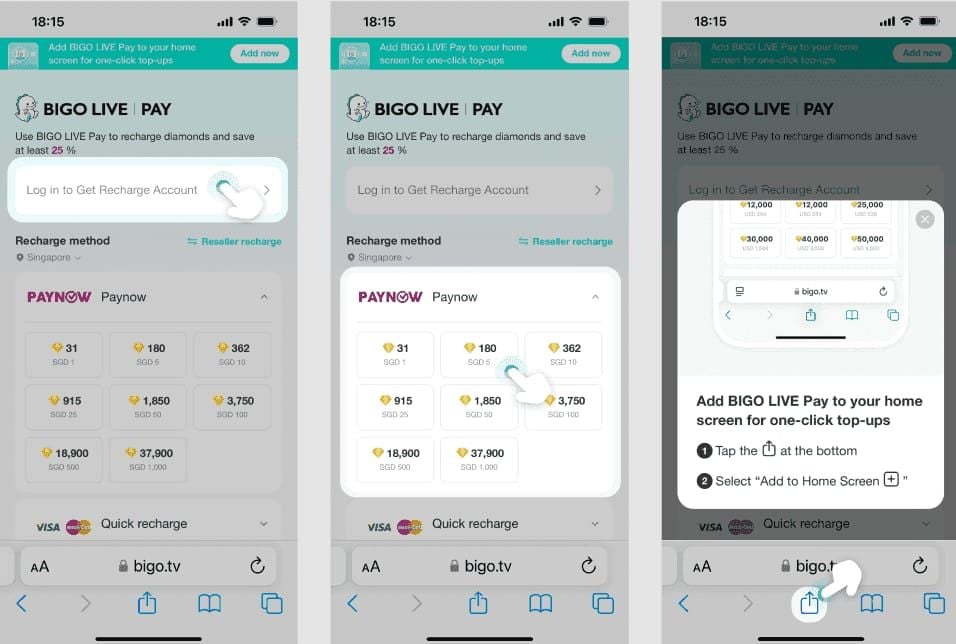
If unsuccessful, force-close app completely (don't minimize) and reopen. Recovers 40% of Diamonds from app state issues.
Check Balance in Multiple Locations
Cross-reference Diamond displays:
- Main Wallet under Me
- Top-right corner during live streams
- Recharge/Top-up history
- Gift-sending interface
Discrepancies indicate sync lag, not missing Diamonds.
Log Out and Back In
Account re-authentication resolves 50% of sync problems. Use your numeric BIGO ID (under Me > nickname) rather than phone/email for login.
Critical: Screenshot current Wallet balance and transaction history before logging out—essential for support if needed.
Payment Verification
Locate Payment Confirmation
Search inbox (including spam) for emails containing:
- Transaction ID or order number
- Exact Diamond package (e.g., 60 Diamonds)
- Payment amount and currency
- Transaction timestamp
No confirmation email suggests payment didn't process—bank debits may be pending authorizations, not completed charges.
Check Bank Statement
Bank timestamps lag 5-15 minutes behind Diamond delivery. Look for:
- Completed or Posted status (not Pending)
- Merchant name matching purchase platform
- Exact amount for Diamond package
Verify Platform Dashboard Status
Check order history for detailed updates. Look for BIGO Diamonds best value packages showing Completed or Delivered status.
Quality platforms display:
- Order creation timestamp
- Payment confirmation time
- Diamond delivery completion time
- BIGO ID used for transaction
Payment Processing vs. Diamond Delivery Phases
- Payment authorization (instant): Bank approves charge
- Payment capture (1-5 min): Funds transfer to merchant
- Order processing (1-3 min): Platform validates BIGO ID
- Diamond delivery (2-10 min): BIGO servers credit account
Total time: 5-15 minutes, with 95% completing within 5 minutes.
Common Delay Reasons
Server Sync Delays During Peak Hours
Highest traffic during 7 PM - 11 PM local time. Sync failures affect 40% of top-ups but resolve within 10 minutes. Server delays don't indicate lost transactions—Diamonds are queued for delivery. Pending top-ups last 10-30 minutes during peak periods.
Account Verification for New Users
First-time purchasers or accounts under 30 days face additional verification. Security flags trigger on 10% of transactions when:
- Account age under 7 days
- First purchase exceeds $50 USD
- Purchase from different country than registration
- Multiple payment methods attempted quickly
Reviews add 10-30 minutes but protect against unauthorized charges.
Payment Gateway Processing Variations
- Credit/debit cards: 2-5 minutes
- Digital wallets: 3-7 minutes
- Bank transfers: 10-30 minutes
- Carrier billing: 5-15 minutes
Regional Network Limitations
Network issues impact 15-25% globally, climbing to 35-40% in areas with:
- Frequent internet interruptions
- Limited 4G/5G coverage
- High network congestion
- Restrictive firewall policies
App Version Compatibility
BIGO LIVE versions below 5.0 exhibit higher failure rates. Outdated apps lack critical sync protocols. iOS below iOS 17 also experiences elevated errors.
Step-by-Step Troubleshooting
Step 1: Wait 15-30 Minutes
80% of pending Diamonds resolve within 1-10 minutes without intervention. After 30 minutes, proceed to active troubleshooting. Screenshot Wallet balance and transaction history for documentation.
Step 2: Clear App Cache
Cache corruption hides existing Diamonds.
Android (resolves 70-80% of glitches):
- Settings > Apps > BIGO LIVE > Storage
- Tap Clear Cache (not Clear Data initially)
- Reopen BIGO LIVE and check balance
- If unsuccessful, select Clear Data (requires re-login)
iOS (fixes 95% of display issues):
- Settings > General > iPhone Storage
- Select BIGO LIVE
- Choose Offload App
- Tap Reinstall App and log back in
Step 3: Update to Latest Version
Outdated apps cause sync failures. Check app store for BIGO LIVE updates. Version 5.0+ required for reliable top-ups. Each update improves delivery success by 2-5%.
After updating, force-close app and restart device before reopening.
Step 4: Check Account Restrictions
Navigate to Me > Settings > Account Status for:
- Active warnings or violations
- Temporary feature restrictions
- Payment method blocks
- Regional access limitations
Frozen balances thaw in 7-14 working days after restriction removal.
Step 5: Verify Correct Account ID
Faulty IDs cause 40-70% of non-received cases—the largest failure point. Your BIGO ID is the 8-12 digit number under Me > nickname (example: 901216366), not username, phone, or email.
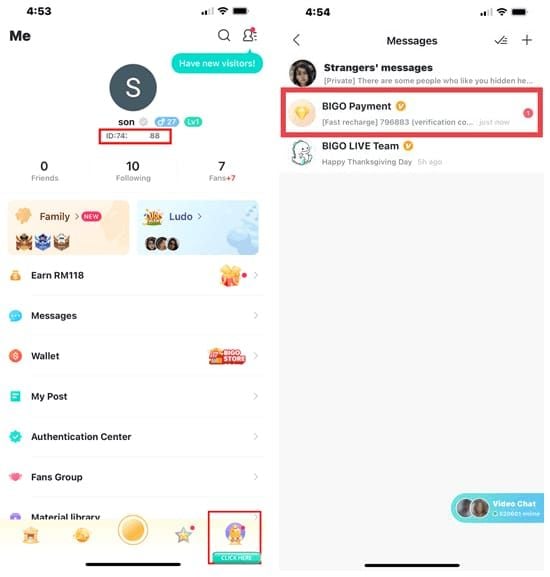
Compare purchase receipt BIGO ID against actual account ID character-by-character. Single digit error sends Diamonds to different account—recovery requires support ticket with payment proof.
Advanced Troubleshooting
Device-Level Solutions
- Reboot completely: Clears system cache and resets network
- Check date/time: Incorrect time causes SSL errors blocking sync
- Verify storage: Under 500MB free prevents app updates
- Disable battery optimization: Power-saving kills background sync
Network Configuration
- Switch DNS to public resolvers (8.8.8.8 or 1.1.1.1)
- Disable IPv6 if ISP implementation unstable
- Enable QoS for BIGO LIVE in router
- Temporarily disable firewall/antivirus
Test with Small Transaction
Top-up 60 Diamonds ($1 USD) to verify account can receive. If test succeeds but larger transaction missing, original encountered specific errors requiring support.
Contacting Support
Essential Information to Prepare
Support tickets achieve 99% resolution with complete documentation:
- Transaction ID: From confirmation email or platform history
- Payment receipt: Screenshot showing amount, date, merchant
- BIGO ID: Your 8-12 digit numeric identifier
- Purchase timestamp: Exact date and time
- Diamond package: Specific quantity purchased
- Screenshots: Current Wallet and transaction history
How to Submit Missing Diamonds Report
In-app Feedback (70% resolved in 24-72 hours):
- Me > Feedback > Recharge Issue
- Select Diamonds Not Received
- Attach screenshots and documentation
- Provide detailed description with time elapsed
Email support (90% resolved in 24-48 hours):
- USA/Canada: cs_bigoamerica@bigo.sg
- International: feedback@bigo.tv
- Subject: Missing Diamonds - Transaction ID [your ID]
Phone support (immediate):
- International: +65 63519330
- Live chat under 5 minutes during business hours
Expected Response Times
- Initial acknowledgment: 6-12 hours
- Investigation completion: 24-48 hours
- Diamond crediting: Immediate upon verification
- Refund processing: 5-10 days for unauthorized charges
In-app Feedback with complete proofs achieves 90% resolution vs. 70% without documentation.
Documentation for Disputes
If unresolved within 48 hours:
- Bank statement: Showing completed charge
- Payment gateway confirmation: Email from PayPal, Stripe, etc.
- Account ownership proof: Screenshot of Me section with BIGO ID
- Communication history: All support responses
- Timeline: Detailed troubleshooting log
File disputes within 30 days of transaction.
Preventing Future Issues
Use Trusted Platforms
Quality platforms catch 40-70% of faulty ID errors before payment. They offer:
- Pre-purchase BIGO ID validation
- Real-time transaction tracking
- Guaranteed delivery timeframes
- Responsive support
- Secure payment processing
Keep Payment Receipts
Retain all documentation:
- Email confirmations from processors
- Order completion screenshots
- Bank statements showing charges
- Platform order history exports
Reduces resolution time from weeks to days.
Verify Account ID Before Each Purchase
Pre-purchase routine:
- Open BIGO LIVE > Me section
- Tap nickname to display full BIGO ID
- Copy numeric ID (long-press on mobile)
- Paste into purchase form
- Double-check before confirming payment
Prevents 40-70% of missing Diamond cases.
Maintain Stable Connection
- Avoid purchasing during commutes
- Use proven Wi-Fi over mobile data
- Disable automatic app updates during transactions
- Close bandwidth-intensive apps
- Verify speed exceeds 1 Mbps (5 Mbps optimal)
Regular App Maintenance
Enable automatic updates. Perform monthly:
- Clear cache proactively
- Remove unnecessary app data
- Verify app permissions
- Check for OS updates
Enable Two-Factor Authentication
Activating 2FA cuts security delays by 80-95%. Verified accounts bypass fraud checks affecting 10% of transactions.
Refund and Resolution Policies
Refund Eligibility
BIGO issues refunds for:
- Payment processed, Diamonds never delivered: After 72-hour investigation
- Duplicate charges: Multiple debits for single purchase
- Unauthorized transactions: Charges without owner consent
- Technical errors: System glitches preventing delivery
Unauthorized charge refunds: 5-10 days. Standard requests: 7-14 working days.
Resolution Timeframes
- Simple sync errors: 10 minutes via basic troubleshooting
- Account verification delays: 10-30 minutes for security clearance
- Payment gateway issues: 24-48 hours for reconciliation
- Frozen balances: 7-14 working days for review
- Disputed transactions: 30-60 days for investigation
60-80% of frozen balances thaw within 7-14 days after documentation submission.
How Reputable Platforms Handle Disputes
Dedicated teams:
- Investigate within 24 hours
- Coordinate with BIGO support directly
- Provide updates every 48 hours
- Offer provisional credits for platform errors
- Maintain detailed transaction logs
Achieve 99% success rates via direct BIGO merchant channels.
Why Platform Choice Matters
Transaction Security
- SSL encryption: Protects payment data
- PCI DSS compliance: International security standards
- Fraud detection: Identifies suspicious transactions
- Secure gateways: Partners with PayPal, Stripe
- Account verification: Confirms BIGO ID validity
Reduces unauthorized charges to below 0.1% vs. 2-5% on unverified platforms.
Guaranteed Delivery
Quality platforms guarantee:
- Delivery within 5-15 minutes
- Automatic refund if delivery fails
- No-questions-asked refund for platform errors
- Compensation for delays
24/7 Support
- Live chat under 5 minutes
- Email support with 6-12 hour guarantees
- Phone support in multiple languages
- Dedicated managers for high-volume users
Reduces resolution time from 48 hours to 6 hours.
Transparent Tracking
Real-time displays:
- Payment confirmation timestamp
- BIGO ID validation status
- Diamond delivery initiation
- Completion confirmation
- Detailed status messages
Enables targeted troubleshooting.
FAQ
How long does it take for BIGO Diamonds to appear after purchase?
95% deliver within 5 minutes. Asia averages 2-3 minutes; Europe/Americas 5-10 minutes. 80% of pending cases resolve within 1-10 minutes automatically. Begin troubleshooting after 30 minutes.
Why are my BIGO Diamonds not showing up after payment?
Incorrect BIGO IDs (40-70%), sync failures (40%), network issues (15-25%), security flags (10%), binding failures (10%), outdated apps. Pull-to-refresh fixes 50%; clearing cache resolves 70-80% on Android, 95% on iOS.
What should I do if my BIGO Diamonds are missing?
Wait 15-30 minutes. Swipe to refresh Wallet 3-5 times, clear app cache, log out/in using numeric BIGO ID. If unsuccessful after 10 minutes, contact support via Me > Feedback > Recharge Issue with transaction screenshots.
How do I check if my BIGO Diamond payment went through?
Verify confirmation email has transaction ID and timestamp. Check bank statement for completed (not pending) charges. On platforms, review order history for Completed status. Bank timestamps lag 5-15 minutes behind delivery.
Can I get a refund if BIGO Diamonds are not received?
Yes, if payment processed but Diamonds never delivered after 72-hour investigation. Unauthorized charge refunds: 5-10 days. Standard requests: 7-14 working days. File disputes within 30 days. Complete documentation achieves 99% success.
How to prevent BIGO Diamond purchase issues?
Verify numeric BIGO ID (8-12 digits under Me > nickname) before purchasing. Use trusted platforms with ID validation. Maintain 1 Mbps+ speed (5 Mbps optimal). Update to BIGO LIVE 5.0+. Enable 2FA to reduce security delays 80-95%. Test with 60 Diamond purchases first.
Tired of Diamond delivery issues? Purchase BIGO Diamonds through BitTopup for instant delivery, secure transactions, and 24/7 support. Get your Diamonds now with complete peace of mind!
Recommended Articles








Recommended Products



Table of Contents
- Understanding BIGO Diamond Delivery
- Normal Processing Timeframes
- Instant vs. Delayed Delivery Factors
- How Trusted Platforms Ensure Delivery
- Immediate Checks When Diamonds Don't Appear
- Verify Internet Connection
- Force Refresh BIGO Live App
- Check Balance in Multiple Locations
- Log Out and Back In
- Payment Verification
- Locate Payment Confirmation
- Check Bank Statement
- Verify Platform Dashboard Status
- Payment Processing vs. Diamond Delivery Phases
- Common Delay Reasons
- Server Sync Delays During Peak Hours
- Account Verification for New Users
- Payment Gateway Processing Variations
- Regional Network Limitations
- App Version Compatibility
- Step-by-Step Troubleshooting
- Step 1: Wait 15-30 Minutes
- Step 2: Clear App Cache
- Step 3: Update to Latest Version
- Step 4: Check Account Restrictions
- Step 5: Verify Correct Account ID
- Advanced Troubleshooting
- Device-Level Solutions
- Network Configuration
- Test with Small Transaction
- Contacting Support
- Essential Information to Prepare
- How to Submit Missing Diamonds Report
- Expected Response Times
- Documentation for Disputes
- Preventing Future Issues
- Use Trusted Platforms
- Keep Payment Receipts
- Verify Account ID Before Each Purchase
- Maintain Stable Connection
- Regular App Maintenance
- Enable Two-Factor Authentication
- Refund and Resolution Policies
- Refund Eligibility
- Resolution Timeframes
- How Reputable Platforms Handle Disputes
- Why Platform Choice Matters
- Transaction Security
- Guaranteed Delivery
- 24/7 Support
- Transparent Tracking
- FAQ
Recommended Products



Recommended Articles

How to Get Free WeSing Kcoin from Ads and Daily Tasks

Poppo Live Next Update: 2026 Patch Notes and Room System Overhaul

Free Fire EU Event Schedule 2026 Reset Times and What to Skip

PSN Card Malaysia Code Redeemed but Balance Not Showing? Fix It

How to Farm Rare Skin Fragments in MLBB | August 2026

Genshin Impact Stygian Onslaught 7.0 Teams | August 2026

Alyosha Best Build, Teams & C6 Guide | August 2026

Cheap StarMaker Coins for SupernovaX 2026 Auditions (12-23% Off)



























































































