Learn how to redeem your Sims 4 CD key on the modern EA App, dodge frustrating account mismatches, and activate your expansion content properly in 2026.
Wrestling with EA's desktop launcher can quickly turn code redemption into a headache. If you recently picked up an activation key, you might wonder where the familiar Origin menus went or why your expansion pack is missing from your library.
Players often panic thinking a missing expansion means an invalid key, but the content usually sits tucked inside an unadvertised sub-menu. Claim your code, verify entitlements, and resolve launcher errors with the steps below.
Origin Is Retired: Understanding the EA App in 2026
For roughly 14 years, PC gamers used Origin. That era ended on April 17, 2025, when Electronic Arts permanently discontinued the Origin client.
If you have not played in a while, you cannot boot up Origin to punch in codes anymore. Everything runs through the EA App. The newer desktop client demands a 64-bit operating system—either Windows 10, Windows 11, or macOS Catalina or higher. If your machine runs an outdated 32-bit OS, the modern client will not load.
Fortunately, your past purchases were not lost during the sunset. Your entitlements, game licenses, and account credentials automatically transferred over to the EA App. You simply log in with your standard EA credentials, and your library sits waiting.
Pre-Redemption Checklist: Avoid the Account Mismatch Trap
Before you paste a single character into a redemption box, verify which profile is active. Product codes bind permanently upon activation. EA Support will not transfer licenses between accounts if you claim a key on the wrong login.
First, check your email address. In the EA App, open Settings, select My Profile, and click Manage. This opens EA.com, where you can inspect your masked email under the About Me tab. Make certain this is the account you intend to keep. EA enforces a strict 30-day cooldown period on updating your email or changing your EA ID, so you cannot casually shuffle credentials back and forth.
Second, check your base game status. The Sims 4 base game went free-to-play, but your account must officially own that base license before any expansion, game pack, or stuff pack key can activate. If you try to apply an expansion code to an account with zero base game entitlement, the launcher will throw an error.
If you need a reliable license for your account, you can secure The Sims 4 Origin CD-Key Global to start stocking your desktop library with complete content access.

Step-by-Step: How to Redeem The Sims 4 CD Key
Redeeming your code takes less than two minutes once you know where EA hid the button.
- Launch the EA App on your 64-bit PC or Mac.
- Sign in using your primary EA Account credentials.
- Click on My Collection (or Library) on the left-hand navigation sidebar.
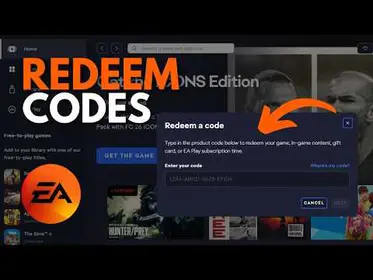
- Look in the top-right corner of your screen and click the Redeem Code button. Alternatively, click your profile avatar in the upper right and select Redeem Code from the drop-down menu.
- Copy the code from your digital receipt. Paste or type the sequence into the text box.
- Click Next to preview the entitlement.
- Review the item summary, then hit Confirm to lock the product to your library.
Check your typing carefully if you enter it manually. Most activation strings exclude spaces, but accidental trailing spaces copied from an email receipt can trigger an invalid code prompt.
| Platform / Launcher Component | Minimum System Requirement | Activation Status (2026) |
|---|
| EA App (PC) | 64-bit Windows 10 / 11 | Fully Active |
| EA App (Mac) | macOS Catalina or newer | Fully Active |
| Origin Desktop Client | Legacy 32-bit / Older OS | Discontinued (April 17, 2025) |
| Steam / Epic Integration | EA App Background Link Required | Active via Client Linking |
Running an active 64-bit environment is mandatory to download, activate, and launch The Sims 4 through EA's desktop systems.
Where Did My DLC Go? Managing Sims 4 Add-ons
Support tickets frequently spike after a player redeems an expansion like Get Together, opens their library, and finds an empty space where they expected a separate game cover.
Do not worry. The EA App does not create separate desktop tiles for expansions, game packs, or stuff packs. Only full base games appear as standalone tiles in your Library.
To view and install your activated add-ons:
- Head to your Library and hover your mouse over the primary The Sims 4 tile.
- Click the three horizontal dots (...) that appear on the game cover.
- Select Manage add-ons from the menu list.
- Scroll through your owned packs. Any newly redeemed pack will show an Install or Download prompt.
Large expansions require adequate local drive space. For instance, an expansion pack like The Sims 4 Get Together requires roughly 18 GB of free storage space, alongside standard PC hardware specifications like 4 GB of RAM.
| Sims 4 Product Type | Typical Size / Delivery | EA App Library Location |
|---|
| Base Game License | Free-to-Play (~20+ GB) | Standalone Game Tile |
| Expansion Pack (e.g., Get Together) | ~18 GB Installation Space | Base Game Tile > Manage add-ons |
| Game / Stuff Pack | Variable Smaller Package | Base Game Tile > Manage add-ons |
| EA Play Catalog License | Subscription Entitlement | Base Game Tile / EA Play Section |
Always inspect the sub-menu of the base game tile whenever adding expansion codes to verify the license attached correctly.

Fixing Common EA App Code Activation Errors
Activation issues usually trace back to single-use locks, typos, or catalog prerequisites. Use these fixes to clear the four most common blockers.
Code Already Redeemed
This error means the exact key was already claimed. Digital product codes are single-use. They attach irrevocably to whichever account used them first. If you bought your key from an unauthorized marketplace or secondhand reseller, EA Support cannot help you recover the funds. You will need to contact the seller directly for a replacement.
Invalid Code
Double-check your characters. Look for confused letters like B and 8, or O and 0. Avoid trailing spaces. Also remember that select legacy titles from the disc era—such as original releases of The Sims (1), The Sims 2, Battlefield 1942, or Crysis—cannot be redeemed through the modern EA App.
Base Game Required Error
If you try to redeem a pack without the core game, the transaction fails. Grab the free base game from the EA App store, let the entitlement tie to your account, and try the key again.
Broken Installs or Missing Add-on Assets
If you redeemed a pack, downloaded it, and your game crashes on load, don't panic. Click the three dots (...) on The Sims 4 tile and hit Repair. The EA App will scan local files, verify integrity, and download damaged or missing files.
If you use custom content, automatic updates can wreck your save folder. Head to Settings > Download > Updates and turn off "Update Games Automatically." Your saves and tray files live inside Documents > Electronic Arts > The Sims 4, so keep backups of that folder before running manual repairs.
If you need a fresh start or want to gift the experience to a friend, you can pick up The Sims 4 Origin CD-Key Global to secure a validated code for immediate library registration.
Spender Recommendations: Building Your Sims 4 Library
The catalog carries dozens of packs. Prioritizing purchases around your specific playstyle keeps costs and storage demands under control.
- Free-to-Play Tier: Stick strictly to the base game. It costs nothing on the EA App and lets you experiment with the building tools and Live Mode without spending a dime. Test how the game runs on your system before putting cash into DLC.
- Mid-Tier Expander: Pick up two or three major expansions that genuinely overhaul gameplay systems (such as Seasons or Get Together). Buy them as global CD keys rather than paying full retail. At roughly 18 GB per major expansion, your hard drive stays manageable while giving your Sims meaningful hobbies and weather cycles.
- Heavy Simmer / Completionist: If you want all expansions, game packs, and stuff packs, consider pairing a subscription like EA Play ($5.99 monthly or $39.99 annually) to snag a 10% discount on official digital catalog items while grabbing external global keys for the remaining packs. Stagger downloads so you do not overwhelm your drive space.
| Spending Tier | Target Content | Strategy |
|---|
| Casual / F2P | The Sims 4 Base Game | Free-to-play claim on EA App |
| Mid Spender | Core Expansions (~18 GB each) | Buy digital CD keys; download via Manage Add-ons |
| Heavy Spender | Full DLC Catalog + Subscriptions | Leverage EA Play 10% member discounts + bundle keys |
Smart expansion planning prevents you from paying full price on massive packs you might only play for a weekend.

Digital Safety: Genuine Codes vs. Account Phishing
Legitimate sellers only ever supply an alphanumeric key. They will never ask for login access.
That key appears on your order confirmation screen or in an email receipt. Paste it directly into the desktop client, and EA handles license assignment automatically. Legitimate transactions never require remote desktop tools or screen sharing.
Never give someone your EA account password or secondary security prompt answers. Avoid sellers who ask for your account credentials to "load the game directly." Handing over account access risks unauthorized email changes, and remember that EA restricts account email and EA ID edits to once every 30 days.
If you ever get locked out due to a forgotten or compromised primary email, you can try signing in using linked platform credentials like Steam, Xbox, PlayStation, Google, or Apple accounts to regain control.
When buying codes, stick to reputable sources that deliver keys cleanly. You can grab The Sims 4 Origin CD-Key Global securely to bypass shady workarounds and get straight into your game.
FAQ
How do I redeem a Sims 4 CD key on the EA app?
Log into the EA App, open your Library, and click the Redeem Code button in the top right. Enter your digital key without typos or trailing spaces, then click Confirm to attach the license to your EA Account.
Why does the EA app say my Sims 4 code has already been used?
Every digital product code is single-use and binds permanently to the account that activated it first. If you bought the key secondhand or from an unauthorized marketplace, EA Support cannot assist, and you must request a refund or replacement from your seller.
Where do my Sims 4 expansion packs appear after redeeming a code?
Sims 4 expansions do not create their own standalone tiles in your Library. Hover over the base Sims 4 tile, click the three horizontal dots, select Manage add-ons, and install your pack from that list.
Can I redeem a Sims 4 expansion pack code if I don't own the base game?
No, your account must have an active base game license before an expansion pack key will validate. Fortunately, The Sims 4 base game is free-to-play and can be claimed directly from the EA App store catalog.
Can I redeem legacy Sims games like The Sims 1 or 2 on the EA app?
No, EA does not support EA App code redemption for legacy disc-era titles. Games like The Sims 1, The Sims 2, and classic Battlefield titles cannot be claimed using modern digital product codes in the app.
What operating system is required to use the EA app in 2026?
You must run a 64-bit operating system, specifically Windows 10, Windows 11, or macOS Catalina or newer. The older 32-bit systems and the legacy Origin desktop client were officially discontinued in April 2025.
How do I avoid redeeming my Sims 4 CD key onto the wrong EA Account?
Before entering your code, open Settings > My Profile > Manage inside the EA App to check the email address registered on the profile. Because keys bind permanently upon activation, verifying your active profile beforehand prevents lost licenses.
Final Verdict
Activating The Sims 4 in the EA App comes down to two steps: checking the base game's "Manage add-ons" sub-menu and confirming your active login before entering the code. Verify your account email, ensure the free base game license is registered, and paste your code cleanly. With those checks in place, your packs will load without launcher conflicts.