


Apple Gift Card (CH) Top Up Overview and CHF Denominations
An Apple Gift Card (CH) top up provides Swiss Franc (CHF) digital credit directly to your Apple Account balance. Designed specifically for users registered in the Switzerland region, this digital voucher lets you purchase apps, premium games, in-game items, digital media, and cloud storage across Apple's digital ecosystem.
BitTopup provides digital code delivery for Swiss Apple Gift Cards in multiple denominations, accommodating both micro-transactions and larger subscription bundles. Pricing details, available denominations, and live conversion rates are displayed directly on the checkout screen.
| Denomination (CHF) | Typical Use Case | Eligible Apple Services |
|---|---|---|
| CHF 15 - CHF 30 | In-game currency, premium mobile apps, single music albums | App Store, iTunes Store |
| CHF 50 - CHF 100 | Monthly subscription bundles, seasonal game passes, iCloud+ 2TB | Apple Music, Apple TV+, iCloud+, Arcade |
| CHF 150 - CHF 300+ | Annual subscriptions, pro creative software, heavy in-app recharges | Final Cut Pro for iPad, Logic Pro, In-App Items |
Swiss Region Lock and Apple Account Requirements
Apple gift cards are strictly region-locked and currency-locked. A Swiss Apple Gift Card (CH) can only be redeemed on an Apple ID whose country/region setting is configured to Switzerland (CHF currency).
Key regional constraints to keep in mind:
- Currency Match: The card code supplies Swiss Francs (CHF). It cannot be redeemed on US, UK, German, French, or other non-Swiss accounts.
- Account Region: If your Apple ID is set to another country, you must either switch your country/region to Switzerland in your account settings or create a dedicated Swiss Apple ID.
- Payment Method on File: When switching account regions, you may need to clear existing balances and cancel active subscriptions before changing to the Switzerland storefront.
- Digital Service Designation: Digital Swiss gift codes purchased through BitTopup are designated for digital services, App Store products, and subscriptions linked to your Swiss Apple Account.
How to Verify Your Swiss Apple ID Region and Account Status
Before redeeming your code, verify that your Apple device or account is set to the Swiss App Store. This avoids regional mismatch errors during code activation.
Follow these steps to check your Apple ID region:
- Open the Settings app on your iPhone or iPad.
- Tap your name at the top to access Apple ID / Apple Account settings.
- Select Media & Purchases, then tap View Account (you may need to sign in with Face ID, Touch ID, or your passcode).
- Tap Country/Region.
- Ensure that Switzerland is selected as your active country. If another country is listed, your Apple Gift Card (CH) top up code will return an error stating that the code must be redeemed in the Swiss storefront.
Step-by-Step Guide: How to Redeem Apple Gift Card (CH)
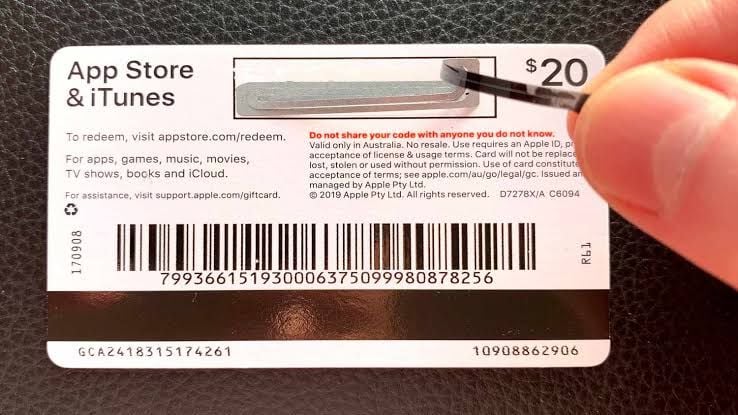
Redeeming your digital code is straightforward and updates your Apple Account balance immediately. Once purchased on BitTopup, retrieve your 16-digit code from your email or order page, then use one of the device-specific methods below.
Redeeming on iPhone, iPad, or Apple Vision Pro
- Open the App Store app.
- Tap your profile icon or photo in the upper-right corner of the screen.
- Tap Redeem Gift Card or Code.
- Choose Enter Code Manually.
- Enter the 16-digit code provided in your BitTopup order.
- Tap Redeem in the upper-right corner. The CHF credit is added instantly to your balance.
Redeeming on Mac (macOS)
- Open the App Store app on your Mac.
- Click your name or the sign-in button at the bottom of the sidebar.
- Click Redeem Gift Card in the top-right corner.
- Type or paste your 16-character digital code.
- Click Redeem.
Redeeming on Windows PC
- Open the Apple Music app, Apple TV app, or iTunes for Windows.
- Click your name or Account in the menu bar or sidebar.
- Click Redeem.
- Sign in with your Swiss Apple Account credentials if prompted.
- Input your 16-digit code and confirm redemption.
What You Can Buy with Your Swiss Apple Account Balance
Redeeming your Swiss voucher provides full flexibility across Apple's digital storefronts. As long as your account holds a positive CHF balance, Apple automatically deducts funds from your credit before charging any secondary payment method.
Eligible purchases include:- App Store and Mobile Games: Purchase paid utility apps, productivity tools, and full premium games on iOS, iPadOS, and macOS.- In-App Purchases: Buy game passes, gacha pulls, gems, coins, skins, and item bundles in top mobile games directly through the App Store billing system.- Apple Subscriptions: Pay for recurring monthly or yearly plans including iCloud+ storage (50GB, 200GB, 2TB), Apple Music, Apple Arcade, Apple TV+, Apple Fitness+, and Apple News+.- Apple Books and Audiobooks: Buy e-books and digital audiobooks via the Apple Books store.- iTunes Media: Rent or buy high-definition movies, TV series, and music tracks.
Ineligible purchases:- Physical hardware and accessories at Apple Retail Stores or on apple.com.- Sending cash transfers via Apple Cash or buying secondary third-party gift cards.
How to Check Your Swiss Apple Account Balance
After completing your Apple Gift Card (CH) recharge, verify that your account balance reflects the new CHF total.
On iOS and iPadOS:1. Open the App Store app.2. Tap your profile picture in the top-right corner.3. Your available Swiss Franc balance appears directly under your name and email address.
On Mac:1. Open the App Store.2. Look at the bottom-left corner of the window below your name. Your balance is displayed in CHF.
On Windows:1. Open Apple Music or iTunes.2. Sign in with your Swiss Apple Account.3. View your balance beneath your account profile name.
Troubleshooting Apple Gift Card (CH) Redemption Errors
If you run into an error during redemption, check the common causes and solutions below:
Code Must Be Redeemed in Another Country or Region- Cause: Your Apple ID is set to a region other than Switzerland.- Fix: Change your Apple ID country to Switzerland, or create a Swiss Apple Account. Swiss CHF gift cards cannot be credited to US, EU, or UK storefronts.
Code Is Not Valid- Cause: Typos in the 16-digit alphanumeric code.- Fix: Double-check characters that look similar (e.g., number 0 vs letter O, number 1 vs letter I, number 8 vs letter B). Copy and paste the exact code from your BitTopup order details.
Code Has Already Been Redeemed- Cause: The code was entered previously or redeemed on another family member's account.- Fix: Sign out of your App Store account and sign back in to refresh your balance display. If your balance did not update, check purchase history to verify if the credit was applied.
Card Is Inactive- Cause: Activation delay from the distribution gateway.- Fix: Contact BitTopup customer support with your order number for quick verification.
Why Buy Apple Gift Card (CH) on BitTopup
Purchasing Swiss digital vouchers through BitTopup offers a secure, fast, and dependable solution for gamers and Apple users worldwide.
- Instant Digital Code Delivery: Receive your 16-digit voucher code immediately after payment verification in your user dashboard and via email.
- Zero Password Sharing: BitTopup never asks for your Apple ID password, two-factor authentication codes, or login credentials. You receive the code and redeem it yourself inside your official Apple interface.
- Safe and Flexible Checkout: Complete your transaction using verified payment options. Live pricing and currency conversions appear clearly at checkout with zero hidden fees.
- 24/7 Customer Support: Dedicated live support agents are available around the clock to assist you with order status, code verification, or redemption guidance.
Frequently Asked Questions
Can I use an Apple Gift Card (CH) outside Switzerland?
Yes, as long as your Apple ID account region is set to Switzerland. The physical location of your device does not block redemption, but your Apple Account country setting and billing storefront must be Switzerland (CHF).
How do I redeem my Apple Gift Card (CH) code on my iPhone?
Open the App Store app, tap your account profile icon in the upper right, tap Redeem Gift Card or Code, choose Enter Code Manually, input your 16-digit BitTopup code, and tap Redeem.
Can I recharge my existing Apple Account balance with this gift card?
Yes. When you redeem the voucher code, the CHF value is automatically added to your existing Apple Account balance. It stacks on top of any current funds and will be used automatically for future purchases and subscription renewals.
What can I purchase with a Swiss Apple Gift Card?
You can use the balance for App Store apps, in-game currency and item top-ups, iCloud+ cloud storage, Apple Music, Apple Arcade, Apple TV+ subscriptions, and iTunes digital movies or music.
How do I check my Apple Account balance after redeeming the card?
Open the App Store on your iPhone, iPad, or Mac. Tap your profile picture in the top-right corner. Your current credit in CHF will appear immediately under your account name.
Do Swiss Apple Gift Cards have an expiration date?
No. Apple Gift Cards and account credit in Switzerland do not have an expiration date. Once redeemed, the funds remain in your Swiss Apple ID balance until you spend them.