


GrabGifts Online Voucher (MY) Top Up: Digital Rides and Delivery Credits
GrabGifts Online Vouchers for Malaysia provide direct credit discounts for everyday on-demand services across the Grab superapp. When you purchase a digital voucher, you receive an activation code or direct link that binds credit value directly to your Malaysian Grab account. These vouchers simplify your daily transit, meal orders, and grocery runs without requiring you to link personal bank cards or credit accounts to the Grab application.
BitTopup delivers authentic, region-locked Malaysia GrabGifts vouchers directly to your digital dashboard. You can redeem vouchers for personal use or send activation links to friends, family, and colleagues across Malaysia for instant redemption.
What is GrabGifts Online Voucher (MY) and Supported Services
A GrabGifts Online Voucher (MY) is an official digital prepaid code denominated in Malaysian Ringgit (MYR). It is specifically configured for users operating Grab accounts registered within Malaysia with active Malaysian phone numbers (+60).
GrabGifts vouchers apply to major core verticals in the Grab mobile application:
- GrabTransport / GrabCar: Apply voucher discounts toward private car hires, taxis, and premium rides across all supported cities in Malaysia.
- GrabFood: Redeem credit to pay for restaurant orders, quick snacks, beverages, and desserts delivered straight to your door.
- GrabMart: Use your balance to cover essentials, fresh produce, packaged goods, and pharmacy items from participating retail merchants.
Note on unsupported services: GrabGifts vouchers do not apply to GrabHitch carpooling, third-party bill payments, mobile prepaid reloads, GrabInsure, or peer-to-peer GrabPay wallet transfers. They cannot be withdrawn to a bank account as cash.
Eligible Categories: GrabCar, GrabFood, and GrabMart Usage Rules
Grab enforces specific transaction terms depending on the category of voucher you purchase. Some GrabGifts vouchers are multi-category (valid across Ride, Food, and Mart), while others are service-specific.
| Service Vertical | Eligible Charges | Excluded Fees / Surcharges |
|---|---|---|
| GrabCar (Rides) | Base fare, distance fare, surge pricing | Toll charges, highway fees, parking fees, driver tips |
| GrabFood | Food item costs, restaurant basket totals | Platform fee, small order fee, delivery fee (unless specified) |
| GrabMart | Retail merchandise, grocery item totals | Platform fee, packaging charges, carrier/driver tips |
Review your voucher's detailed category tags upon receipt to ensure your cart matches the voucher's designated service line.
Step-by-Step Guide: How to Redeem GrabGifts Voucher in Malaysia
Redeeming your voucher takes under a minute. Digital vouchers arrive as an activation URL or alphanumeric code. Follow these exact steps to link the voucher to your Grab app.
BitTopup Order Complete ➔ Open Activation Link ➔ Tap "Claim to Grab App" ➔ Voucher saved in "Offers/Rewards" ➔ Apply at Checkout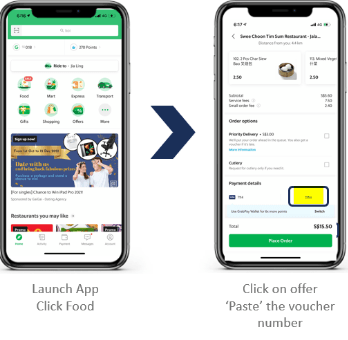
Detailed Redemption Steps:
- Access your voucher link: Open your BitTopup order details and copy your GrabGifts URL or code.
- Open the link on your mobile device: Paste the redemption URL into your mobile browser (Safari, Chrome) on the device where your Grab app is installed.
- Authenticate with Grab: Tap the green Claim to Grab App or Redeem button. The page will automatically trigger and open your Grab app.
- Confirm the claim: Select your active Grab account. Once confirmed, the screen will display a success message, and the voucher will sit in your app's Offers / My Rewards inventory.
- Use during booking or ordering:
- For GrabCar: Set your pickup and drop-off points, tap Offer / Promo, select the claimed GrabGifts voucher, and book your ride.
- For GrabFood / GrabMart: Add items to your cart, proceed to the checkout screen, tap Add Offer, choose your voucher, and place your order.
Important Voucher Limitations: Non-Stackable, Single-Use, and Fee Exclusions
Understanding Grab's redemption rules prevents unexpected charges at checkout:
- Single-Use Rule: Each GrabGifts voucher code can only be used in one transaction. If your order total is lower than the face value of the voucher, the remaining balance is instantly forfeited and cannot be saved for future orders. (Example: Using a MYR 20 voucher on a MYR 15 order forfeits the remaining MYR 5). Always ensure your total meets or exceeds the voucher face value to get full utility.
- Non-Stackable Policy: Grab allows only one promo code or voucher per booking or order. You cannot combine two GrabGifts vouchers or pair a GrabGifts voucher with a merchant discount code in a single cart.
- Excluded Fees: GrabGifts vouchers apply strictly to the primary subtotal. Platform Fees (typically MYR 0.20 to MYR 0.50), Small Order Fees, highway toll surcharges, and optional driver tips must be paid separately using GrabPay balance, linked cards, or cash.
Validity Period and Expiry Guidelines (180 Days)
Every GrabGifts Online Voucher (MY) comes with a strict operational timeframe:
- Activation Window: You must click and bind the voucher link to your Grab account within 180 days from the date of issue.
- Usage Expiry: Once the voucher is claimed into your Grab app under My Rewards, check the specific expiration date listed on the reward card. Unused vouchers past their expiration date become invalid immediately and cannot be reissued, extended, or refunded by Grab or BitTopup.
To ensure zero loss of funds, claim and apply your voucher promptly after purchase.
Why Recharge GrabGifts Online Voucher (MY) on BitTopup
BitTopup provides a streamlined, secure checkout designed specifically for digital vouchers and mobile credits.
- Zero Account Risk (No Passwords Required): We never ask for your Grab login credentials, passwords, or SMS OTP codes. You only receive a secure activation link/code to claim directly within your own app.
- Transparent Live Checkout: Check live, competitive rates directly on the catalog page. What you see during checkout is what you pay, with complete clarity across local and international payment methods.
- Instant Code Delivery: Your activation URL is generated immediately once payment is cleared, giving you instant access to your transport and food funds.
- 24/7 Customer Support: If you encounter any redemption hurdles or link errors, our dedicated support team is available around the clock to assist you.
Troubleshooting Grab Voucher Activation and Error Codes
If you run into issues while claiming or applying your voucher, check these common fixes:
1. "Voucher cannot be used in your region" / Country Mismatch
GrabGifts (MY) vouchers are strictly locked to the Malaysia region. This error occurs if your Grab profile country is set to Singapore, Thailand, Indonesia, or the Philippines. Ensure your registered phone number is a Malaysian (+60) number and that your GPS location indicates you are within Malaysia.
2. "Voucher already redeemed"
If you see this error after tapping your claim link, open your Grab app directly, go to Account > Rewards > My Rewards / Saved Offers. In most cases, the voucher was successfully claimed on your first tap and is already sitting in your wallet ready to be applied.
3. The Link Does Not Open the Grab App
If tapping the link keeps you in your web browser instead of launching the app, copy the redemption link, paste it into your mobile browser's URL bar directly, or update your Grab application to the latest version via the Google Play Store or Apple App Store.
4. Voucher Cannot Be Selected at Checkout
Make sure your cart meets the specific category criteria (e.g., trying to apply a GrabFood-specific voucher to a GrabCar ride will fail). Also, verify that the order subtotal is completely covered by the minimum spend requirements if applicable.
Frequently Asked Questions
How do I redeem my GrabGifts voucher in Malaysia?
Open the redemption link received from BitTopup on your mobile phone, tap Claim to Grab App, and confirm your account. The voucher will automatically bind to your Grab Rewards inventory, where you can select it under the Offers / Promo section during ride booking or food checkout.
Where can I see my redeemed Grab voucher in the Grab app?
Open the Grab app, tap Account in the bottom menu, select Rewards, and tap My Rewards (or Saved Offers). All claimed and active GrabGifts vouchers will appear there with their expiration dates and category terms.
Can I convert a Grab voucher or gift card to cash?
No. GrabGifts vouchers are non-refundable, non-transferable once claimed, and cannot be converted into cash, transferred to bank accounts, or withdrawn from the GrabPay wallet.
Why can't I apply my Grab voucher to my order or booking?
Common reasons include trying to use a category-specific voucher on the wrong service (e.g., Mart voucher on a Food order), not meeting minimum order thresholds, trying to apply the voucher in a country outside Malaysia, or having another promotional discount code already active in your cart.
Can I stack multiple Grab vouchers in a single order?
No. Grab limits checkouts to one voucher or promotional code per transaction. You cannot combine multiple GrabGifts vouchers on a single ride, food delivery, or grocery order.
Does the Grab voucher cover Platform Fees or Small Order Fees?
No. GrabGifts vouchers deduct credit strictly from the base fare or order subtotal. Platform Fees, Small Order Fees, road tolls, and driver tips are excluded and must be paid via GrabPay, debit/credit card, or cash.
What is the validity period of a GrabGifts Online Voucher (MY)?
GrabGifts vouchers generally carry a validity window of 180 days from the purchase date for claiming. Always check your specific voucher details in your BitTopup order dashboard and claim it to your Grab account before the expiration date.