


What is a Steam Wallet Code KRW Top Up?
A Steam Wallet Code (KRW) is a prepaid digital voucher used to add South Korean Won (₩) directly into your Steam account balance. Once redeemed, the funds remain in your digital wallet without expiring, allowing you to purchase PC games, downloadable content (DLC), soundtrack bundles, in-game cosmetics, and community market items across Valve's platform.
Unlike direct credit card billing or local mobile microtransactions that may require domestic identity verification in South Korea, a digital wallet code offers an accessible alternative. You purchase a specific denomination, receive an alphanumeric code, and activate it directly through the official Steam redemption interface. This balance can then be spent across sales, new releases, and microtransactions in major titles like Counter-Strike 2, Dota 2, PUBG: Battlegrounds, or local Korean indie releases.
Steam Currency Lock & South Korea Account Region Requirements
Valve enforces strict currency and regional restrictions on Steam Wallet gift cards. To successfully redeem a Steam Wallet Code denominated in South Korean Won (KRW), your Steam account region and store country must be set to South Korea.
Understanding the Currency Mismatch Restriction
In past years, Steam allowed automatic currency conversion when activating foreign wallet vouchers. Valve updated this policy to protect regional pricing structures. If your Steam account is registered in the United States (USD), Europe (EUR), Japan (JPY), or any other region outside South Korea, attempting to activate a KRW code will trigger an error message: "The code you entered is not valid in your currency."
How to Verify Your Steam Account Country
- Open the Steam client or visit
store.steampowered.com. - Click on your profile name in the top-right corner and select Account details.
- Under Store & Purchase History, verify that Country displays South Korea (KRW).
- If your account reflects South Korea, your wallet will accept KRW codes without conversion friction.
Available KRW Denominations for Steam Wallet
Digital Korean Steam vouchers come in standardized South Korean Won denominations. Choosing the correct value depends on the retail price of the title you plan to buy or the in-game transaction you wish to complete.
| Denomination (KRW) | Typical Use Case | Unlocks Limited Account? |
|---|---|---|
| 5,000 KRW | Indie titles, small in-game DLCs, micro-transactions | Partial (combine with other spending) |
| 10,000 KRW | Mid-tier titles, Battle Passes, Community Market items | Yes (Exceeds the $5 USD threshold) |
| 25,000 KRW | Popular mid-range games, seasonal expansion bundles | Yes |
| 50,000 KRW | Standard Edition AAA game releases | Yes |
| 100,000 KRW | Collector editions, multi-game sales baskets, high-tier skins | Yes |
Note: Exact pricing, exchange rates, and real-time stock availability are displayed directly on the BitTopup live checkout interface before payment confirmation.
How to Recharge Steam Wallet Code (KRW) Step-by-Step
Activating your digital voucher takes less than a minute. Follow these steps to apply the balance to your account:
- Obtain Your Code: Complete your purchase on BitTopup to access your 15- or 16-digit alphanumeric digital key.
- Open the Redemption Page: Launch the desktop Steam client or visit
https://store.steampowered.com/account/redeemwalletcodein your web browser. - Log in to Steam: Sign in with your South Korean Steam account credentials.
- Locate Account Profile Details:
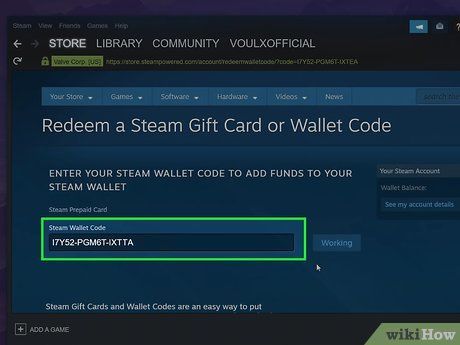
- Enter the Code: Copy the voucher code from your BitTopup order details and paste it into the field labeled Steam Wallet Code.
- Confirm Activation: Click Continue. If prompted for a billing address, provide a valid South Korean address structure to complete the registration.
- Check Balance: The funds will be credited instantly to your account balance, visible in the upper right corner next to your profile name.
Unlocking Limited Steam Account Features with KRW Top Up
Valve limits new or inactive Steam accounts to protect the community from spam, phishing bots, and market manipulation. A "Limited User Account" cannot perform essential social actions until a minimum of $5.00 USD (or equivalent in local currency) has been spent on the platform.
Features Restricted on Limited Accounts
- Sending Steam friend invites.
- Accessing the Steam Community Market to buy or sell items.
- Creating group chats or public Steam community groups.
- Voting on Steam Workshop submissions or Greenlight entries.
- Gaining Steam profile levels and trading cards.
How KRW Vouchers Solve Account Limitations
Redeeming a 10,000 KRW or higher wallet code on your South Korean account instantly fulfills the $5.00 USD threshold. Once the wallet code is activated, Steam automatically removes the limited status from your profile, granting full access to friend requests, trading, and community market transactions.
Troubleshooting Common Steam Code Redemption Errors
If you encounter an issue while attempting to redeem your code, use this guide to identify and resolve the problem.
1. "Code is Invalid" or Typo Errors
- Steam wallet codes use letters and numbers formatted like
AAAAA-BBBBB-CCCCC. Avoid confusing the letter O with the number 0, the letter I with the number 1, or the letter B with the number 8. - Ensure you have not accidentally copied extra blank spaces before or after the code string.
2. "The Code Entered Is Not Valid in Your Currency"
- This indicates an account region mismatch. Steam will not accept a KRW voucher on an account set to USD, EUR, or other regional storefronts. Confirm your account store country is set to South Korea.
3. Attempting to Redeem Non-Steam Keys
- Ensure you are redeeming a Steam Wallet Code on the Steam platform. Do not enter PlayStation Network, Xbox, or mobile platform keys into the Steam client.
4. "Too Many Activation Attempts"
- If you enter incorrect codes repeatedly, Steam temporarily blocks further entries for security reasons. Wait 30 to 60 minutes before attempting to redeem your code again.
Safe Top Up Practices: Zero Account Sharing
Your account security is critical. When purchasing a Steam Wallet Code (KRW) through BitTopup:
- No Password Required: You are buying a standalone digital voucher. BitTopup will never ask for your Steam password, Steam Guard mobile authentication codes, or login credentials.
- No Account Sharing: You never need to hand over control of your account to an external operator. You receive the code directly and redeem it yourself inside the official Steam client.
- Safe Transactions: Standardizing your account funding through digital gift cards protects your primary banking information from being tied directly to online clients.
Why Buy Steam Wallet Code (KRW) on BitTopup
BitTopup provides a straightforward platform for acquiring South Korean Steam Wallet codes:
- Instant Digital Code Retrieval: Access your alphanumeric key immediately after completing your order so you can purchase games without delay.
- Transparent Live Checkout: All applicable pricing and payment options are clearly shown during checkout without hidden fees.
- Broad Payment Selection: Pay using standard international or regional digital payment channels easily.
- 24/7 Customer Support: If you ever experience issues with code retrieval or need guidance on region checks, our support team is available around the clock to assist you.
Frequently Asked Questions
How do I redeem my Steam Wallet Code (KRW)?
Log in to your South Korean Steam account on your computer or mobile browser, visit store.steampowered.com/account/redeemwalletcode, paste your 15- or 16-digit code into the box, and click Continue to add the funds to your balance.
Can I redeem a KRW Steam Wallet Code on an account set to another currency?
No. Due to Steam's regional currency restrictions, KRW wallet codes can only be redeemed on Steam accounts where the store country and currency are set to South Korea (KRW). Valve does not automatically convert KRW codes to other currencies.
Where can I find Korean Steam Gift Cards online?
You can purchase digital Korean Steam Wallet Codes directly on BitTopup. You will receive an authentic alphanumeric code that can be activated on any eligible South Korean Steam account.
Do Steam Wallet Codes (KRW) have an expiration date?
No. Once you purchase a digital code, it does not expire. Furthermore, after you redeem the code, the KRW balance remains in your Steam Wallet indefinitely until you choose to spend it.
What is the Steam $5 rule and does a KRW recharge unlock my account?
Steam requires users to spend or deposit the equivalent of $5.00 USD to lift "Limited Account" restrictions. Redeeming a KRW wallet code of 10,000 KRW or higher satisfies this requirement and unlocks features like adding friends and using the Steam Community Market.
What should I do if my Steam Wallet Code shows an invalid error?
Double-check the code for typos, especially easily confused characters like 0/O or 1/I. Make sure there are no spaces before or after the code. If the error persists, check your order history on BitTopup and verify that your Steam account country is set to South Korea.