


Apple Gift Card (IT) Top Up: Digital EUR Balance for Italian Apple Accounts
An Apple Gift Card (IT) top up gives you instant digital credit in Euros (€) to spend across the entire Italian Apple ecosystem. The unified Apple Gift Card combines App Store, iTunes, and Apple digital service balances into a single, flexible account credit. Once redeemed, your funds apply automatically to your Italian Apple Account balance.
Whether you need to pay for regular monthly subscriptions, buy premium iOS games, unlock in-app purchases, or expand your cloud storage, an Italian Apple Gift Card provides a secure payment method without linking a personal credit card or bank account directly to your device.
Region Lock Requirements: Italy (IT) Apple Accounts Only
Apple enforces strict country and regional restrictions on all digital gift cards. An Apple Gift Card purchased for the Italy (IT) region is denominated in Euros (EUR) and can only be redeemed on an Apple Account registered with Italy as its designated country/region.
Key regional rules to keep in mind:* Country Match: Your Apple ID region must be set to Italy. If your account is registered to another country (such as the US, UK, France, or Germany), the code will return a region mismatch error.* Currency Lock: Italian codes credit your balance strictly in EUR (€). They cannot be converted to other currencies or transferred between accounts.* Account Balances: If you plan to change regions in the future, your Apple Account balance must be spent down to zero first.
How to Check Your Account Region and Find Your Apple ID
Before redeeming your digital code, verify that your active Apple ID is configured for the Italian App Store.
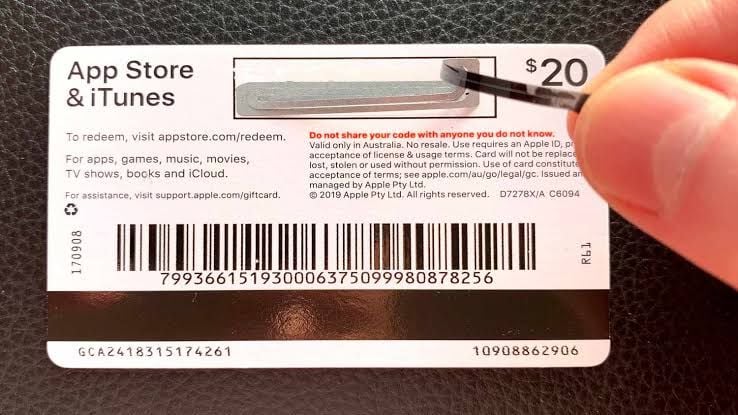
Checking Your Apple ID Region on iOS (iPhone / iPad):
- Open the Settings app on your device.
- Tap your Name / Apple ID Banner at the top of the screen.
- Tap Media & Purchases, then select View Account.
- Tap Country/Region to verify that the active country is set to Italy.
Checking Your Apple ID on Mac:
- Open the App Store on macOS.
- Click your name or profile image in the bottom-left corner.
- Click Account Settings at the top right.
- Look under the Apple ID Summary section to verify your country/region is listed as Italy.
Step-by-Step Guide: How to Recharge and Redeem Apple Gift Card (IT) on iOS, Mac, and PC
Redeeming your 16-character digital code is simple and applies funds immediately to your Apple ID balance.
How to Redeem on iPhone, iPad, or Apple Vision Pro:
- Open the App Store app.
- Tap your profile icon or photo in the top-right corner.
- Tap Redeem Gift Card or Code.
- Tap Enter Code Manually.
- Type or paste the 16-digit alphanumeric code received from BitTopup and tap Redeem.
How to Redeem on Mac (macOS):
- Launch the App Store application.
- Click your profile name in the lower-left sidebar.
- Click Redeem Gift Card in the upper-right corner.
- Enter your 16-character code manually and confirm the redemption.
How to Redeem on Windows PC:
- Open the Apple Music app, Apple TV app, or iTunes for Windows.
- Click on Account in the top menu bar.
- Select Redeem.
- Sign in with your Italian Apple ID, enter your digital gift card code, and confirm.
| Platform | Application Used | Redemption Path | Required Account Region |
|---|---|---|---|
| iOS / iPadOS | App Store | Profile > Redeem Gift Card or Code | Italy (IT / EUR) |
| macOS | Mac App Store | Profile > Redeem Gift Card | Italy (IT / EUR) |
| Windows PC | Apple Music / iTunes | Account Menu > Redeem | Italy (IT / EUR) |
| Web Browser | apple.com/redeem | Log in > Enter 16-digit code | Italy (IT / EUR) |
Eligible Services: Apps, Subscriptions, iCloud+, and Digital Media
Once redeemed, your Apple Account EUR balance is used as the default payment method for almost all digital purchases in the Italian Apple ecosystem:
- App Store & Games: Buy paid apps, mobile titles, and in-game microtransactions directly.
- Apple Subscriptions: Pay your recurring fees for Apple Music, Apple TV+, Apple Arcade, and Apple Fitness+.
- iCloud+ Storage: Cover monthly cloud storage plans (50 GB, 200 GB, or 2 TB tiers) to back up photos, device backups, and files.
- Apple Books & Media: Buy digital books, audiobooks, and purchase or rent HD/4K movies on the Apple TV app.
- In-App Subscriptions: Pay for third-party service subscriptions billed directly through the App Store.
Troubleshooting Common Apple Gift Card Redemption Issues
If you run into an error while redeeming your code, review these standard fixes:
- Code Not Valid Error: Ensure you entered the 16-digit code correctly. Digital codes do not contain spaces. Watch out for easily confused characters like
O(letter) vs0(number),I(capital i) vs1(one), orBvs8. - Card Not Valid in This Region: This confirms your Apple ID country setting is not Italy. Go to Settings > Media & Purchases > View Account > Country/Region to verify or switch your region to Italy.
- Code Already Redeemed: The balance may have already applied. Sign out of the App Store, sign back in, and check your current balance in your account summary.
- Payment Method Required on File: Some active subscriptions require a backup payment method even when your account has an active gift card balance. In most cases, Apple draws from your gift card balance first before touching any secondary card.
Why Buy and Recharge Apple Gift Card IT on BitTopup
Recharging your Italian Apple ID through BitTopup is fast, dependable, and completely secure:
- Instant Digital Code Access: Receive your 16-digit Apple Gift Card code directly on your order screen and via email right after payment confirmation.
- 100% Account Safety: You never share your Apple ID password or personal credentials. You receive an authentic code that you redeem yourself.
- Transparent Live Checkout: Check all current denominations and live pricing options directly at the checkout page.
- Dedicated Support: Access responsive customer service ready to assist you if you have any questions regarding your code or redemption process.
Frequently Asked Questions
Can an Apple Gift Card (IT) be used on non-Italian Apple Accounts?
No. Apple Gift Card (IT) codes are strictly region-locked to the Italian App Store and iTunes environment. You must have an Apple ID set to Italy with EUR selected as the operating currency to redeem this card.
Can an Apple Gift Card be topped up or reloaded directly?
Physical or digital gift card codes themselves cannot be reloaded once used. To increase your account balance, simply purchase a new Apple Gift Card (IT) code on BitTopup and redeem it to add more funds to your existing Apple ID balance.
How do I recharge my Apple Account balance using an IT gift card code?
Open the App Store on your iPhone or iPad, tap your profile icon at the top right, select "Redeem Gift Card or Code", choose "Enter Code Manually", input your 16-character alphanumeric code, and confirm. The funds will reflect immediately in your account balance.
What can I buy with an Apple Gift Card IT balance in 2026?
Your EUR balance covers App Store apps, in-game currency and purchases, iCloud+ storage upgrades, and Apple subscriptions including Apple Music, Apple Arcade, Apple TV+, and Apple Books.
Can I convert an Apple Gift Card balance to cash or Apple Pay?
No. Apple Gift Card balances cannot be redeemed for cash, refunded, or transferred to Apple Pay cash balances. They are exclusively used for purchases across Apple's digital stores and services.
Why does my Apple Gift Card code say invalid or redeemed in another region?
This error occurs if your device is logged into an Apple ID registered outside of Italy, or if a character in the 16-digit code was mistyped. Confirm your account country in App Store settings and re-check each digit of your code.