

Bilibili Premium Membership (SG) Top Up & VIP Privileges (2026)
Bilibili is one of the premier streaming platforms for licensed Japanese anime, Chinese animations (donghua), user-generated content, and Southeast Asian entertainment. While basic streaming is available for free, a Bilibili Premium Membership provides full access to high-tier video resolutions, exclusive simulcasts, and an ad-free viewing experience.
Purchasing a Bilibili Premium Membership (SG) top up gives Singapore-based viewers access to top-tier features optimized for the regional content catalog:
- 1080p and 4K Ultra HD Streaming: Watch your favorite shows in crisp high-definition and 4K clarity. Free accounts are capped at standard definition (480p/720p).
- Zero Advertisements: Skip all pre-roll, mid-roll, and banner ads across mobile apps, tablets, and web browsers.
- Advance Simulcast Releases: Watch the newest seasonal anime episodes the moment they air, usually a full week ahead of non-VIP users.
- High-Bitrate Audio & Dolby Atmos: Enjoy theater-grade surround sound on supported shows and musical showcases.
- Multilingual Subtitles: Stream with localized official subtitles in English, Simplified Chinese, Traditional Chinese, Bahasa Indonesia, Thai, and Vietnamese.
- VIP Profile Customization: Stand out in comments and live chat with exclusive VIP badges, member-only stickers, and customized app icons.
Supported Subscription Durations & VIP Plan Options
BitTopup provides digital voucher codes for various Bilibili Premium Membership durations. You can choose the plan that matches your viewing schedule without being locked into auto-renewing credit card subscriptions.
| Plan Duration | Video Quality | Ad-Free Viewing | Advance Episode Access | Best For |
|---|---|---|---|---|
| 1 Month VIP (SG) | Up to 4K UHD | Yes | Yes | Trying out seasonal anime releases |
| 3 Months VIP (SG) | Up to 4K UHD | Yes | Yes | Full quarterly anime broadcast seasons |
| 12 Months Annual VIP (SG) | Up to 4K UHD | Yes | Yes | Year-round anime fans wanting the best value |
Note: Live pricing for each membership tier is displayed directly on the BitTopup checkout page.
Singapore Regional Account Compatibility & Terms
Before completing your purchase, ensure your account matches the regional criteria for this product:
- Regional Service Scope: This digital voucher is strictly valid for Bilibili accounts operating within the Singapore (SG) / Southeast Asia ecosystem (accessible via the international Bilibili app or
bilibili.tv). - China Mainland Account Restriction: This code cannot be redeemed on Mainland China Bilibili accounts (
bilibili.com). If your account is tied to a Chinese mainland phone number (+86) or China mainland server region, this voucher will return a regional mismatch error. - No Password Required: BitTopup delivers a 100% digital redemption code. You never need to share your account credentials, login email, or password.
- Code Expiration: Codes should be redeemed promptly upon receipt to ensure activation within the standard issuer validity window.
How to Find Your Bilibili Account UID
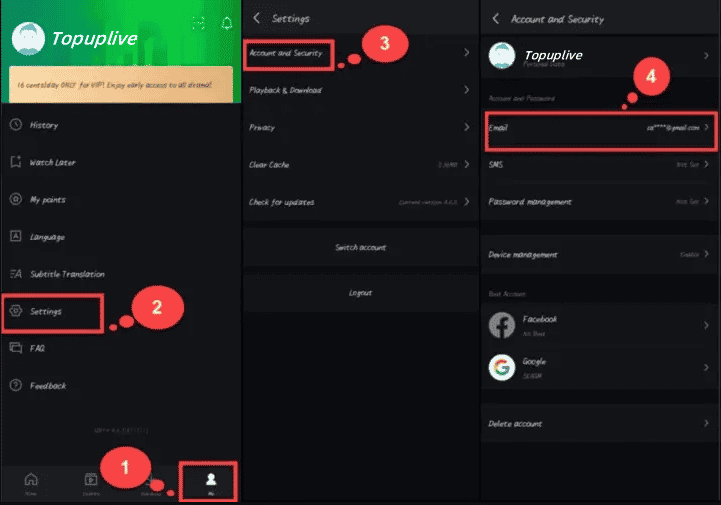
Locating your Bilibili User ID (UID) helps you confirm your account status before and after redemption.
- Open the Bilibili app or visit the official Bilibili website (
bilibili.tv). - Log in to your Singapore account using your registered email, mobile number, or social login.
- Tap Me in the bottom navigation bar (mobile) or click your profile avatar in the top-right corner (PC web).
- Your numeric UID is displayed directly beneath your username on your profile dashboard.
How to Recharge Bilibili Premium Membership (SG) on BitTopup
Getting your Bilibili VIP membership on BitTopup takes only a few minutes:
- Select Duration: Choose your preferred Bilibili Premium Membership duration (1 Month, 3 Months, or 12 Months) on this page.
- Review Order: Check the live checkout pricing and selected quantity.
- Provide Delivery Email: Enter your active email address where your digital voucher code and receipt will be sent.
- Complete Checkout: Select your preferred localized payment method from the available options at checkout and confirm the transaction.
- Receive Code: Your digital VIP voucher code will be displayed instantly on your order confirmation screen and delivered to your email.
Step-by-Step Guide: How to Redeem Bilibili Premium Codes (Web & App)
Once you receive your digital voucher code from BitTopup, follow these steps to activate your VIP status:
Method 1: Redeeming on the Bilibili Mobile App (iOS / Android)
- Open the Bilibili mobile app on your smartphone or tablet.
- Tap the Me icon in the bottom-right corner to open your profile.
- Tap on the VIP / Premium banner to enter the VIP Center.
- Select Redeem Code or Voucher Redemption from the menu options.
- Paste the digital voucher code you received from BitTopup into the text field.
- Tap Redeem to confirm. Your VIP benefits will activate immediately.
Method 2: Redeeming on a Web Browser (PC / Mac / Mobile Web)
- Open your web browser and navigate to
bilibili.tv. - Log in to your Singapore regional Bilibili account.
- Go to the VIP Redemption section via your account settings or the VIP landing page.
- Enter your BitTopup voucher code into the redemption input box.
- Click Confirm. Refresh your account page to see your updated VIP badge and membership expiry date.
Troubleshooting Common Bilibili Voucher Redemption Issues
- Regional Mismatch Error: If the platform shows an error stating the code is not supported in your region, verify that your account is registered under the Singapore / Southeast Asia server (
bilibili.tv) and not the China Mainland server (bilibili.com). - Subscription Stacking: If you currently have active VIP days remaining, redeeming a new voucher code stacks onto your existing subscription. Your new expiration date will automatically extend by the duration of the redeemed voucher.
- In-App Store Conflict: If you have an active recurring subscription through Apple App Store or Google Play, turn off auto-renewal in your app store settings before applying voucher codes to prevent overlapping billing cycles.
- Typo or Spacing Errors: When copying your voucher code from your BitTopup order details, ensure no accidental leading or trailing spaces are pasted into the redemption box.
Why Buy Bilibili Premium Vouchers from BitTopup
- 100% Secure & Private: We deliver digital voucher codes directly to your screen and email. You never need to hand over account passwords or login access.
- Instant Digital Delivery: Codes are issued immediately upon completed payment, allowing you to activate your VIP status with zero delays.
- Transparent Checkout: What you see is what you pay. BitTopup displays clear live rates on the checkout page.
- 24/7 Customer Support: If you ever experience issues with code redemption or account compatibility, our support team is available around the clock to assist you.
Frequently Asked Questions
Can I redeem a Bilibili Premium (SG) voucher on an account outside Singapore?
This voucher is designed specifically for Bilibili accounts registered within the Singapore and Southeast Asia regional service (bilibili.tv and international Bilibili mobile app). It cannot be redeemed on China mainland accounts (bilibili.com).
How do I redeem my Bilibili Premium Membership (SG) code on mobile and PC?
On the mobile app, go to Me > VIP Center > Redeem Code, enter your code, and confirm. On a web browser, log in at bilibili.tv, open the VIP redemption page, paste your voucher code, and click confirm to activate your benefits.
What VIP privileges do I get with Bilibili Premium in Singapore?
VIP members receive 1080p and 4K Ultra HD streaming, completely ad-free playback, early access to newly released seasonal anime episodes, Dolby audio options, multilingual subtitles, and exclusive profile badges.
Do Bilibili Premium SG voucher codes have an expiration date?
Yes, digital codes have an activation validity period set by the platform. It is recommended to redeem your code immediately upon purchase to ensure uninterrupted access.
Can I stack multiple Bilibili Premium vouchers to extend my membership?
Yes. Redeeming multiple vouchers sequentially will stack your VIP time. For example, redeeming two 1-Month codes back-to-back will give your account 60 days of continuous Premium Membership.
Do I need to provide my Bilibili account password during checkout?
No. BitTopup delivers a standalone digital redemption code. You do not need to share your password, login verification codes, or personal account credentials at any stage.