

Destiny Girl SEA Crystal Top Up on BitTopup
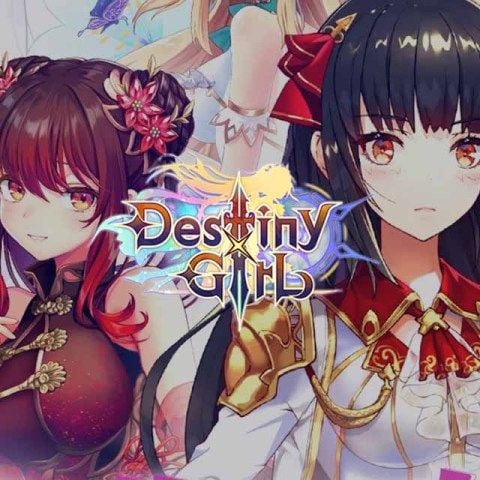
Destiny Girl is a popular idle RPG featuring anime huntress characters, tactical team building, and strategic elemental combat. To unlock top-tier characters, upgrade gear, and compete in PvP arenas, you need Crystals. Crystals serve as the core premium currency within the Destiny Girl South East Asia (SEA) server.
BitTopup provides a direct Destiny Girl SEA Crystal recharge service designed for speed, security, and convenience. By using direct Character UID and Character Name crediting, you receive your purchased Crystals directly into your game account without handing over your login credentials.
Why Recharge Destiny Girl Crystals for the SEA Server?
Crystals give you access to premium features and resources that accelerate your game progression. Whether you want to recruit rare huntresses or maximize your daily rewards, having a balance of Crystals gives you a clear competitive advantage.
Core Benefits of Destiny Girl Crystals
- Huntress Recruitment (Gacha): Pull on limited-time rate-up banners, standard summon pools, and special collaboration events to collect powerful SSR and UR huntresses.
- VIP Privilege Progression: Recharging Crystals advances your account VIP status, unlocking passive resource multipliers, bonus dungeon entries, and exclusive VIP shop discounts.
- Stamina and Action Point Resets: Refresh your daily stamina to clear story stages, farm upgrade materials, and complete character breakthrough challenges.
- Daily Value Packs and Growth Funds: Purchase high-value bundles, battle passes, and growth funds that yield ongoing resource payouts as your account levels up.
- Arena and Event Entries: Buy extra attempts in competitive modes like the Honor Arena, Guild Boss battles, and seasonal trials.
| Crystal Use Case | Primary In-Game Benefit | Recommended Target |
|---|---|---|
| Banner Summons | Recruit top-tier SSR/UR huntresses | Rate-up character banners |
| VIP Progression | Permanent account perks and bonus drops | Active daily players |
| Resource Packs | Fast evolution materials and gold | High-priority character progression |
| Stamina Refreshes | Faster account leveling and stage farming | Event milestones and stage clearing |
How to Find Your Destiny Girl Character UID and Character Name
To ensure your Crystal order arrives quickly and without error, you must provide your exact Character UID and Character Name from the SEA server. Follow these simple steps to retrieve them inside the game app:
- Launch Destiny Girl on your mobile device or emulator.
- Ensure you are connected to your active SEA Server profile.
- From the main game lobby screen, tap your Avatar Icon in the top-left corner.
- Your Character Name is displayed prominently near your avatar.
- Your Character UID (a string of numbers) is visible under your profile details. Tap the Copy icon next to your UID to prevent typos.
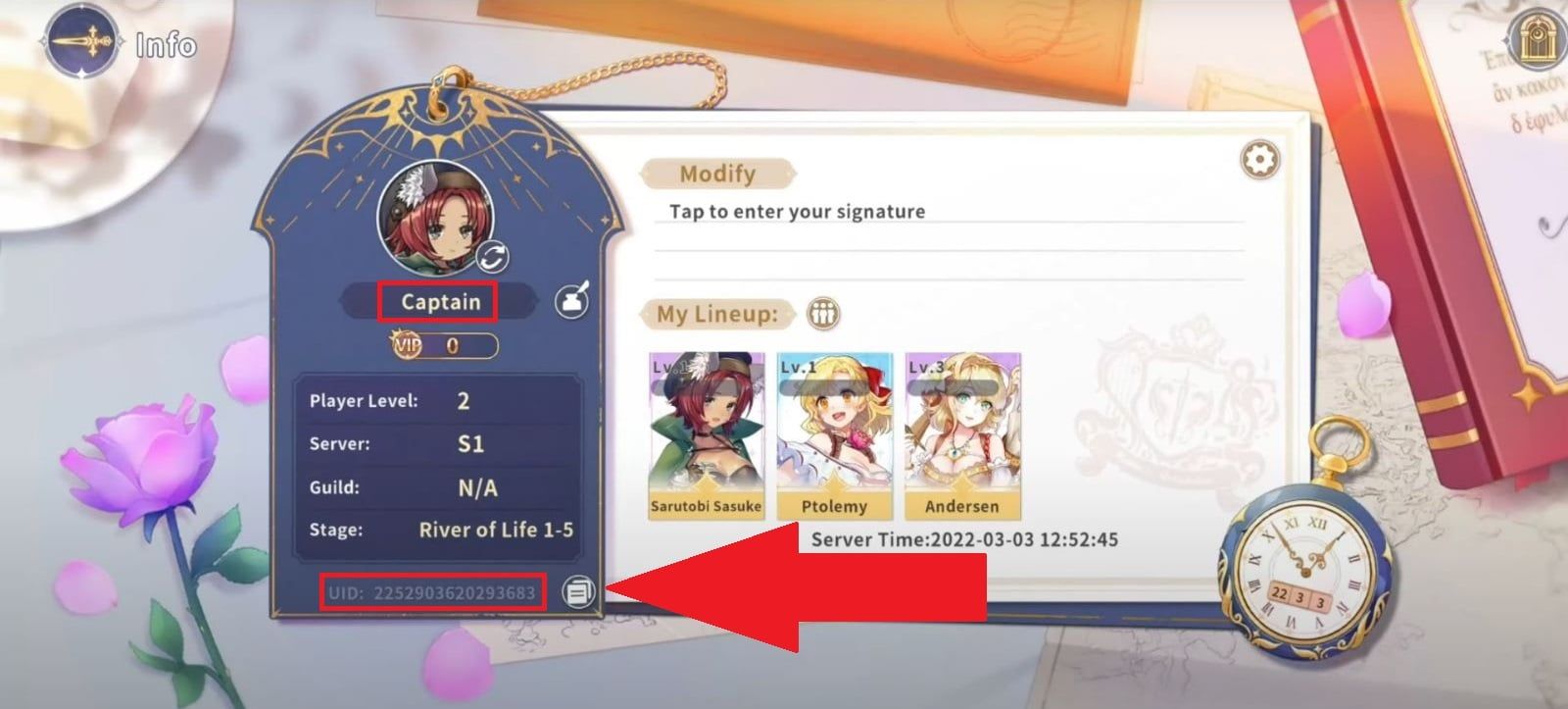
Tip: Always double-check both your Character UID and Character Name before submitting your order to guarantee direct delivery to your specific character profile.
Step-by-Step Guide: How to Buy Destiny Girl Crystals on BitTopup
Recharging your Destiny Girl account on BitTopup is quick and straightforward:
- Select Your Crystal Denomination: Browse the live listing on this page and choose the Crystal pack that fits your in-game goals.
- Enter Account Details: Input your Character UID and Character Name into the required fields.
- Review Order Details: Verify that the selected pack and character information match your SEA server profile.
- Proceed to Checkout: Choose your preferred payment method from the available checkout options.
- Complete Payment: Finalize the transaction. Once payment is confirmed, the system processes your order and credits the Crystals straight to your Destiny Girl SEA account.
Live prices, available pack sizes, and promotional rates are displayed in real-time on the checkout selector above.
Safe Direct UID Top Up: Zero Password Risk
Account safety is a top priority when purchasing in-game currencies. BitTopup uses direct player identification processing, which eliminates the risks associated with manual account logins.
- No Password Required: We will never ask for your login password, Google Play credentials, Apple ID, or third-party binding passwords.
- No Account Sharing: Your game account remains entirely in your hands. You do not need to log out, transfer tokens, or share verification codes.
- Safe Transactions: Every order uses secure payment processing gateways to safeguard your personal data and transaction integrity.
- Official Delivery Format: Crystals are sent directly through authorized direct-recharge systems, keeping your account compliant with game rules.
Troubleshooting and Delivery Verification for SEA Accounts
If your Crystals have not appeared immediately after completing your order, follow these troubleshooting checks:
- Restart the Game Client: Completely close Destiny Girl and relaunch the application to force a refresh with the game server.
- Check In-Game Mail: Some promotional bonuses or event packs arrive through your in-game mailbox rather than directly modifying your top-bar balance. Tap the Mail icon to claim pending attachments.
- Confirm Server Region: Verify that your account is registered on the SEA (South East Asia) server. Direct recharge systems are region-locked and will not credit accounts registered in North America, Europe, or other regional partitions.
- Check Order Status on BitTopup: Log in to your BitTopup profile to check if your transaction is marked as completed or pending payment confirmation.
- Contact 24/7 Support: If your order shows as completed but your balance remains unchanged after 15 minutes, reach out to BitTopup customer support with your Order ID, Character UID, and screenshot of your in-game profile for rapid resolution.
Frequently Asked Questions
How do I find my Destiny Girl Character UID and Character Name?
Open Destiny Girl and tap your avatar icon located in the upper-left corner of the main lobby. Your Character Name appears at the top of the profile window, and your Character UID is displayed directly below it. Use the copy button next to the UID to avoid typing mistakes.
Do I need to provide my Destiny Girl login password to recharge Crystals?
No. BitTopup only requires your Character UID and Character Name to process your Crystal top up. You should never share your account password, email login, or authentication codes with anyone.
How long does it take to receive Crystals after completing the top up?
Top up orders are processed promptly after payment verification. In most cases, Crystals credit to your Destiny Girl account within a few minutes. During peak traffic or server maintenance, delivery may take slightly longer.
What can I use Crystals for in Destiny Girl SEA?
Crystals can be used to purchase recruit summon tickets for limited huntress banners, advance VIP tiers, refresh daily stamina, buy high-value development bundles, and purchase extra attempts in competitive arena events.
Can I recharge Crystals if my Destiny Girl account is outside the SEA region?
This specific product catalog is configured strictly for Destiny Girl accounts on the South East Asia (SEA) server. If your account was created on another regional server (such as Global/NA/EU), top-up attempts will fail or fail to route to your character. Ensure you select the matching regional product for your account.
What should I do if my Destiny Girl Crystal top up fails or is delayed?
First, restart the Destiny Girl application and check both your active balance and in-game mailbox. If the Crystals do not appear within 15 minutes, contact the BitTopup 24/7 live support team with your order number and Character UID for immediate assistance.