

Farlight 84 Diamonds Top Up: Uses and In-Game Value
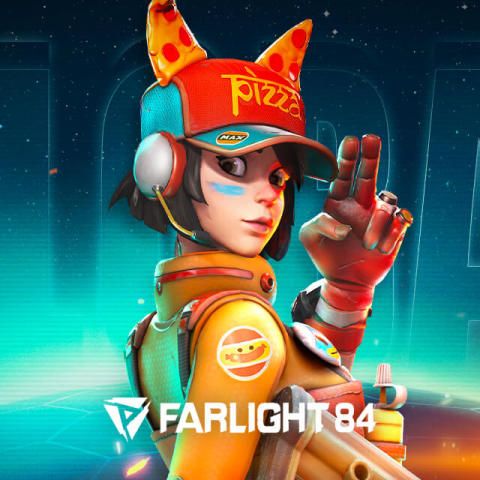
Farlight 84 Diamonds serve as the primary premium currency in the game, giving players direct access to high-tier store items, battle progression, and exclusive customization options across PC and mobile platforms.
Recharging your balance with Diamonds allows you to obtain:
- Battle Pass Activation: Purchase the standard or advanced seasonal Battle Pass to gain exclusive Capsuler skins, weapon models, emotes, and gold caches.
- Hero & Weapon Cosmetics: Direct-purchase legendary and epic outfits for heroes like Maggie, Duckman, Beau, and Ember, as well as distinct weapon finishes.
- Lottery & Capsule Draws: Spend Diamonds on limited-time prize pools and lucky wheel draws for rare vehicle designs and holographic death boxes.
- Tier & Progression Skips: Advance Battle Pass levels instantly to claim late-tier rewards before the competitive season concludes.
- Utility Items: Acquire name-change cards, special avatar borders, chat customization items, and profile banners.
Step-by-Step Guide: How to Recharge Farlight 84 Diamonds on BitTopup
To complete a Farlight 84 Diamonds recharge on BitTopup, follow these steps:
- Select Your Package: Review the available Diamond denominations on the product page and pick the amount you need.
- Enter Your User Account: Input your numeric Farlight 84 User ID in the User Account field. Double-check the digits for accuracy.
- Review Order Details: Confirm the selected denomination and your account information.
- Select Payment and Checkout: Choose your preferred payment option from the checkout screen and complete the transaction.
- Receive Diamonds In-Game: The purchased Diamonds will be sent directly to your Farlight 84 account without requiring you to log out or verify credentials.
Recharge Specifications Overview
| Feature | Parameter |
|---|---|
| Game Title | Farlight 84 |
| Item Type | In-Game Diamonds |
| Region Compatibility | Global (All Servers) |
| Required Account Info | User Account (Numeric User ID only) |
| Security Level | 100% Safe (No Password or Login Required) |
| Delivery Method | Direct In-Game Balance Credit |
How to Find Your Farlight 84 User Account ID
Your User Account (User ID) is a unique sequence of numbers assigned to your Farlight 84 profile. It routes top-ups directly to your character data regardless of the platform you play on.
Finding Your User ID in 4 Steps:
- Open Farlight 84 on your PC, Android, or iOS device.
- From the main lobby, click or tap your Profile Avatar in the upper-left corner of the screen.
- On the Profile Overview tab, look below your username and level display.
- Locate the numerical string labeled ID / User ID. Click the copy icon next to the number to copy it to your clipboard.
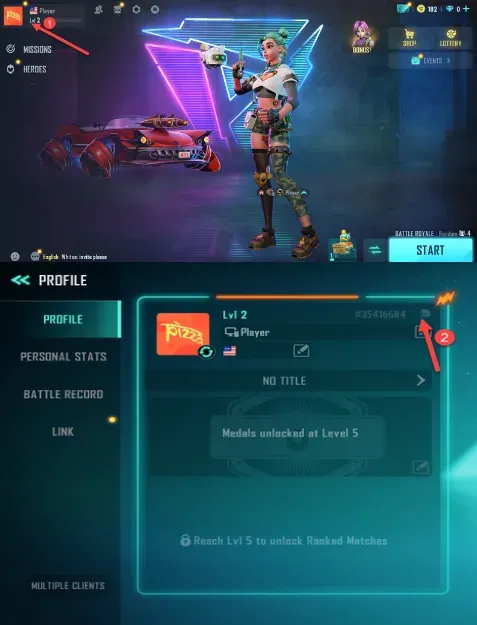
Paste this copied number directly into the User Account box on BitTopup to prevent typographical errors.
Farlight 84 Battle Pass, Hero Skins, and Weapon Upgrades
The 2026 competitive seasons in Farlight 84 bring regular content cycles featuring themed Battle Passes, seasonal balance updates, and rotation events. Having Diamonds ready on your account ensures you never miss time-limited event windows.
Battle Pass Unlocks
Each season introduces a multi-tier Battle Pass track. While free tracks offer basic resources, the premium Battle Pass unlocked via Diamonds includes exclusive character models, vehicle skins, and Diamond rebates across specific milestone levels. If you start a season late, you can use Diamonds to purchase level tiers to ensure you reach level 100 before the season ends.
Limited-Time Lottery and Gacha Events
Certain high-tier weapon skins with custom elimination effects and inspection animations are distributed through seasonal draw events. These events require direct Diamond spending per draw. Maintaining a Diamond balance on your account allows you to participate in these prize pools immediately upon release.
Is User Account-Only Top Up Safe and Secure?
Using BitTopup for your Farlight 84 Diamonds top up eliminates security concerns associated with account sharing:
- Zero Password Requirement: You never share your account password, email access, Google Play login, Steam credentials, or social media tokens.
- No Account Handover: The entire transaction is conducted via the public numeric User ID. Your account stays in your possession at all times.
- Authorized Delivery: Credits are applied directly to the character data via standard server-side protocols, keeping your game standing fully secure.
- Global Account Support: Whether your account was created on mobile or PC, the User ID links directly to your global profile.
Why Choose BitTopup for Farlight 84 Diamonds Recharge
- Direct and Transparent Pricing: Live pricing is displayed directly on the product list, allowing you to select the exact pack you need with complete clarity.
- Broad Denomination Choice: Choose from small top-up packs for individual items up to large bundles for full Battle Pass completion and lottery events.
- Global Server Coverage: Works across all supported regional servers without requiring VPNs or region changes.
- Prompt Support: BitTopup provides customer support to assist you with order verification, transaction status, and player ID inquiries.
Farlight 84 Diamond Delivery and Troubleshooting FAQs
What can I purchase with Farlight 84 Diamonds?
You can use Farlight 84 Diamonds to buy the premium Battle Pass, level skips, permanent Hero outfits, weapon camos, vehicle skins, lottery draw tickets, rename cards, and cosmetics in the in-game store.
Where do I find my Farlight 84 User Account ID?
Launch the game and tap your avatar icon in the top-left corner of the main lobby. Your numerical User ID is listed on the profile summary page directly underneath your player name.
Do I need to provide my Farlight 84 account password to top up?
No. BitTopup requires only your numeric User ID (User Account). You do not need to share passwords, verification codes, or third-party login credentials.
How quickly will the Diamonds arrive in my Farlight 84 account?
Recharges are processed directly after payment verification. Diamonds are credited to your in-game balance. In most cases, the balance updates as soon as the transaction is confirmed.
Can I use recharged Diamonds to unlock the Farlight 84 Battle Pass?
Yes. Once the Diamonds are credited to your game account, navigate to the Battle Pass tab in the Farlight 84 lobby and select Unlock Premium Pass to purchase it using your balance.
What should I do if my Farlight 84 Diamonds are not credited?
If your Diamonds do not reflect in your balance immediately, restart the game client to refresh the server connection. If the balance remains unchanged, verify your payment confirmation and contact BitTopup customer support with your Order ID and User Account number for prompt assistance.