

Life Makeover Top Up: Overview of Packages and In-Game Rewards
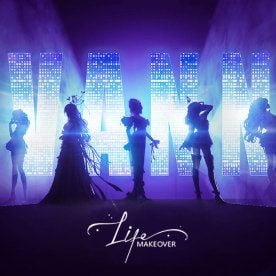
Life Makeover is a high-fidelity fashion styling and social simulation title by Archosaur Games. Players create avatars, customize garments down to the fabric texture, construct custom homes, and compete in styling challenges. Acquiring in-game packages gives players access to premium resources that expand customization options, speed up wardrobe collection, and unlock exclusive features.
Purchasing Life MakeOver Package Global options provides access to essential game currencies and bundles:
- Coupons: The primary paid currency in Life Makeover. Coupons can be converted directly into Diamonds at a 1:1 ratio or used to purchase exclusive shop sets, fashion packs, and premium dyed palettes.
- Diamonds: Used to execute summons in the Lightcase (gacha banners) for limited-edition 5-star and 6-star fashion sets, ally cards, makeup items, and background scenes.
- Fashion & Styling Packs: Bundles containing exclusive limited-run dresses, accessories, hairstyles, and dye charts (such as Trend Color Charts and X-Dye charts) that cannot be obtained through standard story stages.
- Home Decor Resources: Currencies and materials such as Chestnut coupons used to purchase furniture, expand property sizes, and unlock advanced building blueprints.
- Energy and Growth Items: Vitality and stamina refills that let you complete more main story stages, challenge daily Vvanna community quests, and craft intricate design patterns.
BitTopup provides a direct recharge service for Life MakeOver Package Global, delivering packages directly to your account using only your character ID.
How to Find Your Life Makeover No ID
To top up your account without sharing private login credentials, you only need to provide your game No ID (User ID). Follow these steps to locate your No ID within the game client:
- Launch Life Makeover on your mobile device or PC.
- Log in to your character profile on the Global server.
- On the main home screen, tap your Avatar icon located in the top-left corner.
- Open your Personal Info profile window.
- Look for the numeric string labeled No ID (or ID) displayed beneath your character name and level.
- Tap the Copy icon next to your No ID to copy the number directly to your clipboard.
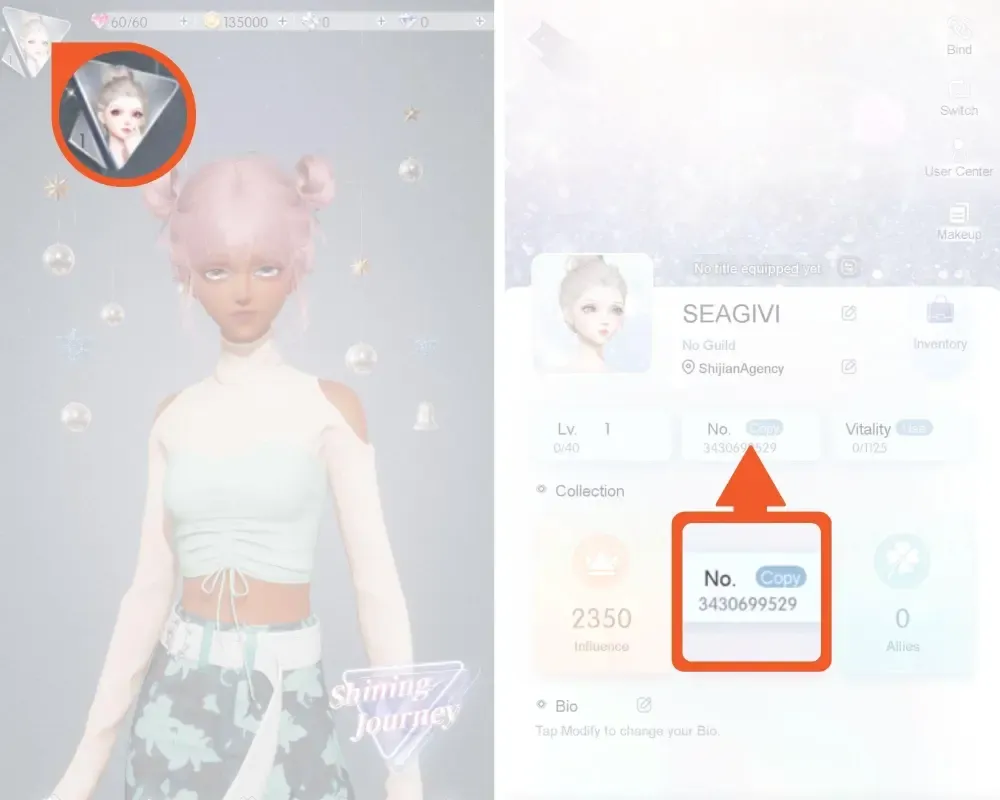
Always use the in-game copy button rather than typing the number manually. This eliminates transcription errors and ensures your recharge credits directly to the correct character.
Step-by-Step Guide: How to Recharge Life Makeover on BitTopup
Recharging your Life Makeover Global account on BitTopup takes only a few simple steps:
- Select Your Desired Package: Browse the product listings on this page and choose the Life MakeOver Package Global tier you wish to purchase. Live pricing and bundle options are displayed directly on the live checkout interface.
- Enter Your Player Information: Paste your copied No ID into the designated User ID input field.
- Confirm Server Region: Ensure that your account is registered on the Global server version of the game.
- Select Payment and Confirm: Choose your preferred payment option from the available checkout choices and finalize your payment.
- Check Your In-Game Account: Once your order is processed, open Life Makeover. Your purchased Coupons or package items will credit directly to your account balance or appear in your in-game mailbox.
Global Server Compatibility and Region Rules
Life Makeover operates on multiple regional clients worldwide. The packages offered on this product page are strictly compatible with the Global server version (encompassing North America, Europe, and associated Global service regions).
| Attribute | Global Package Details |
|---|---|
| Product Name | Life MakeOver Package Global |
| Compatible Client | Life Makeover Global (NA / EU / Global regions) |
| Required Player Input | Character No ID (User ID) |
| Account Credential Required | None (No password or email login needed) |
| Cross-Platform Sync | Synchronized across iOS, Android, and PC Global clients |
| Delivery Method | Direct-to-account credit / In-game system mail |
If your account is registered on separate regional servers such as Southeast Asia (SEA), Traditional Chinese (TW/HK/MO), or Chinese mainland servers, Global package recharges cannot be applied to your profile. Please check your app store region and client title before placing an order. If you play on multiple devices (such as switching between an iPhone, Android tablet, and PC client), purchases credited to your Global No ID automatically synchronize across all devices using the same login.
Account Safety and ID-Only Top Up Security
Protecting your game account is essential. BitTopup processes Life Makeover transactions using an ID-only system designed to keep your private data safe.
- Zero Password Sharing: You never need to supply your password, linked email address, Google account, Apple ID, or social media logins. Top-ups require only your public No ID.
- Account Integrity: Because third parties never log into your profile, your account remains completely secure from unauthorized device logins or credential leaks.
- Transparent Processing: Purchases are routed through standard delivery channels directly to your character ID, ensuring account compliance.
- 24/7 Customer Support: If you ever have a question about package delivery, server verification, or order status, BitTopup provides around-the-clock support to assist you at every step.
Frequently Asked Questions About Life Makeover Recharge
What is the No ID in Life Makeover and where can I find it?
The No ID is your account's unique digital identifier on the server. You can find it by tapping your avatar in the upper-left corner of the main screen to open the Personal Info menu. Your No ID is displayed directly below your player nickname, accompanied by a quick-copy icon.
Do I need to provide my Life Makeover account password to recharge?
No. Recharging through BitTopup requires only your in-game No ID. You never need to provide your account password, email verification codes, or linked social media details.
How long does it take for the purchased Life Makeover package to arrive?
Packages are processed directly to your account shortly after payment confirmation. Once your order status is marked complete on BitTopup, open or restart the Life Makeover app. Check your currency balance or the in-game mailbox to collect your items.
What should I do if I entered the wrong No ID during checkout?
If you realize you entered an incorrect No ID, contact BitTopup customer support immediately with your order number. If the order has not yet been processed by the automated delivery system, support agents can assist in correcting the destination ID. If the transaction has already been fulfilled to an active account matching the submitted ID, completed orders cannot be reversed, so always double-check your ID before payment.
Can I recharge Life Makeover Global packages from any region?
Yes. As long as your character profile exists on the Global server version of Life Makeover, you can purchase packages from any country using the available payment methods on BitTopup.
Is Life Makeover completely free to play?
Yes. Life Makeover is free to download and play. All story chapters, basic fashion crafting, and home design features can be enjoyed without making purchases. Recharging packages is entirely optional and provides players with faster access to exclusive designer outfits, premium dye options, and Lightcase summon currencies.