

MiFinity eVoucher SEK Recharge: Overview and How It Works
A MiFinity eVoucher in Swedish Krona (SEK) is a secure, prepaid digital payment code designed to fund your MiFinity eWallet balance without linking your credit card or personal bank account directly to third-party services. MiFinity operates as a regulated electronic money institution, providing flexible online wallet services across global merchants, gaming platforms, and international money transfers.
When you purchase a MiFinity eVoucher (SEK), you receive a secure digital PIN code. This prepaid voucher works like digital cash: you enter the unique PIN into your personal MiFinity account or directly at a merchant checkout that accepts MiFinity vouchers. The funds become available immediately upon verification, giving you complete privacy, fixed-budget spending limits, and an extra layer of financial security.
Step-by-Step Guide: How to Recharge Your MiFinity eWallet with SEK eVoucher
Recharging your MiFinity balance using a SEK voucher takes less than two minutes. Follow these practical steps inside the MiFinity customer portal:
- Log in to Your MiFinity Account: Open the official MiFinity app or log in via your desktop web browser.
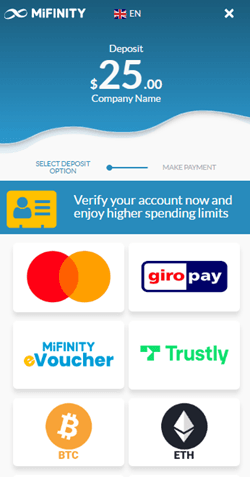
- Select Deposit: On your account dashboard, click the Deposit button from the main navigation menu.
- Choose eVoucher Payment Method: Scroll through the listed deposit options and select eVoucher by MiFinity.
- Pick Your Destination Wallet: Select the eWallet balance you want to credit (choose your SEK eWallet to avoid conversion charges).
- Enter Voucher Details: Type your voucher code digits, the nominal value, and the voucher expiration date.
- Confirm Transaction: Review the deposit details and click Submit. Your MiFinity wallet balance updates instantly.
How to Find Your MiFinity Account Details and Voucher Code
To manage your deposits effectively, you need to know where your account identifiers and purchased vouchers are stored.
Your MiFinity account details are accessible directly on your profile dashboard:* Account Number / User ID: Located at the top right of your MiFinity account dashboard right under your name.* Purchased Voucher PIN: After completing your order on BitTopup, your digital voucher code appears immediately on your order confirmation screen and is sent to your registered email address.
BitTopup provides your prepaid code directly to you. You do not need to share your MiFinity password, login credentials, or account verification pins with anyone to complete a voucher top up.
Available MiFinity eVoucher SEK Denominations
MiFinity eVouchers in SEK are available in multiple fixed denominations, allowing you to choose the exact amount matching your spending plan. The live price for each denomination is displayed directly on the BitTopup checkout page.
| Denomination (SEK) | Currency Code | Code Type | Primary Usage |
|---|---|---|---|
| 100 SEK | SEK | Digital Code (PIN) | Small balance top-ups and micro-payments |
| 250 SEK | SEK | Digital Code (PIN) | Mid-range wallet deposits and subscriptions |
| 500 SEK | SEK | Digital Code (PIN) | Standard gaming and digital entertainment reload |
| 1,000 SEK | SEK | Digital Code (PIN) | High-volume merchant transactions |
| 2,500 SEK | SEK | Digital Code (PIN) | Maximum single-voucher reload capacity |
Fees, Currency Exchange Rules (2.99%), and Partial Redemption
Understanding the fee structure helps you maximize the value of your SEK prepaid voucher:
- Matching Currency Deposits (SEK to SEK): When you deposit a SEK eVoucher into a SEK-denominated MiFinity eWallet, no foreign exchange conversion fee is applied.
- Currency Conversion Fee (2.99%): If you redeem a SEK voucher into a wallet denominated in another currency (such as EUR, USD, GBP, or NOK), MiFinity applies a standard 2.99% currency exchange fee on the converted total.
- Partial Redemption Supported: You do not have to spend the full value of your SEK voucher in a single transaction. If you make a purchase or wallet deposit smaller than the total voucher amount, the remaining funds remain stored on the same voucher PIN. You can use the remaining balance later by entering the same code until the balance reaches zero.
- Checking Remaining Voucher Balance: You can check remaining voucher balances at any time through the official MiFinity voucher balance lookup portal by submitting your voucher code.
Regional Compatibility and Sanctioned Country Restrictions
MiFinity eVouchers operate under international financial compliance regulations set by regulatory authorities, including the Financial Conduct Authority (FCA) and Malta Financial Services Authority (MFSA).
- Supported Regions: MiFinity eVouchers in SEK are primarily designed for customers in Sweden and European Economic Area (EEA) jurisdictions holding SEK accounts.
- Sanctioned and Restricted Jurisdictions: In accordance with international financial sanctions and OFAC regulations, MiFinity services and eVouchers cannot be redeemed or activated in sanctioned territories, including Iran, North Korea, Syria, Cuba, Russia, Belarus, and specific non-cooperative jurisdictions.
- Account Verification: Depending on your tier and transaction history, MiFinity may request standard KYC (Know Your Customer) identity verification to lift balance deposit thresholds.
Safe Digital Transactions on BitTopup Without Account Sharing
BitTopup prioritizes security for digital gaming and payment transactions:
- Zero Account Sharing: You never need to supply your MiFinity login email, password, or security questions. You purchase the digital code and redeem it yourself inside your own private account.
- Instant Digital Delivery: Your voucher code is generated directly on your screen upon payment confirmation, with a backup copy delivered to your email address.
- Transparent Pricing: All payment options and current exchange rates are calculated on the live checkout screen without hidden platform charges.
- 24/7 Order Assistance: If you ever experience issues with code retrieval, BitTopup customer support is available 24/7 to verify order statuses and assist with queries.
Troubleshooting MiFinity eVoucher Code Issues
If you experience an issue while attempting to redeem your voucher, review these common solutions:
- Invalid Code Error: Verify that you did not enter accidental spaces before or after the code. Digital codes are case-sensitive and must match the exact sequence delivered.
- Currency Mismatch Alert: Ensure you have selected the option to allow currency conversion in your MiFinity deposit portal if your default eWallet currency is not SEK.
- Already Redeemed Notice: Check your MiFinity account transaction history. In some cases, a deposit processes successfully while the browser window is refreshing.
- Expired Code: MiFinity eVouchers have a defined validity period printed with the voucher details. Ensure your code has not passed its expiration date prior to redemption.
Frequently Asked Questions About MiFinity eVoucher SEK Top Up
How do I redeem my MiFinity eVoucher SEK in my eWallet?
Log in to your MiFinity account, navigate to the Deposit section, choose eVoucher by MiFinity, pick your desired balance wallet, enter the voucher PIN and amount, and confirm the transaction.
Can I use my MiFinity SEK eVoucher for partial payments?
Yes. MiFinity eVouchers support partial redemption. Any unused balance remains on the voucher PIN and can be applied toward future deposits or payments until the total value is exhausted.
Is there a conversion fee if my MiFinity account is in a different currency?
Yes. If you deposit a SEK voucher into a non-SEK wallet balance (such as EUR or USD), MiFinity charges a standard 2.99% currency exchange fee on the transaction.
Do MiFinity eVouchers have an expiration date?
Yes. MiFinity eVouchers remain valid for 12 months from the date of issue. The exact expiration date is provided alongside your voucher PIN upon purchase.
Which regions or countries are restricted from using MiFinity eVouchers?
MiFinity eVouchers cannot be used in OFAC-sanctioned countries or high-risk jurisdictions, including Iran, North Korea, Syria, Cuba, Russia, and non-supported regulatory regions.
How fast is the digital code delivery on BitTopup?
Digital code delivery on BitTopup is instant. Once your checkout payment is confirmed, your voucher code is displayed immediately on your screen and sent to your email address.