

MapleStory M Package Top Up: Fast, Safe, and Direct In-Game Delivery
Equipping your characters in MapleStory M requires steady access to high-value resources, equipment enhancement scrolls, auto-battle tickets, and exclusive cosmetics. Whether you need monthly packages, growth bundles, or event passes, securing a direct MapleStory M Package top up keeps your progression on schedule across all Global servers.
BitTopup provides a direct recharge service for MapleStory M players worldwide. You do not need to share login credentials or link private third-party social accounts. By using your public Member Code and server details, you can buy packages that credit directly to your in-game account.
How to Recharge MapleStory M Packages on BitTopup
Completing a package recharge takes only a few quick steps on BitTopup:
- Select Your Package: Browse the product listings on BitTopup and choose the MapleStory M Package or Cash Points denomination you wish to buy. Current pricing and package options are displayed live on the checkout screen.
- Enter Your Account Information: Select your specific Region (e.g., America, Europe, Asia 1, Asia 2) and Server (such as Scania, Zenith, Croa, or Union), then paste your Member Code.
- Proceed to Checkout: Select your preferred payment method from the available local and international options.
- Confirm Your Order: Complete the payment. Once verified, your order is processed immediately.
- Claim in MapleStory M: Open your MapleStory M app, log into your character, and check your in-game Mailbox or Cash Shop inventory to collect your items.
How to Locate Your MapleStory M Member Code and Server
To ensure your package reaches the right character without delays, you must provide your exact Member Code and Server. Your Member Code is a unique alphanumeric identifier assigned to your account profile.
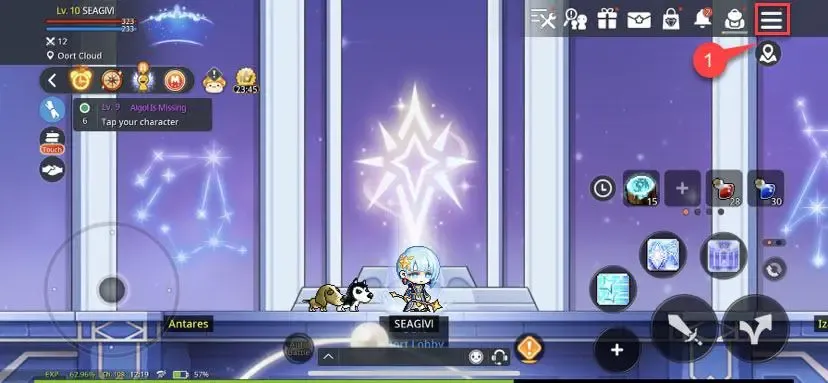
Follow these steps inside the game client to find your details:
- Launch MapleStory M on your mobile device or emulator.
- Log into the character and server where you want to receive the package.
- Tap the Menu icon (three horizontal lines) located in the upper-right corner of the screen.
- Tap the Settings (gear icon) button at the bottom of the menu.
- Select the Account tab.
- Locate your Member Code under the Account Info section.
- Tap the Copy button next to your Member Code to avoid typing mistakes.
Tip: Always verify your active server name on the character selection screen before submitting your order.
Understanding MapleStory M Cash Points and Package Mechanics
Packages in MapleStory M provide bundles tailored for character leveling, equipment star force enhancements, pet auto-buffing, and cosmetic customization. Depending on the specific promotion, packages are delivered either as direct bundle activations or via Maple M Cash Points.
| Package Category | Typical Contents | Reset Frequency |
|---|---|---|
| Daily & Monthly Packages | Daily Crystals, Auto-Battle Charge Tickets, EXP Boosts | Daily / 30-Day Expiry |
| Level-Up & Growth Bundles | Milestones Crystals, Level-Up Potions, Star Force Scrolls | One-Time per Character |
| Maple M Cash Points | In-game flexible currency to purchase featured limited packages | Account-based Balance |
| Pet & Utility Packages | Wonder Pet pull tickets, Water of Life, Auto-Buff Pets | Monthly / Event Specific |
| Enhancement Packs | Lucky Day Scrolls, Shielding Wards, Whetstones | Weekly Reset |
Maple M Cash Points act as a universal wallet balance inside the Cash Shop. When you recharge Cash Points, you can spend them freely on time-limited package banners, seasonal battle passes, or standard crystal bundles.
MapleStory M Package Limits and Weekly Reset Rules
MapleStory M features strict purchase limits on specific value packs to maintain game balance. Understanding reset timers ensures you never miss a time-sensitive reward window:
- Account-Bound Purchase Limits: Certain packages (such as High-End Enhancement Packs and Discounted Auto-Battle Packs) carry a strict limit of 1 to 5 purchases per account per reset period.
- Character-Bound Growth Packs: Level-achievement packages can only be bought once per character. If you create a new class, that specific character can purchase its own growth track.
- Server Reset Timing: Weekly package limits reset automatically according to your server time zone (typically 00:00 server time every Monday). Ensure you complete weekly orders before the server reset occurs.
- Event Duration Windows: Special collaboration or seasonal event packages expire when the event shop closes. Always claim your event mail before maintenance windows begin.
Safe Top-Up Best Practices: Protecting Your Account Credentials
Keeping your MapleStory M account safe requires following strict security standards during any top-up process:
- Never Share Passwords: A legitimate top-up service only requires your public Member Code and Server selection. Never hand over your Google, Apple ID, Facebook, or Nexon login passwords.
- Avoid Account-Piloting Offers: Third-party services requesting direct account access pose severe risks of account theft, unauthorized item disposal, or permanent game bans.
- Verify Your Region and Server: Double-check your server selection before checkout. Crediting packages to an alternate server on your account cannot be transferred between different worlds.
- Keep Transaction Receipts: Save your BitTopup Order ID until all items are fully received and claimed in your game client.
Troubleshooting Delayed or Missing Package Deliveries
If your package does not show up immediately after completing payment, run through these standard verification steps:
- Check Both In-Game Mailboxes: MapleStory M splits mail between the Personal Mailbox and the Shared (Account) Mailbox. Some packages deliver directly to the Cash Shop Storage tab rather than regular character inventory.
- Restart the Game Client: Completely close MapleStory M from your device background apps and relaunch it. A fresh server handshake often triggers pending delivery flags.
- Switch Characters: Changing characters within the same server forces the client to refresh your account data cache.
- Verify Member Code Accuracy: Confirm that the Member Code entered on BitTopup matches your active profile.
- Contact Support: If your order status is marked complete on BitTopup but items remain missing after 15 minutes, reach out to the BitTopup 24/7 customer support team with your Order ID for immediate resolution.
MapleStory M Package Top Up FAQs
How do I recharge a MapleStory M Package on BitTopup?
Select the MapleStory M Package you want, enter your game Region, Server, and Member Code, select your payment method, and complete the order. Your items or Cash Points will credit directly to your in-game account.
Where do I find my MapleStory M Member Code and Server?
Open MapleStory M, tap the top-right Menu icon, open Settings, select the Account tab, and copy your alphanumeric Member Code. Your Server name is visible on the character selection screen or under your profile overview.
What are Maple M Cash Points and how do I use them for packages?
Maple M Cash Points are an account currency credited to your Cash Shop balance. You can use these points to purchase limited-time package banners, daily passes, pet items, and upgrade supplies directly inside the game.
Do I need to share my game account password to buy packages?
No. BitTopup processes top-ups using only your public Member Code and Server. You never need to share your game password or third-party login credentials.
Is MapleStory M worth playing in 2026?
Yes. In 2026, MapleStory M continues to receive regular content updates, new character classes, Legion system expansions, high-level Commander raids, and seasonal events that keep the mobile MMORPG active across global servers.
What should I do if my MapleStory M Package has not arrived after payment?
First, restart your game app and check both the Personal and Shared Mailboxes as well as the Cash Shop Inventory. If the items do not appear, contact BitTopup 24/7 customer support with your Order ID for swift tracking and assistance.