



Fast Alchemy Stars Top Up for Lumocrystals
Lumocrystals serve as the premium currency in Alchemy Stars, allowing Navigators to acquire exclusive character outfits, purchase specialty supply packs, and convert funds directly into Lumamber for summoning powerful 6-star Aurorians. When limited-time recruitment banners appear, having instant access to Lumocrystals ensures you never miss out on key Aurorians for your elemental teams.
BitTopup provides a direct, secure online recharge service for Alchemy Stars players worldwide. By using your Game Account ID (UID) and server selection, orders are processed automatically and credited straight to your game account without requiring your account login credentials or password.
How to Recharge Alchemy Stars Lumocrystals Online
Completing an online recharge for Alchemy Stars is straightforward and takes only a few moments. Follow these steps to receive your Lumocrystals directly in-game:
- Select Your Lumocrystal Package: Browse the available pack denominations on the BitTopup product catalog and choose the quantity you need.
- Enter Your Account Information: Input your Alchemy Stars Game Account ID (UID) and select the server your account is hosted on.
- Review Order Details: Double-check your UID and server to ensure the currency delivers to the correct profile.
- Select Your Payment Method: Choose from the available payment options displayed on the checkout page.
- Complete Checkout: Finalize your transaction. Your Lumocrystals will be credited to your Alchemy Stars account balance automatically.
How to Locate Your Alchemy Stars Account ID
To ensure your recharge delivers without delay, you must provide your exact in-game User ID (UID). You can find your UID directly inside the game client:
- Launch Alchemy Stars on your mobile device or PC client.
- From the main home screen (the Colossus bridge), tap on your Player Avatar / Profile Icon located in the top-left corner.
- Open your profile page to view your account overview.
- Locate your UID (User ID) displayed below your username and account level.
- Tap the copy icon next to your UID to copy the numeric string directly to your clipboard, then paste it into the ID field on BitTopup.
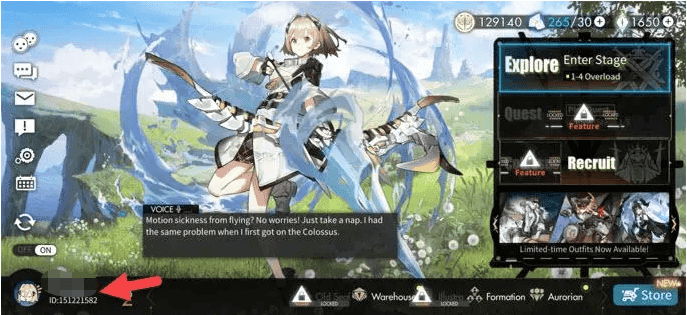
Always double-check that your server selection matches where your character progress resides, as accounts cannot transfer balances across regional servers.
Understanding Alchemy Stars Currencies: Lumocrystals and Lumamber
Navigating the economy of Alchemy Stars requires understanding how premium currencies interact with standard summoning resources. Below is an overview of how currencies function:
| Currency | Type | Acquisition Method | Primary Uses |
|---|---|---|---|
| Lumocrystals | Premium Paid Currency | Direct top-up / real-money purchase | Buying Aurorian outfits, special gift packs, and direct 1:1 conversion to Lumamber |
| Lumamber | Core Summoning Resource | Daily quests, story stages, Spire, events, Lumocrystal conversion | Converting to Star Flares (150 per flare), restoring Prism energy, refreshing black market |
| Star Flare | Standard Summon Item | Lumamber exchange, event milestones, log-in rewards | Pulling on Mainstay Recruitment and standard character banners |
| Special Star Flare | Limited Summon Item | Lumamber exchange, shop bundles, event shops | Pulling on limited-time event banners and exclusive Aurorian recruitments |
Direct Conversion Ratio
Lumocrystals convert directly into Lumamber at a 1:1 ratio. This means purchasing a pack of Lumocrystals gives you the flexibility to either save them for exclusive cosmetic outfits that cannot be bought with free currency, or convert them on demand into Lumamber to purchase Special Star Flares for high-priority rate-up banners.
Account Safety: Secure Top-Up Without Password Sharing
Account security is critical when purchasing game items online. BitTopup processes Alchemy Stars orders exclusively through your public Game UID and server information.
- No Password Required: You never need to share your login email, Google Play account, Apple ID, or third-party social login details.
- Official Direct Crediting: Transactions are fulfilled directly to your player account ID, preserving the integrity of your account.
- Zero Risk of Account Lockouts: Because no unauthorized logins or IP location hops occur, your profile remains completely safe from security flags or credential breaches.
Supported Payment Methods and Delivery Process
BitTopup supports a wide variety of localized and global payment options to accommodate players across all regions. Live pricing, regional payment methods, and applicable processing options appear directly on the live checkout screen.
Once your payment clears through our automated system, order fulfillment triggers immediately. Under normal operating conditions, your Lumocrystals will appear in your account balance within minutes of payment completion. If your game client is open during the recharge, simply restart the app or switch screens to refresh your balance display.
Is Alchemy Stars Still Active and Maintained in 2026?
Yes, Alchemy Stars remains fully active and maintained in 2026. The development team continues to support global and regional servers with scheduled recruitment events, new story chapters, balance adjustments, and seasonal updates.
Active players on Global, US, SEA, and other regional servers can continue to play, participate in live events, and recharge Lumocrystals without interruption. BitTopup maintains active order processing systems aligned with current server operations.
Troubleshooting Common Alchemy Stars Top-Up Delays
If you have completed an order but do not see your Lumocrystals immediately, review these troubleshooting steps:
- Restart the Game App: A running client might cache your previous currency total. Completely close the Alchemy Stars app and relaunch it to refresh your live data from the server.
- Check Your In-Game Mailbox: Certain bonus packs or promotional bundles deliver items as system mail rather than adding directly to the top-bar counter. Check your in-game mailbox for uncollected attachments.
- Verify Your UID and Server: Check your order confirmation receipt on BitTopup to confirm that the UID entered matches your in-game profile number exactly and that the correct server was selected.
- Check Payment Status: Confirm with your payment provider or bank that the transaction was completed and not placed in a pending verification state.
- Contact Customer Support: If your balance has not updated after following these steps, contact BitTopup 24/7 customer support with your Order Number and Game UID for immediate assistance.
Frequently Asked Questions
Is Alchemy Stars still available to play and recharge in 2026?
Yes. Alchemy Stars is active and running on global and regional servers in 2026. Players can log in, play through ongoing events, recruit Aurorians, and top up Lumocrystals through BitTopup.
How do I find my Alchemy Stars ID for top-up?
Open Alchemy Stars and tap your avatar in the upper-left corner of the main screen. Your numeric User ID (UID) is shown below your display name and level. Tap the copy icon next to it to paste it directly into your order form.
What is the difference between Lumocrystals and Lumamber?
Lumocrystals are the premium paid currency obtained through direct top-ups, required for exclusive Aurorian outfits and premium packs. Lumamber is the core summoning currency earned through gameplay or converted 1:1 from Lumocrystals to buy Star Flares.
Do I need to share my account password to buy Lumocrystals on BitTopup?
No. BitTopup requires only your Game UID and Server name. You never need to provide your password or link third-party login credentials to complete a recharge.
What should I do if my Alchemy Stars recharge does not show up immediately?
First, restart your game client to force an account balance refresh. Check your in-game mail for item deliveries. If the currency is still missing, verify that your order status is marked as complete and contact BitTopup customer support with your order ID.
What payment methods are supported for Alchemy Stars top-ups?
BitTopup supports multiple international and local payment options. You can view all available payment channels, regional currencies, and live pricing directly on the checkout page before completing your order.