

Laplace M SEA Top Up: Fast Spirals Direct Recharge
Power your journey across the continent of Laplace with direct Spirals top-ups. BitTopup provides an instant and secure recharge process for Laplace M SEA players. By entering your numerical Character ID, your purchased Spirals are delivered straight to your account balance without sharing your password or account login credentials.
Whether you need Paid Spirals for limited-time gacha summons, Guardian upgrades, Gold Chests, or exclusive seasonal cosmetics in 2026, direct top-ups ensure your character stays competitive in every Kingdom event and dungeon challenge.
What Are Laplace M Spirals and How Are They Used?
Spirals serve as the premium currency in Laplace M. Understanding the distinction between Spirals and other currencies helps you plan your progression and resource allocation efficiently.
Types of Spirals in Laplace M
- Paid Spirals: Obtained exclusively through real-money recharges. These are required for premium shop purchases, direct event spins, limited gift packs, and special top-up milestone rewards.
- Bound / Free Spirals: Earned through in-game achievements, Kingdom events, and daily quests. While useful for routine items and stamina refreshes, bound spirals cannot purchase select premium bundles or exclusive gacha banners.
Best Ways to Spend Spirals in 2026
- Guardian Pet Summons: Pull high-tier Guardians and acquire skill books to boost your character's battle rating.
- Card Synthesis & Refinement: Acquire rare monster cards and enhancement stones to maximize socketed equipment stats.
- Avatar Outfits & Mounts: Unlock permanent stat bonuses and customize your character's visual appearance.
- Glory Pass & Kingdom Packs: Maximize resource yields per run by activating premium tier pass rewards and discounted resource bundles.
- Marketplace Trading: Convert premium currency into tradeable funds to acquire high-tier gear crafted by other players.
Step-by-Step Guide: How to Recharge Laplace M SEA Spirals
Recharging your Laplace M SEA balance on BitTopup takes only a few quick steps:
- Select Your Package: Browse the available Spirals packages on the BitTopup checkout catalog and pick the bundle you want.
- Enter Your Account Details: Input your numerical Character ID in the designated field. Double-check the numbers to prevent misdirected deliveries.
- Confirm Server Region: Ensure your account belongs to the Laplace M South East Asia (SEA) server cluster.
- Proceed to Checkout: Select your preferred payment option from the available local and international payment methods.
- Receive Spirals In-Game: Once your payment is verified, the Spirals are automatically credited directly to your character. Open Laplace M to view your updated balance.
How to Find Your Laplace M Character ID
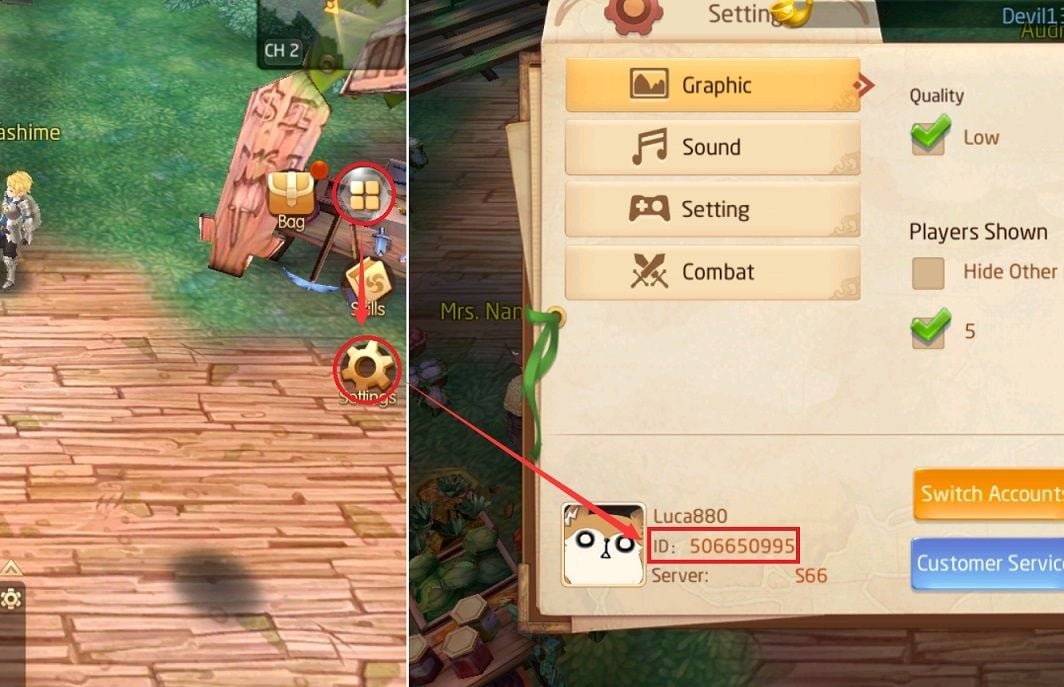
To ensure your recharge reaches the correct character, you must retrieve your exact numerical Character ID from the game interface.
- Launch Laplace M on your mobile device or PC emulator.
- Log in to your character on the appropriate SEA server.
- Tap your Character Avatar located in the top-left corner of the main HUD.
- In the profile overview window, locate the numeric sequence labeled ID or User ID beneath your character name and server title.
- Copy or write down this exact numeric string to paste into the BitTopup checkout field.
Server and Account Compatibility: Laplace M SEA vs Tales of Wind
Before ordering, make sure you are playing on the Laplace M SEA build and not an alternate regional edition of the game.
- Laplace M SEA: Published specifically for Southeast Asian territories (Singapore, Malaysia, Philippines, Thailand, Indonesia, Vietnam). Server names typically follow the SEA cluster designations (e.g., S1, S2, SEA-X).
- Tales of Wind (Global): The global Western version of the game operating under a distinct publisher with separate servers (NA/EU). Recharges made for Laplace M SEA cannot be delivered to Tales of Wind accounts.
- Other Regional Builds: Taiwan/Hong Kong (Laplace M TW) and Mainland China builds operate on completely independent databases.
Regional Compatibility Breakdown
| Game Version | Target Regions | Server Prefix Examples | BitTopup Compatibility |
|---|---|---|---|
| Laplace M SEA | Southeast Asia (SG, MY, PH, TH, ID, VN) | SEA-1, S-XX | Compatible (This Page) |
| Tales of Wind | North America, Europe, South America | EST-XX, EU-XX, SA-XX | Incompatible (Requires ToW Catalog) |
| Laplace M TW/HK | Taiwan, Hong Kong, Macau | TW-XX, HK-XX | Incompatible (Regional Specific) |
Why Choose Direct Character ID Recharge Without Password Sharing
Account safety is essential when purchasing in-game currencies. BitTopup uses direct API crediting protocols that protect your personal data:
- No Password Required: You never need to share your game password, Google account, Facebook login, or verification codes.
- Zero Account Hand-Offs: The entire crediting process is automated. There is no manual login by third parties, completely eliminating the risk of account theft, missing items, or altered settings.
- Secure Payment Channels: Transactions are processed through encrypted, trusted payment gateways.
- Live Support Availability: BitTopup provides 24/7 customer service ready to assist with order tracking and verification.
Delivery Times and Troubleshooting Delayed Top-Ups
Spirals recharges are processed automatically and typically reflect in your balance shortly after payment confirmation.
If Your Spirals Do Not Appear Immediately:
- Restart the Game Client: Completely close Laplace M from your device background apps and re-open it to force a server synchronization.
- Check In-Game Mailbox: Some promotional tiers and bonus packs are distributed via the in-game mail system rather than direct numerical addition to the top bar.
- Verify Your Character ID: Check your BitTopup order confirmation to ensure the Character ID provided was accurate.
- Contact Customer Support: If your balance does not update, reach out to BitTopup 24/7 customer support with your Order ID, Character ID, and server name for rapid resolution.
Frequently Asked Questions
How do I find my Laplace M Character ID?
Tap your character avatar in the upper-left corner of the main screen. Your numeric Character ID is displayed in the profile pop-up window next to your character name.
Do I need to share my Laplace M password to recharge Spirals?
No. BitTopup only requires your numeric Character ID. You should never share your account login credentials or passwords with anyone.
What is the difference between Laplace M SEA and Tales of Wind?
Laplace M SEA is the Southeast Asian regional service, while Tales of Wind is the global edition. The two games operate on entirely separate server infrastructures. Spirals purchased for Laplace M SEA only work on SEA servers.
How long does it take for Laplace M Spirals to arrive after payment?
Delivery begins automatically once payment authorization clears. Most transactions credit to your account within minutes. Refresh your in-game balance by restarting the app if it does not update instantly.
What should I do if my Spirals recharge does not appear in-game?
First, restart your game app to force a server balance check. Next, inspect your in-game mailbox for bundle attachments. If the currency is still missing, contact BitTopup support with your order details.
Can I recharge Laplace M Spirals for a friend using their Character ID?
Yes. You only need your friend's accurate numerical Character ID and confirmation that they play on the Laplace M SEA server to place an order on their behalf.