

Legends of Runeterra Coins Malaysia Top Up: Direct Riot ID Recharge
Coins serve as the premium in-game currency in Legends of Runeterra (LoR), Riot Games' strategic digital collectible card game. Malaysian players use Coins to expand their card collections, unlock Champion Constellations in the Path of Champions single-player mode, purchase premium Event Passes, and customize their boards with exclusive cosmetics.
BitTopup provides a direct top-up system for Legends of Runeterra players in Malaysia. By inputting your Riot ID and Tagline, your account receives Coins directly through official Riot balance channels. You do not need to share passwords, account management credentials, or verification codes. Select your desired package from the live denomination catalog above to initiate your recharge.
Step-by-Step Guide: How to Recharge Legends of Runeterra Coins
To complete a Legends of Runeterra recharge Malaysia order on BitTopup, follow these steps:
- Select Your Coin Package: Choose the coin denomination that matches your in-game upgrade needs from the product list above.
- Enter Your Riot ID and Tagline: Provide your Riot ID followed by the hash and Tagline (e.g.,
PlayerName#MY1) in the designated field. - Review Order Details: Confirm your account details and package selection. Real-time pricing in Malaysian Ringgit (MYR) is displayed directly on the checkout screen.
- Complete Checkout: Select your preferred local payment method and finalize the transaction.
- Receive Coins in LoR: Launch or refresh your Legends of Runeterra client. Your updated Coin balance will reflect in your in-game store wallet automatically.
How to Find Your Legends of Runeterra Riot ID and Tagline
Your Riot ID is the unique identifier tied to your Riot Games account across Legends of Runeterra, League of Legends, and Valorant. It consists of your display name, a hash symbol (#), and a 3-to-5 character Tagline.
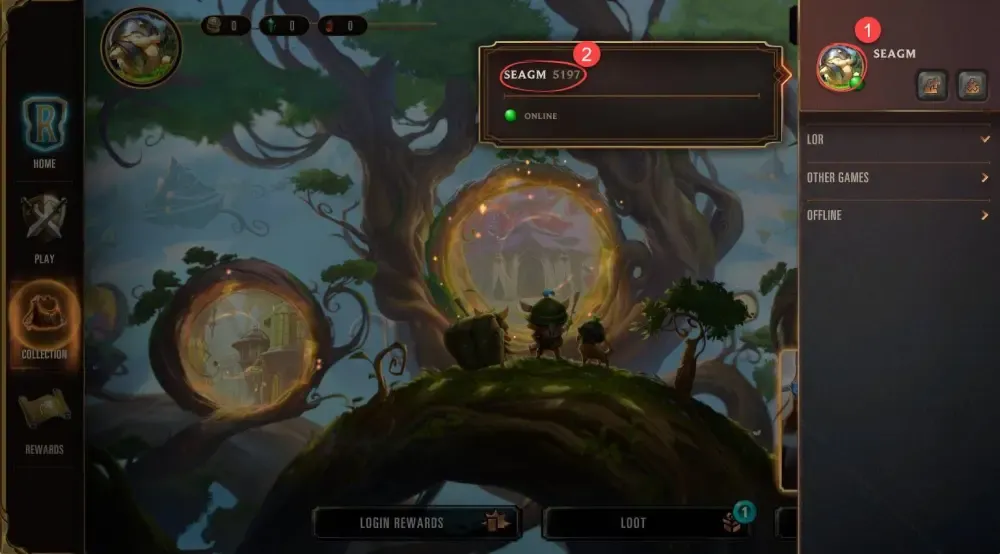
Follow these steps to find your exact Riot ID in the game client:
- PC Client: 1. Open the Legends of Runeterra client and log in. 2. Click on the Friends List icon located at the top-right corner of the home screen. 3. Hover your mouse cursor over your profile avatar/nameplate at the top of the friends window. 4. Your complete Riot ID and Tagline will appear in the format
Name#Tag(for example,BilgewaterKing#MY1). - Mobile Client (Android / iOS): 1. Launch the Legends of Runeterra app. 2. Tap your profile icon or the social panel at the top of the main screen. 3. View your profile card to see your full Riot ID and Tagline.
- Riot Account Portal: 1. Visit
account.riotgames.comin your web browser. 2. Sign in with your Riot credentials. 3. The Riot ID section on the main dashboard displays your current Game Name and Tagline.
Copy both parts exactly as displayed. Do not add spaces before or after the hash sign when placing your order on BitTopup.
Riot Account Region Verification for Malaysia Players
Before you buy Legends of Runeterra Coins Malaysia packages, confirm that your Riot Games account is registered to the Malaysia (MYS / Southeast Asia) region. Digital game currency is region-locked by Riot Games, meaning coin packages intended for the Malaysian region cannot be credited to accounts registered in the Americas, Europe, or other non-SEA regions.
| Detail | Malaysia Account Specification | Verification Method |
|---|---|---|
| Country / Region | Malaysia (MYS) | account.riotgames.com -> Personal Information |
| In-Game Currency | LoR Coins (MYR store pricing) | In-game Store tab header |
| Required Top-Up ID | Riot ID + Tagline (e.g., User#MY1) | Friends list / Profile banner |
| Credential Safety | ID-only (No password needed) | Public identifier verification |
If your Riot account country is set to a different territory, Coins purchased under the Malaysia region catalog will fail to credit. You can check your account's registered country anytime by logging into Riot's account management portal.
In-Game Content and Unlocks with LoR Coins in 2026
Legends of Runeterra continues to expand its gameplay systems, especially within the Path of Champions PvE experience. Adding Coins to your account allows you to obtain several distinct items and upgrades:
- Path of Champions Constellation Resources: Accelerate champion upgrades by acquiring Star Crystals, Nova Crystals, Gemstones, and champion-specific relics directly from the store.
- Event Passes: Unlock premium reward tracks during live in-game events in 2026. Premium passes grant exclusive champion fragments, prismatic card styles, unique card backs, and animated guardians.
- Emotes and Interactive Boards: Personalize your battlefield with dynamic boards featuring custom sound effects and background music, alongside reactive animated emotes.
- Champion Skins: Equip alternative cosmetic skins for your favorite champions, complete with custom level-up animations, unique voice lines, and specialized spell art.
- Wildcard and Card Bundles: Complete meta decks instantly by acquiring Wildcard bundles or curated regional starter packages in the store.
Security and Account Safety: Direct ID Delivery on BitTopup
Account safety is a core priority when topping up digital currencies. BitTopup uses a direct ID-based fulfillment process designed to keep your personal data protected:
- No Password Requirement: BitTopup only asks for your public Riot ID and Tagline. We will never ask for your account password, email access, or multi-factor authentication (2FA) codes.
- Protection Against Account Sharing Flags: Because no third party logs into your game client, your account is safe from automated security flags associated with foreign IP addresses or unauthorized login attempts.
- Authorized Server Syncing: Transactions are processed directly into Riot's backend database, ensuring that your Coins are fully legitimate and safe from chargebacks or balance deductions.
Troubleshooting LoR Coin Delivery and Common Errors
If your Coins do not appear immediately after completing payment on BitTopup, review the following troubleshooting checkpoints:
- Restart the Game Client: In-game currency balances sometimes require a client refresh to update. Completely close Legends of Runeterra on PC or mobile, wait 30 seconds, and log back in.
- Check Your Tagline Accuracy: Verify that the Tagline entered during checkout matches your exact in-game profile. If your Tagline contains letters and numbers (e.g.,
#MY123), every character must match. - Confirm Account Region: Ensure your Riot account is registered to Malaysia. Orders sent to Riot IDs registered in other geographical regions cannot process successfully.
- Verify Server Maintenance: If Riot Games is running maintenance or deploying a new patch, balance deliveries may be briefly queued until servers return to normal status.
- Contact BitTopup Customer Support: If your balance has not updated after following these steps, contact BitTopup's 24/7 customer service team with your Order ID for rapid verification and support.
Frequently Asked Questions
How do I recharge Legends of Runeterra Coins in Malaysia?
Select your preferred LoR Coin package on BitTopup, enter your Riot ID and Tagline, choose your payment method, and complete the order. Your Coins will be credited directly to your in-game account.
Where can I find my Legends of Runeterra Riot ID and Tagline?
Open your Legends of Runeterra client, click on the Friends List icon in the upper right, and hover over your nameplate. Your complete Riot ID and Tagline will appear in the Name#Tag format. You can also view it at account.riotgames.com.
Do I need to share my Riot Games password to top up LoR Coins?
No. BitTopup only requires your Riot ID and Tagline. Never share your password, email credentials, or verification codes with anyone.
Can I recharge LoR Coins if my Riot account region is not Malaysia?
No. Riot Games locks coin top-ups by region. The Legends of Runeterra Coins Malaysia packages on this page are valid only for Riot accounts registered with Malaysia as their primary country.
How long does it take for Coins to reflect in my Legends of Runeterra balance?
Coins are credited directly to your account immediately after payment confirmation. Restart your game client if the new balance does not display right away.
What can I purchase with Coins in Legends of Runeterra in 2026?
You can use Coins to unlock Path of Champions constellation resources (Nova Crystals, Gemstones, Relics), purchase premium Event Passes, buy cosmetic boards, guardians, emotes, and champion skins, or acquire wildcards to craft cards.