

Likee Gift Card Top Up: Instant Diamonds via Player ID
Likee is a global short-video creation and live streaming platform where creators share their talents and build communities. Likee Diamonds are the primary premium virtual currency within the application. With Diamonds, users can send dynamic gifts to their favorite hosts during live broadcasts, access exclusive creator features, boost their profile visibility, and participate in special community events.
BitTopup provides a direct, fast, and secure method for your Likee Gift Card top up. By utilizing direct Player ID fulfillment, you never need to share sensitive account login details or passwords. Simply enter your Likee Player ID, select your preferred diamond package, and complete checkout to receive your balance directly in your app.
What is a Likee Gift Card and How Do Likee Diamonds Work?
A Likee Gift Card or digital diamond voucher represents prepaid credits that can be directly credited or redeemed to your Likee account. Diamonds serve multiple functions across the Likee ecosystem:
- Virtual Gifting: Send interactive gifts, animated stickers, and entrance effects to live streamers during broadcasts. Gifts convert into Beans for creators, allowing you to directly support their work.
- VIP Badges and Chat Highlights: Top gifters and active diamond spenders earn special badges, distinctive chat colors, and priority ranking in broadcast viewer lists.
- Interactive Live Mini-Games: Participate in live stream challenges, lucky wheels, and interactive events hosted by streamers.
- Level Progression: Spending diamonds accelerates your Likee user level progression, displaying your status across live rooms and comment sections.
How to Locate Your Likee Player ID in the App
To ensure your recharge reaches your account without interruption, you must provide your exact Likee Player ID (also referred to as Likee ID). Follow these quick steps to find it:
- Open the Likee app on your mobile device.
- Tap the Profile icon located at the bottom-right corner (or the top-left avatar icon depending on your app version).
- View your profile card located directly beneath your profile picture.
- Locate your Likee ID displayed next to your username.
- Tap the Copy icon next to your ID to copy the numerical or custom handle directly to your clipboard.
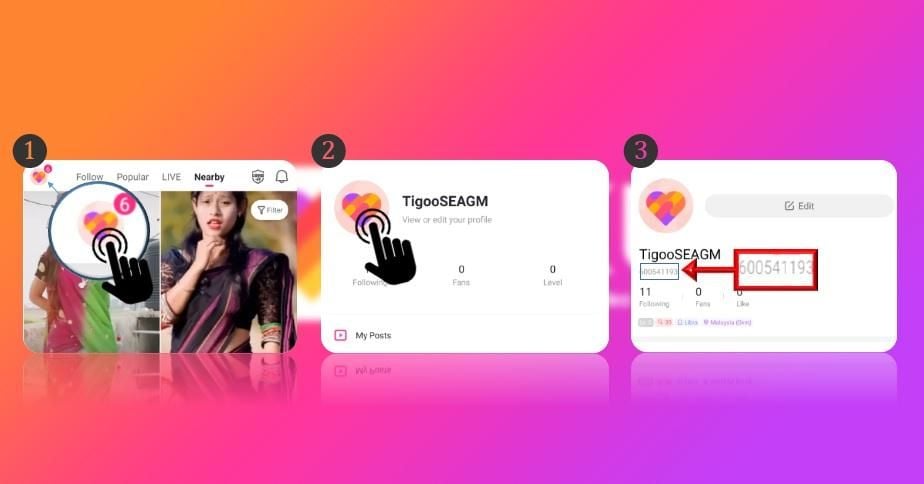
Tip: Always use the copy button rather than typing the ID manually to avoid typos, extra spaces, or confusing similar characters (such as uppercase "I" and lowercase "l").
How to Recharge Likee Gift Card on BitTopup Using Player ID
Recharging your Likee account on BitTopup takes only a few simple steps:
- Select Package: Choose the diamond denomination you wish to purchase from the product catalog.
- Enter Account Details: Paste your verified Likee Player ID into the designated field.
- Review Order: Double-check your Player ID to ensure accurate fulfillment.
- Select Payment Method: Choose from the available secure payment methods shown on the checkout page.
- Complete Payment: Finalize the transaction. Once the order is confirmed, the diamonds will be credited directly to your Likee wallet balance.
Direct Player ID Top-Up vs. Digital Voucher Redemption
| Feature | Direct Player ID Top-Up | Digital Code Redemption |
|---|---|---|
| Fulfillment Method | Direct credit to account | Alphanumeric code sent via email/order history |
| Password Required? | Never (Only Player ID) | Never |
| Account Login Needed? | No | Requires manual entry on Likee redemption portal |
| Best For | Instant personal use & gifting friends | Saving for later or sending as a surprise code |
| Error Risk | Low (Instant UID verification) | Moderate (Risk of mistyping code strings) |
Key Benefits of Using Likee Diamonds for Live Streams and Creators
Diamonds provide direct utility that enhances your experience as a viewer and community member:
- Show Meaningful Creator Appreciation: Sending virtual gifts is the most effective way to support your favorite live broadcasters. Gifts convert into Beans, which creators can cash out.
- Unlock High-Tier Broadcast Entrances: Entering a live room with high-tier gifter status displays custom entrance animations, drawing immediate attention from the host and other viewers.
- Stand Out in Crowded Rooms: Animated gifts pin your profile and message to the top of the chat, making sure the creator reads your comments.
- Participate in PK Battles: Help your favorite streamer win head-to-head Live PK competitions against rival creators by sending boost gifts during active battle rounds.
Step-by-Step Guide to Redeeming Likee Voucher Codes
If you purchased a digital voucher code instead of a direct Player ID top-up, follow these steps to redeem it:
- Visit the official Likee Diamond redemption page via a web browser.
- Enter your Likee Player ID and verify your in-app nickname to ensure you are crediting the correct profile.
- Input the digital voucher code string exactly as delivered in your BitTopup order details.
- Click Confirm / Redeem.
- Launch the Likee app, open your profile, tap Wallet, and verify that your Diamond balance has updated.
Troubleshooting Common Likee Top-Up and Delivery Errors
If you encounter an issue during your recharge, consult these common solutions:
- Diamonds Not Appearing Immediately: Restart your Likee app completely and refresh your Wallet tab. Network delays on the app server can occasionally cause a brief display lag.
- Incorrect Player ID Entered: If you entered an invalid or non-existent ID, the order will fail to process. Contact BitTopup Customer Support immediately with your order number. If you entered a valid ID belonging to another user, orders that have already reached completed status cannot be reversed.
- Region Discrepancies: Ensure your Likee account matches the region of the product selected. Some account profiles registered under specific regional regulations may have restrictions on receiving cross-border credits.
- Payment Verification Holds: In rare cases, your financial institution may flag the transaction for security verification. Ensure your payment went through and check your order status on BitTopup.
Safe and Secure Payment Options for Likee Diamond Recharge
BitTopup uses modern encryption protocols to ensure every transaction is protected. We prioritize your privacy and account security at every stage:
- Zero Password Requirement: We never ask for your Likee password, verification SMS codes, or social media logins. All transactions require only your public Player ID.
- Clear Checkout Pricing: Real-time pricing and applicable fees are transparently displayed at checkout before you confirm payment.
- Broad Payment Selection: Choose from a wide variety of recognized global and localized payment channels tailored to your region.
- 24/7 Dedicated Support: Our multilingual support team is available around the clock to assist you with order inquiries, tracking, and troubleshooting.
Frequently Asked Questions
What is a Likee Gift Card used for?
A Likee Gift Card is used to credit Likee Diamonds to a user's account. These Diamonds are used to send animated gifts to live streamers, join interactive live events, unlock special chat effects, and increase profile visibility.
Where can I find my Likee Player ID?
Open the Likee app, tap your Profile icon, and look directly beneath your avatar and username. You will see your Likee ID alongside a copy icon.
Do I need to share my Likee account password to recharge?
No. BitTopup requires only your Likee Player ID for direct recharges. You should never share your account password or verification codes with anyone.
How do I redeem my Likee Gift Card code?
If you have a voucher code, visit the official Likee redemption portal, input your Likee Player ID, enter your voucher code, and submit to credit your balance.
How long does it take for Likee Diamonds to reflect in my balance?
Recharges are processed automatically. In most cases, diamonds reflect in your Likee Wallet within minutes after payment confirmation.
Can I recharge a Likee Gift Card for a friend using their Player ID?
Yes. Enter your friend's Likee Player ID at checkout instead of your own. The Diamonds will be sent directly to their in-app wallet balance.
What should I do if my Likee recharge fails or is delayed?
First, refresh your Likee app and check your Wallet balance. If your balance does not update and your order status is pending or failed, reach out to BitTopup 24/7 Customer Support with your order ID for prompt assistance.