

Sausage Man Candies Top Up: Direct In-Game Recharge
Candies serve as the primary premium currency in Sausage Man, the popular battle royale game featuring quirky sausage combatants, tactical gunplay, and expansive island maps. Players use Candies to unlock exclusive seasonal rewards, purchase cosmetic outfits, obtain premium weapon skins, and advance their Season Pass progression.
BitTopup provides a direct recharge service for Sausage Man Candies across Southeast Asia and global servers. You only need your in-game Character ID to place an order. Account passwords or login credentials are never required, keeping your account safe while ensuring quick delivery directly to your profile.
What Are Sausage Man Candies and How to Use Them
Sausage Man features several in-game currencies, including Sausage Coins and Colored Keys, but Candies remain the most versatile. Candies are required to access top-tier supply boxes, seasonal battle passes, and limited-time events.
In-Game Utility of Sausage Man Candies
| Item / Feature | Candy Usage | Benefit |
|---|---|---|
| Season Pass Upgrade | 300 – 600 Candies | Unlocks the Golden Season Pass track, exclusive skins, and tier milestone bonuses. |
| Rainbow Supply Boxes | Direct Candy Purchase / Keys | Grants access to legendary weapon finishes, vehicle paint jobs, and animated outfits. |
| Supply Crates | Direct Candy Purchase | Drops character customization items, headgear, party cards, and weapon accessories. |
| Limited-Time Events | Event Spin / Direct Purchase | Allows players to purchase collaborative sets, themed holiday outfits, and custom emotes. |
| Tier Level Boosts | Direct Candy Exchange | Instantly advances Season Pass levels to collect milestone rewards ahead of schedule. |
Candies give you full control over how you personalize your character on the battlefield, from tactical weapon skins to humorous costumes and custom victory poses.
What You Can Unlock: Supply Boxes, Season Pass & Cosmetics
Recharging Candies allows you to participate in all major in-game monetization systems:
- Golden Season Pass: Upgrading to the Golden Pass unlocks dual-track rewards as you complete daily and weekly tactical missions. High-tier pass rewards include full costume sets, exclusive glider skins, and special kill-broadcast banners.
- Premium Rainbow Crates: These crates feature the highest rarity items in the game. Using Candies gives you access to animated gun skins with custom muzzle flashes and unique elimination crates.
- Party Cards & Social Items: Stand out in pre-match lobbies and friend lists by customizing your profile banner, interaction emotes, and team entrance animations.
- Vehicle Customization: Transform standard jeeps, sports cars, and flying saucers with custom paint jobs and sound effects.
How to Locate Your Sausage Man Character ID
To ensure your Sausage Man Candies arrive at the correct account, you must provide your exact Character ID. Follow these steps to find it inside the game client:
- Launch Sausage Man on your mobile device.
- Tap your Avatar / Profile Icon located in the top-left corner of the main lobby screen.
- On your player profile overview, locate the Character ID (a unique sequence of numbers displayed below your player name).
- Tap the Copy icon next to the Character ID to save it directly to your clipboard.
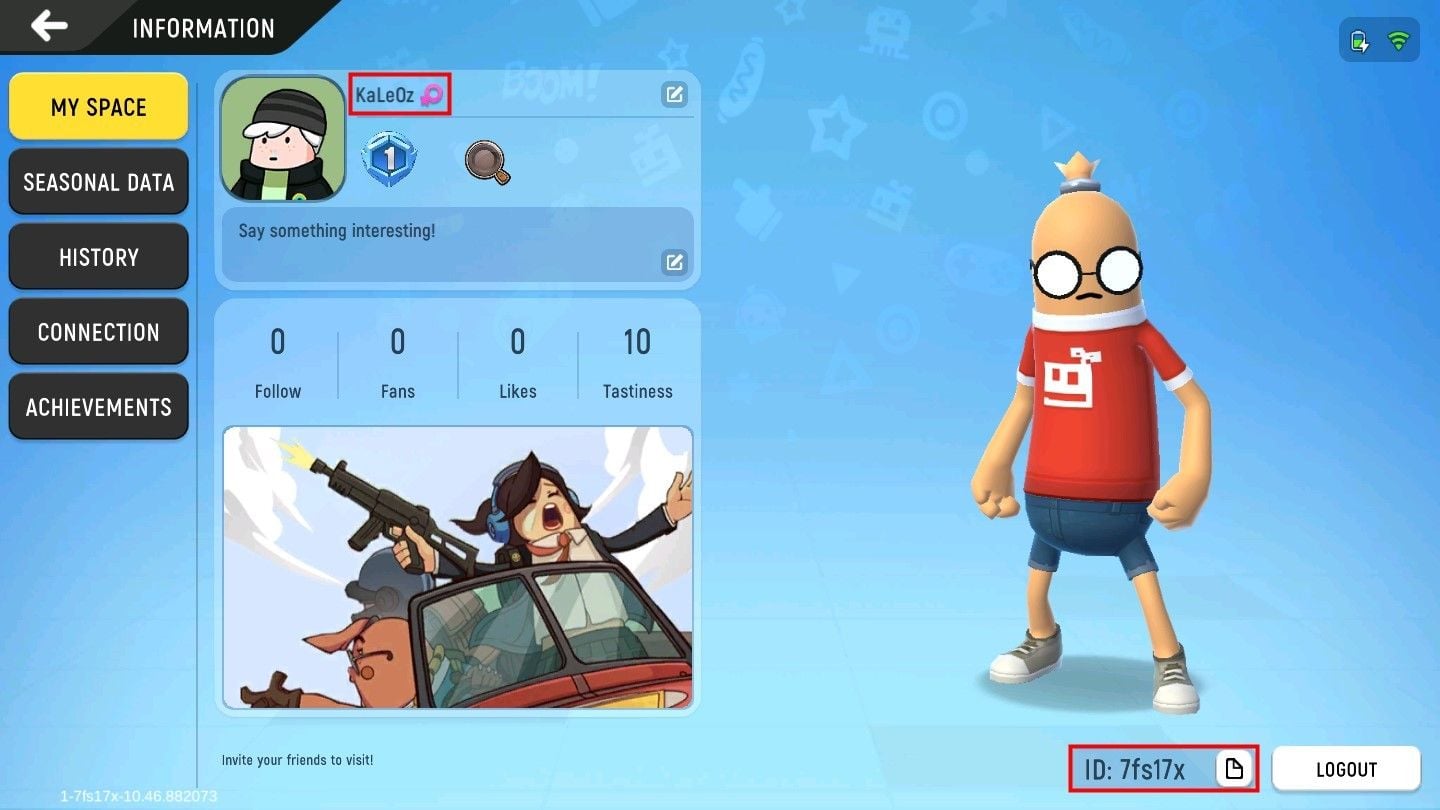
Always copy and paste your Character ID directly to prevent manual typing mistakes during checkout.
How to Recharge Sausage Man Candies on BitTopup (Step-by-Step)
To complete your Sausage Man Candies top-up on BitTopup, follow this simple process:
- Select Your Candy Denomination: Choose the Candy package that fits your in-game needs from the product list.
- Enter Your Character ID: Paste your Sausage Man Character ID into the designated player ID field.
- Select Your Payment Method: Pick from the available secure checkout channels displayed on the payment page.
- Review and Pay: Confirm that your Character ID and package amount are accurate, then finalize the transaction.
- Check In-Game Balance: Open Sausage Man and check your Candy balance in the top lobby bar. In most cases, Candies update automatically within moments after payment confirmation.
Benefits of Recharging Sausage Man Candies via BitTopup
BitTopup is structured to provide players with a straightforward, reliable digital top-up experience:
- Password-Free Security: You only provide your public Character ID. You never need to share social logins, passwords, or verification codes.
- Clear Checkout Pricing: Real-time pricing is displayed directly on the live product catalog without hidden processing fees.
- Automated Processing: Our delivery infrastructure processes orders around the clock to credit Candies directly to your server ID.
- Dedicated Support: If you ever have a question about your order status, our 24/7 customer support team is available to assist.
Troubleshooting Delivery Status and Common Top-Up Inquiries
If your Candies do not appear immediately after completing payment, follow these standard troubleshooting steps:
- Restart the Game Client: Close Sausage Man completely from your background applications and relaunch it to force a server balance refresh.
- Check In-Game Mail: Some promotional items or event Candies are sent directly to your in-game mailbox rather than being added straight to the top balance counter.
- Verify Payment Status: Ensure your payment transaction finished successfully and that you received a completion receipt.
- Check Server Status: During major game updates or seasonal server maintenance, in-game crediting may experience brief network delays.
If your balance does not update after 15–30 minutes, contact BitTopup customer support with your order number and Character ID for immediate verification.
Frequently Asked Questions About Sausage Man Top-Up
How do I find my Sausage Man Character ID?
Open Sausage Man and tap your player profile avatar in the upper-left corner of the home screen. Your Character ID is the number string displayed right beneath your player name. Tap the copy icon next to it to copy it to your clipboard.
What can I purchase with Sausage Man Candies?
Candies can be used to purchase the Golden Season Pass, open Premium and Rainbow Supply Boxes, buy exclusive character outfits, unlock weapon skins, customize vehicle paints, and acquire special lobby emotes.
Do I need to provide my game login password to recharge Candies?
No. BitTopup uses direct Character ID top-ups. You never need to share your game password, Google account, Apple ID, or social media logins.
How long does it take for Sausage Man Candies to arrive in my account?
Orders are processed automatically upon successful payment. Candies typically arrive in your account shortly after payment confirmation. Relaunch the game client to refresh your balance.
What should I do if I entered the wrong Character ID during recharge?
Please double-check your Character ID before making payment. Direct top-ups are processed automatically based on the ID provided. If an order has not yet been processed by the system, contact customer support immediately with your order details.
Can I top up Sausage Man Candies for a friend's account?
Yes. Because the recharge only requires a Character ID, you can enter your friend's Sausage Man Character ID during checkout to send Candies directly to their account as a gift.