



Tantan Coins China Top Up: Quick & Secure Account Refill
Tantan (探探) stands as one of the most widely used social discovery and dating applications in Mainland China. To get the most out of your profile, engage in live streams, and make meaningful connections, in-app currency is essential. Tantan Coins (China) allow you to unlock exclusive features, send interactive gifts, and expand your matching potential across the network.
BitTopup provides a direct recharge service for your Tantan China account. You only need your numeric Tantan ID to complete an order. There is no requirement to share your account credentials, SMS codes, or login passwords. Select your denomination, submit your ID, and complete payment via our secure checkout.
What Are Tantan Coins (China) and In-App Perks
Tantan Coins serve as the primary consumable virtual currency in the Mainland China edition of the Tantan app. Holding a balance of Tantan Coins gives you immediate access to premium social interactions and profile visibility upgrades:
- Super Likes (特别喜欢): Stand out from the regular swipe queue. A Super Like notifies the recipient immediately, increasing your match rate.
- Profile Exposure (曝光增加 / Boost): Put your card in front of thousands of nearby users during peak active hours to maximize views and incoming likes.
- Pass Back (反悔 / Rewind): Accidentally swiped left on someone you liked? Use Coins to rewind your last swipe and correct your decision.
- See Who Liked You: Skip the waiting game and view the complete list of profiles that have already swiped right on your account.
- Live Stream Gifting: Support your favorite broadcast hosts on the Tantan live stage with animated visual gifts, badges, and special room entrance effects.
Important Region Requirements: Tantan China vs Tantan Global
Tantan maintains separate systems for its Mainland China app and its international (Global) version. Before placing your order, ensure your account is registered on the China server.
| Feature / Attribute | Tantan China (探探) | Tantan Global / International |
|---|---|---|
| App Store Availability | Chinese iOS App Store / Android Stores | Google Play / International Apple App Store |
| Primary Account Binding | +86 Mobile Number, WeChat, QQ, Weibo | International Mobile (+1, +44, etc.), Apple ID, Facebook |
| Primary In-App Currency | Tantan Coins (China) | Tantan Global Coins / VIP Subscription |
| BitTopup Product Match | Tantan Coins (China) | International Tantan SKU |
| Server Compatibility | Mainland China Server Only | International Regional Servers |
Note: Top-ups ordered under this product listing credit only Mainland China server accounts. If your account was created on the international version, please choose the corresponding global product on BitTopup.
Tantan Coins vs Tantan Diamonds: Currency Differences Explained
Understanding how currencies function in the China app ensures you purchase the exact item you need:
- Tantan Coins (探探币): The direct-purchase consumer currency. You buy Coins to purchase privilege cards, boost swipes, unlock direct messaging perks, and send live stream gifts.
- Tantan Diamonds (探探钻石): The creator-side earnings currency. When a streamer receives gifts bought with Coins, those gifts convert into Diamonds in the creator's balance. Diamonds are used for host payouts or specific platform creator tools.
BitTopup direct recharge adds Tantan Coins directly to your personal user wallet balance.
How to Locate Your Tantan ID in the Tantan App
To ensure your order delivers smoothly to the correct account, retrieve your unique Tantan ID directly from your profile settings:
- Open the Tantan app on your mobile device.
- Tap the Me (我) or Profile icon located at the bottom-right corner of the main screen.
- Tap on your profile picture or the Edit Profile / Settings (设置) section.
- Locate your Tantan ID (探探号 / ID) displayed beneath your nickname. It is a unique numeric or alphanumeric string.
- Copy or carefully write down this ID for entry during checkout.
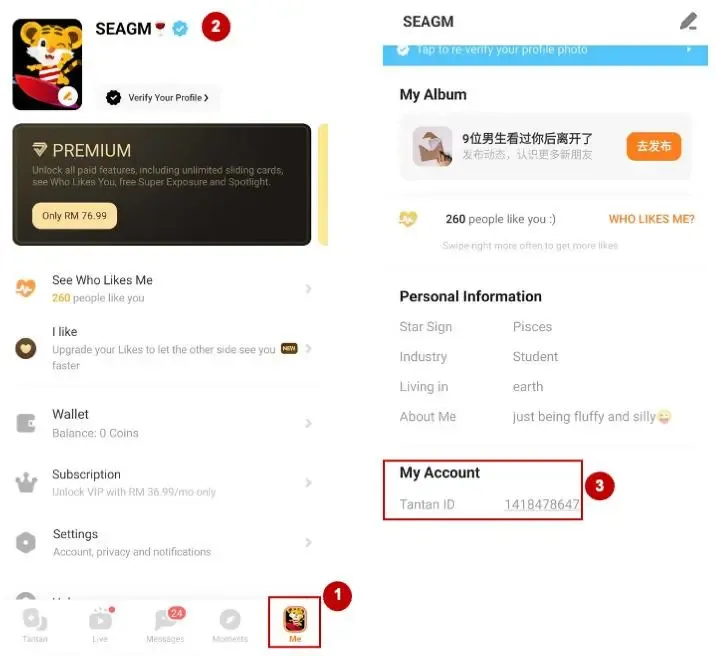
Tip: Do not use your display nickname or bound phone number in the ID field. Only the actual Tantan ID string ensures accurate system delivery.
How to Recharge Tantan Coins (China) via Tantan ID on BitTopup
Refilling your balance on BitTopup takes only a few simple steps:
- Select Denomination: Choose the amount of Tantan Coins (China) you wish to add to your account.
- Enter Your Tantan ID: Paste your numeric ID into the
charge_accountfield. - Proceed to Checkout: Check the live product price, review your order details, and choose your preferred local or international payment option.
- Receive Your Coins: Once payment confirmation is complete, our automated system processes the direct top-up to your Tantan China account balance.
Account Safety: Why Direct ID Recharge Protects Your Account
Account safety is a core priority when buying digital game and app credits online. BitTopup uses a direct ID-based fulfillment process:
- No Password Required: We never ask for your Tantan login password, gesture lock, or third-party login credentials.
- No Verification Codes: You never need to share SMS verification codes or two-factor authentication prompts.
- Official API Channels: Balance additions process directly through verified top-up pathways, protecting your account against third-party policy violations and bans.
- Data Privacy: Your profile ID is used solely to route your Coin delivery and is never shared or stored insecurely.
Troubleshooting Delivery Status and Order Verification
If your Coins do not display immediately after completing checkout, follow these diagnostic steps:
- Refresh the App: Completely swipe away and close the Tantan app on your phone, then relaunch it to refresh your local wallet cache.
- Verify Server Connection: Confirm that your device is connected to a stable network and that you are logged into the same China-server profile whose ID you submitted.
- Check Order History: Log in to your BitTopup account to check whether your order status shows as Processing or Completed.
- Contact 24/7 Support: If your order status is completed but your balance has not updated after a short wait, contact the BitTopup Customer Support team with your Order ID and Tantan ID for instant assistance.
Frequently Asked Questions
Where do I find my Tantan ID to complete the recharge?
Open the Tantan app, tap the Me (我) tab at the bottom right, and view your profile or account settings. Your unique ID (探探号) appears directly below your avatar and nickname.
Can I recharge a global or international account using Tantan China Coins?
No. This product is strictly for accounts registered on the Mainland China server of Tantan. If you registered your account via international app stores using a non-mainland phone number, you must purchase international Tantan products.
Do I need to share my Tantan password or phone verification code?
No. BitTopup only requires your public Tantan ID to process the top-up. Never share your password or SMS verification codes with anyone.
What premium features can I unlock with Tantan Coins?
With Tantan Coins, you can purchase Super Likes, trigger Profile Boosts (Exposure), rewind accidental left swipes, view who swiped right on you, and purchase virtual gifts for live stream broadcasters.
What should I do if my Tantan Coins have not arrived after payment?
First, force-close and restart your Tantan app to refresh your balance display. If the balance remains unchanged, check your order status in your BitTopup dashboard and reach out to our 24/7 customer support team with your order number.
Can a recharge order be refunded if I submit the wrong Tantan ID?
Because digital recharges are delivered automatically to the submitted ID, completed orders cannot be reversed or refunded once processed. Please verify your Tantan ID carefully before confirming your purchase on BitTopup.