
BitTopup Logohow to top-up in bittopup
ค้นหา
วิธีเติมเงิน Steam Wallet Code (INR)

Steam Wallet Code (INR)

Excellent
Trustpilot
INDIAINDIA
Instant Deliveryจัดส่งทันที
Safe & Secure paymentชำระเงินปลอดภัยและมั่นใจได้

Get instant digital INR Steam wallet balance safely and easily with BitTopup.

เลือกมูลค่า

Steam Wallet Code (INR) Steam Wallet Code 130 Rupee IN

฿ 43.25

ยอดรวม · x1

Steam Wallet Code (INR) คู่มือการเติมเงิน

Steam Wallet Code (INR) Top Up: What It Is and How It Works

A Steam Wallet Code (INR) is a prepaid digital voucher used to credit Indian Rupees (₹) directly into your Steam account balance. Instead of linking a credit card or debit card directly to the Steam platform, you purchase a digital redemption code that converts directly into store credit upon activation. This wallet credit can be used across the entire Steam catalog to buy PC games, downloadable content (DLC), in-game items, software, soundtracks, and Community Market goods.

Digital wallet codes eliminate the need for recurring credit card authorizations and prevent unintended recurring charges. Once credited, your Steam wallet balance never expires, allowing you to save funds for major promotional events, publisher sales, and game releases throughout 2026.

Steam Region and Currency Policy: Why INR Codes Require an Indian Account

Valve applies strict regional currency controls to Steam Wallet Codes to preserve regional pricing structures. Steam codes denominated in Indian Rupees (INR) can only be activated on Steam accounts whose store country is set to India.

Key regional guidelines:- Your Steam account store currency must show INR (₹).- If your account is registered to another country (such as the United States, United Kingdom, or Eurozone), an INR code will not convert automatically. Steam will reject the redemption with a currency mismatch notification.- Using VPNs or proxy services to bypass regional restrictions violates the Steam Subscriber Agreement and can lead to account limitations.- Ensure your Steam profile region matches India before purchasing and attempting to redeem INR vouchers.

How to Check Your Steam Account Details and Region

To ensure your account is ready for an INR code redemption, verify your current store country setting:1. Open the Steam desktop client or log in via a web browser.2. Click on your profile name in the top right corner and select "Account details".3. Under "Store & Purchase History", check the line labeled "Country".4. Confirm that the country is listed as "India" and the displayed wallet currency is "INR" (₹).
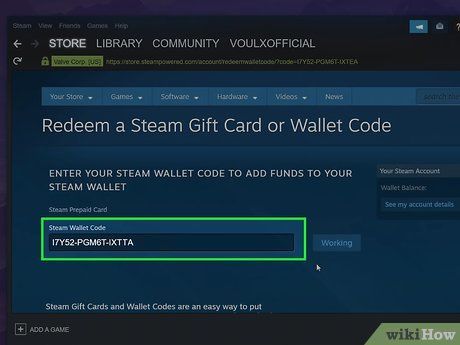
How to recharge Steam Wallet Code (INR)

Your Steam Account Name (or Steam ID / login username) is the identifier associated with your profile, but you do not need to share your account credentials or login passwords with anyone to redeem a digital code. All wallet redemptions occur privately through your own authenticated Steam account.

Supported Steam Wallet INR Denominations in 2026

Steam wallet codes come in various fixed denominations tailored for Indian gamers, ranging from small values suitable for microtransactions to larger amounts for premium AAA releases. Current live pricing for each voucher amount is displayed on the BitTopup checkout catalog.

Denomination (INR)Typical Use CaseCompatibility
₹100In-game microtransactions, battle passes, stickersIndian Steam Accounts only
₹250Indie titles, early access games, cosmetic DLCIndian Steam Accounts only
₹500Mid-tier games, seasonal event passesIndian Steam Accounts only
₹1000Standard game purchases, bundle packagesIndian Steam Accounts only
₹2500AAA title pre-orders, premium game editionsIndian Steam Accounts only
₹5000Collector editions, multiple game wishlist haulsIndian Steam Accounts only

Note: Exact listing rates and denomination availability are shown on the live checkout page on BitTopup.

How to Recharge Steam Wallet Code (INR) on PC and Mobile (Step-by-Step)

You can redeem your digital voucher code across desktop, browser, and mobile interfaces. Follow these direct steps:

Redeeming via Steam Desktop Client or Web Browser:1. Open Steam and log into your Indian Steam account.2. Click your account username in the top-right corner and select "View my wallet" (or click "Games" in the top menu and select "Redeem a Steam Wallet Code").3. In the "Steam Wallet Code" input field, type or paste the digital voucher key received from BitTopup.4. Click "Continue".5. The system verifies the code, and the INR balance will instantly appear in your Steam wallet balance in the upper right corner.

Redeeming via the Steam Mobile App:1. Open the Steam Mobile application on iOS or Android.2. Tap your profile icon or open the navigation menu.3. Select "Store" and tap "Account Details".4. Tap "Add funds to your Steam Wallet".5. Select "Redeem a Steam Gift Card or Wallet Code".6. Enter your digital voucher code and tap "Continue" to finalize the balance update.

Fixing Common Steam Code Activation and Redemption Errors

If you encounter an issue during voucher redemption, check these standard troubleshooting steps:- Currency Mismatch Error: Occurs when an INR code is entered on an account registered to another country. Verify that your store country in "Account details" is set to India.- Invalid Code Error: Verify that there are no accidental spaces before or after the code. Check easily confused characters, such as the letter "O" versus the number "0", or the letter "I" versus the number "1".- Code Already Redeemed: If you receive a notice that the voucher has already been used, refresh your account wallet page. Sometimes the balance updates on the server before the confirmation page loads. If the balance remains unchanged, contact BitTopup customer support with your order reference.- Unexpected Error / Rate Limiting: Entering incorrect codes multiple times triggers a temporary cooldown on Steam. Wait 30 to 60 minutes before retrying the redemption.

Why Buy Steam Wallet Code (INR) on BitTopup

BitTopup provides a straightforward, safe purchasing process for Indian gamers looking to fund their Steam libraries.- Direct Digital Delivery: Codes are delivered straight to your order screen and dashboard account immediately after payment confirmation.- Account Safety & Privacy: You never need to provide your Steam password, login credentials, or account sharing access. You receive a digital code that you redeem yourself.- Multiple Local Payment Methods: Complete transactions using familiar payment solutions without requiring international credit cards enabled for overseas billing.- Clear Value Structure: Transparent listings show verified INR denominations clearly before you pay. Check the live checkout screen for current pricing and availability.- 24/7 Dedicated Support: Customer service is available around the clock to assist with order tracking and code redemption verification.

Best Uses for Steam Wallet Balance: In-Game Items and Seasonal Sales

Loading your Steam wallet in advance gives you immediate buying power during major platform events and seasonal promotions throughout 2026.- Steam Seasonal Sales: Pre-funding your wallet ensures fast checkouts during major events like the Steam Autumn Sale, Winter Sale, and Summer Sale without payment gateway delays or bank server downtime.- In-Game Purchases: Use your balance directly inside games like Counter-Strike 2, Dota 2, Apex Legends, and PUBG for weapon skins, battle passes, keys, and case openings.- Steam Community Market: Trade and buy player-listed items, trading cards, profile backgrounds, and emotes directly using your stored INR balance.- Software & VR Applications: Purchase digital productivity tools, game development software, benchmark utilities, and VR games available across the Steam store.

Frequently Asked Questions

How to recharge a Steam wallet in India?

To recharge your Steam wallet in India, purchase an INR Steam Wallet Code on BitTopup. Once your code is delivered, log into your Steam account, open the "Redeem a Steam Wallet Code" page, enter the key, and click "Continue". The funds credit to your account balance immediately.

Can I redeem an INR Steam Wallet Code on a non-Indian Steam account?

No. Due to Valve regional currency policies, Steam Wallet Codes denominated in INR can only be activated on accounts whose store country is set to India. Accounts set to other regions will receive a currency error.

How to add 100 rupees to my Steam wallet balance?

Select the ₹100 denomination voucher on BitTopup and proceed through the checkout. Once generated, paste the code into the Steam redemption page. Your account will be credited with exactly ₹100.

Do Steam Wallet Code (INR) digital vouchers expire?

Steam Wallet digital codes do not carry an expiration date prior to activation. Once redeemed, the funds remain in your Steam wallet balance indefinitely until you choose to spend them.

Where do I receive my digital Steam Wallet code after purchasing on BitTopup?

Your digital code is displayed directly on the order confirmation screen on BitTopup and is saved in your BitTopup user account order history for easy access.

What should I do if Steam gives an invalid code or currency mismatch error?

First, double-check that your Steam account country is set to India under "Account details". Next, verify the code characters to ensure no typos or extra spaces were included. If the error continues, reach out to BitTopup 24/7 customer support with your order ID.


Steam Wallet Code (INR) ข่าวสารแนะนำ

How to Top up Tarisland?

Tarisland International, a highly anticipated MMORPG, launched worldwide on June 21, 2024. Developed by Tencent, this game offers an immersive experience with stunning graphics, diverse classes, and challenging dungeons. Players can choose from nine unique classes, each with specialized talent trees and ultimate abilities, allowing for endless customization and strategic gameplay.


How to Recharge PUBG Mobile UC Easily with BitTopup

PUBG Mobile UC (Unknown Cash) is the in-game currency used in PUBG Mobile, one of the most popular battle royale games worldwide. Players use UC to purchase a variety of in-game items, including skins, costumes, weapon skins, and the coveted Royal Pass, which provides access to exclusive rewards and missions. With UC, you can enhance your gameplay experience by customizing your characters and gear to stand out in the battlegrounds.

Introduction of new characters in "King of Holy Beasts", the content of the game is the largest among Vanilla Club's works

Introduction of new characters in "King of Holy Beasts", the content of the game is the largest among Vanilla Club's works

The well-known mod maker of "The Elder Scrolls" has now joined the team to develop "The Elder Scrolls 6"

The well-known mod maker of "The Elder Scrolls" has now joined the team to develop "The Elder Scrolls 6"

Major reorganization! Riot CEO Bobby Caudick will step down on December 29

Major reorganization! Riot CEO Bobby Caudick will step down on December 29

Akatsuki announces capital alliance with Sony and Koei Tecmo

Akatsuki announces capital alliance with Sony and Koei Tecmo

สินค้าแนะนำ

Steam Wallet Code (INR) คำถามที่พบบ่อยเกี่ยวกับการเติมเงิน

ใช้เวลานานเท่าใดกว่าที่คำสั่งซื้อจะเสร็จสมบูรณ์?
โดยปกติแล้ว คำสั่งซื้อจะเสร็จสมบูรณ์ภายในไม่กี่นาที หากมีความล่าช้าใดๆ โปรดติดต่อฝ่ายสนับสนุนลูกค้าของเรา
BitTopup คืออะไร?
BitTopup คือแพลตฟอร์มออนไลน์สำหรับเติมเกมและบริการต่าง ๆ ได้อย่างรวดเร็วและปลอดภัย
เวลาทำการของฝ่ายบริการลูกค้า?
ฝ่ายบริการลูกค้าของ BitTopup พร้อมให้บริการตลอด 24 ชั่วโมงทุกวัน
ฉันจะแลกรับโค้ด Steam Wallet Code (INR) ได้อย่างไร?
ไปที่หน้าแลกรับอย่างเป็นทางการ กรอกโค้ดจากคำสั่งซื้อของคุณ จากนั้นยอดคงเหลือ/ไอเทมจะเข้าบัญชีทันที
Steam Wallet Code (INR) รองรับภูมิภาคใดบ้าง?
สินค้านี้รองรับบัญชีภูมิภาค INDIA โปรดตรวจสอบภูมิภาคบัญชีของคุณก่อนทำการสั่งซื้อ
ฉันสามารถชำระเงินด้วยคริปโตได้หรือไม่?
ได้ เรายอมรับ Bitcoin, ETH, USDT และคริปโตเคอร์เรนซียอดนิยมอื่นๆ พร้อมการยืนยันทันที
หากเติมเงินแล้วไม่เข้าต้องทำอย่างไร?
ติดต่อฝ่ายสนับสนุนลูกค้าตลอด 24 ชั่วโมงทุกวันพร้อมแจ้งหมายเลขคำสั่งซื้อของคุณ แล้วเราจะส่งรหัสให้ใหม่หรือคืนเงินให้ทันที

Steam Wallet Code (INR) รีวิวจากลูกค้าเกี่ยวกับการเติมเงิน

รีวิวทั้งหมด: 736

คะแนนเฉลี่ย

how to top-up in bittopup

4.1

customer avatar
Rahim Software2026/09/29
แอปที่ดีที่สุด ชอบเว็บไซต์นี้มาก รวดเร็วทันใจ แถมคืนเงินให้ทันทีหากมีปัญหา
customer avatar
Madni Shahzad2026/09/27
คำสั่งซื้อของฉันถูกยกเลิกเนื่องจากปัญหาบางอย่าง และฉันได้รับเงินคืนแล้ว
customer avatar
Zi Young Phoon2026/09/29
ส่วนลดเยอะมาก
customer avatar
Okeana2026/09/30
สุดยอด ดีมากๆ
customer avatar
Jean Piero2026/09/29
ดี รวดเร็ว น่าเชื่อถือ และมีประสิทธิภาพ ขาดอย่างเดียวคืออยากให้มีโบนัสหรือของขวัญสำหรับการเติมเงินบ่อยๆ
customer avatar
DELIGHT2026/09/26
ชำระเงินง่ายและรวดเร็ว แถมราคายังดีมากด้วย แนะนำเลยครับ!
customer avatar
Edrei Isai Martinez2026/09/30
ชอบที่ทุกอย่างใช้งานง่ายและชัดเจนมากครับ
customer avatar
Luq Mannn2026/09/26
บริการดีครับ
customer avatar
Mugaida Atipa2026/09/30
แล้วแอปไลฟ์สตรีมอื่นๆ อย่าง Cruslive กับ Baatlive ล่ะ?
customer avatar
Juan Jo2026/09/26
แอปยอดเยี่ยมและมีประสิทธิภาพมาก ไม่มีอะไรจะติเลย ดีมากๆ ครับ
customer avatar
Gulilat Hunde2026/09/27
แพลตฟอร์มที่ดี
customer avatar
Alberto Togonon2026/09/29
ซื่อสัตย์และช่วยเหลือดีมาก
customer avatar
Luna Lee2026/09/26
เติมเงิน Identity V และ Blood Strike ได้ไม่มีปัญหาเลย ให้แค่ 4 ดาวเพราะหน้าชำระเงินขัดข้องไปครั้งหนึ่ง แต่ฝ่ายสนับสนุนแก้ไขให้เร็วมากๆ ราคาดีและมีเกมให้เลือกเยอะมาก!
customer avatar
Dustin Wesley2026/09/26
บริการดีมากและราคาดีเลยทีเดียว จะกลับมาใช้บริการอีกแน่นอน
customer avatar
Farhan Nafis2026/09/28
ดี โอเค เยี่ยมเลย
customer avatar
Gamezy2026/09/26
ดี รวดเร็ว และน่าเชื่อถือ
customer avatar
Александр Макаренко2026/09/29
ช่องทางการชำระเงินที่ดีที่สุด ขอบคุณนักพัฒนาครับ
customer avatar
Adiyat2026/09/28
ประสบการณ์การซื้อ Poppo Coins ก็โอเคดี ราคาเหมาะสม แต่ครั้งนี้ฉันต้องรอเหรียญนานกว่าที่คิด ไม่ใช่ตัวเลือกที่แย่ แค่ยังไม่สมบูรณ์แบบ
customer avatar
Jarrett Meyer2026/09/29
ฉันใช้ BitTopUp มาสองสามปีแล้ว และอยากจะบอกสามเรื่องคือ: ไม่เคยมีปัญหาเรื่องการเติมเงินเลย, ความเร็วในการจัดส่งชนะทุกเว็บที่เคยลองมา, และมันง่ายมากๆ แค่คลิกไม่กี่ทีก็เรียบร้อย ช่วยให้ชีวิตง่ายขึ้นเยอะ
customer avatar
Prakash Sunar2026/09/27
บริการดี
Steam Wallet Code (INR) รีวิวทั้งหมด

ทำไมต้องเลือกเรา?

ธุรกรรมปลอดภัย 100%

ทุกการเติมเงินได้รับการปกป้องด้วยระบบรักษาความปลอดภัยในการชำระเงินที่เข้ารหัสตามมาตรฐานอุตสาหกรรม ซึ่งจะรักษาข้อมูลส่วนตัวและข้อมูลการชำระเงินของคุณไว้เป็นความลับอย่างสมบูรณ์ ช้อปได้อย่างมั่นใจ ปลอดภัย 100% ทุกครั้ง

บริการลูกค้าตลอด 24 ชั่วโมงทุกวัน

ทีมสนับสนุนที่เป็นมิตรของเราพร้อมให้บริการตลอด 24 ชั่วโมงเพื่อช่วยเหลือคุณทั้งก่อน ระหว่าง และหลังการซื้อ รับความช่วยเหลือที่รวดเร็วและเชื่อถือได้ทุกเมื่อที่คุณต้องการ ไม่ว่าจะเป็นกลางวันหรือกลางคืน

รับประกันคืนเงินเต็มจำนวน

เพลิดเพลินกับราคาที่คุ้มค่าที่สุดพร้อมการจัดส่งที่รวดเร็วและเชื่อถือได้ หากคำสั่งซื้อของคุณไม่ได้รับการจัดส่งหรือไม่สามารถใช้งานได้ เรารับประกันการคืนเงิน 100% เงินของคุณจะได้รับการคุ้มครองเสมอ

ช่องทางการชำระเงินที่รองรับ

PM_PIX - ช่วยเหลือด้านการชำระเงิน | BitTopupWG_PIX - ช่วยเหลือด้านการชำระเงิน | BitTopupPMKakaoPay - ช่วยเหลือด้านการชำระเงิน | BitTopupPMTNG - ช่วยเหลือด้านการชำระเงิน | BitTopupWG_TNG - ช่วยเหลือด้านการชำระเงิน | BitTopupPMGCASH - ช่วยเหลือด้านการชำระเงิน | BitTopupPM_WALLET_NAVERPAY - ช่วยเหลือด้านการชำระเงิน | BitTopupPM_WALLET_PMPROMPTPAY - ช่วยเหลือด้านการชำระเงิน | BitTopupAlipay HK - ช่วยเหลือด้านการชำระเงิน | BitTopupDANA - ช่วยเหลือด้านการชำระเงิน | BitTopupAM_SBP - ช่วยเหลือด้านการชำระเงิน | BitTopupPM_OXXO - ช่วยเหลือด้านการชำระเงิน | BitTopupOVO - ช่วยเหลือด้านการชำระเงิน | BitTopupPMToss - ช่วยเหลือด้านการชำระเงิน | BitTopupWG_PAY_NOW - ช่วยเหลือด้านการชำระเงิน | BitTopupWG_BLIK - ช่วยเหลือด้านการชำระเงิน | BitTopupPM_CARD_SA - ช่วยเหลือด้านการชำระเงิน | BitTopupWG_PAYU - ช่วยเหลือด้านการชำระเงิน | BitTopupPM_WALLET_JKOPAY - ช่วยเหลือด้านการชำระเงิน | BitTopupWG_STCPAY - ช่วยเหลือด้านการชำระเงิน | BitTopupPM_WALLET_SAMSUNGPAY - ช่วยเหลือด้านการชำระเงิน | BitTopupPM_7_ELEVEN - ช่วยเหลือด้านการชำระเงิน | BitTopupPM_WALLET_WECHATPAYHK - ช่วยเหลือด้านการชำระเงิน | BitTopupPM_NET_BANKING_FPX - ช่วยเหลือด้านการชำระเงิน | BitTopupPM_WALLET_QRIS - ช่วยเหลือด้านการชำระเงิน | BitTopupAM_CARD_KZ - ช่วยเหลือด้านการชำระเงิน | BitTopupAM_CARD_BY - ช่วยเหลือด้านการชำระเงิน | BitTopupWG_SADAD - ช่วยเหลือด้านการชำระเงิน | BitTopupWG_MADA - ช่วยเหลือด้านการชำระเงิน | BitTopupAM_TBANK - ช่วยเหลือด้านการชำระเงิน | BitTopupAM_SBERPAY - ช่วยเหลือด้านการชำระเงิน | BitTopupPM_REALTIME_PAYMENT - ช่วยเหลือด้านการชำระเงิน | BitTopupPM_WALLET_GASH - ช่วยเหลือด้านการชำระเงิน | BitTopupPM_OKMART - ช่วยเหลือด้านการชำระเงิน | BitTopupPM_HILIFE - ช่วยเหลือด้านการชำระเงิน | BitTopupPM_FAMILYMART - ช่วยเหลือด้านการชำระเงิน | BitTopupPM_CARD_SA_CD - ช่วยเหลือด้านการชำระเงิน | BitTopupAM_CARD - ช่วยเหลือด้านการชำระเงิน | BitTopupPM_CARD_EU - ช่วยเหลือด้านการชำระเงิน | BitTopupPM_CARD_KNET - ช่วยเหลือด้านการชำระเงิน | BitTopupBIN_DO_PAY_ME - ช่วยเหลือด้านการชำระเงิน | BitTopupPM_CARD_JP - ช่วยเหลือด้านการชำระเงิน | BitTopupBIN_DO_OCTOPUS - ช่วยเหลือด้านการชำระเงิน | BitTopupPM_CARD_US - ช่วยเหลือด้านการชำระเงิน | BitTopupPM_CARD - ช่วยเหลือด้านการชำระเงิน | BitTopupPM_WALLET_SHOPEEPAY - ช่วยเหลือด้านการชำระเงิน | BitTopupPM_WALLET_PAOTANGPAY - ช่วยเหลือด้านการชำระเงิน | BitTopupPM_WALLET_LINEPAY - ช่วยเหลือด้านการชำระเงิน | BitTopupPM_WALLET_TRUEMONEY - ช่วยเหลือด้านการชำระเงิน | BitTopupD_LOCAL_MX_IO - ช่วยเหลือด้านการชำระเงิน | BitTopupD_LOCAL_MX_BQ - ช่วยเหลือด้านการชำระเงิน | BitTopupD_LOCAL_MX_SE - ช่วยเหลือด้านการชำระเงิน | BitTopupD_LOCAL_MX_SM - ช่วยเหลือด้านการชำระเงิน | BitTopupD_LOCAL_MX_BV - ช่วยเหลือด้านการชำระเงิน | BitTopupD_LOCAL_PK_HB - ช่วยเหลือด้านการชำระเงิน | BitTopupD_LOCAL_PK_JK - ช่วยเหลือด้านการชำระเงิน | BitTopupD_LOCAL_PK_ES - ช่วยเหลือด้านการชำระเงิน | BitTopupD_LOCAL_PK_IO - ช่วยเหลือด้านการชำระเงิน | BitTopupPMPayco - ช่วยเหลือด้านการชำระเงิน | BitTopupGOPAY - ช่วยเหลือด้านการชำระเงิน | BitTopupPMPAYMAYA - ช่วยเหลือด้านการชำระเงิน | BitTopupPMGRABPAYPH - ช่วยเหลือด้านการชำระเงิน | BitTopupPMGRABPAYMY - ช่วยเหลือด้านการชำระเงิน | BitTopupPMBOOST - ช่วยเหลือด้านการชำระเงิน | BitTopupWG_PAYTM - ช่วยเหลือด้านการชำระเงิน | BitTopupPM_BANK_TRANSFER_PSE - ช่วยเหลือด้านการชำระเงิน | BitTopupPM_BANK_TRANSFER_EFECTY - ช่วยเหลือด้านการชำระเงิน | BitTopupWG_BPI - ช่วยเหลือด้านการชำระเงิน | BitTopupWG_GCASH - ช่วยเหลือด้านการชำระเงิน | BitTopupWG_BANCOMAT_PAY - ช่วยเหลือด้านการชำระเงิน | BitTopupWG_iDEAL - ช่วยเหลือด้านการชำระเงิน | BitTopupWG_BANCONTACT - ช่วยเหลือด้านการชำระเงิน | BitTopupPM_CARD_APPLE_US - ช่วยเหลือด้านการชำระเงิน | BitTopupPM_APPLEPAY - ช่วยเหลือด้านการชำระเงิน | BitTopupD_LOCAL_PH_PM - ช่วยเหลือด้านการชำระเงิน | BitTopupD_LOCAL_PH_GY - ช่วยเหลือด้านการชำระเงิน | BitTopupWG_BHIM - ช่วยเหลือด้านการชำระเงิน | BitTopupPM_WALLET_STCPAY - ช่วยเหลือด้านการชำระเงิน | BitTopupPM_GOOGLEPAY_US - ช่วยเหลือด้านการชำระเงิน | BitTopupPM_GOOGLEPAY - ช่วยเหลือด้านการชำระเงิน | BitTopupD_LOCAL_TH_TK - ช่วยเหลือด้านการชำระเงิน | BitTopupGATE_IO_PAY - ช่วยเหลือด้านการชำระเงิน | BitTopupBINANCE_PAY - ช่วยเหลือด้านการชำระเงิน | BitTopupWG_PHONE_PE - ช่วยเหลือด้านการชำระเงิน | BitTopupPAY_LOCO_ESumLifeET - ช่วยเหลือด้านการชำระเงิน | BitTopupPAY_LOCO_ESumFamilyMart - ช่วยเหลือด้านการชำระเงิน | BitTopupPAY_LOCO_ESum711 - ช่วยเหลือด้านการชำระเงิน | BitTopupBIT_WALLET - ช่วยเหลือด้านการชำระเงิน | BitTopup

10 Years Trusted Game & Live Streaming Top-Up Platform

Since 2016 | 5,000,000+ Users Worldwide

KAMAGEN LIMITED

Registration No. 76888246

Room 1508, 15/F, Grand Plaza Office Tower II, 625 Nathan Road, Mong Kok, Kowloon, Hong Kong

BUSINESS COOPERATION: ibittopup@gmail.com

© 2016-2026 BitTopup. All Rights Reserved.

Trusted & Verified by

ScamAdviser review of BitTopupGridinsoft review of BitTopupTrustpilot review of BitTopup
customer service