BitTopup Logohow to top-up in bittopup
ค้นหา
วิธีเติมเงิน Tmall Supermarket e-Gift Card (CN)

Tmall Supermarket e-Gift Card (CN)

Excellent
Trustpilot
CHINACHINA
Instant Deliveryจัดส่งทันที
Safe & Secure paymentชำระเงินปลอดภัยและมั่นใจได้

Shop China grocery essentials easily with fast Tmall digital vouchers on BitTopup.

เลือกมูลค่า

Tmall Supermarket e-Gift Card CNY 100

฿ 456.81

ยอดรวม · x1

Tmall Supermarket e-Gift Card (CN) คู่มือการเติมเงิน

Overview of Tmall Supermarket e-Gift Card (CN) Top Up & Xiangtao Card

The Tmall Supermarket e-Gift Card (known natively in China as the Tmall Supermarket Xiangtao Card / 天猫超市·享淘卡) is a prepaid digital voucher used exclusively on the Tmall Supermarket platform. Tmall Supermarket is Alibaba Group's dedicated e-commerce hub for groceries, personal care items, domestic household goods, beverages, fresh food, and imported daily essentials in Mainland China.

When you buy a digital card voucher, you receive a unique Card Number (卡号) and Redemption PIN/Password (卡密). Once bound to your verified Taobao account, the stored balance applies directly toward qualifying orders at checkout, deducting the full order amount or offsetting cart totals alongside valid platform coupons.

Digital Voucher Specifications

SpecificationDetails
Card TypeDigital PIN / Electronic Code (卡号 + 卡密)
Store ScopeExclusive to Tmall Supermarket (天猫超市) storefront orders
Region LockMainland China (CN) stores and local delivery addresses
DenominationsCheck live product list for current CNY values and pricing
CurrencyChinese Yuan (RMB / ¥)
Account BindingPermanently binds to your personal Taobao / Alipay account
Balance StackingSupported (combine multiple cards on one account)

Step-by-Step Guide: How to Redeem Tmall Supermarket e-Gift Card (CN)

Redeeming your digital voucher requires entering your card credentials into the official Taobao mobile application or the Tmall desktop web portal.

Method 1: Redeem via the Taobao Mobile App (Recommended)

  1. Open the Taobao (手机淘宝) app on your mobile device and log in to your account.
  2. Tap the Tmall Supermarket (天猫超市) icon on the home screen or search for "天猫超市" in the search bar.
  3. Tap My / User Center (我的) in the bottom right corner of the Tmall Supermarket interface.
  4. Select Supermarket Card / Xiangtao Card (超市卡 / 享淘卡) under your asset tools.
  5. Tap Bind New Card (绑定新卡 / 绑定超市卡).
  6. Enter the Card Number (卡号) and PIN Code (卡密) provided in your BitTopup order confirmation.
  7. Tap Confirm Binding (确认绑定). The RMB credit will reflect in your Supermarket Card balance immediately.

Method 2: Redeem via Desktop Web Browser

  1. Visit chaoshi.tmall.com and log in with your Taobao / Alipay account.
  2. Click on My Tmall Supermarket (我的天猫超市) in the upper navigation bar.
  3. Locate Supermarket Card (天猫超市卡) under your balance overview.
  4. Click Bind Card (卡券绑定), input the digital code credentials, and submit.

How to Access Your Tmall Supermarket Card Balance & Account ID

To view your active stored balance, verify past redemptions, or check your Taobao account identifiers before binding, follow the account profile path inside the application.
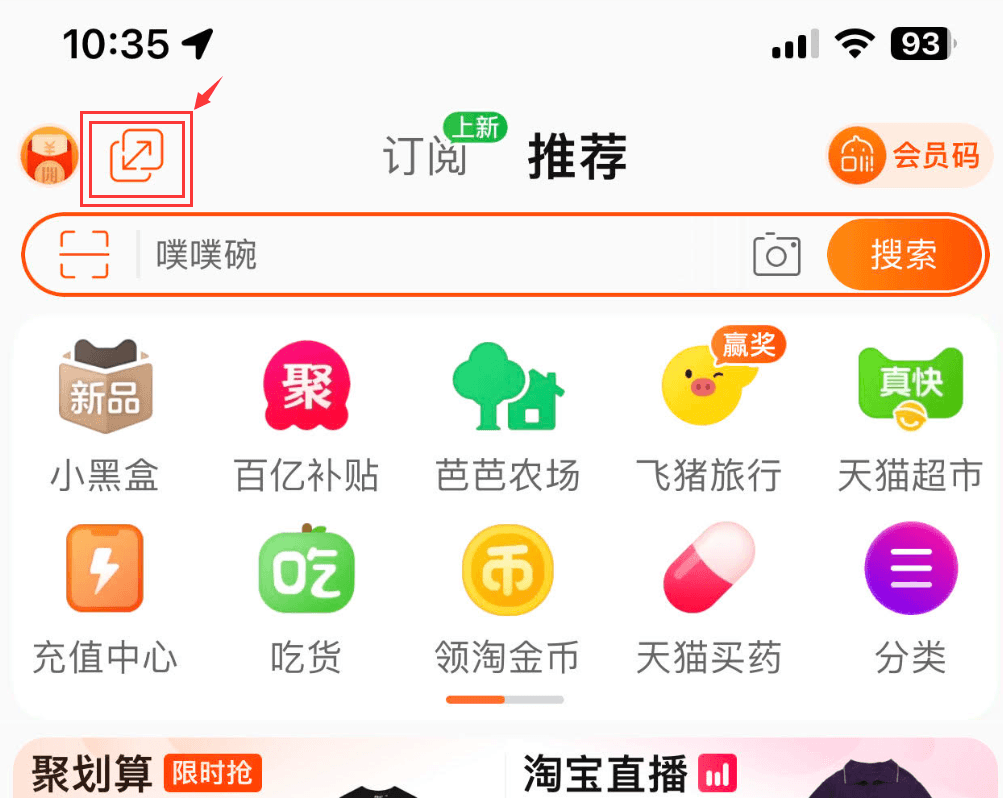
How to recharge Tmall Supermarket e-Gift Card (CN)

  1. Open the main Taobao App and navigate to My Taobao (我的淘宝) on the bottom-right corner of the main app bar.
  2. Your Taobao Member ID (淘宝账号 / 会员名) is displayed near the top profile picture.
  3. Enter Tmall Supermarket (天猫超市) from the main page shortcuts.
  4. Select My (我的) > Supermarket Card (超市卡) to see your available balance, transaction history, and active card expiration schedules.

Region Restrictions and Taobao & Alipay Account Compatibility

Tmall Supermarket e-Gift Cards (CN) operate strictly within the mainland Chinese e-commerce infrastructure:

  • Mainland Delivery Required: Tmall Supermarket delivers products from regional fulfillment warehouses across Mainland China. Shipping is configured for domestic Chinese mainland addresses only. You cannot use Xiangtao Card balance for direct cross-border international shipping addresses.
  • Account Verification: Your Taobao account must be in good standing. While basic card binding requires only a standard Taobao account, order checkout requires a linked Alipay account that has passed standard identity registration.
  • Merchant Scope Limitations: Xiangtao Cards apply solely to products sold directly by Tmall Supermarket (marked with the "天猫超市" badge). They cannot be spent on third-party marketplace merchant stores on Taobao, Tmall Global cross-border bonded shops, or external Alibaba services like Ele.me or Fliggy.

Expiration Validity, Balance Stacking, and Eligible Product Categories

  • Balance Stacking: You can bind multiple Tmall Supermarket e-Gift Cards to a single Taobao account. The system automatically sums all redeemed vouchers into a single shared balance, drawing from the earliest-expiring card first during checkout.
  • Card Validity: Xiangtao Cards typically feature a multi-year validity period (commonly up to 36 months from digital issuance). Once bound, your remaining balance tracks under your Supermarket Card wallet with individual expiration markers.
  • Eligible Items: Usable across packaged food, drinks, toiletries, paper products, electronics sold by Tmall Supermarket, small kitchen appliances, bedding, cleaning chemicals, and fresh pantry essentials.
  • Ineligible Purchases: Cannot be used to purchase virtual products, mobile top-ups, fuel cards, other prepaid gift certificates, or non-supermarket merchant offerings.

Why Buy Tmall Supermarket e-Gift Cards on BitTopup

  • Direct Digital Delivery: Receive your Card Number and Card PIN directly in your customer dashboard and registered email immediately upon payment approval.
  • Zero Password Risk: BitTopup delivers unredeemed digital codes. You never need to share your Taobao login, Alipay payment credentials, or SMS verification codes.
  • Global Payment Access: Purchase Chinese digital vouchers from anywhere in the world using standard international payment methods without needing a local Chinese mainland bank card.
  • Transparent Pricing: Check final product costs directly on our live checkout screen with no unexpected service surcharges.
  • Dedicated 24/7 Support: Multilingual customer service is available around the clock to assist you with order status checks, code inquiries, or redemption walkthroughs.

Troubleshooting Common Tmall Gift Card Redemption Issues

1. Card Number or Password Error (卡号或卡密错误)

  • Ensure there are no accidental spaces before or after the code when pasting.
  • Double-check uppercase and lowercase alphanumeric characters (such as distinguishing between uppercase "I", lowercase "l", and number "1", or "0" and "O").

2. Card Already Bound (该卡已被绑定)

  • Digital vouchers can only be bound once. If you receive this message, check your Supermarket Card history in the Taobao app to confirm whether the balance was already credited to your wallet.

3. Account Restricted or Binding Limit Reached

  • If Taobao prompts that your account cannot bind more cards, ensure your account has completed required security verification in Alipay. Taobao may limit daily high-frequency card bindings as an automated anti-bot measure; wait 24 hours before submitting additional PINs.

4. Voucher Not Applying at Checkout

  • Verify that every item in your shopping cart is sold directly by Tmall Supermarket (天猫超市) rather than third-party marketplace sellers. Ensure your shipping address is located within Mainland China.

Frequently Asked Questions

How do I redeem my Tmall Supermarket e-Gift Card (CN)?

Open the Taobao app, tap Tmall Supermarket, go to My (我的) > Supermarket Card (超市卡), tap Bind Card (绑定卡), and enter the Card Number and PIN provided by BitTopup.

Can I use the Tmall Supermarket e-gift card outside of Mainland China?

You can redeem the card to your Taobao account from anywhere in the world. However, physical orders placed through Tmall Supermarket require a delivery address within Mainland China.

Do Tmall Supermarket e-Gift Cards expire?

Yes. Tmall Supermarket cards come with a validity period set at generation (typically up to 3 years). After binding, you can track the exact expiration date of each credit batch inside your Supermarket Card wallet on Taobao.

Can I bind multiple Tmall Supermarket gift cards to one Taobao account?

Yes. Multiple card codes can be bound sequentially. Their values combine into your total Supermarket Card balance, and orders will deduct funds automatically starting from the earliest-expiring balance.

Do I need to provide my Taobao or Alipay password to recharge?

No. BitTopup provides standard digital redemption codes (Card Number + PIN). You redeem the voucher yourself inside your own app, ensuring your passwords and credentials remain private.

What products can be purchased using Tmall Supermarket Xiangtao cards?

You can buy any regular merchandise shipped and sold directly by Tmall Supermarket, including groceries, personal care items, domestic household products, snacks, beverages, and home supplies.


Tmall Supermarket e-Gift Card (CN) ข่าวสารแนะนำ

สินค้าแนะนำ

Tmall Supermarket e-Gift Card (CN) คำถามที่พบบ่อยเกี่ยวกับการเติมเงิน

ใช้เวลานานเท่าใดกว่าที่คำสั่งซื้อจะเสร็จสมบูรณ์?
โดยปกติแล้ว คำสั่งซื้อจะเสร็จสมบูรณ์ภายในไม่กี่นาที หากมีความล่าช้าใดๆ โปรดติดต่อฝ่ายสนับสนุนลูกค้าของเรา
BitTopup คืออะไร?
BitTopup คือแพลตฟอร์มออนไลน์สำหรับเติมเกมและบริการต่าง ๆ ได้อย่างรวดเร็วและปลอดภัย
เวลาทำการของฝ่ายบริการลูกค้า?
ฝ่ายบริการลูกค้าของ BitTopup พร้อมให้บริการตลอด 24 ชั่วโมงทุกวัน
ฉันจำเป็นต้องแชร์รหัสผ่านบัญชี Tmall Supermarket e-Gift Card (CN) หรือไม่?
ไม่จำเป็น การเติมเงินโดยตรงใช้เพียง Player ID/UID ของคุณเท่านั้น ห้ามแชร์รหัสผ่านของคุณกับใครเด็ดขาด
Tmall Supermarket e-Gift Card (CN) รองรับภูมิภาคใดบ้าง?
สินค้านี้รองรับบัญชีภูมิภาค CHINA โปรดตรวจสอบภูมิภาคบัญชีของคุณก่อนทำการสั่งซื้อ
ฉันสามารถชำระเงินด้วยคริปโตได้หรือไม่?
ได้ เรายอมรับ Bitcoin, ETH, USDT และคริปโตเคอร์เรนซียอดนิยมอื่นๆ พร้อมการยืนยันทันที
หากเติมเงินแล้วไม่เข้าต้องทำอย่างไร?
ติดต่อฝ่ายสนับสนุนลูกค้าตลอด 24 ชั่วโมงทุกวันพร้อมแจ้งหมายเลขคำสั่งซื้อของคุณ แล้วเราจะส่งรหัสให้ใหม่หรือคืนเงินให้ทันที

Tmall Supermarket e-Gift Card (CN) รีวิวจากลูกค้าเกี่ยวกับการเติมเงิน

รีวิวทั้งหมด: 627

คะแนนเฉลี่ย

how to top-up in bittopup

4.4

customer avatar
Mary Degamo2026/09/25
แฮปปี้มาก ขอบคุณครับ
customer avatar
Dustin Wesley2026/09/24
บริการดีมากและราคาดีเลยทีเดียว จะกลับมาใช้บริการอีกแน่นอน
customer avatar
Ольга Блохина2026/09/28
รวดเร็วและแม่นยำเสมอ
customer avatar
Leung Kendlz2026/09/26
คำสั่งซื้อของฉันเสร็จสิ้นแทบจะในทันที ไม่มีอะไรจะง่ายไปกว่านี้อีกแล้ว
customer avatar
Raju Mandal2026/09/27
จ่ายเงินแล้วได้รับของไวมาก
customer avatar
Muksal Mina2026/09/26
น่าเชื่อถือ
customer avatar
Karlotia2026/09/26
บริการรวดเร็วและง่ายดาย
customer avatar
Tina Rivera2026/09/24
สุดยอดมาก ขอบคุณครับ
customer avatar
Majed Al Zahrani2026/09/28
เป็นประสบการณ์ที่ดีมากจริงๆ และราคาของคุณก็ถูกมาก ฉันจะแนะนำให้เพื่อนร่วมงานทุกคนเลย
customer avatar
Hason Habibi2026/09/26
สมบูรณ์แบบ!
customer avatar
Yobeisis Rafezca2026/09/27
แอปยอดเยี่ยม มีประสิทธิภาพและรวดเร็ว
customer avatar
Francis Wynne2026/09/27
บอกตามตรงว่าไม่เคยเจอปัญหาในการใช้แอปนี้เลย แถมยังส่งไวด้วย แนะนำเลยครับ
customer avatar
Hafiz Blattp2026/09/26
การดำเนินการ Bigo Diamonds ของฉันใช้เวลานานกว่าที่คิดไว้เล็กน้อย แต่ก็ส่งถึงอย่างปลอดภัย ฉันพอใจมาก
customer avatar
Александр Макаренко2026/09/25
ช่องทางการชำระเงินที่ดีที่สุด ขอบคุณนักพัฒนาครับ
customer avatar
Kamel Mansour2026/09/24
เว็บไซต์นี้ดีมากจริงๆ
customer avatar
Alberto Togonon2026/09/28
ซื่อสัตย์และช่วยเหลือดีมาก
customer avatar
C C2026/09/24
ฉันใช้เว็บนี้เติมเงิน และแม้ว่าในที่สุดจะสำเร็จ แต่เครดิตไม่ได้เข้าทันที ฝ่ายบริการลูกค้าใช้เวลาอย่างน้อย 5 นาทีในการตอบกลับ ซึ่งทำให้ฉันกังวลมาก แต่สุดท้ายการเติมเงินก็ผ่านไปด้วยดี จะดีกว่านี้มากถ้าฝ่ายสนับสนุนตอบกลับเร็วกว่านี้
customer avatar
Dipak magar2026/09/27
ประสบการณ์ที่ดีและบริการลูกค้าดีมาก
customer avatar
Bibo Khong2026/09/28
ขั้นตอนการชำระเงินไม่ราบรื่นอย่างที่คิด และไม่รองรับช่องทางการชำระเงินมากเท่าที่ฉันหวังไว้ บางครั้งเว็บไซต์ก็แลคหรือค้างระหว่างเติมเงิน และฝ่ายบริการลูกค้าก็ตอบกลับช้า แถมยังไม่ชัดเจนว่าการชำระเงินจะดำเนินการเสร็จสิ้นเมื่อไหร่ หากปัญหาเหล่านี้ได้รับการแก้ไข มันจะน่าเชื่อถือขึ้นมาก
customer avatar
Mansoor Ahadi2026/09/24
ดีและยอดเยี่ยมมาก
Tmall Supermarket e-Gift Card (CN) รีวิวทั้งหมด

ทำไมต้องเลือกเรา?

ธุรกรรมปลอดภัย 100%

ทุกการเติมเงินได้รับการปกป้องด้วยระบบรักษาความปลอดภัยในการชำระเงินที่เข้ารหัสตามมาตรฐานอุตสาหกรรม ซึ่งจะรักษาข้อมูลส่วนตัวและข้อมูลการชำระเงินของคุณไว้เป็นความลับอย่างสมบูรณ์ ช้อปได้อย่างมั่นใจ ปลอดภัย 100% ทุกครั้ง

บริการลูกค้าตลอด 24 ชั่วโมงทุกวัน

ทีมสนับสนุนที่เป็นมิตรของเราพร้อมให้บริการตลอด 24 ชั่วโมงเพื่อช่วยเหลือคุณทั้งก่อน ระหว่าง และหลังการซื้อ รับความช่วยเหลือที่รวดเร็วและเชื่อถือได้ทุกเมื่อที่คุณต้องการ ไม่ว่าจะเป็นกลางวันหรือกลางคืน

รับประกันคืนเงินเต็มจำนวน

เพลิดเพลินกับราคาที่คุ้มค่าที่สุดพร้อมการจัดส่งที่รวดเร็วและเชื่อถือได้ หากคำสั่งซื้อของคุณไม่ได้รับการจัดส่งหรือไม่สามารถใช้งานได้ เรารับประกันการคืนเงิน 100% เงินของคุณจะได้รับการคุ้มครองเสมอ

ช่องทางการชำระเงินที่รองรับ

PM_PIX - ช่วยเหลือด้านการชำระเงิน | BitTopupWG_PIX - ช่วยเหลือด้านการชำระเงิน | BitTopupPMKakaoPay - ช่วยเหลือด้านการชำระเงิน | BitTopupPMTNG - ช่วยเหลือด้านการชำระเงิน | BitTopupWG_TNG - ช่วยเหลือด้านการชำระเงิน | BitTopupPMGCASH - ช่วยเหลือด้านการชำระเงิน | BitTopupPM_WALLET_NAVERPAY - ช่วยเหลือด้านการชำระเงิน | BitTopupPM_WALLET_PMPROMPTPAY - ช่วยเหลือด้านการชำระเงิน | BitTopupAlipay HK - ช่วยเหลือด้านการชำระเงิน | BitTopupDANA - ช่วยเหลือด้านการชำระเงิน | BitTopupAM_SBP - ช่วยเหลือด้านการชำระเงิน | BitTopupPM_OXXO - ช่วยเหลือด้านการชำระเงิน | BitTopupOVO - ช่วยเหลือด้านการชำระเงิน | BitTopupPMToss - ช่วยเหลือด้านการชำระเงิน | BitTopupWG_PAY_NOW - ช่วยเหลือด้านการชำระเงิน | BitTopupWG_BLIK - ช่วยเหลือด้านการชำระเงิน | BitTopupPM_CARD_SA - ช่วยเหลือด้านการชำระเงิน | BitTopupWG_PAYU - ช่วยเหลือด้านการชำระเงิน | BitTopupPM_WALLET_JKOPAY - ช่วยเหลือด้านการชำระเงิน | BitTopupWG_STCPAY - ช่วยเหลือด้านการชำระเงิน | BitTopupPM_WALLET_SAMSUNGPAY - ช่วยเหลือด้านการชำระเงิน | BitTopupPM_7_ELEVEN - ช่วยเหลือด้านการชำระเงิน | BitTopupPM_WALLET_WECHATPAYHK - ช่วยเหลือด้านการชำระเงิน | BitTopupPM_NET_BANKING_FPX - ช่วยเหลือด้านการชำระเงิน | BitTopupPM_WALLET_QRIS - ช่วยเหลือด้านการชำระเงิน | BitTopupAM_CARD_KZ - ช่วยเหลือด้านการชำระเงิน | BitTopupAM_CARD_BY - ช่วยเหลือด้านการชำระเงิน | BitTopupWG_SADAD - ช่วยเหลือด้านการชำระเงิน | BitTopupWG_MADA - ช่วยเหลือด้านการชำระเงิน | BitTopupAM_TBANK - ช่วยเหลือด้านการชำระเงิน | BitTopupAM_SBERPAY - ช่วยเหลือด้านการชำระเงิน | BitTopupPM_REALTIME_PAYMENT - ช่วยเหลือด้านการชำระเงิน | BitTopupPM_WALLET_GASH - ช่วยเหลือด้านการชำระเงิน | BitTopupPM_OKMART - ช่วยเหลือด้านการชำระเงิน | BitTopupPM_HILIFE - ช่วยเหลือด้านการชำระเงิน | BitTopupPM_FAMILYMART - ช่วยเหลือด้านการชำระเงิน | BitTopupPM_CARD_SA_CD - ช่วยเหลือด้านการชำระเงิน | BitTopupAM_CARD - ช่วยเหลือด้านการชำระเงิน | BitTopupPM_CARD_EU - ช่วยเหลือด้านการชำระเงิน | BitTopupPM_CARD_KNET - ช่วยเหลือด้านการชำระเงิน | BitTopupBIN_DO_PAY_ME - ช่วยเหลือด้านการชำระเงิน | BitTopupPM_CARD_JP - ช่วยเหลือด้านการชำระเงิน | BitTopupBIN_DO_OCTOPUS - ช่วยเหลือด้านการชำระเงิน | BitTopupPM_CARD_US - ช่วยเหลือด้านการชำระเงิน | BitTopupPM_CARD - ช่วยเหลือด้านการชำระเงิน | BitTopupPM_WALLET_SHOPEEPAY - ช่วยเหลือด้านการชำระเงิน | BitTopupPM_WALLET_PAOTANGPAY - ช่วยเหลือด้านการชำระเงิน | BitTopupPM_WALLET_LINEPAY - ช่วยเหลือด้านการชำระเงิน | BitTopupPM_WALLET_TRUEMONEY - ช่วยเหลือด้านการชำระเงิน | BitTopupD_LOCAL_MX_IO - ช่วยเหลือด้านการชำระเงิน | BitTopupD_LOCAL_MX_BQ - ช่วยเหลือด้านการชำระเงิน | BitTopupD_LOCAL_MX_SE - ช่วยเหลือด้านการชำระเงิน | BitTopupD_LOCAL_MX_SM - ช่วยเหลือด้านการชำระเงิน | BitTopupD_LOCAL_MX_BV - ช่วยเหลือด้านการชำระเงิน | BitTopupD_LOCAL_PK_HB - ช่วยเหลือด้านการชำระเงิน | BitTopupD_LOCAL_PK_JK - ช่วยเหลือด้านการชำระเงิน | BitTopupD_LOCAL_PK_ES - ช่วยเหลือด้านการชำระเงิน | BitTopupD_LOCAL_PK_IO - ช่วยเหลือด้านการชำระเงิน | BitTopupPMPayco - ช่วยเหลือด้านการชำระเงิน | BitTopupGOPAY - ช่วยเหลือด้านการชำระเงิน | BitTopupPMPAYMAYA - ช่วยเหลือด้านการชำระเงิน | BitTopupPMGRABPAYPH - ช่วยเหลือด้านการชำระเงิน | BitTopupPMGRABPAYMY - ช่วยเหลือด้านการชำระเงิน | BitTopupPMBOOST - ช่วยเหลือด้านการชำระเงิน | BitTopupWG_PAYTM - ช่วยเหลือด้านการชำระเงิน | BitTopupPM_BANK_TRANSFER_PSE - ช่วยเหลือด้านการชำระเงิน | BitTopupPM_BANK_TRANSFER_EFECTY - ช่วยเหลือด้านการชำระเงิน | BitTopupWG_BPI - ช่วยเหลือด้านการชำระเงิน | BitTopupWG_GCASH - ช่วยเหลือด้านการชำระเงิน | BitTopupWG_BANCOMAT_PAY - ช่วยเหลือด้านการชำระเงิน | BitTopupWG_iDEAL - ช่วยเหลือด้านการชำระเงิน | BitTopupWG_BANCONTACT - ช่วยเหลือด้านการชำระเงิน | BitTopupPM_CARD_APPLE_US - ช่วยเหลือด้านการชำระเงิน | BitTopupPM_APPLEPAY - ช่วยเหลือด้านการชำระเงิน | BitTopupD_LOCAL_PH_PM - ช่วยเหลือด้านการชำระเงิน | BitTopupD_LOCAL_PH_GY - ช่วยเหลือด้านการชำระเงิน | BitTopupWG_BHIM - ช่วยเหลือด้านการชำระเงิน | BitTopupPM_WALLET_STCPAY - ช่วยเหลือด้านการชำระเงิน | BitTopupPM_GOOGLEPAY_US - ช่วยเหลือด้านการชำระเงิน | BitTopupPM_GOOGLEPAY - ช่วยเหลือด้านการชำระเงิน | BitTopupD_LOCAL_TH_TK - ช่วยเหลือด้านการชำระเงิน | BitTopupGATE_IO_PAY - ช่วยเหลือด้านการชำระเงิน | BitTopupBINANCE_PAY - ช่วยเหลือด้านการชำระเงิน | BitTopupWG_PHONE_PE - ช่วยเหลือด้านการชำระเงิน | BitTopupPAY_LOCO_ESumLifeET - ช่วยเหลือด้านการชำระเงิน | BitTopupPAY_LOCO_ESumFamilyMart - ช่วยเหลือด้านการชำระเงิน | BitTopupPAY_LOCO_ESum711 - ช่วยเหลือด้านการชำระเงิน | BitTopupBIT_WALLET - ช่วยเหลือด้านการชำระเงิน | BitTopup

10 Years Trusted Game & Live Streaming Top-Up Platform

Since 2016 | 5,000,000+ Users Worldwide

KAMAGEN LIMITED

Registration No. 76888246

Room 1508, 15/F, Grand Plaza Office Tower II, 625 Nathan Road, Mong Kok, Kowloon, Hong Kong

BUSINESS COOPERATION: ibittopup@gmail.com

© 2016-2026 BitTopup. All Rights Reserved.

Trusted & Verified by

ScamAdviser review of BitTopupGridinsoft review of BitTopupTrustpilot review of BitTopup
customer service