
BitTopup Logohow to top-up in bittopup
ค้นหา
วิธีเติมเงิน Twitch Gift Card USD

Twitch Gift Card USD

Excellent
Trustpilot
UNITED STATESUNITED STATES
Instant Deliveryจัดส่งทันที
Safe & Secure paymentชำระเงินปลอดภัยและมั่นใจได้

Enjoy instant digital code delivery when you recharge your Twitch balance on BitTopup.

เลือกมูลค่า

Twitch Gift Card USD 25

฿ 766.65

ยอดรวม · x1

Twitch Gift Card USD คู่มือการเติมเงิน

Twitch Gift Card USD Top Up: Digital Balance & Channel Support

A Twitch Gift Card USD top up provides digital credit directly to your Twitch wallet. Once applied to your account, the credit appears as your Twitch Gift Card Balance, allowing you to support your favorite creators, participate in stream communities, and customize your viewing experience.

Twitch wallet funds denominated in US Dollars (USD) give viewers flexible spending options across the platform without linking a credit card or direct bank account. Whether you want to send Cheer Bits during an exciting gaming moment, buy a Tier 1, Tier 2, or Tier 3 channel subscription, or purchase Twitch Turbo for ad-free viewing across all channels, digital gift card codes offer a direct and secure payment path.

What Balance Can and Cannot Be Used For

Purchase TypeSupported with USD Gift Card BalanceNotes & Platform Rules
Channel SubscriptionsYesOne-time monthly billing via web browser
Tier Upgrades & Multi-Month SubsYesUpfront payment using wallet balance
Gift Subscriptions (Community / Single)YesWeb checkout only; supports 1 to 100 gift subs
Bits (Cheering)YesPurchased directly through desktop or mobile web
Twitch TurboYesMonthly ad-free viewer pass via browser
Recurring Auto-RenewalsNoBalance pays initial period; renewal requires fallback method
Prime Gaming / Amazon PrimeNoBilled directly through Amazon payment systems
Physical Twitch MerchandiseNoTwitch Loot Cave requires standard retail checkout
In-App Purchases (iOS / Android)NoMobile apps route through Apple/Google in-app billing

How to Find Your Twitch Account Username and Verification Status

Before you buy a digital code, verify that you are logged into the correct Twitch account and that your account settings align with US region requirements.
How to recharge Twitch Gift Card USD

  1. Open your web browser and navigate to twitch.tv.
  2. Log in to your personal Twitch account.
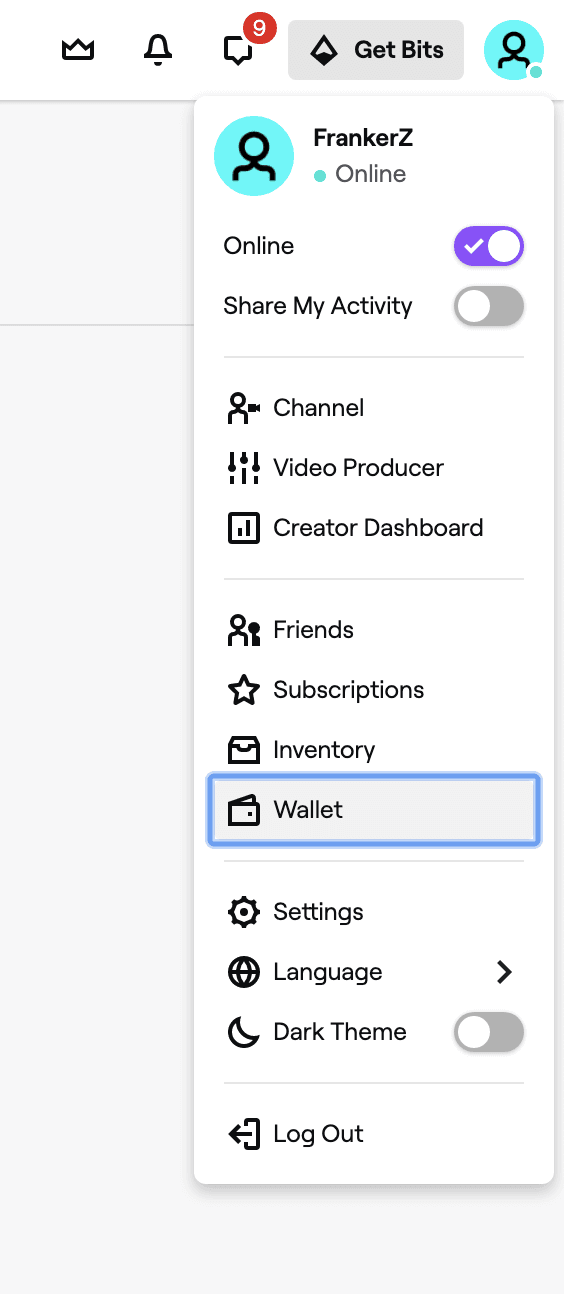
  3. Click your profile avatar in the top-right corner of the screen.
  4. Your Twitch username is displayed at the top of the dropdown menu.
  5. Select Settings and click the Security and Privacy tab to confirm your email verification and two-factor authentication (2FA) status. Having 2FA enabled is recommended before applying digital balances.

Step-by-Step Guide: How to Redeem a US Twitch Gift Card

Redeeming your digital code takes only a few seconds. Follow these steps to load funds into your Twitch wallet balance:

  1. Open a desktop or mobile browser and go directly to twitch.tv/redeem.
  2. Log in with the Twitch credentials of the account where you want the balance stored.
  3. Locate the alphanumeric redemption code from your BitTopup order details.
  4. Enter the code exactly as provided into the redemption box.
  5. Click Redeem.
  6. The page will display a confirmation message showing the credited USD amount. Your updated balance will be visible under your profile icon in the Wallet section.

US Account and Region Lock Requirements for USD Cards

Twitch Gift Cards in USD are region-locked. They are designed exclusively for users with accounts based in the United States and accounts where currency settings reflect USD.

Residency and Currency Matching

Twitch uses account verification and payment profile settings to confirm region eligibility. When redeeming a USD code, your account must not be locked to another regional currency (such as EUR, GBP, CAD, or AUD). Attempting to apply a USD card to an account registered in a non-USD region will result in a redemption error. If you manage multiple profiles or travel frequently, confirm that your active Twitch profile is set to the United States region before entering your code.


Browser vs Mobile App Spending Restrictions for Wallet Balance

A critical distinction for Twitch balance users is the difference between web checkout and mobile app checkout.

Due to mobile platform policies, the official Twitch iOS and Android apps process payments through Apple App Store and Google Play in-app billing systems. As a result, your Twitch Gift Card Balance will not display as an available payment option when attempting to subscribe or buy Bits directly inside the mobile apps.

How to Spend Your Balance on Mobile Devices

If you prefer to browse or watch streams on your smartphone or tablet, you can still use your gift card balance:

  1. Open Safari, Chrome, or any mobile browser on your device.
  2. Go to twitch.tv and log in to your account.
  3. Navigate to the streamer's channel page or the Bits checkout page.
  4. Complete your subscription or Bits purchase through the browser interface.
  5. Your gift card balance will be applied automatically as the primary payment source.
  6. Return to your Twitch mobile app; your subscription badges, sub status, and Bits inventory will update immediately.

Troubleshooting Common Twitch Gift Card Errors

If you experience an issue while redeeming or spending your balance, review these standard fixes:

Invalid Code Error

  • Check formatting: Ensure there are no accidental spaces before or after the code when pasting.
  • Character confusion: Double-check easily confused characters, such as the numeral 0 and uppercase O, or uppercase I and the numeral 1.

Region Mismatch or Currency Error

  • This occurs when attempting to apply a USD code to an account tied to a different country or local currency. Check your account settings to ensure your residency details reflect the United States.

Balance Not Applying at Checkout

  • Ensure you are purchasing an eligible product via a web browser.
  • Subscriptions set to recurring billing may request a secondary backup payment method. Select one-month non-recurring options where available, or apply the balance to gift subscriptions and Bits directly.

Code Already Redeemed

  • Refresh your browser and check twitch.tv/wallet. Digital balances credit instantly; if the page timed out during entry, the balance may already be present in your wallet summary.

Safe Twitch Gift Card USD Recharge on BitTopup

BitTopup provides a straightforward digital delivery system for purchasing Twitch Gift Card USD digital codes. When purchasing digital codes on BitTopup, you never need to share your Twitch password or grant third-party account access. You receive an authentic digital code directly in your order center and email, ready to be entered at twitch.tv/redeem.

  • Fast Digital Delivery: Access your code immediately after payment confirmation.
  • No Account Credentials Required: Keep your login information secure; redeem the code yourself directly on the official Twitch website.
  • Live Checkout Rates: Current rates, denominations, and availability are always transparently presented on the product selection page.
  • Customer Support: Responsive help desk support is available to assist with any order queries.

Frequently Asked Questions

How to load a Twitch gift card?

To load a Twitch gift card, sign in to your Twitch account on a web browser and go to twitch.tv/redeem. Enter your digital code into the input field and click Redeem. The USD amount is instantly added to your Twitch wallet balance and is ready for use.

Can I use a USD Twitch gift card on an account outside the United States?

No. USD Twitch gift cards are region-restricted to accounts operating in the United States and using USD currency. Accounts registered in regions with other currencies cannot redeem USD gift cards.

Why can I not spend my Twitch Gift Card balance on the Twitch mobile app?

Twitch mobile apps on iOS and Android use external platform billing (Apple App Store and Google Play), which cannot access internal Twitch wallet balances. To spend your balance, log in to twitch.tv using a web browser on desktop or mobile.

Can Twitch gift card balance be used for Bits and channel subscriptions?

Yes. Your Twitch wallet balance can be used to buy Cheer Bits, single-month channel subscriptions, multi-month subs, Tier 2/Tier 3 upgrades, gift subs for the community, and Twitch Turbo via web checkout.

Can I use a Twitch gift card to pay for Prime Gaming or Twitch merch?

No. Prime Gaming memberships are billed separately through Amazon, and physical merchandise from the Twitch Loot Cave uses a separate storefront checkout. Gift card balances apply only to digital Twitch platform products.

What should I do if my Twitch gift card code shows an error during redemption?

First, verify that every character was entered correctly with no stray spaces. If the issue persists, check your Twitch account region settings and refresh your Twitch Wallet page to ensure the funds were not already applied. For code-specific verification, reach out to BitTopup customer support with your order ID.


Twitch Gift Card USD ข่าวสารแนะนำ

วิธีแก้: เกิดข้อผิดพลาด We Were Unable to Redeem Your Gift Card บน Twitch

ติดหน้าจอแจ้งเตือนข้อผิดพลาดของ Twitch อยู่ใช่ไหม? แก้ปัญหา "we were unable to redeem your gift card" ด้วยวิธีตั้งค่าประเทศ 2FA และยอดกระเป๋าเงินที่พิสูจน์แล้วว่าได้ผลจริง

คู่มือปรับกราฟิก vs FPS ใน Dynasty Warriors Overlords: การตั้งค่าที่ดีที่สุด

ปรับแต่งกราฟิกและ FPS ใน Dynasty Warriors Overlords ให้ลื่นไหล บอกลาเฟรมเรตตก ปัญหาเครื่องร้อน พร้อมล็อก 60 FPS นิ่งๆ ทั้งบน Android และ iOS

วิธีแก้ไขข้อผิดพลาด Error Redeeming Twitch Gift Card Please Try Again

เจอปัญหาเติม Twitch Gift Card ไม่ได้ใช่ไหม? แก้บล็อก 2FA สกุลเงินไม่ตรง และพิมพ์โค้ดผิด เพื่อเติมยอดเข้า Twitch Wallet ของคุณได้ทันที

ตารางกิจกรรม Spotify France 2026: เวลาปล่อยเพลงใหม่และรอบรีเซ็ต

ติดตามตารางกิจกรรม Spotify France 2026 เช็กเวลารีเซ็ตวันศุกร์ การปล่อยเพลงในฮับคอนเสิร์ต และดีลโปรโมชัน Premium ท้ายฤดูร้อนทั่วยุโรป

Sony announced that it will hold a corporate strategy meeting on May 22

Sony announced that it will hold a corporate strategy meeting on May 22

"Phantom Beast Parlu" continues to lead the way! The new Steam sales list is released

"Phantom Beast Parlu" continues to lead the way! The new Steam sales list is released

สินค้าแนะนำ

Twitch Gift Card USD คำถามที่พบบ่อยเกี่ยวกับการเติมเงิน

ใช้เวลานานเท่าใดกว่าที่คำสั่งซื้อจะเสร็จสมบูรณ์?
โดยปกติแล้ว คำสั่งซื้อจะเสร็จสมบูรณ์ภายในไม่กี่นาที หากมีความล่าช้าใดๆ โปรดติดต่อฝ่ายสนับสนุนลูกค้าของเรา
BitTopup คืออะไร?
BitTopup คือแพลตฟอร์มออนไลน์สำหรับเติมเกมและบริการต่าง ๆ ได้อย่างรวดเร็วและปลอดภัย
เวลาทำการของฝ่ายบริการลูกค้า?
ฝ่ายบริการลูกค้าของ BitTopup พร้อมให้บริการตลอด 24 ชั่วโมงทุกวัน
ฉันจำเป็นต้องแชร์รหัสผ่านบัญชี Twitch Gift Card USD หรือไม่?
ไม่จำเป็น การเติมเงินโดยตรงใช้เพียง Player ID/UID ของคุณเท่านั้น ห้ามแชร์รหัสผ่านของคุณกับใครเด็ดขาด
Twitch Gift Card USD รองรับภูมิภาคใดบ้าง?
สินค้านี้รองรับบัญชีภูมิภาค UNITED STATES โปรดตรวจสอบภูมิภาคบัญชีของคุณก่อนทำการสั่งซื้อ
ฉันสามารถชำระเงินด้วยคริปโตได้หรือไม่?
ได้ เรายอมรับ Bitcoin, ETH, USDT และคริปโตเคอร์เรนซียอดนิยมอื่นๆ พร้อมการยืนยันทันที
หากเติมเงินแล้วไม่เข้าต้องทำอย่างไร?
ติดต่อฝ่ายสนับสนุนลูกค้าตลอด 24 ชั่วโมงทุกวันพร้อมแจ้งหมายเลขคำสั่งซื้อของคุณ แล้วเราจะส่งรหัสให้ใหม่หรือคืนเงินให้ทันที

Twitch Gift Card USD รีวิวจากลูกค้าเกี่ยวกับการเติมเงิน

รีวิวทั้งหมด: 502

คะแนนเฉลี่ย

how to top-up in bittopup

4.1

customer avatar
mypchamdosamer2026/09/30
เชื่อถือได้ ง่าย รวดเร็ว ปลอดภัย
customer avatar
Huang Dacres2026/09/27
การรับเครดิตง่ายมาก! ขั้นตอนรวดเร็วและบริการก็รู้สึกเป็นกันเองสุดๆ
customer avatar
Pablin2026/09/28
ลองเติมขั้นต่ำแล้วใช้งานได้จริง เข้าทันทีเลย
customer avatar
Алексей Зеелиг2026/09/29
เว็บที่ดีที่สุดสำหรับการเติมเงินแอปทุกประเภท
customer avatar
Rethabile Jinx2026/09/28
ราคาประหยัดกว่าซื้อในแอป Poppo โดยตรง
customer avatar
Kanetsu Jesus_Rey2026/09/30
ทำทุกอย่างได้ดีมาก รวดเร็วและเชื่อถือได้ ตั้งแต่การเลือกดูสินค้าไปจนถึงวิธีการชำระเงิน เลย์เอาต์ทั้งหมดทำให้พวกเขาเหนือกว่าเจ้าอื่นมากเพราะช่วยป้องกันข้อผิดพลาดได้เยอะเลย
customer avatar
Rosaria Queta2026/09/29
แอปดีมาก ช่วยให้เราซื้อสกุลเงินในเกมได้ง่ายขึ้นเยอะเลย
customer avatar
MUNYEMANA Theobard2026/09/30
สวัสดี ยินดีมากเลยที่ซื้อเหรียญ Poppo Live แล้วได้รับเหรียญเข้าบัญชี Binance ทันที ประทับใจแอปและวิธีแนะนำการใช้งานมาก ขอบคุณนะ ทำดีต่อไป
customer avatar
Aseel2026/09/26
ฉันชอบเนื้อเรื่องและเกมนี้มาก แต่ฉันเข้า teapot และ Wonderland ไม่ได้ ช่วยฉันที ส่วนเรื่องอื่น ๆ ดีหมดเลย
customer avatar
Yacine Chaabna2026/09/28
เว็บไซต์ที่ดีที่สุดในการเติมเงินบัญชีและบัตรของขวัญ รวดเร็วทันใจ และรองรับช่องทางการชำระเงินหลายช่องทาง เคยลองใช้เว็บอื่นแล้วแต่ BitTopup ดีที่สุด ทำดีต่อไปนะ!
customer avatar
perpetual T Mpofu2026/09/30
บริการรวดเร็วและน่าเชื่อถือ
customer avatar
ricky lee2026/09/27
รวดเร็วและราคาถูก
customer avatar
Mia Becca2026/09/26
รายการสั่งซื้อไม่สำเร็จแต่เงินถูกหักจากบัญชีไปแล้ว และฉันก็ไม่เคยได้รับอีเมลแจ้งเตือนว่าชำระเงินล้มเหลวหรืออีเมลยืนยันเลย ฝ่ายบริการลูกค้าก็ช่วยอะไรไม่ได้ และฉันคิดว่าเป็นบอทเพราะจู่ๆ ก็พูดภาษาจีนขึ้นมา
customer avatar
Leung Kendlz2026/09/26
คำสั่งซื้อของฉันเสร็จสิ้นแทบจะในทันที ไม่มีอะไรจะง่ายไปกว่านี้อีกแล้ว
customer avatar
Siphilisiwe Phiri2026/09/26
ทำรายการได้รวดเร็วและได้รับทันที
customer avatar
Prime Divas2026/09/29
บริการดีมาก
customer avatar
俞臻2026/09/30
หน้าตาใช้งานง่ายและยอดเยี่ยมมาก แถมเติมเงินได้เร็วสุดๆ
customer avatar
C C2026/09/27
ฉันใช้เว็บนี้เติมเงิน และแม้ว่าในที่สุดจะสำเร็จ แต่เครดิตไม่ได้เข้าทันที ฝ่ายบริการลูกค้าใช้เวลาอย่างน้อย 5 นาทีในการตอบกลับ ซึ่งทำให้ฉันกังวลมาก แต่สุดท้ายการเติมเงินก็ผ่านไปด้วยดี จะดีกว่านี้มากถ้าฝ่ายสนับสนุนตอบกลับเร็วกว่านี้
customer avatar
Samsung As G2026/09/27
ประสบการณ์การใช้งานที่นี่ดีมาก เติมเงินง่ายและไม่เคยเจอความล่าช้าเลย บริการยอดเยี่ยมมาก รักษามาตรฐานนี้ไว้ต่อไปนะ
customer avatar
Aloosh2026/09/27
ยอดเยี่ยมมาก แนะนำเลยครับ
Twitch Gift Card USD รีวิวทั้งหมด

ทำไมต้องเลือกเรา?

ธุรกรรมปลอดภัย 100%

ทุกการเติมเงินได้รับการปกป้องด้วยระบบรักษาความปลอดภัยในการชำระเงินที่เข้ารหัสตามมาตรฐานอุตสาหกรรม ซึ่งจะรักษาข้อมูลส่วนตัวและข้อมูลการชำระเงินของคุณไว้เป็นความลับอย่างสมบูรณ์ ช้อปได้อย่างมั่นใจ ปลอดภัย 100% ทุกครั้ง

บริการลูกค้าตลอด 24 ชั่วโมงทุกวัน

ทีมสนับสนุนที่เป็นมิตรของเราพร้อมให้บริการตลอด 24 ชั่วโมงเพื่อช่วยเหลือคุณทั้งก่อน ระหว่าง และหลังการซื้อ รับความช่วยเหลือที่รวดเร็วและเชื่อถือได้ทุกเมื่อที่คุณต้องการ ไม่ว่าจะเป็นกลางวันหรือกลางคืน

รับประกันคืนเงินเต็มจำนวน

เพลิดเพลินกับราคาที่คุ้มค่าที่สุดพร้อมการจัดส่งที่รวดเร็วและเชื่อถือได้ หากคำสั่งซื้อของคุณไม่ได้รับการจัดส่งหรือไม่สามารถใช้งานได้ เรารับประกันการคืนเงิน 100% เงินของคุณจะได้รับการคุ้มครองเสมอ

ช่องทางการชำระเงินที่รองรับ

PM_PIX - ช่วยเหลือด้านการชำระเงิน | BitTopupWG_PIX - ช่วยเหลือด้านการชำระเงิน | BitTopupPMKakaoPay - ช่วยเหลือด้านการชำระเงิน | BitTopupPMTNG - ช่วยเหลือด้านการชำระเงิน | BitTopupWG_TNG - ช่วยเหลือด้านการชำระเงิน | BitTopupPMGCASH - ช่วยเหลือด้านการชำระเงิน | BitTopupPM_WALLET_NAVERPAY - ช่วยเหลือด้านการชำระเงิน | BitTopupPM_WALLET_PMPROMPTPAY - ช่วยเหลือด้านการชำระเงิน | BitTopupAlipay HK - ช่วยเหลือด้านการชำระเงิน | BitTopupDANA - ช่วยเหลือด้านการชำระเงิน | BitTopupAM_SBP - ช่วยเหลือด้านการชำระเงิน | BitTopupPM_OXXO - ช่วยเหลือด้านการชำระเงิน | BitTopupOVO - ช่วยเหลือด้านการชำระเงิน | BitTopupPMToss - ช่วยเหลือด้านการชำระเงิน | BitTopupWG_PAY_NOW - ช่วยเหลือด้านการชำระเงิน | BitTopupWG_BLIK - ช่วยเหลือด้านการชำระเงิน | BitTopupPM_CARD_SA - ช่วยเหลือด้านการชำระเงิน | BitTopupWG_PAYU - ช่วยเหลือด้านการชำระเงิน | BitTopupPM_WALLET_JKOPAY - ช่วยเหลือด้านการชำระเงิน | BitTopupWG_STCPAY - ช่วยเหลือด้านการชำระเงิน | BitTopupPM_WALLET_SAMSUNGPAY - ช่วยเหลือด้านการชำระเงิน | BitTopupPM_7_ELEVEN - ช่วยเหลือด้านการชำระเงิน | BitTopupPM_WALLET_WECHATPAYHK - ช่วยเหลือด้านการชำระเงิน | BitTopupPM_NET_BANKING_FPX - ช่วยเหลือด้านการชำระเงิน | BitTopupPM_WALLET_QRIS - ช่วยเหลือด้านการชำระเงิน | BitTopupAM_CARD_KZ - ช่วยเหลือด้านการชำระเงิน | BitTopupAM_CARD_BY - ช่วยเหลือด้านการชำระเงิน | BitTopupWG_SADAD - ช่วยเหลือด้านการชำระเงิน | BitTopupWG_MADA - ช่วยเหลือด้านการชำระเงิน | BitTopupAM_TBANK - ช่วยเหลือด้านการชำระเงิน | BitTopupAM_SBERPAY - ช่วยเหลือด้านการชำระเงิน | BitTopupPM_REALTIME_PAYMENT - ช่วยเหลือด้านการชำระเงิน | BitTopupPM_WALLET_GASH - ช่วยเหลือด้านการชำระเงิน | BitTopupPM_OKMART - ช่วยเหลือด้านการชำระเงิน | BitTopupPM_HILIFE - ช่วยเหลือด้านการชำระเงิน | BitTopupPM_FAMILYMART - ช่วยเหลือด้านการชำระเงิน | BitTopupPM_CARD_SA_CD - ช่วยเหลือด้านการชำระเงิน | BitTopupAM_CARD - ช่วยเหลือด้านการชำระเงิน | BitTopupPM_CARD_EU - ช่วยเหลือด้านการชำระเงิน | BitTopupPM_CARD_KNET - ช่วยเหลือด้านการชำระเงิน | BitTopupBIN_DO_PAY_ME - ช่วยเหลือด้านการชำระเงิน | BitTopupPM_CARD_JP - ช่วยเหลือด้านการชำระเงิน | BitTopupBIN_DO_OCTOPUS - ช่วยเหลือด้านการชำระเงิน | BitTopupPM_CARD_US - ช่วยเหลือด้านการชำระเงิน | BitTopupPM_CARD - ช่วยเหลือด้านการชำระเงิน | BitTopupPM_WALLET_SHOPEEPAY - ช่วยเหลือด้านการชำระเงิน | BitTopupPM_WALLET_PAOTANGPAY - ช่วยเหลือด้านการชำระเงิน | BitTopupPM_WALLET_LINEPAY - ช่วยเหลือด้านการชำระเงิน | BitTopupPM_WALLET_TRUEMONEY - ช่วยเหลือด้านการชำระเงิน | BitTopupD_LOCAL_MX_IO - ช่วยเหลือด้านการชำระเงิน | BitTopupD_LOCAL_MX_BQ - ช่วยเหลือด้านการชำระเงิน | BitTopupD_LOCAL_MX_SE - ช่วยเหลือด้านการชำระเงิน | BitTopupD_LOCAL_MX_SM - ช่วยเหลือด้านการชำระเงิน | BitTopupD_LOCAL_MX_BV - ช่วยเหลือด้านการชำระเงิน | BitTopupD_LOCAL_PK_HB - ช่วยเหลือด้านการชำระเงิน | BitTopupD_LOCAL_PK_JK - ช่วยเหลือด้านการชำระเงิน | BitTopupD_LOCAL_PK_ES - ช่วยเหลือด้านการชำระเงิน | BitTopupD_LOCAL_PK_IO - ช่วยเหลือด้านการชำระเงิน | BitTopupPMPayco - ช่วยเหลือด้านการชำระเงิน | BitTopupGOPAY - ช่วยเหลือด้านการชำระเงิน | BitTopupPMPAYMAYA - ช่วยเหลือด้านการชำระเงิน | BitTopupPMGRABPAYPH - ช่วยเหลือด้านการชำระเงิน | BitTopupPMGRABPAYMY - ช่วยเหลือด้านการชำระเงิน | BitTopupPMBOOST - ช่วยเหลือด้านการชำระเงิน | BitTopupWG_PAYTM - ช่วยเหลือด้านการชำระเงิน | BitTopupPM_BANK_TRANSFER_PSE - ช่วยเหลือด้านการชำระเงิน | BitTopupPM_BANK_TRANSFER_EFECTY - ช่วยเหลือด้านการชำระเงิน | BitTopupWG_BPI - ช่วยเหลือด้านการชำระเงิน | BitTopupWG_GCASH - ช่วยเหลือด้านการชำระเงิน | BitTopupWG_BANCOMAT_PAY - ช่วยเหลือด้านการชำระเงิน | BitTopupWG_iDEAL - ช่วยเหลือด้านการชำระเงิน | BitTopupWG_BANCONTACT - ช่วยเหลือด้านการชำระเงิน | BitTopupPM_CARD_APPLE_US - ช่วยเหลือด้านการชำระเงิน | BitTopupPM_APPLEPAY - ช่วยเหลือด้านการชำระเงิน | BitTopupD_LOCAL_PH_PM - ช่วยเหลือด้านการชำระเงิน | BitTopupD_LOCAL_PH_GY - ช่วยเหลือด้านการชำระเงิน | BitTopupWG_BHIM - ช่วยเหลือด้านการชำระเงิน | BitTopupPM_WALLET_STCPAY - ช่วยเหลือด้านการชำระเงิน | BitTopupPM_GOOGLEPAY_US - ช่วยเหลือด้านการชำระเงิน | BitTopupPM_GOOGLEPAY - ช่วยเหลือด้านการชำระเงิน | BitTopupD_LOCAL_TH_TK - ช่วยเหลือด้านการชำระเงิน | BitTopupGATE_IO_PAY - ช่วยเหลือด้านการชำระเงิน | BitTopupBINANCE_PAY - ช่วยเหลือด้านการชำระเงิน | BitTopupWG_PHONE_PE - ช่วยเหลือด้านการชำระเงิน | BitTopupPAY_LOCO_ESumLifeET - ช่วยเหลือด้านการชำระเงิน | BitTopupPAY_LOCO_ESumFamilyMart - ช่วยเหลือด้านการชำระเงิน | BitTopupPAY_LOCO_ESum711 - ช่วยเหลือด้านการชำระเงิน | BitTopupBIT_WALLET - ช่วยเหลือด้านการชำระเงิน | BitTopup

10 Years Trusted Game & Live Streaming Top-Up Platform

Since 2016 | 5,000,000+ Users Worldwide

KAMAGEN LIMITED

Registration No. 76888246

Room 1508, 15/F, Grand Plaza Office Tower II, 625 Nathan Road, Mong Kok, Kowloon, Hong Kong

BUSINESS COOPERATION: ibittopup@gmail.com

© 2016-2026 BitTopup. All Rights Reserved.

Trusted & Verified by

ScamAdviser review of BitTopupGridinsoft review of BitTopupTrustpilot review of BitTopup
customer service