Server Processing vs Display Delays
Two distinct issues exist:
- Server processing: Payment verification and diamond allocation on BIGO's backend
- Display delays: App fails to sync with updated server data
Manual wallet refresh fixes 50-95% of sync issues—your first troubleshooting step.
The 5-Minute Rule
If diamonds don't appear within 5 minutes of payment confirmation, start troubleshooting. This accounts for normal processing variations while preventing extended delays. 95% of cases resolve within 5 minutes when users actively troubleshoot.
The 30-Minute Fix Order
Phase 1 (0-5 Minutes): Immediate Refresh
- Swipe down on wallet screen 3-5 times, wait 60-90 seconds between attempts
- Navigate to profile/live feed, return after 30 seconds
- Check Recharge Center transaction history for pending status
- Wait full 5 minutes before escalating
Phase 2 (5-15 Minutes): Account & Device Fixes
- Force-close BIGO Live completely
- Wait 30 seconds before reopening
- Switch between WiFi and mobile data
- Clear app cache (see methods below)
Switching networks resolves 80% of sync failures by establishing fresh server connections.
Android cache clear: Settings > Apps > BIGO Live > Storage > Clear Cache
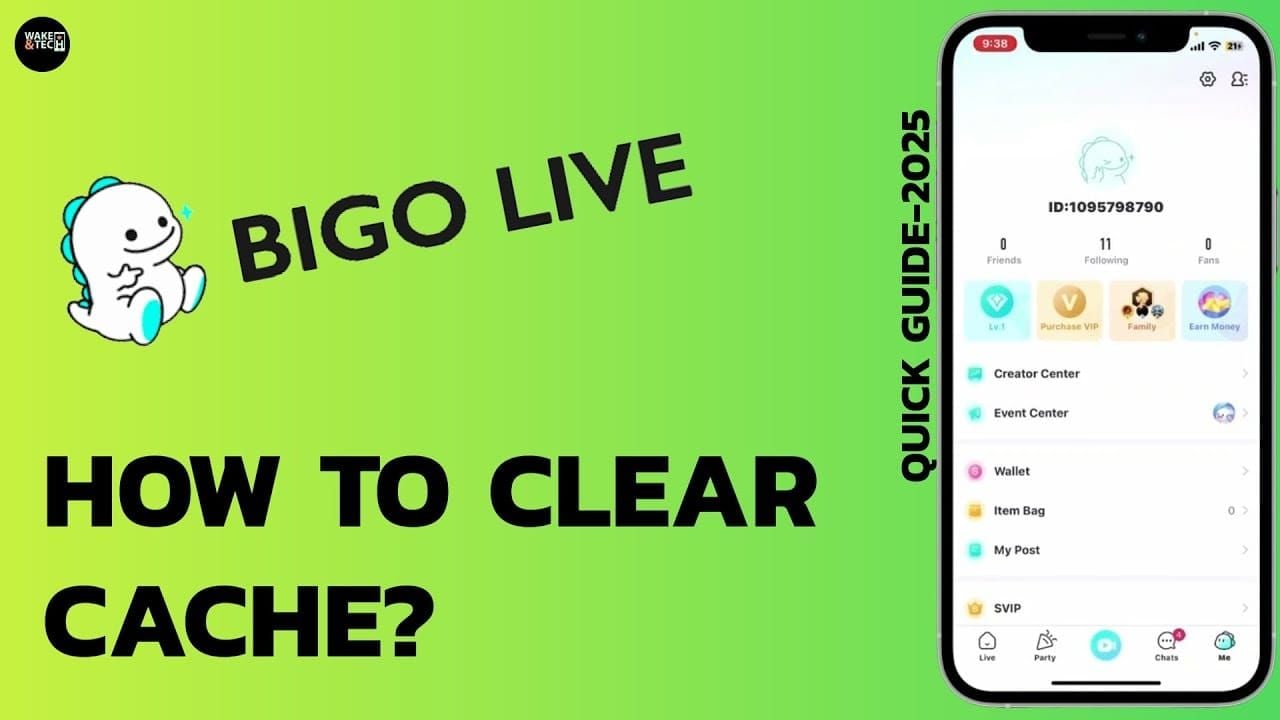
iOS cache clear: Settings > General > iPhone Storage > BIGO Live > Offload App > Reinstall
Phase 3 (15-25 Minutes): Advanced Verification
- Confirm payment deduction from bank/payment method
- Locate transaction ID (15-25 character code) from payment confirmation
- Verify BIGO ID matches your account (8-12 digits like 901216366)
- Check email confirmation from BIGO or payment provider
Incorrect BIGO ID causes 40-70% of unresolved issues at this stage.
Phase 4 (25-30 Minutes): Documentation & Escalation
Prepare for support contact:
- Screenshot current diamond balance
- Capture payment confirmation with transaction ID
- Note exact BIGO ID and recharge amount
- Submit ticket: Me > Feedback > Recharge Issue with all documentation
Support responds within 24 hours, most cases resolve in 24-48 hours.
Minutes 0-5: Quick Refresh Techniques (Solve 60% of Cases)
Pull-to-Refresh

Swipe down firmly on wallet screen, hold 1-2 seconds, release. Repeat 3-5 times with 60-90 seconds between attempts. Forces app to query server for updated balance.
Force Close and Reopen
iPhone X+: Swipe up from bottom, pause mid-screen, swipe BIGO Live preview upward
Android: Recent apps > swipe BIGO away, or Settings > Apps > BIGO Live > Force Stop
Wait 30 seconds after force-closing before reopening.
Navigate Different Tabs
Visit live feed, profile, trending streams—spend 15-20 seconds in each before returning to wallet. Triggers multiple server sync events.
Check Transaction History
Access Recharge Center through Me tab. Look for Processing,Pending, or Completed status. Completed with missing diamonds = display sync issue.
Minutes 5-15: Account-Level Troubleshooting
Complete Logout/Login
Me > Settings > Logout. Wait 30 seconds. Log back in. Wait 60-90 seconds for full sync before checking balance. Triggers comprehensive data synchronization.
Clear App Cache
Android: Settings > Apps > BIGO Live > Storage > Clear Cache (resolves 70-80% of Android glitches)
iOS: Settings > General > iPhone Storage > BIGO Live > Offload App > Reinstall (fixes 95% of iOS issues)
No data loss—preserves login credentials, chat history, account settings.
Switch Networks
Disable WiFi, use mobile data (or vice versa). Forces new server connection, bypassing routing issues or DNS cache problems. Network issues cause 15-25% of delivery problems.
For persistent issues, configure DNS to 8.8.8.8 (Google) or 1.1.1.1 (Cloudflare).
Restart Device
Power off completely—not sleep mode. Wait 30 seconds. Power on. Open BIGO Live, wait 2-3 minutes for full initialization before checking balance.
Minutes 15-25: Advanced Verification
Verify Payment Confirmation
Check bank statement, card history, or e-wallet for deduction. Confirm exact amount, timestamp, recipient (should show BIGO or recharge platform). Payment confirmation proves money left your account.
If payment wasn't deducted, original transaction failed—retry recharge instead of troubleshooting.
Cross-Reference Order Number
Compare transaction ID (15-25 characters) from payment confirmation with Recharge Center entries. Matching entry confirms BIGO received payment notification.
Platforms like BIGO Live diamonds top up through BitTopup use direct API integration, eliminating this failure point.
Check Server Status
Search community forums/social media for BIGO diamonds not showing or BIGO server down to identify widespread issues. Regional maintenance occasionally causes localized delays.
Confirm Correct BIGO ID
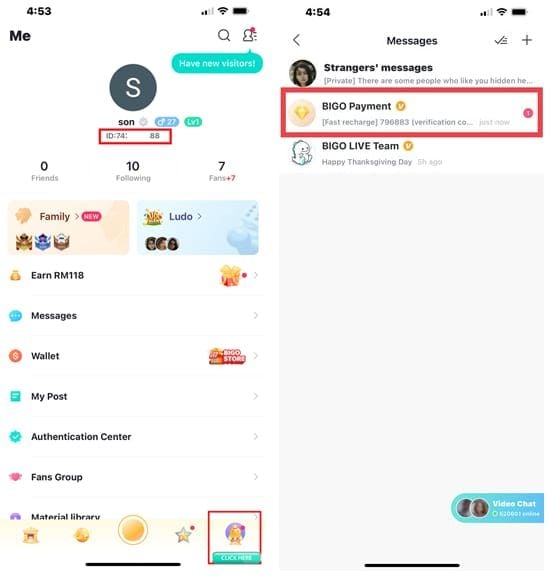
Open app: Me > profile name. BIGO ID appears as 8-12 digit code (example: 901216366) below display name. Compare with ID entered during recharge.
Single digit error sends diamonds to different account. Causes 40-70% of Phase 3 cases.
Minutes 25-30: Preparing for Support
Essential Documentation
Gather before contacting support:
- Payment receipt (amount, date, time, confirmation number)
- Transaction ID (15-25 character code)
- Verified BIGO ID (8-12 digits from profile)
Complete documentation = 24-hour resolution vs 7-14 days for incomplete submissions.
Screenshot Requirements
Capture:
- Current diamond balance with timestamp
- Payment confirmation with transaction ID and amount
- BIGO ID from profile (proves ownership)
- Transaction history from Recharge Center
Ensure unedited, full-screen screenshots.
Access Support
In-app (recommended): Me > Feedback > Recharge Issue (auto-includes account info)
Phone: +65 63519330 (GMT+8 business hours)
Email (Global): feedback@bigo.tv
Email (USA/Canada): cs_bigoamerica@bigo.sg
Expected Response Times
- Acknowledgment: Within 24 hours
- Resolution: 24-48 hours for straightforward cases
- Complex cases: 7-14 days (60-80% frozen balance cases resolve successfully)
- Status updates: Every 48-72 hours during extended investigations
Common Mistakes That Delay Delivery
Wrong BIGO ID
Most common error. Users confuse BIGO ID with phone number, username, or friend's ID. Always copy-paste from profile, never type from memory. Verify first/last three digits after pasting.
Unstable Network During Transaction
Networks below 1 Mbps cause incomplete submissions—payment processes but confirmation never reaches BIGO. Verify 5+ Mbps before starting. Don't switch networks mid-transaction or close app before confirmation.
Closing App Before Server Confirmation
Wait 30 seconds after payment confirmation before closing app. Allows server response confirming diamond crediting. Premature closure forces sync during next launch, which may fail.
Multiple Rapid Recharge Attempts
Creates queue of pending transactions processing sequentially, multiplying processing time. If first recharge hasn't appeared after 30 minutes, contact support—don't create additional purchases.
Why BitTopup Ensures Faster Delivery
Direct API Integration
BitTopup maintains direct API connections with BIGO's recharge systems, bypassing intermediary processors. Enables 2-3 minute crediting regardless of region. Automated systems detect and retry failed transactions within seconds.
24/7 Transaction Monitoring
Continuous monitoring with immediate escalation for delays. Support proactively contacts users about issues before customers notice, resolving complications before diamonds would normally appear.
Guaranteed Delivery Times
Automatic compensation for platform-caused delays. Retry system attempts delivery through multiple routing paths, achieving 99%+ success rates. Failed transactions trigger automatic refunds within 24 hours.
Transparent Order Tracking
Real-time status tracking shows payment verification, BIGO communication, and crediting stages. Users see exactly where transactions stand, distinguishing normal delays from actual problems.
Prevention Checklist
Pre-Purchase Verification
- Copy BIGO ID directly from profile
- Check network speed (confirm 5+ Mbps)
- Ensure BIGO Live app version 5.0+
- Confirm no active account restrictions
Optimal Recharge Times
Schedule during off-peak hours (2-6 AM) for under 2-minute delivery vs 5-10 minutes during peak (6-11 PM). Avoid major BIGO events when transaction volume spikes.
Maintain Updated App
Enable automatic updates or check weekly. Updates include payment processing improvements. iOS users need iOS 17+ for optimal compatibility.
Documentation Best Practices
Save immediately:
- Email confirmations with transaction IDs
- Screenshots of payment success screens
- Bank/payment app transaction records
Enables instant support ticket submission, reducing resolution from days to hours.
Real User Cases
Case 1: Cache Issue (7 Minutes)
European user missing 210 diamonds during peak hours. Phase 1 refreshes failed. Cleared Android cache (Settings > Apps > BIGO Live > Storage > Clear Cache). Diamonds appeared within 90 seconds after restart.
Case 2: Server Delay (12 Minutes)
Asian user missing 1,050 diamonds off-peak. Phase 1-2 logout/login failed. Switched WiFi to mobile data. Diamonds appeared within 30 seconds, indicating WiFi routing issues.
Case 3: Wrong Account (36 Hours)
North American user missing 525 diamonds after full troubleshooting. Phase 3 revealed transposed BIGO ID digits—diamonds credited to different account. Support transferred diamonds within 36 hours after proper documentation.
FAQ
How long should I wait before troubleshooting?
Wait 5 minutes after payment confirmation. Accounts for regional variations (Asian 2-3 min, European/American 5-10 min). Off-peak delivers under 2 min, peak adds 20-30% delay. Start systematic troubleshooting after 5 minutes.
Will clearing cache delete my diamonds?
No. Cache clearing removes only temporary files, preserving diamond balance, chat history, login credentials, settings. Android: Settings > Apps > BIGO Live > Storage > Clear Cache. iOS: Offload App feature. Resolves 70-80% Android glitches, 95% iOS issues with zero data loss.
What info do I need for support?
Payment receipt (amount, date), transaction ID (15-25 characters), verified BIGO ID (8-12 digits from profile). Include screenshots of current balance, payment confirmation, transaction history. Complete documentation = 24-hour resolution vs 7-14 days incomplete.
Can I get a refund?
Yes, after proper investigation. Contact support after 30 minutes systematic troubleshooting via Me > Feedback > Recharge Issue or feedback@bigo.tv. Provide complete documentation. Support investigates within 24-48 hours. Most cases resolve through crediting. Frozen balance: 7-14 days, 60-80% success rate.
Why do delivery times vary?
Server load, payment method, network quality affect speed. Off-peak (2-6 AM): under 2 min. Peak (6-11 PM): +20-30% delay. Digital payments: 2-5 min. Bank transfers: 15-30 min. Regional differences: Asian 2-3 min vs European/American 5-10 min. VPN adds 10-20% delay.
Is logout/login safe while troubleshooting?
Yes, completely safe. Diamond balance exists on BIGO's servers, not locally. Logging out can't delete diamonds. Wait 30 seconds after logout, then 60-90 seconds after login for full sync. Resolves stubborn display issues while maintaining all account data.
Avoid delivery issues—recharge through BitTopup for guaranteed instant delivery, 24/7 support, and reliable processing. Get diamonds in seconds!