

Likee Top Up: Fast, Safe, and Direct Diamond Delivery
Likee is a global short-video creation and live streaming platform where creators and viewers connect in real time. Diamonds serve as the core virtual currency within the Likee ecosystem. Whether you want to send animated gifts to your favorite live streamers, stand out in interactive chat rooms, or increase your fan club ranking, having a steady diamond balance is essential.
BitTopup provides a streamlined, direct Likee top up service designed for convenience and safety. You can buy Likee diamonds from anywhere in the world without sharing account credentials or logging into third-party portals. All transactions process directly through your unique Likee Player ID, delivering currency straight to your account balance.
How to Recharge Likee Diamonds on BitTopup
Completing a Likee recharge on BitTopup takes only a few simple steps. Follow this guide to top up your diamond balance:
- Select Your Diamond Package: Review the list of available Likee diamond denominations on the product page and choose the amount that fits your budget.
- Enter Your Likee Player ID: Input your numeric Likee Player ID in the designated user field. Double-check the digits to ensure accurate delivery.
- Choose Your Preferred Payment Method: Pick from the available secure checkout channels displayed on the live payment page.
- Review and Confirm Order Details: Check the diamond quantity and recipient Player ID before proceeding to payment.
- Complete Checkout: Follow the on-screen instructions to finalize payment. Once the payment clears, your diamonds process directly to your Likee profile.
- Check Your In-App Balance: Open the Likee app, visit your wallet, and verify your updated diamond total.
Step-by-Step Guide to Finding Your Likee Player ID
Your Likee Player ID (also referred to as your Likee ID or UID) is a unique numeric identifier linked to your account profile. It is the only detail required to process an order on BitTopup.
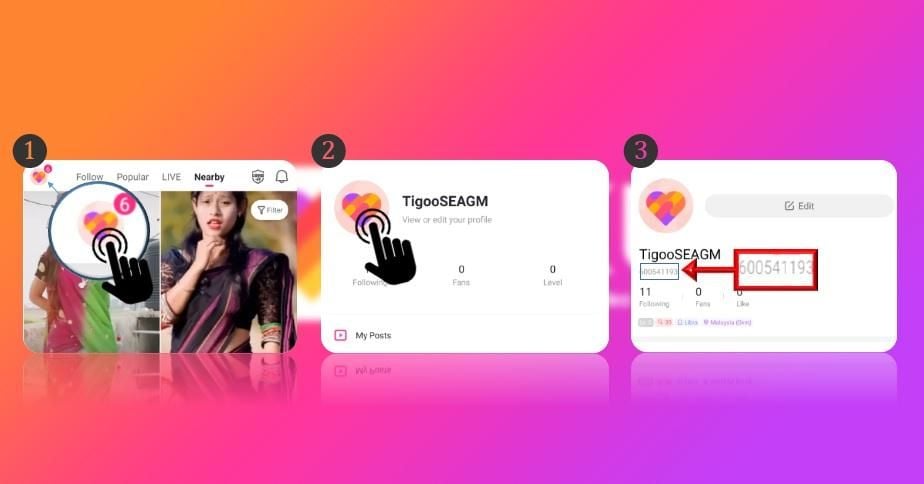
Here is how to locate your Player ID inside the Likee mobile app:
- Launch the Likee app on your iOS or Android device.
- Tap the Profile (Me) icon in the bottom right or top left corner of the home screen.
- On your main profile page, look directly below your profile photo and display name.
- You will see your Likee ID displayed as a series of numbers (or a custom username if you set one up).
- Tap the copy icon next to the ID or write it down carefully to paste into the BitTopup checkout form.
Benefits of Passwordless Likee Top-Up
Account security is critical when purchasing virtual currency online. BitTopup uses a direct-to-ID recharge system that protects your personal data and gaming credentials at every stage.
| Feature | Direct Player ID Top-Up on BitTopup | Traditional Login-Based Recharges |
|---|---|---|
| Account Password Required | No (Never requested) | Yes (High security risk) |
| Third-Party Login Access | Not required | Required |
| Risk of Credential Leaks | Zero risk | Moderate to High risk |
| Gift Diamonds to Friends | Yes, enter their Player ID directly | No, requires their login info |
| Account Verification Friction | None | High (2FA codes, device alerts) |
Complete Account Privacy
You never need to share your Likee password, phone verification code, or social login credentials (Google, Apple ID, Facebook). Your private profile information stays entirely in your hands.
Send Diamonds to Other Users
Because the system only requires a Player ID, you can easily top up diamonds for friends, family members, or favorite creators. Simply enter their Player ID at checkout, complete payment, and the diamonds will arrive in their wallet automatically.
What Are Likee Diamonds and How to Use Them
Diamonds are the primary premium currency used across the Likee platform. When you buy Likee diamonds, you gain access to multiple interactive features designed for live broadcasting and social engagement:
- Live Stream Gifting: Send virtual gifts ranging from simple roses and hearts to elaborate animated items like sports cars, yachts, and royal crowns during live broadcasts.
- Support Content Creators: When you send diamond gifts, creators receive beans that they can convert into real-world earnings. Gifting is the most direct way to support your favorite talents.
- Climb Fan Leaderboards: Active gifters earn higher contributor rankings in live rooms, receiving special badges, colored chat text, and unique entry banners.
- Unlock Interactive Effects: Use diamonds to activate special screen filters, join interactive mini-games within live streams, and trigger special audio-visual effects.
Supported Payment Methods for Likee Recharge
BitTopup accommodates users across the globe by supporting a wide range of secure payment channels. Available checkout methods include:
- International Credit & Debit Cards: Visa, Mastercard, and other major bank card networks.
- Digital Wallets & Local Payment Gateways: Region-specific e-wallets, online banking transfers, and localized payment rails depending on your location.
- Secure Payment Processing: Every transaction is protected with industry-standard encryption protocols to safeguard your financial details.
Note: Exact available payment options, processing channels, and live currency rates depend on your region and appear directly on the real-time checkout page.
Troubleshooting Common Likee Top-Up Issues
If you experience any delay or issue with your diamond order, follow these troubleshooting steps:
1. Refresh Your In-App Wallet
If your diamonds do not appear immediately after payment confirmation, fully close the Likee app from your multitasking menu and reopen it. Go to Settings > Wallet to trigger a balance refresh.
2. Confirm Payment Status
Check your email or BitTopup account dashboard to ensure your payment status is marked as successful. If your payment is still pending authorization from your bank or payment provider, delivery will proceed once the transaction clears.
3. Verify the Player ID Provided
Review your order confirmation receipt to make sure the Player ID entered matches your actual Likee UID. If you accidentally submitted an incorrect ID, reach out to customer support immediately before the order status updates to fulfilled.
4. Contact 24/7 Customer Support
If your order shows as completed on BitTopup but your balance remains unchanged after restarting the app, contact our 24/7 support team. Provide your Order Number, Likee Player ID, and Proof of Payment for prompt assistance.
Frequently Asked Questions
How do I find my Likee Player ID?
Open the Likee app, tap your profile icon to go to your personal profile page, and look beneath your avatar and display name. Your numeric Likee ID is displayed right there with an option to copy it directly.
Do I need to share my Likee account password to recharge diamonds?
No. BitTopup only requires your numeric Likee Player ID to process your diamond recharge. You should never share your account password, SMS verification codes, or login credentials with anyone.
How long does it take for Likee diamonds to arrive after payment?
Diamond recharges process directly once payment verification is complete. In most cases, diamonds reflect in your Likee in-app wallet shortly after a successful transaction.
Can I top up Likee diamonds for a friend using their Player ID?
Yes. You can purchase diamonds for any user by entering their specific Likee Player ID during checkout. They will receive the diamonds directly into their account balance without needing to take any action.
What can I do with Likee diamonds?
Likee diamonds allow you to purchase virtual gifts for live broadcasters, join interactive live events, unlock special chat badges, and improve your ranking on creator fan leaderboards.
What should I do if my Likee diamonds have not arrived?
First, restart the Likee app and check your wallet balance. If the balance has not updated, check your BitTopup order history to confirm your payment completed successfully. If the issue persists, contact the BitTopup 24/7 customer support team with your order ID for immediate investigation.