

Uplive Diamonds Top Up: Direct Delivery with Up ID
Uplive Diamonds are the core premium virtual currency in the Uplive live streaming ecosystem. Diamonds allow you to support your favorite broadcasters, send animated 3D virtual gifts, trigger interactive room effects, and unlock exclusive VIP privileges across the platform.
BitTopup provides a direct diamond reload service that requires only your unique Uplive Up ID. You never have to share your account login credentials, verification codes, or linked social media accounts. Select your desired diamond amount, submit your Up ID, and complete your payment to receive your balance directly in your Uplive wallet.
Step-by-Step Guide: How to Recharge Uplive Diamonds
Recharging diamonds on BitTopup takes less than two minutes. Follow these direct steps to complete your purchase:
- Select Your Diamond Package: Review the available diamond denominations listed on the live product catalog above and choose the amount you need.
- Enter Your Up ID: Type your numeric Uplive account ID into the Up ID field. Double-check the digits to ensure accurate delivery.
- Proceed to Checkout: Click the purchase button and select your preferred payment method on the secure checkout screen.
- Confirm Payment: Complete the transaction through your chosen payment provider.
- Check Your In-App Balance: Open the Uplive app on your mobile device, head to your profile or wallet tab, and verify your updated diamond total.
How to Locate Your Up ID in the Uplive App
Your Up ID is your permanent numeric identifier inside the Uplive application. It is distinct from your display name and remains unchanged even if you modify your nickname.
- Launch the Uplive application on your iOS or Android device.
- Log in to your personal account.
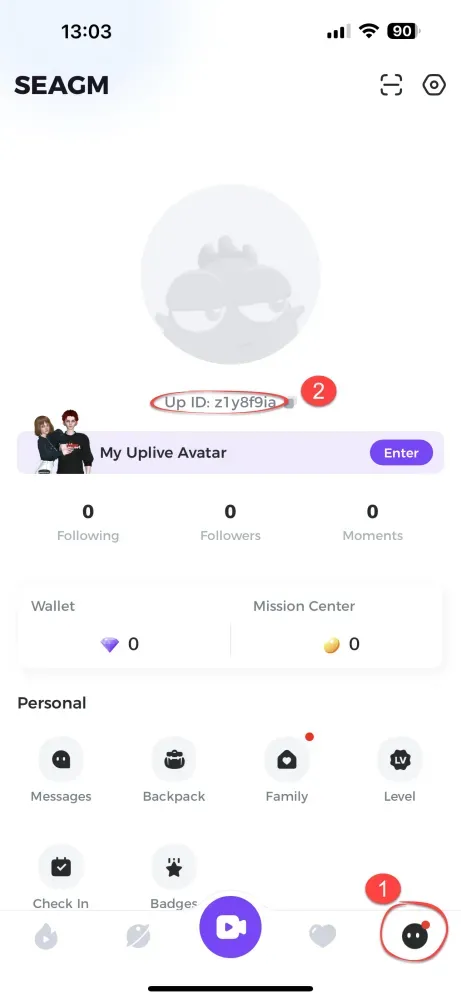
- Tap the Me (profile) icon located in the bottom-right corner of the screen.
- Look directly below your profile avatar and username.
- You will see Up ID: followed by a sequence of numbers (e.g.,
Up ID: 12345678). - Tap the copy icon next to the number or write it down carefully to enter it on BitTopup.
What Are Uplive Diamonds Used For: Gifts, Battles, and Features
Diamonds grant full access to interactive entertainment features throughout the Uplive platform:
- Virtual Gifting: Send luxury animated gifts, standard stickers, and dynamic effects to live hosts. Broadcasters convert received gifts into platform points, making diamonds the primary way to support talent.
- PK Live Battles: Boost your chosen streamer during real-time streamer-versus-streamer PK competitions by dropping high-value gifts during match rounds.
- Room Entry Effects: Unlock customized entrance banners, exotic vehicle animations, and special audio cues that announce your arrival when joining popular broadcast rooms.
- VIP Badges & Profile Frames: Access premium tier levels that display exclusive badges next to your name in public chat and customize your avatar outline.
- Interactive Mini-Games & Lucky Draws: Participate in live room games, seasonal prize wheels, and interactive features hosted by platform creators.
Available Uplive Diamond Packages and Denominations in 2026
BitTopup offers a comprehensive range of Uplive Diamond tiers to support casual gifting as well as competitive PK event participation. Live prices and current regional availability are displayed directly on the product selection grid at the top of this page.
| Diamond Package | Recommended Use Case | In-App Feature Access |
|---|---|---|
| 60 – 300 Diamonds | Casual chat engagement & basic stickers | Standard virtual gifts, basic chat participation |
| 600 – 1,500 Diamonds | Regular streamer support & mini-games | Animated room gifts, interactive games, combo streaks |
| 3,000 – 6,000 Diamonds | PK Battle support & room rank climbing | Luxury dynamic gifts, entrance animations, room alerts |
| 12,000+ Diamonds | Event sponsorship & VIP status progression | High-tier event gifts, custom badges, top supporter ranking |
Note: Exact bundle sizes, regional pricing, and checkout totals are updated dynamically on the BitTopup storefront above.
Safe Diamond Top-Up: Password-Free Checkout with Up ID
Account safety is essential when purchasing digital live stream goods. BitTopup utilizes direct ID-based fulfillment, maintaining complete account security:
- Zero Password Requirements: You are never asked for your Uplive password, phone verification SMS, Apple ID, or Google login.
- Direct API Delivery: Diamonds are credited straight into your game account using official server-side player identification.
- Spark Live Compatibility: Uplive and Spark Live share core technology under the Asia Innovations Group network. If your regional app version displays Spark Live branding, your numeric account ID functions identically for top-up verification on BitTopup.
- Encrypted Checkout: Every transaction is handled over SSL-encrypted payment processing channels.
Troubleshooting Common Recharge Issues and Up ID Errors
If you experience any delay or issue during your transaction, consult these standard diagnostic checks:
1. Diamonds Have Not Refreshed in the App
If your order status on BitTopup shows completed but your Uplive wallet balance has not updated:* Completely close the Uplive application on your phone.* Clear the app cache in your device settings.* Reopen the app and visit the Me > Wallet section.* Allow up to 5–10 minutes during peak broadcast hours for server synchronization.
2. Entered an Incorrect Up ID
Orders processed to an incorrect but active Up ID cannot be reversed once delivered by the system. To avoid lost funds:* Always copy and paste your Up ID directly from your profile.* If you realize you entered the wrong ID before the order status updates to processed, contact BitTopup customer support immediately with your order number.
3. Payment Completed but Order Pending
If your funds were deducted but your order remains in pending status, your payment provider may be completing routine security clearance. Check your BitTopup account order history for real-time status updates.
Frequently Asked Questions
How do I find my Up ID in Uplive?
Open the Uplive app, tap the Me tab in the bottom right corner, and look directly underneath your profile photo and nickname. Your Up ID is the numerical string displayed there. Tap the copy icon next to the number to copy it to your clipboard.
Do I need to provide my Uplive account password to recharge diamonds?
No. BitTopup only requires your numeric Up ID to deliver diamonds. We never ask for your account password, email access, phone verification code, or social media login details.
What can I use Uplive Diamonds for on the live stream platform?
Uplive Diamonds are used to send animated 3D gifts to broadcasters, support hosts during competitive PK battles, buy special room entrance animations, unlock VIP chat frames and badges, and participate in in-app entertainment events.
Are Spark Live diamonds the same as Uplive Diamonds?
Yes. Spark Live and Uplive operate under the same parent infrastructure. Users registered through regional variations of the app can recharge their balances using their standard account ID on BitTopup.
How long does it take for Uplive Diamonds to be credited?
Diamond orders on BitTopup are processed automatically after payment authorization. Under standard network conditions, diamonds appear in your Uplive account wallet within minutes.
What happens if I enter an incorrect Up ID during recharge?
If the entered Up ID belongs to an active account, the platform servers will deliver the diamonds to that user, and completed digital orders cannot be refunded or transferred. If the Up ID does not exist on the platform, the order will fail to process. Contact BitTopup customer support with your order details if you need assistance with a failed transaction.