


MICO Live Coins Top Up: Fast, Direct UID Delivery
MICO Live connects millions of users worldwide through live streaming, group voice chat rooms, competitive gaming broadcasts, and social interaction. Coins serve as the primary premium in-app currency, enabling you to send dynamic virtual gifts, back your favorite hosts in competitive PK battles, and secure exclusive VIP privileges.
BitTopup provides a direct top-up system requiring only your numeric Player ID. You do not need to share passwords, verify email codes, or link private social accounts. Select your desired coin package on the checkout page, enter your Player ID, and receive your balance straight into your MICO wallet.
How to Find Your MICO Player ID in the App
Your MICO Player ID is a permanent numeric identifier assigned to your account during registration. It is distinct from your display name or handle, which can be modified at any time.
Follow these steps to find your exact Player ID:
- Open the MICO Live app on your mobile device.
- Tap the Profile icon located in the bottom-right corner of the main screen.
- Look directly beneath your profile avatar and display name.
- Locate the label marked ID: followed by a sequence of digits (e.g.,
123456789). - Tap the copy icon next to the number, or write down the exact digits.
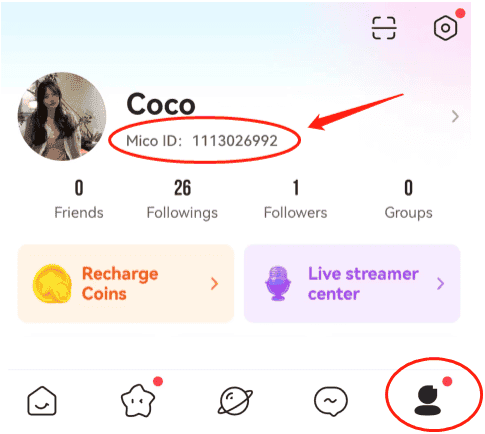
Important Tip: Do not enter your display nickname, custom username, or phone number in the top-up field. Only enter the numeric Player ID to ensure accurate and immediate delivery.
Step-by-Step: How to Recharge MICO Live Coins on BitTopup
Recharging your MICO wallet through BitTopup is quick and straightforward:
- Choose Your Coin Package: Browse the available coin denominations listed on the live BitTopup catalog and select the tier that fits your gifting needs.
- Enter Your Player ID: Paste your numeric MICO Player ID into the designated field. Double-check the digits to prevent routing errors.
- Select Your Payment Option: Pick your preferred payment method from the checkout menu.
- Complete the Transaction: Confirm your purchase details. Once processed, the coins credit directly to your MICO Live account balance.
- Verify In-App: Open MICO Live, go to your Profile wallet, and check your updated coin count.
Global vs Regional MICO Account Compatibility Guidelines
MICO Live operates global servers alongside localized content clusters. To ensure smooth delivery, keep these regional guidelines in mind:
| Feature / Setting | Global MICO Accounts | Regional / Localized Accounts |
|---|---|---|
| Identifier Type | Numeric Player ID (digits only) | Numeric Player ID (digits only) |
| Account Binding | Global server network | Specific regional server (e.g., MENA) |
| Currency Utility | Usable across all global streams & PKs | Usable within regional rooms & global events |
| Top-Up Requirements | Exact Player ID required | Exact Player ID required |
Player ID top-ups through BitTopup support Global accounts, delivering coins directly without region-locking conflicts when the correct numeric ID is provided. Make sure your MICO app is downloaded from official distribution channels and kept updated to the latest 2026 build.
What MICO Live Coins Are Used For in 2026
MICO Live Coins grant access to the platform's social, interactive, and gamified features:
- Live Stream Gifting: Send animations, luxury vehicles, entry effects, and themed gifts to broadcasters. Gifting boosts your contributor rank on the host's daily and monthly fan leaderboards.
- PK Battle Support: During live PK battles between creators, sending coin gifts boosts your host's battle score, helping them defeat rival streamers before the round timer expires.
- Voice Room Interactivity: Spend coins in multi-guest voice rooms to trigger special audio effects, activate interactive room games, or tip room moderators and speakers.
- VIP Perks and Badges: Accumulating and spending coins raises your account level, unlocking exclusive chat bubbles, distinct name colors, entrance announcements, and higher profile placement on stream visitor lists.
- Creator Support and Diamond Conversion: Broadcasters receive Diamonds or Beans when you send coin gifts, which they can convert according to platform rules.
Why Player ID-Only Recharge Keeps Your MICO Account Safe
Account security is essential when purchasing digital currencies. BitTopup uses a direct Player ID fulfillment model that guarantees complete safety:
- Zero Password Requests: You are never asked for your MICO password, verification codes (OTP), Apple ID, Google account, or social login credentials.
- Protection Against Phishing: Because no login details are transferred, your personal chats, friend lists, and saved payment methods remain completely private and inaccessible to third parties.
- No Risk of Account Sharing Penalties: Logging into accounts from foreign IP addresses can trigger security flags or suspensions by platform moderators. Direct UID top-up avoids this risk entirely.
Payment Options and Denomination Selection on BitTopup
BitTopup offers a versatile selection of MICO Live Coin packages to suit casual viewers and high-tier VIP gifters alike. Real-time prices, currency conversions, and available package tiers are clearly displayed on the product checkout interface.
Select the exact denomination you require, check the current rate displayed on the page, and proceed with a secure checkout. All payment channels utilize encryption to ensure your financial data is fully protected.
Troubleshooting Delivery and Verifying Your MICO Coin Balance
If your purchased coins do not reflect immediately in your MICO wallet, follow these troubleshooting steps:
- Restart the App: Fully close MICO Live from your device's recent apps switcher and reopen it. This forces the app to fetch the latest balance from the server.
- Check Your Wallet Ledger: In MICO Live, go to Profile > Wallet > Coin History to verify if the incoming transaction was logged.
- Verify the Submitted ID: Check your BitTopup order receipt to confirm that the Player ID entered matches your actual in-app ID without misplaced or omitted digits.
- Wait a Few Moments: During platform maintenance or high server traffic, slight processing delays can occur.
- Contact Customer Support: If the coins do not appear after checking the steps above, reach out to BitTopup support with your Order ID and MICO Player ID for prompt assistance.
Frequently Asked Questions
Where can I buy MICO Live Coins recharge safely?
You can buy MICO Live Coins safely on BitTopup. The platform uses a direct ID-only delivery system that credits your account directly without requiring passwords or sensitive login credentials.
Where do I find my MICO Player ID?
Open MICO Live, tap the Profile tab in the bottom-right corner, and find the numeric sequence labeled "ID:" directly beneath your profile avatar and nickname.
What is MICO recharge used for?
Recharging MICO coins allows you to send virtual gifts to live broadcasters, vote during PK battles, activate VIP entry effects, customize your profile, and participate in interactive voice room activities.
Do I need to share my MICO password to recharge coins?
No. BitTopup only requires your numeric Player ID. Never share your password, login tokens, or two-factor authentication codes with any top-up service.
Can I recharge MICO accounts from different regions?
Yes, BitTopup supports global MICO accounts. As long as you provide the correct numeric Player ID corresponding to your account, the coins will be delivered directly to your profile.
What should I do if my MICO Live Coins do not appear after purchase?
First, close and restart the MICO app to refresh your wallet balance. Check your in-app coin history and confirm that the Player ID on your order receipt is accurate. If you still need help, contact BitTopup customer support with your order number.