



Mango Live Diamonds Top Up: Virtual Currency and VIP Perks in 2026
Mango Live is an interactive global live-streaming platform where users watch broadcasts, chat with creators, and participate in real-time talent showcases. Mango Live Diamonds serve as the primary premium currency on the platform. Viewers use diamonds to purchase virtual gifts, activate special profile badges, unlock VIP statuses, and support their favorite broadcasters during live streaming sessions.
During competitive streamer battles, known as PK Battles, two creators compete against each other in real time. Diamonds spent on gifts directly boost a broadcaster's battle score, deciding the winner of the match. Beyond direct support, spending diamonds increases your user wealth level in the app. Higher levels unlock distinctive entry animations, colorful chat bubbles, premium name badges, and prominent placement in the live room's viewer list, ensuring your presence stands out in busy chat rooms.
Diamonds vs Beans: Understanding the In-App Economy
Mango Live operates on a dual-currency system designed to balance user engagement and creator monetization. Understanding the distinction between Diamonds and Beans ensures you manage your account balance effectively.
| Feature | Mango Live Diamonds | Mango Live Beans |
|---|---|---|
| Target User | Viewers, Fans, and Supporters | Broadcasters and Stream Hosts |
| Acquisition | Direct purchase and account top up | Earned when viewers send gifts in streams |
| Primary Function | Buying gifts, VIP perks, entering PKs | Creator revenue and performance rewards |
| Redemption | Consumable in-app currency only | Convertible to real cash or diamond balance |
Diamonds are strictly for viewers to spend inside the application. When a viewer sends a virtual gift—such as a sports car, crown, or animated avatar effect—the platform converts that gift into Beans for the receiving broadcaster. Broadcasters accumulate Beans to track their streaming milestones and withdraw their earnings according to platform payout terms. Viewers cannot cash out diamonds; they remain in your wallet ready to be spent on content creators.
How to Find Your Numeric Mango ID
To complete a top up on BitTopup, you only need to provide your official numeric Mango ID. You do not need to share usernames, email addresses, or phone numbers.
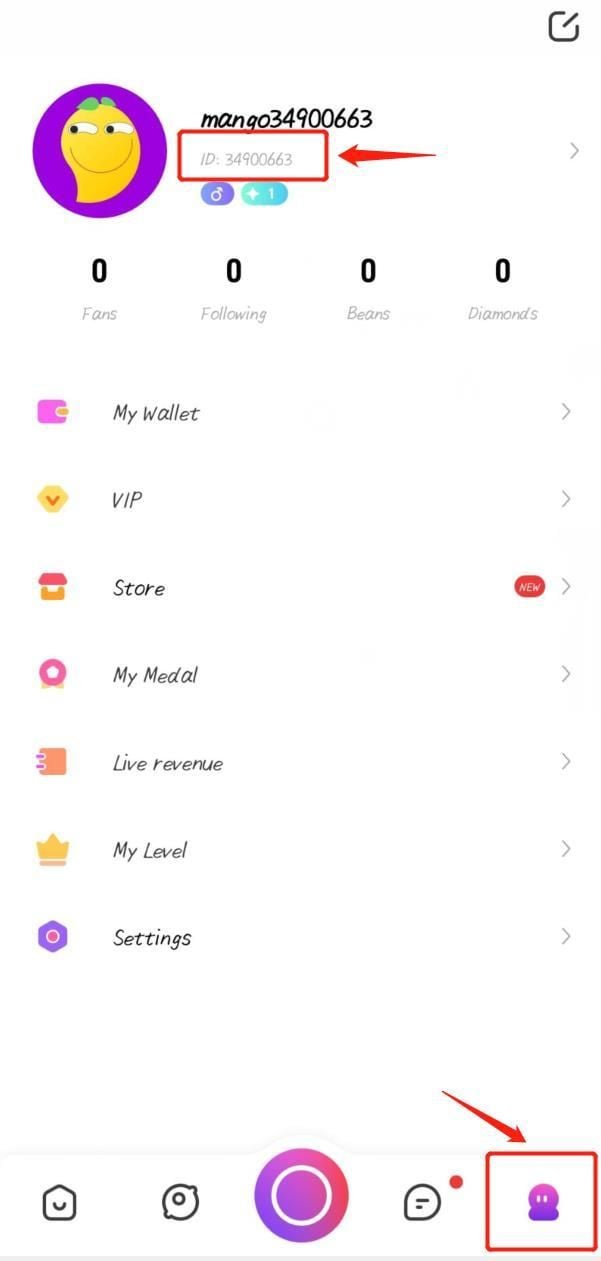
Follow these steps to find your numeric ID inside the app:
- Open the Mango Live application on your mobile device.
- Log in to your account using your regular method.
- Tap the Profile (or Me) icon in the bottom right corner of the screen.
- View the area directly underneath your profile picture and nickname.
- Find the line labeled ID: followed by a unique string of numbers (for example:
12345678). - Tap the copy icon next to the number to copy your Mango ID directly to your clipboard.
Note: Do not submit custom display nicknames or third-party login handles. The top up system uses the exact numeric ID to credit diamonds directly to your account.
Step-by-Step Guide to Buy Mango Live Diamonds on BitTopup
Recharging your Mango Live Diamonds on BitTopup is fast, direct, and straightforward. Follow this guide to place your order:
- Select Your Diamond Package: Browse the available diamond denominations on BitTopup. Current pricing, available bundles, and special promotions are displayed directly on the live checkout page.
- Enter Your Mango ID: Paste or type your numeric Mango ID into the player ID field. Check the numbers carefully to ensure they match your in-app profile.
- Choose Your Payment Method: Select your preferred payment channel from the options available on the secure checkout screen.
- Confirm and Pay: Review your order summary and finalize the payment.
- Receive Diamonds: Once your transaction is confirmed, the BitTopup automated system processes the request and deposits the diamonds directly into your Mango Live balance.
Safe Recharges: Why BitTopup Never Asks for Your Password
Account safety is a critical priority when purchasing digital currencies online. BitTopup relies on direct-to-ID crediting, which requires only your public numeric Mango ID.
Key Safety Protections:
- No Passwords Required: You never have to share your account password, email credentials, or social media login details. Your private access credentials remain completely in your control.
- Protection Against Account Takeovers: Because no login access is granted to third parties, there is zero risk of credential theft, unauthorized profile edits, or unapproved spending.
- Zero Risk of Account Bans: Services that require logging into your account from unauthorized locations or using modified client apps violate platform security terms and risk account suspension. Direct ID top-ups work with platform-compatible crediting, keeping your account safe and compliant.
- Data Privacy: Your personal information and payment details are processed through encrypted channels, ensuring complete transaction confidentiality.
Troubleshooting Delivery Times and Balance Refresh Delays
Most diamond top-ups process rapidly after payment verification. However, network delays or local app caching can occasionally cause a momentary delay. Use the following steps to resolve common balance display questions:
1. Force-Restart the App
If you completed your purchase while Mango Live was open, the app may display a cached balance. Force close Mango Live completely from your recent apps switcher and reopen it. Check your in-app wallet under the Profile tab to view the updated total.
2. Switch Stream Rooms or Send a Test Message
Enter any live broadcast room and open the gift panel. Performing an in-app action forces the app to sync with the server database, immediately updating your displayed diamond count.
3. Verify the Submitted Mango ID
Check your BitTopup order confirmation to verify the numeric ID you entered. If you made a typo and entered an inactive ID, contact BitTopup customer support immediately with your order number. If you accidentally sent diamonds to another active user's ID, the transaction cannot be reversed once processed by the network.
4. Check Order Status on BitTopup
Log into BitTopup and visit your order history page. Confirm that your payment status shows as completed. If a payment is pending review by your financial provider, the diamonds will be dispatched as soon as the payment gateway clears the transaction.
5. Contact 24/7 Customer Support
If your order shows as completed on BitTopup but your balance has not updated after restarting the app, contact BitTopup support. Provide your order number, transaction timestamp, and numeric Mango ID for rapid assistance.
Frequently Asked Questions About Mango Live Top Up
How do I top up Mango Live Diamonds using my Mango ID?
To top up using your Mango ID, select the diamond package you want on BitTopup, enter your numeric Mango ID in the specified field, and complete payment. The diamonds are credited straight to your Mango Live account balance automatically.
Where can I find my Mango ID in the Mango Live app?
Open the Mango Live app and tap the Profile icon in the lower right corner. Your numeric Mango ID is displayed directly below your profile picture and nickname. Tap the copy icon next to the number to copy it.
Is it safe to buy Mango Live Diamonds from BitTopup?
Yes, buying Mango Live Diamonds on BitTopup is safe. BitTopup uses direct ID recharges that do not require your account password or login credentials. All payments are processed through encrypted, secure checkout systems.
Do I need to provide my Mango Live account password to top up?
No. You never need to share your password, login verification codes, or personal account credentials. BitTopup only requires your public numeric Mango ID to deliver your diamonds.
How long does it take for Mango Live Diamonds to appear in my account?
Orders are processed automatically upon payment confirmation. In most cases, diamonds are credited to your balance within moments. If there is a brief network delay, restarting the app will sync your balance.
What should I do if my Mango Live Diamonds do not arrive immediately?
First, force close and restart your Mango Live app to refresh your wallet balance. Next, check your BitTopup order history to ensure the payment status is marked as complete. If the diamonds still do not appear, reach out to the BitTopup 24/7 customer support team with your order ID for immediate investigation.