

Migo Live Top Up: Instant & Secure Coin Recharge
Migo Live is a global interactive live streaming platform where users connect with talented broadcasters, join voice chat rooms, and participate in community events. Coins are the official digital currency inside Migo Live. They power every premium interaction across the platform, from sending animated gifts to unlocking VIP room status and boosting your favorite creators up the leaderboard rankings.
BitTopup provides a direct, fast, and dependable Migo Live top up service. By using direct User ID processing, your coin balance updates directly without requiring you to share login credentials or private passwords. Select your coin pack, enter your User ID, and complete your transaction with transparent regional payment channels.
How to Locate Your Migo Live User ID
To ensure your coins arrive in the correct account, you must enter your exact Migo Live User ID (UID) during checkout. Your UID is a unique numeric identifier linked directly to your profile.
Follow these quick steps to find your User ID inside the app:
- Open the Migo Live app on your mobile device.
- Tap the Profile or Me icon located in the bottom-right corner of the main screen.
- Look directly beneath your profile picture and nickname at the top of the screen.
- Locate the number labeled ID or UID.
- Tap the copy icon next to the number, or write down the exact sequence of digits.
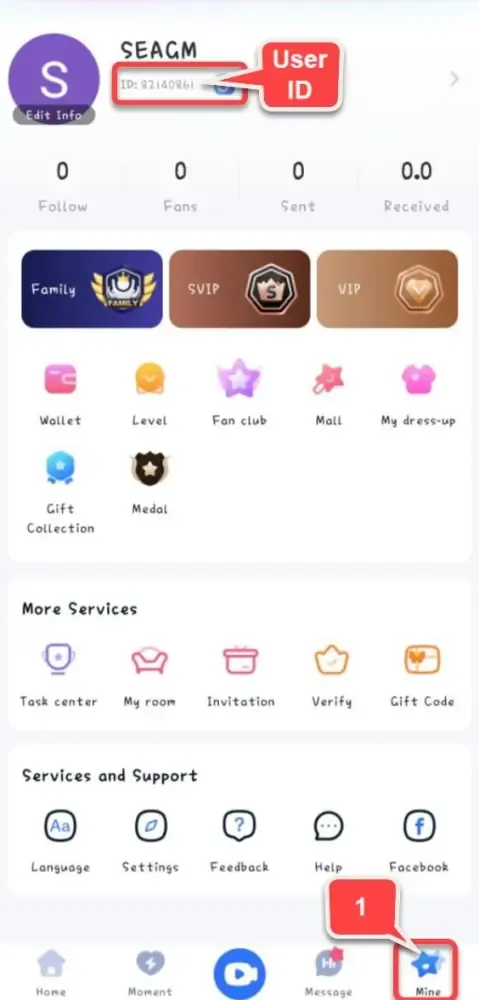
Verification Tip: Always copy and paste your User ID directly from the app to avoid typos. Entering an incorrect UID can cause your coins to be delivered to another user's account.
How to Recharge Migo Live Coins on BitTopup
Recharging your Migo Live account on BitTopup takes only a few simple steps. The entire checkout workflow is designed for speed and clarity.
- Select Your Coin Package: Browse the available coin amounts on the product page and pick the denomination you want to purchase.
- Enter Your User ID: Paste your numeric Migo Live User ID into the input field. Double-check the digits to confirm accuracy.
- Review Order Details: Check the live checkout screen for current pricing and regional availability.
- Choose a Payment Channel: Select your preferred local or international payment method from the available list.
- Complete Payment: Finalize the secure transaction. Your order processes immediately, and coins credit to your Migo Live balance automatically.
Migo Live Coin Recharge Overview
| Feature | Details |
|---|---|
| Account Requirement | Migo Live User ID (UID) Only |
| Password Required | No (Never share your password) |
| Supported Region | Global |
| Primary Use Cases | Live Gifting, VIP Privileges, Creator Support |
| Delivery Method | Direct In-App UID Credit |
| Customer Support | 24/7 Live Assistance on BitTopup |
Uses and Benefits of Migo Live Coins in 2026
Coins serve as the primary medium of exchange within the Migo Live ecosystem. Having a healthy coin balance gives you immediate access to all interactive tools and social features across live video and audio rooms.
1. Sending Virtual Gifts to Broadcasters
Virtual gifts are the centerpiece of Migo Live. Broadcasters rely on gifts from their audience to climb daily, weekly, and monthly leaderboards. You can send everything from small animated roses and hearts to full-screen luxury animations, sports cars, and fantasy effects. Sending high-tier gifts displays your profile prominently in the stream chat and alerts the host in real time.
2. Unlocking VIP Status and Profile Customization
Active users who recharge and spend coins can unlock exclusive VIP badges, premium entrance banners when joining live rooms, and custom chat bubbles. These visual enhancements establish your presence in high-traffic rooms and make your messages stand out to broadcasters and other viewers.
3. Participating in PK Battles and Interactive Events
Broadcasters frequently engage in competitive head-to-head PK battles. Viewers use coins to send targeted battle gifts that push their chosen streamer's score past their opponent. Supporting your favorite host during special events and PK matches earns you exclusive fan club badges and recognition.
4. Joining Exclusive Audio Rooms and Private Features
Certain community hosts host private audio parties, interactive games, or VIP-only voice seats that require entry gifts or specific coin contributions. Maintaining a coin reserve ensures you never miss out on exclusive group conversations or gaming sessions.
Safe and Secure Account Recharging Without Passwords
Account safety is a critical priority when buying virtual currencies online. BitTopup uses a direct ID recharge model that protects your personal data at every step.
- Zero Password Requirement: You never need to supply your Migo Live password, Facebook login, Google credentials, or phone verification codes. Recharges require only your public User ID.
- No Account Sharing: Your account remains strictly in your hands. You do not need to grant temporary access to third-party operators.
- Protected Payment Gateways: All financial transactions on BitTopup are processed through encrypted, compliant payment gateways to safeguard your billing details.
- Direct System Dispatch: Once payment is confirmed, the system routes the coin top-up directly to the Migo Live platform servers for balance updating.
Flexible Payment Methods and Fast Delivery Workflow
BitTopup offers a versatile checkout experience tailored to international users. Because exchange rates and payment options differ by location, all pricing, local currency options, and available payment processors are displayed dynamically in real time on the live checkout screen.
The Delivery Process Explained
- Step 1 - Order Validation: The BitTopup system receives your order and verifies the format of the submitted User ID.
- Step 2 - Payment Confirmation: The payment gateway validates your transaction securely.
- Step 3 - Instant Dispatch: The automated recharge engine transmits the coin package directly to your Migo Live account.
- Step 4 - In-App Confirmation: Open or refresh Migo Live to see your updated coin balance in your user wallet.
If you experience any delay, BitTopup provides 24/7 customer service ready to check your order status, verify transaction IDs, and assist you until your coins are successfully credited.
Resolving Common Recharge and UID Entry Issues
If you encounter any questions during or after your recharge, use these direct troubleshooting steps:
What if the Coins Have Not Appeared in Migo Live?
- Restart the App: Completely close the Migo Live application on your phone and reopen it. This forces the app to sync with the server and refresh your wallet balance.
- Check Your Order Status: Log into your BitTopup account to ensure your transaction status shows as completed.
- Verify Your Internet Connection: A weak mobile or Wi-Fi connection can prevent your profile page from fetching the latest balance immediately.
- Contact Customer Support: If your order shows completed but the coins do not appear after a few minutes, reach out to BitTopup support with your Order Number and Migo Live UID.
How to Avoid UID Mistakes
Because ID recharge orders are processed automatically, sending coins to an incorrectly entered UID cannot be reversed once completed. Always copy your User ID directly from your Migo Live profile and review the number before submitting payment.
Frequently Asked Questions About Migo Live Top Up
How do I find my Migo Live User ID?
Open Migo Live, tap the Me or Profile icon in the bottom-right corner, and locate the numeric ID displayed under your profile avatar. Tap the copy icon next to it to copy the exact digits.
Do I need to provide my Migo Live login password to recharge?
No. BitTopup only requires your Migo Live User ID to complete a coin top up. Never share your account password, SMS verification codes, or third-party login credentials with anyone.
What are Migo Live coins used for?
Migo Live coins are used to purchase and send virtual gifts to live streamers, participate in streamer PK battles, unlock VIP room entrance effects, obtain custom chat styling, and access special audio room features.
How quickly will the coins arrive after completing payment?
Coin delivery is automated. Once your payment clears through the live checkout, the coins are dispatched directly to your Migo Live UID. Most orders credit within a few moments. Refresh your in-app wallet to see the updated total.
What should I do if I entered the wrong User ID during checkout?
If you enter the wrong User ID and the transaction has already processed on the platform servers, the coins are delivered to that account and cannot be refunded. If you notice an error before the payment completes, cancel the order immediately and re-enter your correct UID. If you need assistance, contact BitTopup customer support right away with your transaction details.
Is recharging Migo Live coins on BitTopup safe?
Yes. BitTopup utilizes secure encrypted payment gateways and a password-free UID recharge system. Your personal account credentials remain safe, and your transactions are protected by dedicated customer support around the clock.