



Yalla Live Top Up: Direct Gold Refill via User ID
Yalla Live is a global voice chat and social entertainment platform where users join multi-person audio rooms, interact in real time, play interactive games, and send dynamic virtual gifts. Gold is the primary in-app currency in Yalla Live, allowing you to participate in community activities, support popular room hosts, and unlock premium visual perks.
BitTopup provides a direct, secure Yalla Live recharge service using only your public User ID. You never have to share your account password, email credentials, or third-party login tokens. Simply select your Gold package, enter your User ID, and have your balance credited directly to your Yalla Live wallet.
How to Find Your Yalla Live User ID in the App
To ensure your Gold reaches the correct profile, you need your exact numerical User ID from inside the application. Follow these steps to find and copy it:
- Open the Yalla Live application on your mobile device.
- Tap the Profile tab (marked as Me) in the lower right corner of the home screen.
- Look directly beneath your avatar, nickname, and level badge.
- You will see ID: followed by a numeric string (e.g.,
12345678). - Tap the Copy icon next to the number to copy your User ID to your clipboard.
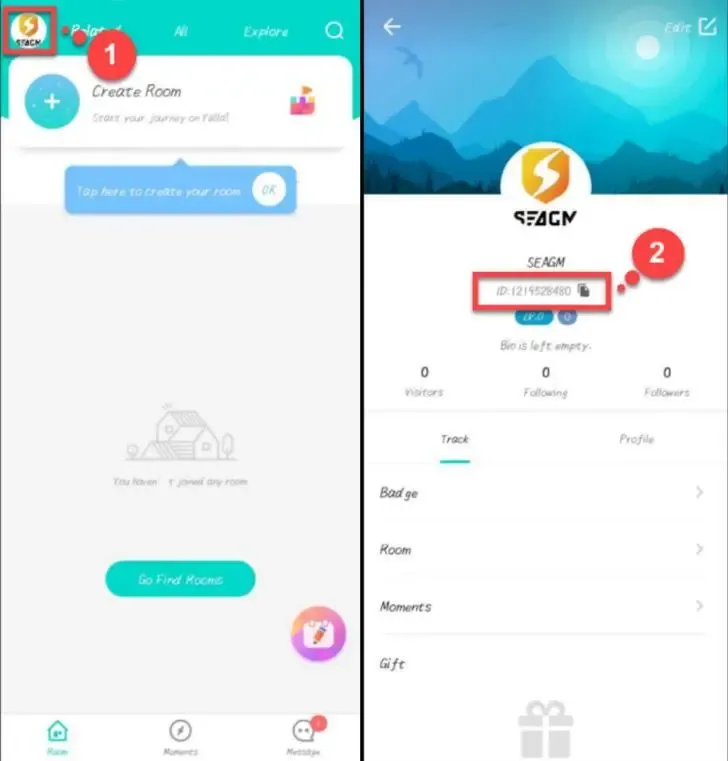
Always copy and paste the ID directly into the BitTopup order field rather than typing it manually to avoid accidental typos.
Step-by-Step Guide to Recharge Yalla Live on BitTopup
Refilling your Yalla Live Gold coins takes less than two minutes:
- Select Package: Choose the amount of Yalla Live Gold you wish to purchase from the product catalog.
- Enter User ID: Paste your numeric Yalla Live User ID into the required account field.
- Review Order: Confirm the Gold denomination and check that the User ID matches your in-app profile.
- Choose Payment Method: Select your preferred payment channel on the live checkout screen.
- Complete Checkout: Finalize your payment. The system processes the order and sends the Gold directly to your Yalla Live account.
- Verify Balance: Open or restart your Yalla Live app and check your in-app wallet to confirm the updated Gold balance.
What Are Yalla Live Gold and Coins Used For?
Gold coins are the core utility on Yalla Live, powering interaction across thousands of live audio rooms:
- Virtual Gifting: Send animated luxury gifts, cars, planes, and special event tokens to broadcasters and room speakers during live discussions.
- Room Customization & Leveling: Level up your custom voice room, change room wallpaper themes, and activate exclusive room sound effects.
- VIP Status and Badges: Purchase nobility titles, special profile frames, glowing nameplates, and custom chat bubbles that highlight your presence in busy voice rooms.
- Entrance Effects: Display animated visual and audio entrance effects whenever you join a voice room.
- Interactive Social Mini-Games: Spend Gold to participate in casual room games with friends and community members.
Direct User ID Recharge vs. Gift Cards: Safe Top-Up Without Passwords
Direct UID recharge eliminates the risks associated with manual PIN redemption and account sharing. The table below highlights key differences:
| Feature | Direct User ID Top-Up (BitTopup) | Third-Party Gift Card Codes |
|---|---|---|
| Account Access | Zero password or login access required | No login needed, but requires manual redemption |
| Delivery Method | Direct automatic credit to your in-app balance | Digital alphanumeric PIN sent via email |
| Risk of Typing Errors | Minimal (verified before checkout) | High risk of failed redemptions or region locks |
| Expiration Date | Never expires; credited immediately | Codes may expire if not redeemed promptly |
| Gifting to Friends | Enter your friend's UID directly | Must send the code and instruct them how to redeem |
Using direct User ID recharge ensures your login credentials remain 100% private on your own device at all times.
Supported Payment Methods for Yalla Live Top-Up
BitTopup supports a wide selection of regional and international payment options to accommodate users globally. Depending on your location, you can complete your purchase using major debit cards, credit cards, local e-wallets, and regional banking rails.
Exact payment methods, local currency conversions, and final pricing are displayed dynamically on the checkout page before you submit payment. Select the option that best fits your region for smooth payment processing.
Common Mistakes and What to Do If Gold Has Not Arrived
If you experience any delay after completing your purchase, review these troubleshooting points:
- Typo in the User ID: If you entered another user's ID by mistake, the Gold will be delivered to that account upon payment completion. Double-check your numbers before paying.
- App Display Cache: Sometimes your local app display does not refresh immediately. Completely close Yalla Live from your phone's background app switcher, reopen it, and check your wallet again.
- Network Latency: In rare cases during server maintenance, delivery can take a few minutes to reflect on the main server.
- Contact 24/7 Support: If your Gold balance does not update, gather your BitTopup order number and your Yalla Live User ID, then reach out to BitTopup customer service for prompt order verification.
Frequently Asked Questions About Yalla Live Top Up
Where do I find my Yalla Live User ID?
Open Yalla Live, tap the Me profile tab in the bottom right corner, and locate the numeric ID displayed under your username and profile picture. Tap the copy icon next to it to copy your ID.
Do I need to share my Yalla Live password to recharge?
No. BitTopup only requires your public numeric User ID. You should never share your password, verification codes, or social login credentials with anyone.
Can I recharge Yalla Live Gold for a friend using their User ID?
Yes. Enter your friend's Yalla Live User ID into the order field instead of your own. Once the payment is complete, the Gold will deposit directly into their account.
How long does it take for Yalla Live Gold to reflect in my account?
Gold recharges are processed immediately upon payment confirmation. Once the transaction finishes, open or refresh your Yalla Live app to see your updated balance.
What can I do with Gold coins in Yalla Live?
You can use Gold to send animated virtual gifts to room hosts, purchase noble VIP badges, unlock room entrance animations, customize your voice chat room, and join in-app games.
What should I do if I entered the wrong User ID during checkout?
Contact BitTopup customer support immediately with your order reference. If the order has not yet been processed by the automated system, support will help correct the details. If the order has already been credited to the specified UID on the platform server, completed transactions cannot be reversed.