Learn how to fix Steam wallet code currency mismatch errors, update your store country properly, and redeem EUR gift cards without risking account bans.
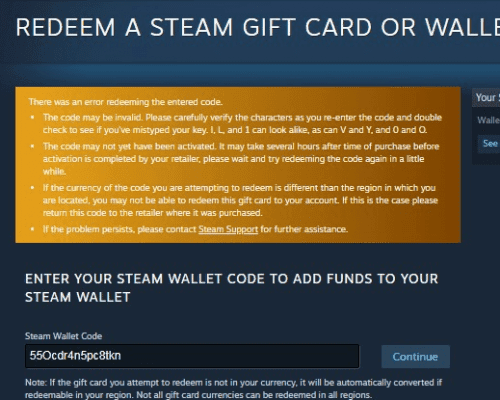
Entering a digital balance code into Steam only to see a red error banner means your voucher's currency denomination does not match your profile's registered store region. This is the Steam wallet currency mismatch error 2026 players frequently encounter.
Steam Wallet funds operate as a closed-loop store credit system managed by Valve Corporation. Because Steam handles direct software distribution across dozens of sovereign nations, Valve strictly restricts how and where wallet funds enter user accounts.
Your unredeemed voucher balance is not lost. Resolving the error requires understanding how Valve locks store regions, why proxy workarounds trigger account suspensions, and how to align your billing settings legitimately.
Why Steam Blocks Wallet Codes from Different Currencies
Every Steam profile is pinned to a single store currency matching the account's registered country of residence. If your account uses United States Dollars (USD) or British Pounds (GBP), the redemption system expects a code generated specifically in that currency.
Automatic currency conversions on gift cards no longer exist. Valve removed cross-currency redemptions to shut down regional price exploitation and unauthorized reseller arbitrage.
In November 2023, Valve replaced domestic pricing in Argentina and Turkey with regional USD pricing, causing game prices in those markets to spike by up to 2900% overnight. The currency-locked wallet code system is part of that same enforcement framework.
Physical Steam gift cards are being phased out at retail by the end of 2026, shifting distribution entirely to digital vouchers. When you purchase a digital Steam Wallet code in EUR, you buy credit locked to the European economic zone. If your profile is set to a different region, the client immediately rejects the code.
Core Wallet and Account Limits in 2026
Valve enforces strict financial ceilings and cooldown timers across all user accounts:
| Limit or Rule Type | Value / Duration | Operational Impact |
|---|
| Account Wallet Balance Maximum | $2,000 USD (or local equivalent) | Upper holding ceiling; balance additions above this cap are blocked. |
| Store Region Change Cooldown | 3 Months (90 Days) | Mandatory waiting period between consecutive country modifications. |
| Direct Digital Gifting Friend Lock | 3 Days (72 Hours) | Required duration on friends list before sending native digital gift cards. |
| Direct Wallet Top-Up Minimum | $5.00 USD | Minimum transaction floor allowed through standard store checkout. |
| Limited Account Unlock Threshold | $5.00 USD | Total spend required to remove new-account social and community limits. |
| Steam Community Market Fee | 15% | Combined platform cut deducted when liquidating items for wallet funds. |
These hard caps prevent balance overloading and stop users from jumping between regional storefronts to exploit price differences.
Step-by-Step Fix: How to Change Steam Store Currency to EUR
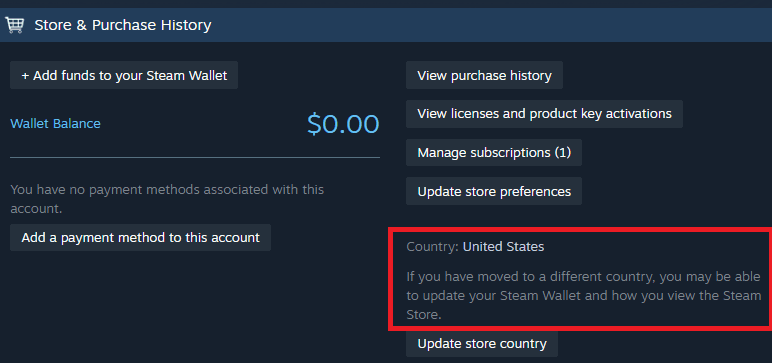
You cannot switch store currency through basic account settings. Valve removed manual store region dropdowns from profile menus. The only verified method to update your store country and currency is completing a purchase with a payment method issued in the new country.
If you have relocated to a Eurozone country, follow this sequence to update your profile:
- Connect from your local network: Open the Steam client from an internet connection located within the Eurozone. Do not use VPNs or proxy networks.
- Add an inexpensive item to your cart: Place any low-cost game or DLC into your shopping cart.
- Locate the Country dropdown in your cart: Open your cart and find the Country selector above the item summary.
- Select your new European country: Choose your country of residence from the dropdown. The cart total will automatically switch from your old currency to Euros (EUR).
- Check out with a local payment method: Click Purchase for myself and provide a local debit card, credit card, or bank method registered in that country, along with a local billing address.
- Complete the purchase: Once the transaction clears, your account profile, store catalog, and wallet denomination permanently switch to EUR.
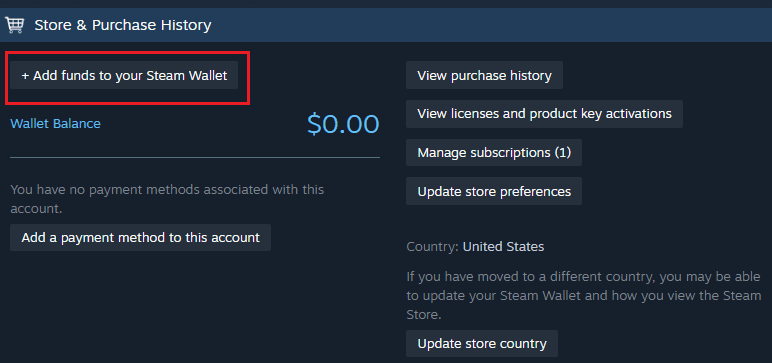
- Redeem your voucher: Go to Account Details, select Add funds to your Steam Wallet, click Redeem a Steam Gift Card or Wallet Code, and submit the PIN.
After your account currency updates to EUR, you can activate any valid Steam Wallet Code (EUR) without error.
Platform Differences for Region and Code Management
Managing your balance and store settings varies by client interface:
| Platform / Client Type | Store Region Modification | Wallet Code Redemption | Security & Verification Flow |
|---|
| PC Desktop Client (Windows/Mac/Linux) | Full support via shopping cart checkout with local payment method. | Native redemption window under Account Details menu. | Direct integration with Steam Guard desktop session. |
| Web Browser (Chrome/Firefox/Edge) | Supported via browser cart, but requires re-authenticating billing info. | Fully supported via the dedicated web redemption portal. | Two-factor prompt required for new IP or untrusted browser sessions. |
| Steam Mobile App (iOS / Android) | Restricted; difficult to trigger country dropdown during mobile checkout. | Supported via embedded account settings webview. | Manages Steam Guard Mobile Authenticator confirmations. |
The PC desktop client is the most reliable interface for store region updates. Browsers frequently retain cached session cookies that display outdated pricing, while the mobile app lacks consistent regional checkout toggles.
Why Trying to Redeem EUR Steam Code on USD Account Fails
A USD account will reject a Euro voucher every time. When you submit a code, Steam checks the currency tag embedded in that voucher. If the code tag reads EUR and your account is set to USD, the server rejects the request.
[Code Currency: EUR] ---> [Steam Account: USD] = ERROR: Currency Mismatch
[Code Currency: EUR] ---> [Steam Account: EUR] = SUCCESS: Funds Added to Wallet
Activating a VPN does not bypass this check. Steam determines redemption eligibility by your account's registered store country, not your temporary IP address.
Using a VPN to falsify your billing location violates the Steam Subscriber Agreement. Valve monitors IP routing discrepancies during checkout and code activation. Accounts flagged for manipulating store regions face specific penalties:
- Permanent revocation of purchasing privileges across the platform.
- Account-wide trading and Steam Community bans.
- Permanent account termination and loss of your game library.
Do not risk your account library over an incompatible code. If you cannot legitimately switch your region using a local payment method, avoid using location-spoofing software.
Alternative Solutions When Store Country Change Is Not Working
If your store country will not update, your profile is likely hitting an active restriction.
The 3-Month Cooldown Lock
Valve enforces a mandatory 90-day cooldown between country changes. During this period, the country dropdown in your cart is disabled, and Steam Support will not manually bypass the timer. You must wait for the 90 days to expire.
Direct Digital Gifting Restrictions
If a friend abroad sent you an incompatible code, use native Steam digital gift cards instead. Valve allows direct digital balance transfers between users in increments from $5 to $100.
Two conditions apply:
- Both accounts must be mutual Steam friends for at least 3 days (72 hours).
- Accounts in domestic-locked regions, such as Argentina and Turkey, cannot transfer digital balances outside their local market.
Creating a Secondary Regional Account
If you live abroad temporarily but want to keep your primary account in your home currency, create a secondary Steam account. Set the second profile to your European address, link your European payment credentials, and redeem your EUR Steam digital voucher there. You can share supported games with your primary account via Steam Family Sharing.
Contacting the Code Retailer
Steam Support does not exchange foreign vouchers or replace third-party retail keys. Contact the merchant where you bought the code directly. Depending on whether the key was viewed or revealed, they may issue a refund or exchange it for a code in your local currency.
Regional Comparison of Steam Currency Policies
Valve divides global storefronts into distinct economic zones with specific trading and redemption rules:
| Region / Market Tier | Primary Store Currency | Wallet Code Cross-Compatibility | Special Gifting / Trading Rules |
|---|
| Eurozone | Euro (EUR) | Restricted strictly to EUR accounts across member states. | Unrestricted gifting within EU member countries. |
| North America | US Dollar (USD) / CAD | Locked to domestic currency denomination. | Standard 3-day friendship requirement for direct digital gifting. |
| Converted USD Zones (LATAM / MENA) | US Dollar (USD Pricing) | Standard USD codes required; regional currencies retired. | Domestic price adjustments; strict export checks. |
| Domestic Lock Markets (Argentina / Turkey) | US Dollar (USD Pricing) | Region-locked domestic voucher redemption only. | Sending and receiving digital gift cards restricted to domestic users. |
| Sanctioned Nations | None (Services Suspended) | Blocked completely due to international trade sanctions. | Total embargo on software exports and transactions. |
Once added to an account, Steam Wallet funds do not expire. However, they cannot be transferred between accounts or withdrawn to a bank account.
Troubleshooting Steam Account Region Locked Wallet Code Errors
If your code still fails to redeem, check these specific account constraints:
Check for Sanctioned Territory Blocks
Under international trade compliance regulations, Steam services and software access are unavailable in North Korea, Syria, Cuba, Sudan, and Iran. Accounts linked to or accessed from these territories cannot redeem wallet codes or make store purchases.
Verify Your Account Balance Ceiling
Steam caps total wallet balances at $2,000 USD (or local currency equivalent). If redeeming your voucher pushes your total balance above $2,000, the system rejects the transaction. Spend down your existing funds before redeeming the code.
Check Limited Account Status
New accounts are restricted until they spend at least $5.00 USD (or equivalent) to block automated bot accounts. Redeeming a valid regional wallet voucher of $5 or more satisfies this requirement and unlocks community features, friend invites, and Workshop access.
Community Market Liquidations
If you cannot return an incompatible voucher, another option is trading items across third-party inventories to generate wallet credit locally. Remember that sales on the official Steam Community Market incur Valve's standard 15% transaction fee, meaning direct voucher redemption is the only method that delivers 100% of the card's value.
FAQ
Why am I getting a currency mismatch error when redeeming my Steam code?
Steam requires wallet vouchers to match your account's registered store currency. Attempting to redeem an EUR code on an account set to USD, GBP, or another currency causes an automatic rejection.
Can I automatically convert a foreign Steam Wallet code to my local currency?
No. Steam discontinued automatic cross-currency wallet conversions. Codes only redeem on accounts configured to that specific fiat currency.
How often am I allowed to change my Steam store country?
Valve permits store region changes once every 90 days. After completing a purchase with a local payment method to switch regions, you must wait out the full 90-day cooldown before changing it again.
Can Steam Support manually convert or redeem my mismatched wallet code?
No. Steam Support does not convert foreign vouchers or override currency mismatches. You must request a replacement or refund from the merchant where the code was purchased.
Can I use a VPN to bypass the currency mismatch error?
No. Region updates require a valid local payment method and billing address. Spoofing your location with a VPN violates the Steam Subscriber Agreement and can result in account suspension.
How can I send a Steam gift card to a friend in another country?
Send funds through the digital gift card option inside the Steam client. You must be mutual Steam friends for at least 72 hours before the platform permits digital transfers.
Do Steam Wallet funds expire if I do not spend them immediately?
No. Wallet balances remain on your account permanently until spent. Wallet credit cannot be refunded or withdrawn to a personal bank account.
Final Verdict on Handling Currency Mismatches
Valve's currency restrictions are strictly enforced to protect regional pricing tiers. There are no client workarounds, console commands, or VPN methods that allow activating a Euro voucher on a non-Euro profile.
If you have moved to Europe, update your region by adding an item to your cart and checking out with a European payment method. Your profile will convert to EUR, allowing immediate code redemption.
If you do not live in Europe, do not attempt to bypass regional blocks with proxy tools. Contact the merchant who sold you the voucher to arrange an exchange, or trade the key directly with a friend in the Eurozone who can gift you content through Steam.