Track upcoming Microsoft 365 leaked features 2026, from Insider Beta builds to new Copilot AI models, and decide if early access justifies risks.
Running pre-release productivity software is a calculated trade-off. Switch a primary workstation to an experimental channel, and you gain early access to frontier AI models or formula engines weeks before standard release. You also risk broken COM add-ins, unstable sync daemons, and unexpected build rollbacks in the middle of a workday.
August 2026 accelerated development across the Office build tree. With multi-model routing landing in Copilot, standalone storage plans being retired, and experimental feature flags surfacing in Insider rings, users must decide whether early access outweighs stability risks.
Tracking the August 2026 Office Insider Release Wave
Microsoft splits active builds across several release tracks to balance stability against feature freshness. By late August 2026, branch divergence created a noticeable feature gap between rings.
The Beta Channel reached Version 2609 (Build 20416.20004) on August 20, 2026. This channel pushes rapid, unpolished builds where interface tweaks, unfinished API endpoints, and experimental Copilot triggers first surface. Two days earlier, on August 18, 2026, the Current Channel Preview advanced to Version 2608 (Build 20326.20100). This preview build represents near-final code scheduled for broad distribution once telemetry confirms baseline reliability.
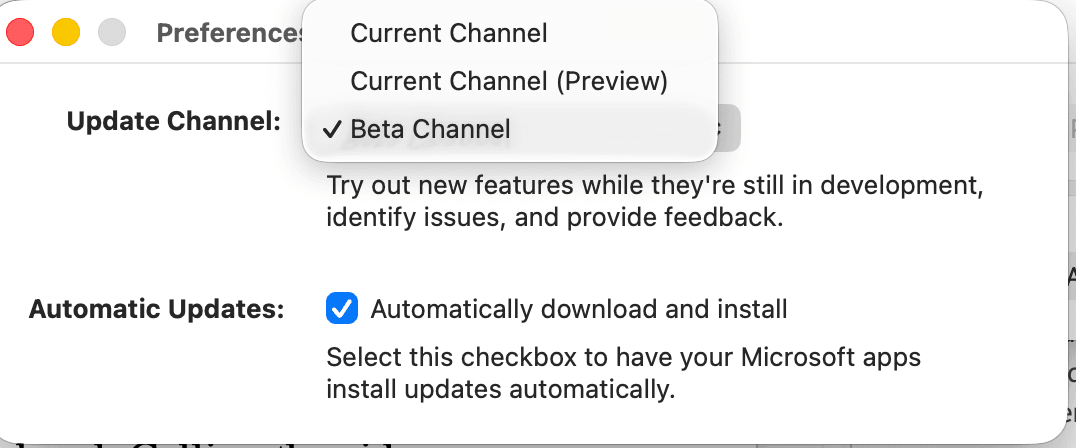
| Update Channel | Current Active Version & Build (August 2026) | Release Cadence & Purpose |
|---|
| Beta Channel | Version 2609 (Build 20416.20004) | Multiple weekly updates; earliest code validation and experimental features |
| Current Channel (Preview) | Version 2608 (Build 20326.20100) | Monthly preview build deployed roughly one week before broad general availability |
| Current Channel | Version 2607 / Version 2608 | General production release; updates when stability and telemetry criteria pass |
| Monthly Enterprise Channel | Second Tuesday Monthly Cadence | Single monthly release combining scheduled quality fixes and tested features |
| Semi-Annual Enterprise Channel | January and July Releases | Long-cycle release with an eight-month supported lifecycle per version |
Beta builds provide early looks at software features, but Current Channel Preview gives sufficient advance warning for pending production changes without daily stability risks.
Datamined AI Frontier Models: GPT-5.6, Claude, and FLUX.2 Flex
Microsoft 365 Copilot updates in 2026 move beyond single-vendor architecture, deploying multi-model routing directly across Office applications.
OpenAI GPT-5.6 handles text transformation, long-form synthesis, and deep data correlations across Word, Excel, PowerPoint, Chat, and Cowork. Alongside it, Anthropic Claude Sonnet 5 rolled out across PowerPoint, Cowork, and Word during July and August 2026.
Copilot Chat integrates Anthropic Claude directly (Roadmap Item 557348) for structured, multi-step analytical reasoning. Instead of high-level summaries, Claude executes chain-of-thought audits across enterprise repositories.
For design and asset generation, Microsoft integrated Black Forest Labs FLUX.2 Flex (Roadmap Item 559993). This image generation engine runs inside PowerPoint to generate slide graphics and visual assets directly from text prompts, replacing older diffusion models.
Copilot Notebooks also added Quick Create functionality (Roadmap Items 558938, 558934, and 559480). You assemble raw project notes, unstructured transcripts, and reference tables in a Notebook, then prompt Copilot to convert that context into a Word brief, an Excel financial model, or a PowerPoint slide deck.
If you want early access to these capabilities for personal or enterprise workloads, configure your tenant before you buy Microsoft 365 digital subscription codes to activate your client seats.
Leaked Excel and Word AI Features in Active Testing
Excel received the most substantial functional overhaul in 2026 with the introduction of the native =COPILOT() formula function.
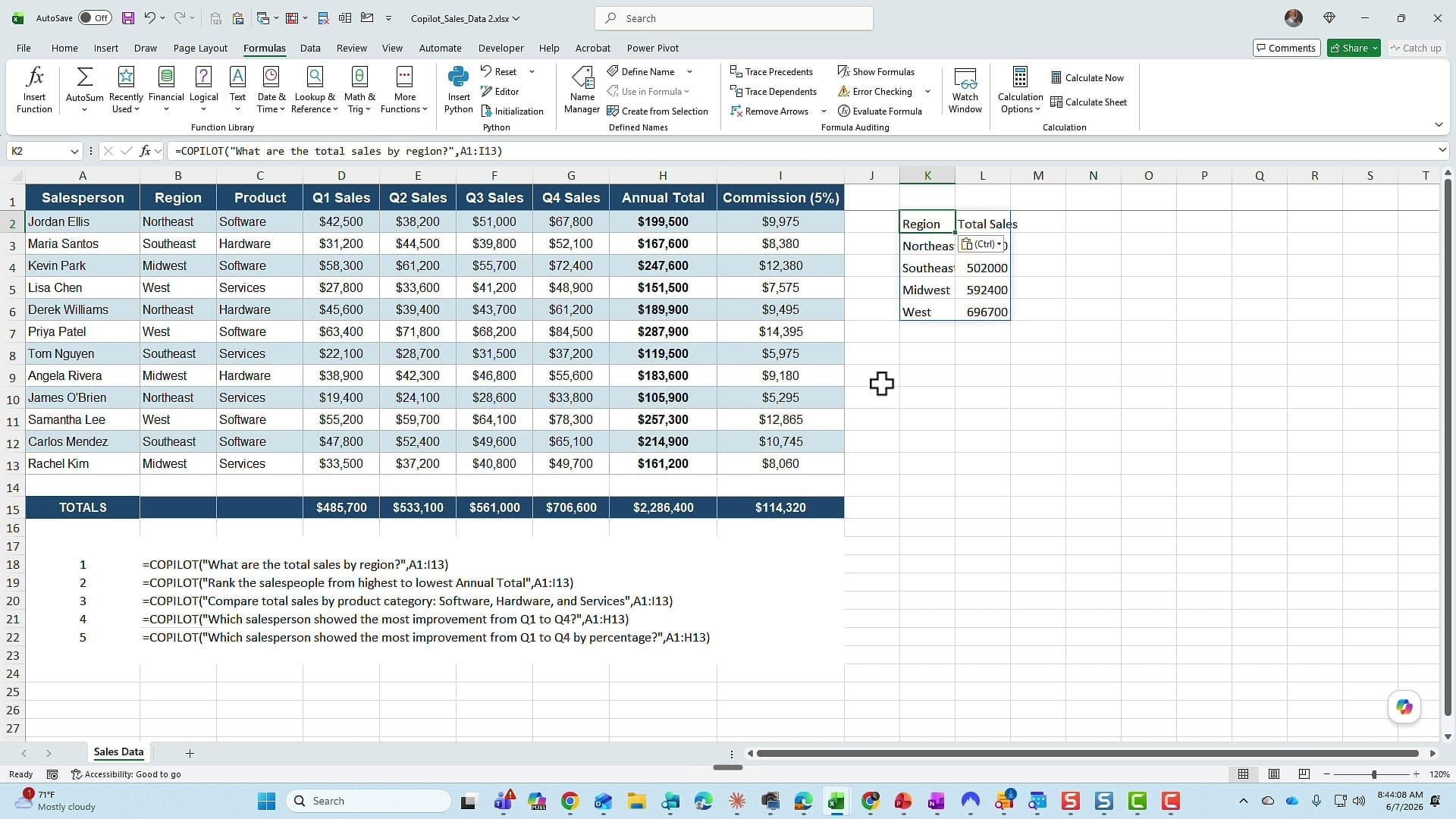
Standard Copilot interactions in Excel relied on a side-panel assistant executing actions across tables. The in-cell =COPILOT() function treats generative intelligence like any native calculation formula. You pass strings, cell coordinates, and instructions directly inside a grid cell:
=COPILOT("Extract primary risk factor and classify sentiment", A2:B2)
The calculation engine queries the language model and outputs structured text or categorized values into target cells, automating classification workflows without requiring custom Python or Office Scripts.
Third-party integrations are expanding alongside native tools. Anthropic Claude for Excel operates across Windows, Mac, and Excel on the Web for Pro and Enterprise users ($20/month). It provides multi-tab context comprehension and explicit cell citations to audit how the model derived specific numerical outputs.
In Word, pairing GPT-5.6 with Claude Sonnet 5 enables real-time comparative drafting. Users can direct the editor to redline contracts against regulatory guidelines stored in SharePoint, flagging non-compliant clauses automatically.
Collaboration Shifts Across Teams, SharePoint, and Purview
Teams, SharePoint, and Purview received targeted operational updates in late summer 2026.
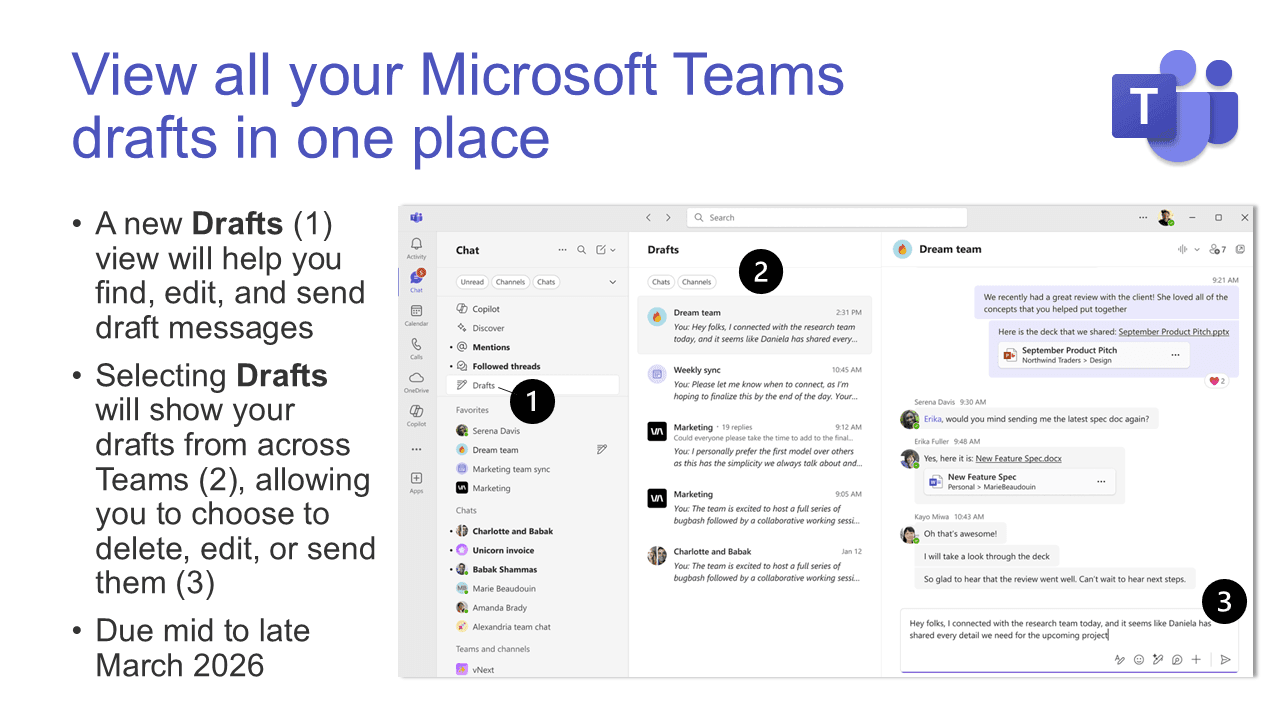
Microsoft Teams introduced user configuration options for the Enter key. Users can select whether pressing Enter immediately sends a chat message or inserts a line break (requiring Ctrl+Enter or a send button click). Teams also added a dedicated Drafts quick-view drawer, centralizing unfinished responses across direct messages and channel threads.
Some roadmap milestones slipped. Roadmap Item 558680, which introduces the Teams Phone Attendant Agent—a conversational AI voice agent designed for after-hours call routing—missed its June 2026 preview target. The release is rescheduled for late September 2026.
Administrative backends also received infrastructure updates:
- Purview DLP Sync Acceleration: Policy synchronization latency for Purview Data Loss Prevention dropped from two hours to 30 minutes, shortening the gap between policy creation and active enforcement.
- Legacy Whiteboard Retirement: On August 22, 2026, Microsoft permanently deleted unmigrated legacy whiteboards, completing the transition to OneDrive-backed whiteboards in Teams.
- OneDrive Sync Deprecation: On August 15, 2026, the OneDrive desktop client ceased supporting Windows 10 Version 21H2 and older builds. Windows 10 Version 22H2 remains supported through October 10, 2028.
Activating Hidden Bits: Feature Flags and Registry Exposure
Testing unreleased features previously required third-party tools like ViveTool to toggle hidden flags. Windows 11 Insider Preview builds (25H2) introduced a native Feature Flags configuration page inside the Settings app.
This interface lets Insiders toggle experimental flags individually. If a preview file handler or UI shell causes instability, you can disable that specific flag without rolling back the operating system build.
For Office client apps, channel exposure can be managed using client-side registry keys. If an enterprise tenant restricts self-service channel switching in the account UI, setting keys under HKCU\Software\Microsoft\Office\16.0\Common\officechannelexposure exposes Beta and Current Channel Preview selections on local machines.
[HKEY_CURRENT_USER\Software\Microsoft\Office\16.0\Common\officechannelexposure]
"channelname"="BetaChannel"
Each licensed account permits concurrent installation across five PCs or Macs and five mobile devices. This makes it practical to run experimental Beta builds on a secondary test machine while maintaining a stable Monthly Enterprise Channel build on your main workstation.
Preview builds carry failure risks. In April 2026, Microsoft rolled back preview build 19929.20012 after telemetry identified severe crashes during standard data sorting. When testing beta software, maintain working backups of critical files.
Confirmed Roadmap vs Speculative Leaks Matrix
Not every feature spotted in testing reaches production on schedule. Some tools ship immediately, while others encounter delays or scope adjustments.
| Feature / Capability | Target Application / SKU | Implementation Status (August 2026) | Source & Confidence Level |
|---|
| OpenAI GPT-5.6 Integration | Word, Excel, PowerPoint, Chat | Confirmed / Live in Production & Preview | Microsoft Release Notes (High) |
| Claude Sonnet 5 Integration | PowerPoint, Cowork, Word | Confirmed / Rolling Out | Microsoft 365 Updates (High) |
| FLUX.2 Flex Image Engine | PowerPoint Presentation Builder | Confirmed (Roadmap Item 559993) | Official Roadmap Track (High) |
| In-Cell =COPILOT() Formula | Microsoft Excel (Windows, Web) | Active Beta / Preview Validation | Insider Datamine & Testing (High) |
| Teams Phone Attendant Agent | Microsoft Teams Phone System | Delayed to September 2026 (Item 558680) | Roadmap Schedule Update (Medium) |
| Copilot Notebooks Quick Create | Microsoft 365 Web & Desktop Apps | Confirmed (Items 558938, 558934, 559480) | Microsoft Copilot Notes (High) |
| SharePoint AI Deep Agent Routing | SharePoint Online Workspaces | Conflicted Status / Active Development | Insider Build Strings (Medium) |
| Native Settings Feature Flags | Windows 11 25H2 / Office Hosts | Confirmed for Insiders | Windows Insider Program (High) |
Track roadmap numbers when planning deployments. Confirmed items with published release IDs typically launch within 30 to 60 days of preview targets.
Licensing Shakeup and Commercial SKU Pricing
Microsoft restructured its licensing lineup in 2026, retiring standalone storage plans and bundling AI tools into standard business tiers.
Standalone SharePoint Online Plan 1, SharePoint Online Plan 2, OneDrive for Business Plan 1, and OneDrive for Business Plan 2 were retired. Microsoft halted new sales for these standalone storage SKUs on May 31, 2026. Existing customers can renew active contracts, but new deployments require unified Microsoft 365 suites.
Copilot pricing structures also shifted. Enterprise tenants can still purchase the standalone Copilot add-on for $30.00 per user per month. For small and mid-sized businesses (1 to 300 seats), Microsoft introduced bundled plans integrating Copilot directly:
- Microsoft 365 Business Standard with Copilot: $23.50 per seat monthly.
- Microsoft 365 Business Premium with Copilot: $32.00 per seat monthly.
These tiers lower entry costs for organizations adding generative AI tools across their workforce. If you are setting up new accounts for your team, make sure to secure an authentic Microsoft 365 plan with proper seat allocations.
| Plan / SKU Configuration | Target User Count | Pricing Structure (Monthly) | Status & Availability |
|---|
| Business Standard with Copilot | 1 to 300 Seats | $23.50 / seat | Active SMB bundle introduced in 2026 |
| Business Premium with Copilot | 1 to 300 Seats | $32.00 / seat | Active SMB advanced security & AI bundle |
| Enterprise Copilot Add-on | Enterprise Tenants | $30.00 / user | Add-on license for existing base plans |
| SharePoint Online Plan 1 & 2 | Standalone Storage | Grandfathered Renewals | Sales ended May 31, 2026; renewals only |
| OneDrive for Business Plan 1 & 2 | Standalone Storage | Grandfathered Renewals | Sales ended May 31, 2026; renewals only |
Bundled tiers provide cost savings compared to purchasing base enterprise licenses with standalone add-ons.
Choosing Between Beta Channel and Production
Enrolling in the Beta Channel is worthwhile if your daily work involves complex data modeling, dynamic formula development, or high-volume document drafting. Early access to the =COPILOT() function in Excel Version 2609 and multi-model drafting in Word provides practical advantages.
Avoid the Beta Channel on primary production machines if your workflow depends on legacy COM add-ins, customized macro templates, or unverified document management tools. Unannounced API deprecations and build rollbacks can interrupt critical workflows.
For most users, Current Channel Preview offers the ideal middle ground. You receive major feature updates like GPT-5.6 and Claude Sonnet 5 integration roughly a week before general availability, avoiding the daily stability risks of raw Beta builds.
When you are ready to update your workstation or deploy new seats, renew your Microsoft 365 license online so your setup remains fully compliant and ready for upcoming features.
FAQ
What is the difference between Beta Channel and Current Channel Preview?
Beta Channel receives frequent, unpolished builds containing experimental code multiple times per week. Current Channel Preview receives monthly updates roughly one week ahead of broad production release, providing early access to finalized features with higher stability.
Can individual users switch update channels without administrator tools?
Yes. If tenant policies permit user self-selection, you can switch channels directly in the Office Account settings menu. Alternatively, you can configure registry keys under HKCU\Software\Microsoft\Office\16.0\Common\officechannelexposure to expose preview channels locally.
Which AI models are integrated into Microsoft 365 Copilot in 2026?
Microsoft 365 Copilot integrates OpenAI GPT-5.6 across standard apps, Anthropic Claude Sonnet 5 in Word, PowerPoint, and Cowork, and Black Forest Labs FLUX.2 Flex for image generation in PowerPoint.
What happens if an experimental build causes application crashes?
Microsoft regularly patches preview issues or rolls back problematic builds when telemetry detects severe errors, as seen with build 19929.20012. You can also revert to an earlier build or change channels using administrative command-line tools.
How many devices can run a single Microsoft 365 user license?
A standard Microsoft 365 subscription license allows simultaneous installation and activation on up to five desktop computers (PCs or Macs) and five mobile devices per user.
Are standalone SharePoint and OneDrive storage plans being phased out?
Yes. Microsoft officially retired standalone SharePoint Online and OneDrive for Business Plan 1 and Plan 2 SKUs on May 31, 2026. Existing customers may renew active subscriptions, but new purchases must use comprehensive Microsoft 365 suites.
The Insider Build Verdict for 2026
The 2026 feature additions in Microsoft 365 deliver practical upgrades rather than cosmetic tweaks. In-cell =COPILOT() formulas in Excel, multi-model support featuring Claude Sonnet 5 and GPT-5.6, and Notebook Quick Create provide measurable productivity gains.
If you have a secondary PC or a dedicated test partition, enrolling in the Beta Channel (Version 2609) gives you an actionable early look at these tools. For primary workstations, stick with Current Channel Preview (Version 2608) to balance early access with day-to-day stability.