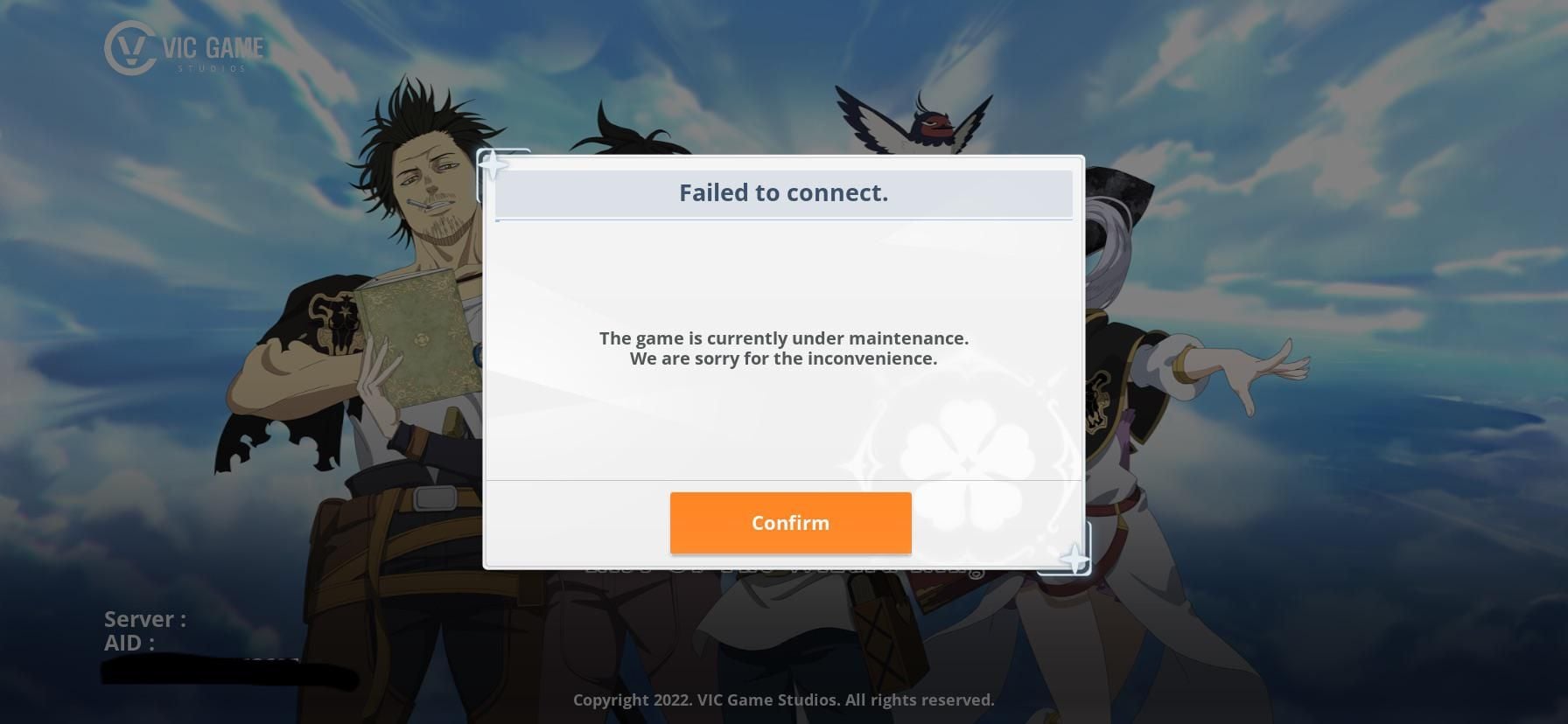
Stuck on the title screen? Here is how to fix Black Clover M error code 10001 connection failed, repair your handshake, and verify server availability.
Immediate Solution: Fixing Black Clover M Error 10001 Step-by-Step
When Black Clover M: Rise of The Wizard King stalls at the login screen with Error Code 10001, the client failed its initial handshake with the game server. Skip the full client reinstall. Instead, work through these targeted steps to clear stale sockets and corrupt local files:
- Force-close the app and toggle Airplane Mode: Swipe the game out of your active app tray. Turn on Airplane Mode, wait 15 seconds, switch it off, and reconnect to your network.
- Purge the application cache: Open your device Settings > Apps > Black Clover M > Storage, then tap Clear Cache. Avoid "Clear Data" for now, which forces a full re-download of game patches.
- Switch connection type: If you are on home Wi-Fi, test cellular data. If you are on mobile data, jump onto a stable Wi-Fi network.
- Power-cycle your router: Unplug your home router and modem for 30 seconds. Plug them back in to flush gateway routing tables and grab a renewed local IP address.
- Change your DNS resolver: Configure private DNS to Cloudflare (
1.1.1.1) or Google (8.8.8.8) to bypass ISP lookup timeouts. - Route through Cloudflare WARP: Launch Cloudflare 1.1.1.1 WARP to push traffic through an encrypted tunnel directly to Garena's authentication host.
For active regional clients, handling foreign currency can be another hurdle. Players maintaining regional rosters can get Black Clover M Premium Black Crystals without dealing with localized payment failures.
| Diagnostic Step | Action | Resolution Target |
|---|
| Network Gateway Stall | Power-cycle router (unplug for ~30s) | Clears corrupted gateway routing states and forces clean local IP |
| Corrupted Cache Memory | Android Settings > Apps > Storage > Clear Cache | Removes stale authentication tokens without deleting save assets |
| ISP Routing Block | Switch network or activate Cloudflare WARP 1.1.1.1 | Routes packets across alternate hops to bypass dead carrier routes |
| DNS Lookup Failure | Set DNS resolver to 8.8.8.8 or 1.1.1.1 | Bypasses slow or broken ISP domain lookups |
| Server Availability Check | Check service notice board | Identifies planned maintenance or permanent server retirement |
Each step targets a specific breakdown point in the authentication handshake before packet loss forces a client timeout.
Deciphering the Handshake: What Network Error 10001 Actually Means
Error Code 10001 is a connection timeout. Mobile game architecture built by Vic Game Studios and published by Garena executes a rigid two-way handshake at launch: your device transmits an ID, app version, and regional routing headers to the authentication cluster.
If the server fails to reply within roughly 30 seconds, the client abandons the session and shows "Connection Failed".
Three conditions trigger this failure:
- Local Gateway Stalls: Your phone keeps a dead TCP socket from an earlier session, routing packets nowhere.
- Corrupted Handshake Cache: The app attempts authentication using an expired session token saved in app storage.
- Carrier Route Drops: Your mobile carrier or home ISP drops packets across international hops to Garena's data centers.
Do not wipe a 10 GB installation over this dialogue box. In most cases, local game assets are completely fine—the breakdown is strictly the network session between your phone and the remote host.
The Vital Check: Server Sunset Status vs Local Network Failure
Verify which regional client you are launching before altering network settings.
Garena permanently decommissioned the global servers for Black Clover M on August 21, 2025, at 2:00 AM UTC-5. In-app purchases and new signups had already ended on June 20, 2025, followed by an account balance transfer window from August 21 to September 25, 2025.
Launching an old global build today triggers Error Code 10001 on loop. The global authentication cluster simply no longer exists. No cache reset or network tweak will connect to retired infrastructure.
Regional versions, including the Thailand server, continue operating under local publishing. If you encounter Error 10001 on an active regional build, it is an active network routing conflict you can solve.
| Attribute | Global Client Status | Regional Client (TH/Active) |
|---|
| Server Operational Status | Offline (Shut down August 21, 2025) | Operational under regional publishing |
| Account Creation | Disabled (Halted June 20, 2025) | Active |
| Primary Error Cause | Servers permanently decommissioned | DNS stalls, cache corruption, ISP blocks |
| Transfer Application Window | Closed (Ended September 25, 2025) | N/A |
| Store & Top-Up Functional | Disabled permanently | Active via regional services |
Confirming your client build first prevents diagnosing an app that has been taken offline permanently.
Clearing Corrupted Cache and App Data Without Losing Your Account
Game updates often leave obsolete handshake files and regional manifests inside local memory. These stale references direct your game to decommissioned server endpoints or pass invalid login tokens, causing an instant 10001 reject.
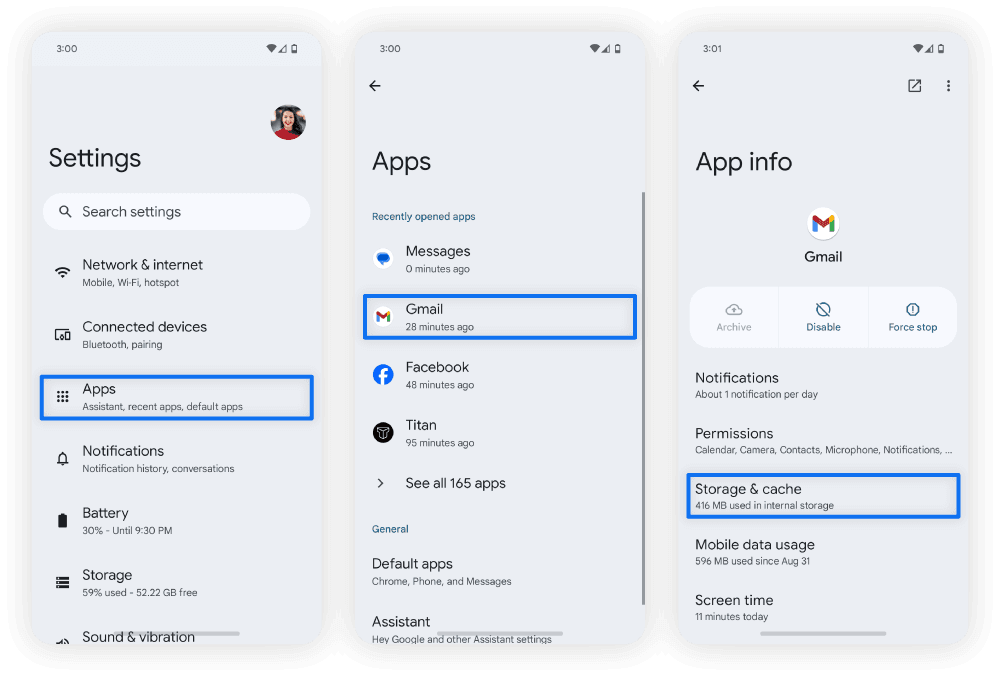
Clearing temporary cache touches zero account data. Android stores cached handshake logs separately from your player identity.
How to Safely Clear Cache on Android
- Close Black Clover M completely.
- Open your device Settings.
- Tap Apps (or App Management).
- Select Black Clover M.
- Tap Storage & Cache.
- Select Clear Cache.
Avoid selecting "Clear Storage" or "Clear Data". "Clear Cache" flushes temporary handshake logs, asset indices, and expired tokens. It frees under 10 MB, but forces the app to rebuild its gateway socket from scratch on the next launch.
On emulators, the identical workflow applies in the virtual Android settings panel. Purging cache resolves locks left behind by crashes or interrupted patch downloads.
Overriding ISP Route Drops with DNS and VPN Workarounds
When a cache wipe fails to restore access, your provider is likely dropping packets before they reach Garena's login cluster. ISP domain resolvers update slowly and frequently misroute traffic headed to overseas nodes.
Public DNS resolvers replace your ISP's routing lookup table with updated global routing data.
Changing to Public DNS on Android
- Open phone Settings.
- Go to Network & Internet > Private DNS.
- Change the setting to Private DNS provider hostname.
- Enter
one.one.one.one (Cloudflare) or dns.google (Google). - Save and launch Black Clover M.
On a PC emulator, set Windows IPv4 DNS to 1.1.1.1 (preferred) and 1.0.0.1 (alternate), or 8.8.8.8 and 8.8.4.4.
If manual DNS entries fail, the carrier itself is likely dropping international packets. Cloudflare WARP establishes an encrypted tunnel over Cloudflare's edge network, bypassing broken hops while preserving low latency.
| DNS / Routing Service | Primary Address | Secondary Address | Primary Benefit |
|---|
| Cloudflare DNS | 1.1.1.1 | 1.0.0.1 | Lowest resolution latency, rapid route updates |
| Google Public DNS | 8.8.8.8 | 8.8.4.4 | High reliability, massive global edge distribution |
| Cloudflare WARP | Automated VPN Profile | N/A | Bypasses carrier routing blocks and packet throttling |
| Default ISP DNS | Assigned by DHCP | Assigned by DHCP | Prone to stale cache, regional routing loops, and drops |
Replacing provider-assigned DNS resolvers resolves the majority of unexplained timeout drops.
Once logged into active regional servers like Thailand without hangs, you can top up Black Clover M Premium Black Crystals safely to pull characters and progress through seasonal passes.
Account Profile Clashes and Test Server Linkage Conflicts
Error 10001 can also stem from an account authentication mismatch rather than local network hardware.
Early accounts often linked to test environments during soft launches (such as the Canadian test server). If your Google Play ID or social handle remains bound to a retired test environment, the live regional client attempts to pull data from a dead database.
The server cannot map your UID to an active cluster, throwing a generic Error Code 10001 timeout.
To diagnose this mismatch:
- Open the game and wait for the title screen.
- If the client auto-logs in and immediately shows Error 10001, disconnect device Wi-Fi or data while the title screen loads.
- Once connectivity drops, the client stops its login loop and reveals the "Log Out" or "Switch Account" icon.
- Re-enable network connectivity.
- Tap the switch account icon and sign in with a new guest or unbound Google account.
If the clean account logs in without incident, your primary profile has an outdated server association. Contact Garena customer support to rebind the profile.
Mobile Data vs Wi-Fi: Stopping Android Network Desync
Switching network adapters while Black Clover M runs in the background frequently triggers Error 10001. Android can freeze socket resolution when handing off active TCP sessions from cellular antennas to wireless access points.
Stepping out of Wi-Fi range shifts your connection to LTE or 5G, but the client retains a half-open socket linked to your old local IP. The server waits for packets from an address that no longer routes to your phone. At 30 seconds of silence, the handshake fails.
How to Fix Network Desync
- Avoid mid-session network swaps: Fully close the client before switching between Wi-Fi and mobile data.
- Disable Wi-Fi Assist / Smart Network Switching: Turn off automatic cellular-Wi-Fi toggling in Wi-Fi settings; mid-session switching drops your authentication token.
- Reset Android Network Interfaces: Turn Airplane mode on for 15 seconds, turn it off, and verify full mobile signal before opening the game.
Stick to one connection type from launch to logout.
Device Compatibility and Garena Support Channels
If servers are operational, cache is clean, and routing is verified, the client might be failing basic OS integrity checks.
Black Clover M requires Android 7.0 or higher to process current security certificates and server handshakes. Legacy Android versions or modified custom ROMs missing current root certificates cause authentication rejections.
Verify these device baselines:
- Minimum OS: Android 7.0 or higher.
- Storage Reserve: At least 3 GB free above total game size for cache read/write operations.
- Network Ports: Open outbound ports 80, 443, and standard UDP game traffic on your firewall.
If the device passes all baselines and Error 10001 continues, open a ticket with Garena customer service.
Include these details in your ticket:
- Exact geographic location and ISP.
- Device model and OS version.
- Screenshot of Error Code 10001 showing UID (if visible).
- Steps already tested (cache wipe, DNS swap, WARP tunnel).
If you need items on active regional accounts without local billing restrictions, purchase Black Clover M Premium Black Crystals - TH through standard digital checkout.
FAQ
What does Error Code 10001 Connection Failed mean in Black Clover M?
Error Code 10001 means your mobile client timed out trying to complete an initial handshake with the server. It occurs when local network drops, corrupt cache, or offline servers prevent the client from getting a response within 30 seconds.
Does clearing the cache in Black Clover M delete game progress?
No. Clearing app cache in Android settings only removes temporary network files, manifests, and session tokens. Your account progress and inventory remain stored on the remote game server.
How do I switch DNS to resolve connection errors on mobile?
Open device Network settings and select Private DNS. Switch from Automatic to a custom provider and enter one.one.one.one (Cloudflare) or dns.google to bypass congested ISP resolvers.
Can using a VPN fix Error Code 10001?
Yes. A routing tool like Cloudflare WARP 1.1.1.1 tunnels around carrier packet drops by routing game traffic through Cloudflare edge nodes directly to the authentication gateway.
Why does Error Code 10001 appear after switching between Wi-Fi and mobile data?
Switching connections mid-session breaks the active TCP socket and creates a network desynchronization lockup. Force-closing the game and cycling Airplane Mode establishes a clean socket.
Are the Black Clover M global servers currently online?
No. Garena shut down global servers on August 21, 2025. Launching the old global client triggers Error 10001 permanently because authentication clusters are no longer online.
What should I do if Error Code 10001 persists on an active server?
Confirm your device runs Android 7.0 or higher and verify connectivity across both Wi-Fi and cellular networks. If timeouts persist on multiple networks, submit a support ticket to Garena.
Final Verdict: Fixing Handshake Errors
Fixing Error Code 10001 depends on identifying whether you are troubleshooting a local network fault or a decommissioned server. If you are launching the global build closed in August 2025, no router reboot or DNS change will help; uninstall the application.
On active regional clients, the error points to stale session cache or ISP routing drops. Clear your app cache, switch your DNS resolver to 1.1.1.1, and test Cloudflare WARP if your cellular carrier drops authentication packets. These adjustments bypass routing bottlenecks and push you past the title screen into the game.