Official paths to claim free Microsoft 365 subscription days and reward codes include turning Microsoft Rewards points into digital gift cards, enrolling in verified academic grants like Office 365 A1, testing a 1-month consumer trial, or activating a renewable 90-day Microsoft 365 Developer E5 sandbox. Each method relies on legitimate Microsoft account verification rather than unverified activator tools, though strict redemption requirements and cancellation rules apply.
Official Methods to Claim Free Microsoft 365 Days
Microsoft does not distribute random key drops through unauthorized third-party blogs. Instead, legitimate free access falls into four defined channels: reward point redemptions, student or faculty donations, developer sandboxes, and time-limited trial periods.
| Access Type | Scope & Allocation | Requirements & Limits | Source Link |
|---|
| Office 365 A1 for Education | Free institutional tier for students & teachers | Requires eligible educational email; core web apps | Microsoft Education |
| Microsoft 365 Developer E5 | Free sandbox with 25 user licenses | Renews every 90 days with active development; non-production only | Medha Cloud |
| Consumer 1-Month Trial | Full Personal or Family features | Requires payment method; auto-renews for 1 year if uncancelled | Microsoft Community |
| Microsoft 365 Personal (SA) | 1 User, 5 simultaneous devices, 1 TB OneDrive | Geo-locked prepaid code; stacks up to 5 years (60 months) | BitTopup |
| Microsoft 365 Family (SA) | Up to 6 Users, up to 6 TB OneDrive (1 TB each) | Geo-locked prepaid code; family safety controls | BitTopup |
Free Academic Access via Office 365 A1
Enrolled students and active faculty members can claim free access through the Office 365 A1 program. Microsoft donates this tier directly to qualified educational institutions to support classroom learning and digital productivity.
To activate this tier, you must enter a valid school-issued domain email address on the official portal. While verification runs instantaneously for many established universities and schools, manual institutional validation can take up to a full month, or up to 10 business days when completing domain questionnaires (Microsoft Education).
Office 365 A1 grants access to online web applications including Word, Excel, PowerPoint, and OneNote. If your educational status ends or your school removes the license, the associated apps switch directly into a read-only state. You can still open files, but you cannot edit them online.
Earning Subscription Credit via Microsoft Rewards
Earning Microsoft Rewards points through daily Bing searches, edge browser tasks, and Xbox quests provides another legitimate avenue to subsidize your productivity suite. Once accumulated, these points can be redeemed for Microsoft account balance codes or promotional gift vouchers applied toward subscription renewals.
Redeeming reward codes requires strict adherence to Microsoft's service guidelines. Accounts risk suspension if automated fraud prevention flags unnatural activity. Common triggers that lock accounts during the payout phase include:
- Connecting through a proxy service or active VPN.
- Sharing a single IP address, Wi-Fi network, or physical device across several accounts.
- Reusing the same phone number for SMS verification on duplicate profiles.
- Submitting rapid back-to-back redemption orders within a short window (Microsoft Community).
Always maintain a single verified personal account and disable proxy tools before converting points into store vouchers.
Developer E5 Sandbox Access for Builders
If you build applications or integrate custom workflows within the productivity ecosystem, Microsoft offers the Developer E5 sandbox program. This free sandbox grant includes 25 user licenses complete with advanced administrative features.
The developer sandbox is provisioned for an initial term and renews every 90 days, provided your telemetry demonstrates active development activity (Medha Cloud). Subscribers holding an active Visual Studio Professional or Enterprise tier receive automatic renewal for the lifespan of their paid developer plan.
This tier carries a non-negotiable legal condition: sandbox environments are barred from live production workloads. Storing business records or running routine day-to-day office paperwork on an E5 sandbox violates program terms.
Managing Free Trials and Avoiding Automatic Charges
New users can activate a 1-month consumer trial directly through Microsoft. This trial grants full desktop and cloud features across the trial window, but requires caution regarding billing.
Microsoft automatically schedules a recurring 1-year subscription charge the moment the 30-day window concludes (Microsoft Community). To prevent unexpected charges, follow these cancellation steps:
- Sign in to your Microsoft account at
account.microsoft.com/services. - Locate the active trial entry under the Subscriptions header.
- Click Manage, then choose Cancel subscription or toggle off Recurring billing.
- Complete the confirmation prompts until the status reflects an explicit expiration date.
Turning off recurring billing keeps your trial benefits active until day 30 while preventing the auto-charge for the full annual plan.
For commercial trials, refund and cancellation rules depend on your contract structure. Microsoft Customer Agreement (MCA) commercial accounts feature a 7-day cancellation window for prorated refunds (10 days in Chile), whereas Microsoft Online Subscription Agreement (MOSA) billing setups permit prorated refunds across the standard billing cycle.
How to Redeem a 25-Character Product Key
When redeeming prepaid cards, digital codes, or verified promotional vouchers, you must apply the key to your Microsoft profile.
XXXXX - XXXXX - XXXXX - XXXXX - XXXXX
- Go to
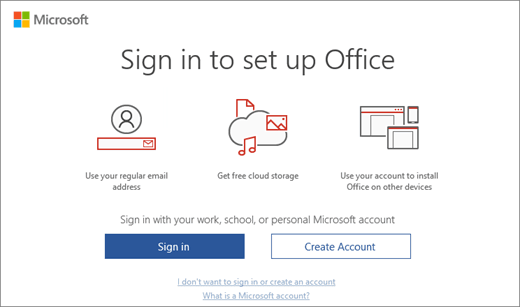
office.com/setup or microsoft365.com/setup in your web browser. - Sign in with the primary personal account you intend to use for your desktop software and OneDrive storage (Microsoft Support).
- Type your 25-character product key without spaces or hyphens.
- Confirm your regional details and finalize the claim.
Once redeemed, the digital key is permanently consumed and bound to your login credentials. You do not need to preserve or re-enter the code for future computer installs; managing installations simply requires logging into account.microsoft.com.
Stacking Rules and Extension Limits
Users who hold active subscriptions can add prepaid digital codes of the identical tier (such as Personal to Personal, or Family to Family). When applying a standard 12-month code to an active plan, your expiration date automatically moves forward by 365 days (BitTopup).
Microsoft allows you to stack matching codes up to a hard ceiling of 5 cumulative years (60 months) from today's date. Any attempt to apply a voucher that pushes the expiration past 60 months will be rejected by the server until your active time runs down.
Resolving Geo-Restriction Errors
Prepaid vouchers distributed for specific markets like Saudi Arabia carry geographic restrictions. If your account settings do not match the key's region, the setup portal will output error codes such as GeoRestricted or CatalogSkuDataNotFound (BitTopup).
To correct these regional activation errors:
- Visit
account.microsoft.com/profile and verify that your region is set to Saudi Arabia, accompanied by a valid local postal code. - Disconnect any active VPN, proxy software, or encrypted tunneling clients on your router or browser.
- Clear your browser cache and cookies, or switch to a private browsing window before re-attempting the setup link.
If you need a reliable regional key for a Saudi Microsoft account, you can pick up a verified Microsoft 365 (SA) prepaid code to safely stack up to your 5-year limit without billing interruptions.
The Risks of Counterfeit standalone Keys
Seeking free or steep discount activation keys on gray marketplaces carries substantial technical and financial risk. Dishonest vendors often resell volume licensing keys intended for corporate intranets, education grants, or stolen credit batches.
Microsoft periodically audits activation servers and permanently deactivates unauthorized, counterfeit, or stolen codes (Microsoft Support). When a key gets blocked, you lose application functionality instantly and must pursue a refund directly from the seller.
Avoid automated crack scripts or third-party executable "activators." These unauthorized tools routinely bundle background malware, compromise local system credentials, and circumvent essential security updates.
What Happens When Your Subscription Reaches Expiration?
If your prepaid time or free trial period concludes without applying a new code, your account enters an expired status. Your stored data is not deleted immediately, but your workflow changes sharply.
Desktop applications on Windows and macOS drop into a reduced-functionality View Only state (Microsoft Community). You can open documents, read text, and send files to a printer, but creating new documents, editing text, or saving adjustments is blocked.
Cloud storage allocations shrink from the premium 1 TB tier down to the baseline 5 GB free OneDrive tier. If your stored files exceed 5 GB, your cloud sync halts until you clear space or renew your plan. Basic browser-based editing remains accessible for free at office.com regardless of desktop expiration status.
Frequently Asked Questions
Can I redeem a Saudi Arabia Microsoft 365 prepaid key outside the country?
No. Saudi Arabia prepaid keys are geo-locked. Your Microsoft account profile region must be set to Saudi Arabia, and you cannot have an active VPN hiding your location during redemption (BitTopup).
How many days does an active subscription gain from a 12-month prepaid code?
Entering a matching 12-month prepaid voucher extends your existing subscription by exactly 365 days from its current expiration date, up to a cumulative ceiling of 5 years (BitTopup).
What should I do if my Microsoft Rewards account is blocked from redeeming vouchers?
Reward suspensions occur when the system detects VPN use, multiple accounts on one IP/phone number, or rapid successive redemptions (Microsoft Community). You must contact Microsoft Rewards customer support to review the restriction, as keys cannot be generated while flagged.